FSX Nvidia settings

A place to converse about the general aspects of flight simulation in New Zealand

Postby AlisterC » Mon Nov 12, 2007 8:31 am

Well I've posted this elsewhere, so if you've seen it I apologise, but info this good I think I should post it around.

http://www.nzone.com/object/nzone_fsx_techtips.html

In particular the recommendation by Nvidia on how to handle ansiotropic filtering.. Invaluable in my opinion. I've got FSX running so well, I think it's time to let my FS9 start to fade into the past smile.gif
Last edited by AlisterC on Mon Nov 12, 2007 8:45 pm, edited 1 time in total.
Image
User avatar
AlisterC
NZFF Pro
 
Topic author
Joined: Thu Jul 20, 2006 11:13 am
Posts: 2543
Location: Nelson, NZ

Postby Charl » Mon Nov 12, 2007 11:14 am

Albatross wrote:
QUOTE (Albatross @ Nov 12 2007, 09:31 AM) <{POST_SNAPBACK}>
Well I've posted this elsewhere, so if you've seen it I apologise, but info this good I think I should post it around.
http://www.nzone.com/object/nzone_fsx_techtips.html
In particular the recommendation by Nvidia on how to handle ansiotropic filtering.. Invaluable in my opinion. I've got FSX running so well, I think it's time to let FS9 start to fade into the past smile.gif

Excellent link, thanks for that.
Interestimg even with an 8800 card, the last few settings recommended:
Airline traffic density 7%
General aviation traffic density 7%
Airport vehicle density minimum
Road vehicles 0%
Ships and ferries 15%

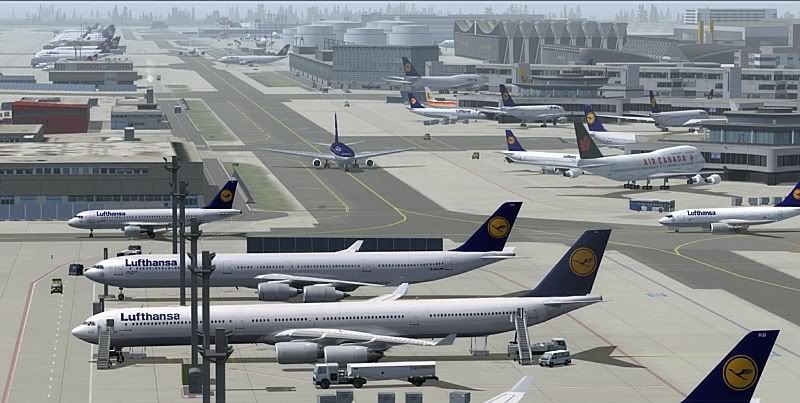
Now I'm not aiming to start a slugfest, but in my sim I like to see this at 25 fps when I fly into a major airport like Frankfort:

Chopping that down by 93% is not an option, (this scenery in FS9 also happens to come with animated highway vehicle traffic BTW)

I guess it depends what you do with your flightsim, and FSX may well have a niche for cockpit IFR flyers.
In which case, why is BUMP MAPPING and other HI-RES texturing so important??

FS9 definitely very much in the present still, over here.
User avatar
Charl
NZFF Pro
 
Joined: Mon May 01, 2006 8:28 am
Posts: 9691
Location: Auckland

Postby AlisterC » Mon Nov 12, 2007 5:27 pm

John Murchison mentioned this in another post, but AI like that pictured isn't default. If you ran FS9 default AI at levels like that pictured you too would have poor fps winkyy.gif One day ( laugh.gif ) someone will release a decent set of AI for FSX, and when they do with the lighter models that are available aftermarket for ai, you'll find you'll be able to turn up ai in fsx as well. But default, I for one fly around with almost empty airports until that day comes.
smile.gif

To quote John:

AI TRAFFIC - nothing new here, MS has been producing models unsuitable for AI since FS2002. If you remember back to when FS2004 was released it was generally accepted the aircraft were no good for mass AI. Thats why Project AI and people like me with AIS-AI became so popular with framerate friendly models. I developed AIS-AI because standard FS9 models killed my system. Try filling up Heathrow with 120 default FS9 models on a top-end computer system of the day, and see what happens. FSX is no different. Replace the FSX models with PAI or my AIS-AI models and your in business, just like FS9.

Edit: I also reworded my post, I didn't want to imply "we" as a general collective of virtual pilots should move to FSX, I meant to say that I might move on from FS9.
Regards,
Last edited by AlisterC on Mon Nov 12, 2007 5:34 pm, edited 1 time in total.
Image
User avatar
AlisterC
NZFF Pro
 
Topic author
Joined: Thu Jul 20, 2006 11:13 am
Posts: 2543
Location: Nelson, NZ

Postby Timmo » Mon Nov 12, 2007 6:47 pm

Also, as another 'tip' - download the nVidia 'nTune' application- it allows you to overclock various components of your computer and will do this automatically (based on tests it will do)

Make sure you read the disclaimer: Like any overclocking it may cause hardware to fail.....
Timmo
NZFF Pro
 
Joined: Wed Oct 25, 2006 6:28 pm
Posts: 2056
Location: Tauranga

Postby Ian Warren » Mon Nov 12, 2007 6:53 pm

I hav'nt installed AI in FSX yet , I'll install this week and post ... starting with the OZ VOZ smile.gif test setting displayed Charl...... and Alister , look at your settings smile.gif I'll wait till installed Xcell
Image
User avatar
Ian Warren
NZFF Pro
 
Joined: Fri May 05, 2006 5:23 pm
Posts: 41187
Location: AREA 51


Return to General

Who is online

Users browsing this forum: No registered users and 17 guests