It is a rare event these days that I fire up Prepar3D V4.5 and things run smoothly (yes I know we are up to 5.3 but my PC hardware isn't there yet). Usually something requires attention and this can range from a minor irritant to a few hours worth of investigation and trouble shooting to solve. Numerous time sapping restarts may be needed.
It also seems that the more limited the time that's available to "get a quick flight sim "fix"' the more major the problems are to deal with.
My sim set up is not a permanent one although I do leave the Honeycomb yoke in place more often that not as it is a PITA to detach from the desk. Generally this means that, like now, I have to bob my head from side to side and up and down in order to see the keyboard when typing. The CH rudder pedals are permanently attached with only the CH Throttle quadrant requiring attaching onto the keyboard shelf.
After the hardware is all connected up I generally use Simbrief to plan my flight and export the plan to other add ons that need it.
As I have a lot of add on programs I use Simstarter NG P3D to control them all. These include Active Sky, Chaseplane, FFTF Dynamic, Aviaserver (for a remote CDU for PMDG and QW on an iPad), AI ground, AI Flow and AI Cull, as well as P3D itself. It's a good program, whereby you can set up a lot of configurations to run. As an example I have configs for use when off or on VATSIM (Disable AI), specific geographical scenery areas and Active sky on or off.
What could go wrong with all that you may ask?.......... Well plenty.
Lets look at a typical sim session.
Its early Saturday evening and on VATSIM this means there is the probability of either an organised event, or at least a good controller coverage.
So I stealthily sneak away into the office unnoticed. The intention is for a quick flight in the PMDG 777 from AKL to CHC.
While Simstarter is doing it's thing and the start process grinds away, I go to plug the USB headset into the computer case. USB (at least the earlier versions) has an odd law that states: You will not insert this in that slot first time....nope. So I turn it 180 degrees and it still wont fit. Turning it back to the way it was and it slides in easily. WTH is with that? It's right up there with if you drop a slice of toast with butter and or jam on it, it will always fall with the topping towards the floor. In fact my headset USB connection has taken it into a whole new dimension. It requires much more turning and jabbing and usually the requirement to have to get down on the floor fiddle with it. Just when I'm about to give up, it slips in easily as if to say "What was all that fuss about".
About this time the P3D logo screen appears on the monitor detailing the loading progress.....and then suddenly it vanishes and stays that way. It shows up in Task manager as an active process, but it isn't. It took me many of these sessions to learn that Simstarter doesn't seem to like loading complex add on aircraft. So I close the remnants of P3D down via Task manager, change Simstarter selection to a default aircraft and start the process all over again.
Total elapsed time 10 min.
I'm now on the gate at NZAA in the default Raptor fighter and select the PMDG 777. This loads up and initialises and then, upon gazing outdoors, I realise that all the jetbridges are missing. What? They were there last time I was here . I reload Coualti to see if that fixes it. Nope. Bugger. In the P3D menu I re-select NZAA Gate 6 and wait to see if it will reload properly.....nope. Go into the GSX customise airport positions and find that all looks ok. So where are they? I decide that I will go without them and put it on the "To be investigated later list"
Total elapsed time 15min.
I check VATspy to see which controllers are online. It wont connect to any server. Odd but I don't really need it. Fire up vPilot so that I can communicate online. Here I can logon to the VATSIM network and check that the plan is uploaded. I can also do a functional check of the audio setup. Here I check that the mike and PTT switch are working OK. Nope ...nothing, dada, zip. I start troubleshooting as not having any ATC comms is a no go for me. I start troubleshooting by unplugging the USB lead and putting it back in again, well almost. The "USB law" requires a repeat of the USB connection steps, as above, and still nothing. Restart vPilot. Voila...success. vPilot just doesn't like my headset being connected to the PC after it's started. Odd.
Total elapsed time: 20 min
Now onto prepping and preflighting the aircraft. Usually this is the quickest part.....usually. I have noticed that on some occasions that even though the aircraft appears and sounds as if it's loaded fine, that it hasn't. We will revisit this latter.
I used to print out the Simbrief flight plans but it became wasteful. I use ORBX's Volanta to extract the flight plan info from Simbrief. Often Volanta will just show a seemingly endless loading prompt that requires a reload.
From here I extract and load the data into the PMDG 777 FMC of which I use the Aviaserver remote CDU on my iPad. HHmmm, why isn't it working? Upon investigation the Aviaserver has not started on my PC. This requires searching for the EXE file to get it running. Finally I get it to connect. It is about this point in time, with the remote CDU functioning, that I load the payload and required total fuel figures into the CDU. I enter 20.0 into the required fuel and it displays 139, 000kg. Huh? In the past I have tried using other methods of entering the correct fuel required such as using the preselect fuel loads (25% 50% etc), but they don,t take either. Trying to select the fuel via the P3D menu just ends up in a world of pain. From past experience I now check that the fuel figure displayed is my default 19,990 kg. Often it is not and requires shutting down P3D and starting all over again.
On a good day I can have the aircraft fully preflighted in just over 5 min. That includes a fully set up FMC and TO performance calculated and entered. All ready for the checklists.
Elapsed time: 30-35 min
So I am now connected to VATSIM and ready for pushback. Cleared to "Push and start" so I open the GSX menu to select the pushback option in the menu only to find that the whole GSX module is not displayed. From experience this means that GSX (or SODE) did not shutdown properly and so when the sim was restarted with SimStarter it tried to run it again, which it doesn't like. My options are to start all over again or use the PMDG pushback option. I use the latter but I can never remember what nose L or R means for any particular add on. Is it L or R from the pilots perspective or the pushback tug driver's? Nothing slewing 180 degrees can't fix but it's a bit embarrassing when having to resort to using it online for all to see.
It doesn't happen often but random things such as the rudder not working can happen from time to time. I use FSUIPC for my assignments and I don't know how it is that these can change, or not work, but it happens. Sometimes a joystick recalibration might fix the problem, but often it is a conflict from some other recently installed add on aircraft or changes made to their settings. Sometimes it's an easy fix and other times its the end of the sim session.
Elapsed time: 45 to 60 min
This is when another law of the universe comes into play
Just when the frustration reaches it's maximum, but you think that you might just have an idea as to what the problem might be and still be able to salvage the mission,.............a voice will be heard from afar. It can take many forms, and may be repeated frequently usually with both increasing volume and cadence, but the message is clear: "Dinner is ready!", "Dinner is on the table!!", "Your dinner is getting cold!!!", "Are you going to watch this program or not!". Then just at the point of the last P3D reload to prove that the problem is solved....... the final assault rings out............ "Get off that XXXXX computer". They just don't really understand what's at stake.
Currently I'm isolating due to Covid. It's a good opportunity for a "not so quick fly".
NTAA to NFFN in the 777.
I never got to Nadi.
I was so appalled by the default state of Faa'a that I thought that I had to either find something better or fix it myself. I did manage to find some FSX scenery but it was all in French. Google translate worked very well.
It includes many Tahitian airports, a mesh, a small area of photoreal and an elevation stub. I installed it and then fired up the sim. It was a bit underwhelming and the autogen floating at 200 ft or more above the ground was an immersion killer. So I set about fixing it all up. Changing the mesh layer fixed the floating autogen, I added vegetation, fixed disappearing taxiways, taxiway signage and then started to sort out the Ai aircraft.
Using AIG's OCI system is not easy but I got there and thought I might add some extra AI traffic into the mix.
Man can you lose complete track of time doing this stuff, especially AI. Just getting a Global 6000 biz jet to go back and forth between NTAA and NTTB (Bora Bora) 4 times a day was a mission. For a start NTTB only had one proper parking spot which I only really discovered when the jet landed there only to disappear on the landing roll......a sign that there is no parking avail. Sure enough an Air Tahiti ATR-600 was parked on it.
Anyway to cut a long story short it took countless reloads and scenery enhancements to get it all to work. Most of a day in fact.
Let me say that a few "laws of the universe" where invoked!
I have even more respect for scenery designers.
A lengthy post I'm sorry but just maybe some of this will resonate with you.
The UPs and DOWNs of flight simming
11 posts
• Page 1 of 1
The UPs and DOWNs of flight simming
 by cowpatz » Tue Sep 27, 2022 2:34 pm
-

cowpatz - NZFF Pro
- Topic author
- Joined: Wed Mar 07, 2007 3:28 pm
- Posts: 3773
Re: The UPs and DOWNs offlight simming
by emfrat » Tue Sep 27, 2022 2:50 pm
 I feel your pain. Been there, done all that, except there's only me here, meaning I have to make my own dinner, so no hassles on that.
" USB .......has an odd law that states: You will not insert this in that slot first time....nope. So I turn it 180 degrees and it still wont fit. Turning it back to the way it was and it slides in easily. WTH is with that?"
Classic example of the 50-50-90 rule - if only one of two possibilities is correct, then there is a 90% likelihood of getting it wrong.

Mike
MikeW
'Propliner' is actually short for 'Proper airliner, with big rumbly radials'

'Propliner' is actually short for 'Proper airliner, with big rumbly radials'
-


emfrat - NZFF Pro
- Joined: Sat May 07, 2011 7:41 pm
- Posts: 4159
- Location: 50 DME YBBN
Re: The UPs and DOWNs of flight simming
by Charl » Tue Sep 27, 2022 2:59 pm
One rainy Sunday afternoon, I took the time out to assemble EVERY SINGLE USB cable in the house, and applied a spot of correcting fluid (a product from long long ago; paint will do but is not as quick or convenient as Correcting Fluid).
The spot goes on top, every time.
If it goes into a breakout box, the breakout box gets a spot on top too.
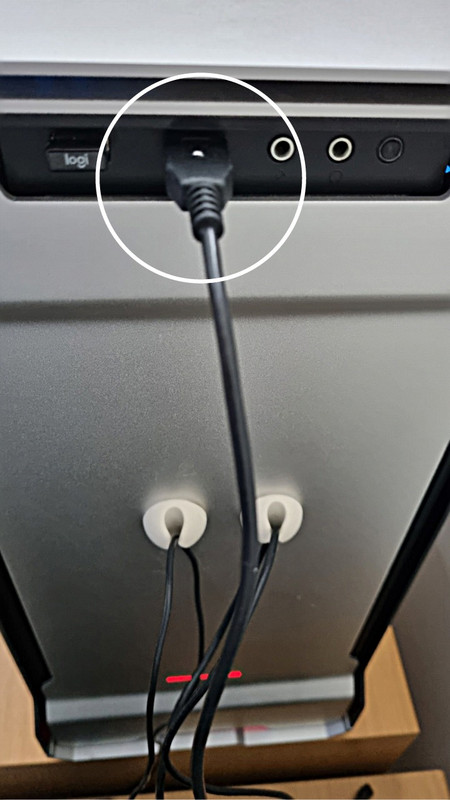
The spot goes on top, every time.
If it goes into a breakout box, the breakout box gets a spot on top too.
-

Charl - NZFF Pro
- Joined: Mon May 01, 2006 8:28 am
- Posts: 9800
- Location: Auckland
Re: The UPs and DOWNs of flight simming
by cowpatz » Tue Sep 27, 2022 3:28 pm
Charl wrote:One rainy Sunday afternoon, I took the time out to assemble EVERY SINGLE USB cable in the house, and applied a spot of correcting fluid (a product from long long ago; paint will do but is not as quick or convenient as Correcting Fluid).
The spot goes on top, every time.
If it goes into a breakout box, the breakout box gets a spot on top too.
A very sensible idea. I'm just not that organised.
-
cowpatz - NZFF Pro
- Topic author
- Joined: Wed Mar 07, 2007 3:28 pm
- Posts: 3773
Re: The UPs and DOWNs of flight simming
by deeknow » Tue Sep 27, 2022 5:18 pm
cowpatz wrote:..a voice will be heard from afar. It can take many forms, and may be repeated frequently usually with both increasing volume and cadence, but the message is clear: "Dinner is ready!".

 I dont know whether to laugh or cry but this last bit defo resonates with me
 I am impressed by your perseverance tho CP .. I know you wont wanna hear this but my rig has been rock solid lately running P3Dv5 and many of the same addons you mention, maybe I'm just lucky and have my tongue pointed in the right direction at startup
-

deeknow - NZFF Pro
- Joined: Tue Sep 18, 2007 10:15 pm
- Posts: 4484
- Location: NZHN
Re: The UPs and DOWNs of flight simming
by FlyingKiwi » Tue Sep 27, 2022 5:59 pm
My last couple of FS PC builds I've tried to limit myself to just the absolute minimum addons I think I will definitely need and use. It's been a bit easier since MSFS as I've just stuck to things that are in the official store and the official world update packages, but I recall in my early days of FS9 and FSX having so many installed (and partly uninstalled) aircraft, scenery packages etc. that it became a nightmare. Admittedly I don't spend a lot of time in FS compared to what I did back then, usually just a couple of hours on the weekend at the most and I mostly stick now to GA and the occasional warbird which usually don't require as many extra third party addons to have running to a decent level of simulation. I applaud your persistence and dedication though!
-

FlyingKiwi - Senior Member
- Joined: Mon May 29, 2006 4:17 pm
- Posts: 1690
- Location: Auckland
Re: The UPs and DOWNs of flight simming
by cowpatz » Wed Sep 28, 2022 4:17 pm
I'm still running a quad core 4770K overclocked to 4.3 GHZ. My old Titan card finally gave up the ghost a few months so i put a 1080ti in it for the time being.
When exactly to upgrade is the issue at hand. A familiar position for most us. Do I buy now or wait for the latest and greatest over the horizon? There are pros and cons to both arguments.
I have decided to wait it out for the new stuff that's just about to come out. Which camp I decide on will be "evidence based". With other trailblazers/enthusiasts providing the evidence.
It would be cheaper to go with what's available currently but most are running on end of line Mobos, Ram, PCIE and wifi specs.
When exactly to upgrade is the issue at hand. A familiar position for most us. Do I buy now or wait for the latest and greatest over the horizon? There are pros and cons to both arguments.
I have decided to wait it out for the new stuff that's just about to come out. Which camp I decide on will be "evidence based". With other trailblazers/enthusiasts providing the evidence.
It would be cheaper to go with what's available currently but most are running on end of line Mobos, Ram, PCIE and wifi specs.
-
cowpatz - NZFF Pro
- Topic author
- Joined: Wed Mar 07, 2007 3:28 pm
- Posts: 3773
Re: The UPs and DOWNs of flight simming
by Splitpin » Sun Oct 02, 2022 8:52 am
Brilliant post CP , i don't feel alone anymore :unsure. I agree with deeknow , and really admire your patience.
As each of my many sims continue to be upgraded, my system moves in the opposite direction, meaning I have the most up-to-date versions that are all but useless.
The USB thing is real for sure, it even happens to my phone charger, and sometimes my bloody car key ...go figure.
Now that Ms Ardern is adding more money to my coffers, I've been given clearance to upgrade everything and "stop complaining all the time''
Anyway CP , thanks for a great read ...hang in there and take care.
As each of my many sims continue to be upgraded, my system moves in the opposite direction, meaning I have the most up-to-date versions that are all but useless.
The USB thing is real for sure, it even happens to my phone charger, and sometimes my bloody car key ...go figure.
Now that Ms Ardern is adding more money to my coffers, I've been given clearance to upgrade everything and "stop complaining all the time''
Anyway CP , thanks for a great read ...hang in there and take care.
-

Splitpin - NZFF Pro
- Joined: Mon Aug 03, 2009 12:15 pm
- Posts: 21443
- Location: Christchurch NZ
Re: The UPs and DOWNs of flight simming
by Lindstrim » Sun Oct 02, 2022 6:17 pm
I'm waiting for most of AKL to head through Costco before I venture in there to see what's interesting in the computing department so I can have the same experience of being yelled at for dinner.
- Lindstrim
- Sim-holic
- Joined: Thu Jan 09, 2014 9:14 am
- Posts: 567
Re: The UPs and DOWNs of flight simming
by tanken2 » Fri Nov 18, 2022 6:17 am
Read the bit about the dinner call to my wife, she found that very funny, so true. Agree with improving airports, shite load of time and frustration but can be extremely satisfying. I have done both Christchurch and Wellington for X plane.
- tanken2
- Member
- Joined: Fri Jan 20, 2017 4:08 pm
- Posts: 122
- Location: Rolleston
Re: The UPs and DOWNs of flight simming
by jpreou » Fri Nov 18, 2022 12:32 pm
I try to keep my MSFS fairly lean, and I'm still concentrating only on NZ.
Mind you, I dunno what happened recently; there have been three changes and MSFS was ok after each of them; the main update that was just released; an Nvidia driver update ; a SPAD.Next update, in that order.
But all of a sudden I'm seeing 2FPS in some cases!
Yes .... I didn't mis-spell "20" ... TWO!!
I honestly can't be arsed to troubleshoot it. If I get on and it gives me crap performance, I just exit and do something else.
Of course, I know having such an old rig now doesn't help, but I was seeing 30-50 FPS until recently and mid-range settings, and that was good enough for me.
Mind you, I dunno what happened recently; there have been three changes and MSFS was ok after each of them; the main update that was just released; an Nvidia driver update ; a SPAD.Next update, in that order.
But all of a sudden I'm seeing 2FPS in some cases!
Yes .... I didn't mis-spell "20" ... TWO!!
I honestly can't be arsed to troubleshoot it. If I get on and it gives me crap performance, I just exit and do something else.
Of course, I know having such an old rig now doesn't help, but I was seeing 30-50 FPS until recently and mid-range settings, and that was good enough for me.
--
Jeff, ChCh, NZ
Jeff, ChCh, NZ
- jpreou
- Sim-holic
- Joined: Sun Dec 09, 2012 1:21 pm
- Posts: 734
- Location: Redwood, Christchurch, NZ
11 posts
• Page 1 of 1
Who is online
Users browsing this forum: No registered users and 40 guests