MSFS 2020 Goodbye for now

A place to converse about the general aspects of flight simulation in New Zealand

MSFS 2020 Goodbye for now

Postby Splitpin » Sat Dec 07, 2024 2:14 pm

I've just spent 2 hours trying to figure this thing out... :wacko:
Its loads just fine, but all I'm confronted with are Discovery flights or training.
Went to the content manager and (I thought) dumped all the stuff I don't want or will use, Gliders, aerobatic aircraft, POI's, resurrections of FS2004 aircraft etc . I understand the reasoning behind that( FS2004 etc), as some of those models were way ahead of the scenery etc. I was hoping to slim it down a bit...but no...why give an option to delete something, with the "are you sure "question if you cant delete it ??
I cant access the market place , as its "not available" :ph43r:
Tomorrow I'll look at some YouTube stuff and maybe figure it out.
As I've said recently ...all I want is a list of loaded aircraft, and locations , and a bloody Fly Now button....or am I asking too much.
This could the be result of an extremely hard work week on my part and therefore missing something ......but its really starting to piss me off big time.
Heading back to my X-Plane safe place ...Stuff this.
OnlineUser avatar
Splitpin
NZFF Pro
 
Topic author
Joined: Mon Aug 03, 2009 12:15 pm
Posts: 21327
Location: Christchurch NZ

Re: MSFS 2020 Goodbye for now

Postby Adamski » Sat Dec 07, 2024 2:37 pm

Splitpin wrote:I've just spent 2 hours trying to figure this thing out... :wacko:
Its loads just fine, but all I'm confronted with are Discovery flights or training.
... I was hoping to slim it down a bit...but no...why give an option to delete something, with the "are you sure "question if you cant delete it ??
I cant access the market place , as its "not available" :ph43r:

Yes - you *can* "delete" stuff. Just select "Uninstall". The *entry* stays there in case you want to add it back, but the actual files on the HD are gone.

Marketplace got stuffed by 2024. Not sure why the 2020 Marketplace is affected though.

Try Googling a few 2020 tutorials on YouTube - they might show you some steps you're missing (or not seeing).

Otherwise, just try to think like a dyslexic 7yr old (which is probably what the GUI developers were) ... and see if anything comes right. You'll get there in the end, but I'm sure you'll agree that the whole interface is simply ghastly.
Image
User avatar
Adamski
NZFF Pro
 
Joined: Thu Nov 01, 2007 2:22 am
Posts: 5029
Location: Birkenhead, Auckland

Re: MSFS 2020 Goodbye for now

Postby Charl » Sat Dec 07, 2024 2:54 pm

Splitpin wrote:am I asking too much.

Once you discover the strengths of this sim, you will always be tempted by it, despite the frequent and sometimes massive annoyances.
I binned it for 6 months when it ate my controller bindings.
But you come back, forewarned, and then do it "right".
(Tip: Happily, during the eternal load/startup, you can <Alt> - Tab away and come browse the NZFF!)

I will not grant FS24 the same courtesy at present, they should've known better.
But I will go there eventually.
OnlineUser avatar
Charl
NZFF Pro
 
Joined: Mon May 01, 2006 8:28 am
Posts: 9687
Location: Auckland

Re: MSFS 2020 Goodbye for now

Postby Splitpin » Sat Dec 07, 2024 4:22 pm

Thanks gents, I'm just over tired and generally not a nice person to be around at the moment....however I did have a break through.
After a re start my world map came to life...with a list of aircraft and destinations :)
Now if I can just get rid of all those overlays, and figure out the cameras, I should be ready to post some half decent screens in about............ 12 months.
Normally I wouldn't pursue something like this so hard, but being a gift, there is is an element of obligation.
Thanks again for the input , much appreciated.
OnlineUser avatar
Splitpin
NZFF Pro
 
Topic author
Joined: Mon Aug 03, 2009 12:15 pm
Posts: 21327
Location: Christchurch NZ

Re: MSFS 2020 Goodbye for now

Postby Adamski » Sat Dec 07, 2024 5:38 pm

Splitpin wrote:Now if I can just get rid of all those overlays, and figure out the cameras

Suggestion ....

Write down (on real ink & stuff) ... the various names of all the axes for the different cameras and what they actually do, as you go. They're all confused ... but, basically, you have:

1) Move (swivel)
2) Translate (slide)
3) Rotate (swivel in most cases)

However ... often they're labelled as "rotate" when they actually "slide" (translate) and vice-versa. It's a dogs' breakfast.

I've never worked out what the "Lock" versions of all these are.

The main views are:
1) Cockpit
2) External (the sort of fixed one, with the gauges showing).
3) Drone (or Showcase). This is the most customisable one for screenshots, as you can move the camera in 6 DOF and also the position of the aircraft itself (also in 6 DOF).

After that, there are a couple of view MODE (switch) commands that are essential to set up so you can toggle in and out of the various camera modes. Again - the labelling on those is confusing. Also important are the commands to RESET the views, as you're bound to end up zooming in on your toenails a lot of the time.

Once you've worked all that out, you try the impossible: mapping all the above to handy joystick buttons/hats. 10 yrs should just about do it LOL!
Image
User avatar
Adamski
NZFF Pro
 
Joined: Thu Nov 01, 2007 2:22 am
Posts: 5029
Location: Birkenhead, Auckland

Re: MSFS 2020 Goodbye for now

Postby Charl » Sun Dec 08, 2024 6:42 am

I detest the "camera" views - they differ between aircraft, at the whim of the designer, and I never ever want to see the underside of the wingtip in fisheye view thank you very much.
The only thing I map to joystick in cockpit view is "Reset Cockpit View" when you've ended up zooming in on your toenails, as Adam suggests.
For external screenshots I've never progressed beyond using the drone as it allows me to frame and move where I like.
Also it allows a (somewhat convoluted) flyby view setup.
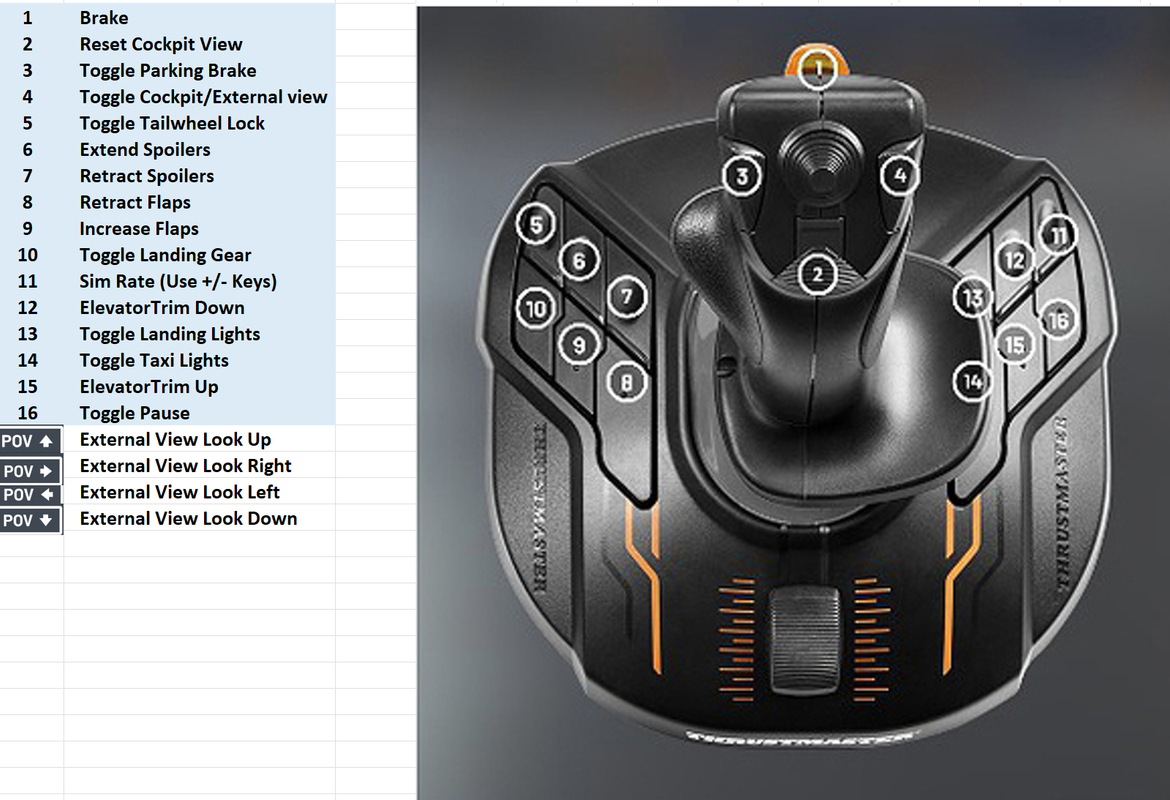
FWIW here's my last control binding setup, may be of some help
Image
and drone camera commands - I really only use the first lot.
Image
I'm sure there are many other bits I haven't learned, but as you point out, you only have one life...
OnlineUser avatar
Charl
NZFF Pro
 
Joined: Mon May 01, 2006 8:28 am
Posts: 9687
Location: Auckland

Re: MSFS 2020 Goodbye for now

Postby Adamski » Sun Dec 08, 2024 8:12 am

Marty - what controllers are you using at the moment?
Image
User avatar
Adamski
NZFF Pro
 
Joined: Thu Nov 01, 2007 2:22 am
Posts: 5029
Location: Birkenhead, Auckland

Re: MSFS 2020 Goodbye for now

Postby toprob » Sun Dec 08, 2024 8:47 am

As the drone was a real nuisance in 2020 using the keyboard, I bought a cheap Logitech gamepad, which was already set up in the sim, and is very similar to flying a real drone. I see that you can buy a wired Xbox controller for the same price these days, around $70. It doesn't take screenshots, though, so I have to reach for the keyboard.

In 2024, the built-in photo mode takes care of all that. It will pause the sim for you (although you can unpause using the controller) and you fly the camera like a drone. When you have your shot framed, just press 'A' on the gamepad to take the photo. One handy thing is that whatever you have on your screen, such as the external HU display, or in my case the SDK menu up top, these won't appear in the photo, whereas they do show up in a normal screenshot. When you initially 'grab' the camera, it starts with your current view, which for me is normally in the cockpit, but you can still move the camera anywhere within a sphere around your start location. So you don't need to switch views to the drone.

When you take the photo, a thumbnail of it shows up in the corner of your screen, so you can check your composition/exposure/focus etc. When you've finished taking photos, you toggle the photo mode again and you are back in the cockpit (or wherever -- walking your avatar, in external view, just not flying the drone), unpaused.
User avatar
toprob
NZFF Pro
 
Joined: Sat Apr 29, 2006 4:56 pm
Posts: 6711
Location: Upper Hutt

Re: MSFS 2020 Goodbye for now

Postby Splitpin » Sun Dec 08, 2024 9:08 am

Adamski wrote:Marty - what controllers are you using at the moment?


Logitech extreme 3d pro , but will change to the thrust master as per Charls post.
OnlineUser avatar
Splitpin
NZFF Pro
 
Topic author
Joined: Mon Aug 03, 2009 12:15 pm
Posts: 21327
Location: Christchurch NZ

Re: MSFS 2020 Goodbye for now

Postby Splitpin » Sun Dec 08, 2024 5:36 pm

A new day, a clear head and progress.
Got a couple of flights in today (screens to follow) using some of the default stuff.
Now I'm tackling the other monster....the community folder...WTH.
Whatever happened to , find the Sim objects file/ aircraft...job done. :angry:
Strictly speaking from my point of view...this is the most convoluted piece of software I've ever encountered...and I'm only half way there after 72 hours according to steam.
Maybe its just me...who knows , and frankly, who cares...you pay good money, and you get this BS...

But, all that aside, the parts I have got working are pretty good... more with screens tomorrow.
OnlineUser avatar
Splitpin
NZFF Pro
 
Topic author
Joined: Mon Aug 03, 2009 12:15 pm
Posts: 21327
Location: Christchurch NZ

Re: MSFS 2020 Goodbye for now

Postby Adamski » Sun Dec 08, 2024 7:23 pm

Splitpin wrote:...this is the most convoluted piece of software I've ever encountered...
... by a LONG way :(
Somehow I don't think you'll be going down the 2024 route then :D :lol: :ph43r:
Image
User avatar
Adamski
NZFF Pro
 
Joined: Thu Nov 01, 2007 2:22 am
Posts: 5029
Location: Birkenhead, Auckland


Return to General

Who is online

Users browsing this forum: Google Adsense [Bot] and 4 guests