Page 1 of 1

PostPosted: Tue Aug 25, 2009 5:19 pm
by hoki1185
Is anyone operating this unit or know much a about it.I would be interested to know how it runs with Vista and ATI Radeon Graphics cards compatibility.I've been to the Matrox sight and it specifies compatibilty,even with my laptop.I think this is at odds with some of the reviews I have read.Ian.

PostPosted: Tue Aug 25, 2009 7:36 pm
by dbcunnz
hoki1185 wrote:
QUOTE (hoki1185 @ Aug 25 2009, 05:19 PM) <{POST_SNAPBACK}>
Is anyone operating this unit or know much a about it.I would be interested to know how it runs with Vista and ATI Radeon Graphics cards compatibility.I've been to the Matrox sight and it specifies compatibilty,even with my laptop.I think this is at odds with some of the reviews I have read.Ian.

Hi Ian I am using 3 monitors with a Matrox TripleHead2Go Digital and I had a ATI Radeon 256mb earlier model forgot the number now but I had to upgrade the graphics card to run it so upgraded to NV9800GTX 512mb and it is working fine work with Win XP 32 and 64bit Vista 32bit not tried Vista 64bit and Win 7 32 and 64bit
Doug

PostPosted: Fri Aug 28, 2009 10:41 am
by G-HEVN
I'm using it on Windows 7-64 bit and an Nvidia GTX280. Runs like a dream. cool.gif

PostPosted: Fri Aug 28, 2009 5:55 pm
by hoki1185
Any problems setting it up initially?Would it run with a larger central monitor(say 24") with 2x 22" monitors adjacent?Ian.

PostPosted: Sat Aug 29, 2009 10:42 am
by G-HEVN
I believe it needs three identical monitors, or at least with the same resolution.

PostPosted: Sat Aug 29, 2009 12:30 pm
by dbcunnz
hoki1185 wrote:
QUOTE (hoki1185 @ Aug 28 2009, 05:55 PM) <{POST_SNAPBACK}>
Any problems setting it up initially?Would it run with a larger central monitor(say 24") with 2x 22" monitors adjacent?Ian.

It will run with any 3 monitors but for best results use 3 identical monitors I tested mine hooked to a 26inch TV a 19 and a 17 inch monitor and worked fine but for Flight Sim you need to have three identical monitors to get everything lined up correctly I have 3 x 22inch monitors
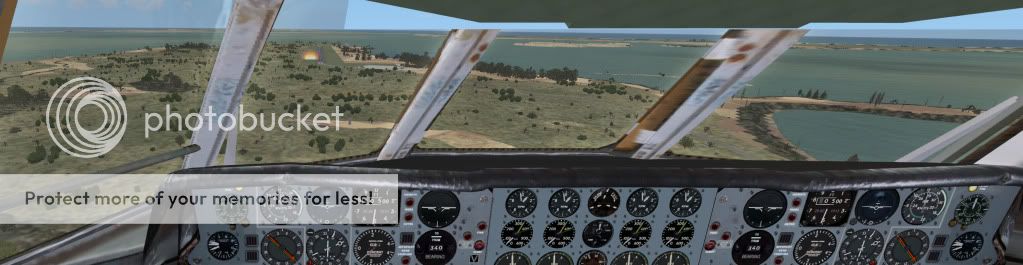
Here is a couple of pics but not taken right out to the full view about 3/4 of the available width.


PostPosted: Tue Sep 01, 2009 6:39 pm
by shotgun
WOW great view angle.
Ill have to look into it smile.gif

PostPosted: Wed Oct 27, 2010 9:31 am
by mfraser
Hi all, I'm just consolidating the info I've gathered in the process of getting into widescreen multi-monitor simming........... I hope it will be of use to others thinking about doing the same........

So I recently went out and purchased three new LG W2261VP 22" widescreen LCD monitors and two EVGA GTX460 1GB videocards, in the hope of using Nvidia Surround (NVS) at a resolution of 5760x1080 @ 60Hz (3x 1920x1080). Sadly, the hype didn't live up to the expectation and I've been plauged with crashes and stability issues. I'm sure this will be fixed in future driver releases, but I'm not willing to wait for that to happen when I have the monitors sitting on my desk right now!!

So I then had a look st SoftTH - a software solution for multi-monitor gaming, however I never managed to get it to work at all........

So I then started looking at the Matrox Triplehead2Go (Digital Edition) as a possible solution - however the maximum resolution supported (at least to date) is only 5040x1050 @ 57Hz (3x 1680x1050) which is disappointing as its not quite as high as NVS - however it is more stable. You also have to ensure that your monitors support the 57Mhz frequency..........mine do. I've also read that the box gets hot while running - however one of our forum members has assured me that it warms slightly!! The best import price including shipping to NZ is NZD$440 or around NZD$700 if bought locally.
Matrox TripleHead2Go Specifications

Interestingly, a new player has just entered the multi-monitor market - called MViewTech. Their product - the MV103-HDVE Pro - can support resolutions up to 5760x1080 @ 50Hz. Again, you would have to be careful to ensure that the monitors you have would support this frequency....... luckily mine do. Also of interest is their resolution of 5040x1050 @ 60Hz - which is a standard frequency over the non-standard frequency of 57Hz that Matrox uses. A negative is their Bezel Management technology - its restricted to a maximum of 128 pixels and I need 140 pixels to suit my monitors. I've read that the product runs cooler than the Matrox equivalent. The best import price including shipping to NZ is NZD$373 and is not currently available to purchase locally.
MViewTech Blogsite
MViewTech Website

So now my decision is to whether to go with Matrox or MViewTech. I could save a few dollars, get the higher resolution but sacrifice full bezel management with the MViewTech box. Or pay a bit extra, have slightly limited resolutions and non-standard frequencies, but better bezel management and brand name security with Matrox......

I'll edit this post when I make a decision!!

Regards,
MAT

PostPosted: Wed Oct 27, 2010 9:57 am
by IslandBoy77
Hey Mat. Thanks for posting your "journey" - very interesting. A questions: the "bezel management" you talk about - what's the story with this? Are you able to elaborate on exactly what it is, how it works, and why the "limitation" is a problem for you? Ta. cool.gif

PostPosted: Wed Oct 27, 2010 10:29 am
by mfraser
IslandBoy77 wrote:
QUOTE (IslandBoy77 @ Oct 27 2010, 10:57 AM) <{POST_SNAPBACK}>
Hey Mat. Thanks for posting your "journey" - very interesting. A questions: the "bezel management" you talk about - what's the story with this? Are you able to elaborate on exactly what it is, how it works, and why the "limitation" is a problem for you? Ta. cool.gif

Thanks - my hope is that it will give others thinking about doing the same a point to start from!!

Bezel management allows you to compensate for the width of the plastic frames (Bezels) of your monitors. Without it, images spanning across two adjacent displays appear disjointed as they stop at the edge of the displayed image on one screen, before starting again on the adjacent screen. See the images and videos below to see what I mean - look at how the fences, race track and track markings look. With bezel management on, you can select how many pixels are compensated for and the software will remove an appropriate portion from each edge of the image. To the viewer, it gives the impression that the image continues behind the bezels, rather than stopping and starting. It makes a HUGE difference to the immersion of FS!!

Matrox Bezel Management Explanation

Image Example Without Bezel Management

Image Example With Bezel Management


PostPosted: Wed Oct 27, 2010 11:39 am
by IslandBoy77
Awesome - thanks for that. I thought that was probably the case, but had never had the hardware available to play with. Another bit of info in my tech inventory for later... biggrin.gif

BTW, you're gonna have a kick-ass sim pit once you've got everything ironed out. Oh for 3 screens - I'm 'stuck' with 1 x 22" sad.gif Got a client on 3 x 24" Samsungs, but he's not using the bezel management thing so gets that awful disjointedness you speak of.

All the best, Mat - hope it smooths out soon. thumbup1.gif plane.gif