I have been (an amateur) MS simmer since day one (Green Screen IBM PC in 1982?). Generally all my early PC upgrades were due to MS FS. I never really got the hang of anything more technical than taking off and landing, then later on - sightseeing. Over the years I have purchased $0,000's of dollars of upgrades, joysticks, VOX, Scenery, Mega Scenery USA, Australia, and the ecxellent locally produced Auckland (only for FS 2004, unfortunatey). In the last decade I upgraded to FSX then FSX Accelerator. I also purchased the CH Yoke & Pedals years ago, but was recently lured by the "supposed" improvement (over the CH yoke "sticky in-out" feature being "improved") by the Saitek Yoke and also purchased the add-on throttles, Saitek Headset (? I know, it's all Greek to me, but I want to learn) and excellent Switch Panel (when it works), as my aircraft of choice is the twin engine Beechcraft Baron 58.
Despite reading and re-reading the instructions, I cannot get the syetem set up so that I can just load the program - and fly! I also purchased - after being screen prompted "FS can't find XXX" - an obscure program that supposedly assists in setting up the instrument profile for the Saitek stuff (I can't recall the name - I'm at work and the stuff is at home - but it is an acronym name) It's very frustrating and there seems to be no-one locally I can ask (I live in Ellerslie, Auckland) Years ago I belonged to the Auckland University MSFS Club where members took their stuff to a hall somewqhere and were very helpful in setting the software up. There does't seem to be anything like that these days and the Might Ape (Saitek supplier) aren't knowledgeable, and Saitek importers just as bad. Incidentally the Saitek Yoke is just as bad as the CH one, so perhaps the upgraded CH product will be a better buy?
Perhaps to save time on answering suggestions (will there be any?) I have loaded FS2004 ADN FSX on two seperate hard drives - Win XP and Win 7 - and downloaded all the updated drivers etc. from the Saiktek site (the Japanese Saitek site is more available than the German site which seems always too busy). I reloaded Win XP AND Win 7 again, and loaded FS2004 AND FSX, then laborioulsuy all the other required programs. I havent' bothered with the Sceneery stuff yet - I just want to FLY!
Finally, the MATROX TripleHead2Go does not seem to performn as I imagined it would from the salkes literature I read. If I go into SETTINGS and click the 3850 x 16 (?) I get a stretched image of the control panel - very unsightly- and if I revert to the 1280 x 1024 I get a central image, then have to "add window" load the virtual cockpit again, detach the window, move to the left screen, toggle RIGHT to get the left wing view, I then repeat this process to get the right wing view. Obvioulsy the three screen do not exactly line up, giving a very "fake" looking cockpit view!
I'm pushing 70, but still retain an interest in IT and microcomputers (THAT word shows my age, huh?)
HELP. PLEASE?
I am about to give up! I can't get it running properly and need assistance! HELP!
6 posts
• Page 1 of 1
 by creator2003 » Thu Apr 15, 2010 8:44 am
Thought you mite of got some help by now ,im sure you will before you give up ,a lot of the hardware you are running not many of us have ,so will take a little while before those who do have them see this post .
I do know the Westpac trust helicopter downtown ,in there sim they have a matrix triple head to go ,and the guy that set that up is a member here called sreweti and his email is "S.reweti@massey.ac.nz " maybe he could give you a idea on that setup ?
do you have the pay version of FSUIPC ? this helps with setting up controllers etc ..
anyway hang in there and someone will be more of assistance im sure
I do know the Westpac trust helicopter downtown ,in there sim they have a matrix triple head to go ,and the guy that set that up is a member here called sreweti and his email is "S.reweti@massey.ac.nz " maybe he could give you a idea on that setup ?
do you have the pay version of FSUIPC ? this helps with setting up controllers etc ..
anyway hang in there and someone will be more of assistance im sure
Last edited by creator2003 on Thu Apr 15, 2010 8:45 am, edited 1 time in total.
-

creator2003 - NZFF Pro
- Joined: Fri Jun 16, 2006 12:08 am
- Posts: 4633
- Location: Cant U C im LOCO
by OGG1E » Thu Apr 15, 2010 1:45 pm
creator2003 wrote:QUOTE (creator2003 @ Apr 15 2010, 09:44 AM) <{POST_SNAPBACK}>Thought you mite of got some help by now ,im sure you will before you give up ,a lot of the hardware you are running not many of us have ,so will take a little while before those who do have them see this post .
I do know the Westpac trust helicopter downtown ,in there sim they have a matrix triple head to go ,and the guy that set that up is a member here called sreweti and his email is "S.reweti@massey.ac.nz " maybe he could give you a idea on that setup ?
do you have the pay version of FSUIPC ? this helps with setting up controllers etc ..
anyway hang in there and someone will be more of assistance im sure
Thanks - I have emailed him. Also, Paid version of FSUIPC - Larry
-

OGG1E - Newbie
- Topic author
- Joined: Sun Mar 14, 2010 1:05 pm
- Posts: 5
- Location: Ellerslie. Auckland
by totalrain » Thu Apr 15, 2010 3:48 pm
Hi, I am 66 and live in Henderson. I don't have TH2Go, I use TrackIR on a 24" widescreen monitor instead. But, I do have the Saitek Pro panels(Switch, Multi, Radio), Yoke and second TQ, pedals, and X52 pro HOTAS. So could help with any problems with those.
I run FSX+Accelleration with XP Home SP3 OS, on an AMD Athlon 3500+ (2.2GHz) single core processor. I also have FSUIPC (payware) and run all my control settings through that, and have disabled the joystick controller in FSX.
Is "SPAD" the panels config program you were referring too? I use SPAD to configure the Saitek panels in conjuction with FSUIPC, and it works great, much better then the Saitek drivers. The trick here is, you must remove the Saitek panel driver through the Add/Remove Control Panel before using SPAD. Otherwise the two drivers will conflict with each other. If you have any specific problems using SPAD I could help with that as well.
I get some stretching with 2D panels, and 2D panel pop-ups (ie when I use the "A" key or Shift+1,2,3...) on my widescreen monitor. This is because the 2D textures were designed for a 4:3 aspect ratio, and my monitor is 16:9 ratio (1920x1080). So, I use 3D cockpits whenever possible. I am guessing this would cause problems with TH2Go as well, but much worse of course.
Don't give up hope, you are 99.9% of the way to success. Unfortunately, tweaking FSX is a never ending process.
I run FSX+Accelleration with XP Home SP3 OS, on an AMD Athlon 3500+ (2.2GHz) single core processor. I also have FSUIPC (payware) and run all my control settings through that, and have disabled the joystick controller in FSX.
Is "SPAD" the panels config program you were referring too? I use SPAD to configure the Saitek panels in conjuction with FSUIPC, and it works great, much better then the Saitek drivers. The trick here is, you must remove the Saitek panel driver through the Add/Remove Control Panel before using SPAD. Otherwise the two drivers will conflict with each other. If you have any specific problems using SPAD I could help with that as well.
I get some stretching with 2D panels, and 2D panel pop-ups (ie when I use the "A" key or Shift+1,2,3...) on my widescreen monitor. This is because the 2D textures were designed for a 4:3 aspect ratio, and my monitor is 16:9 ratio (1920x1080). So, I use 3D cockpits whenever possible. I am guessing this would cause problems with TH2Go as well, but much worse of course.
Don't give up hope, you are 99.9% of the way to success. Unfortunately, tweaking FSX is a never ending process.
Last edited by totalrain on Thu Apr 15, 2010 3:55 pm, edited 1 time in total.
- totalrain
- Newbie
- Joined: Thu Jun 12, 2008 1:31 pm
- Posts: 3
by dbcunnz » Thu Apr 15, 2010 9:23 pm
OGG1E wrote:QUOTE (OGG1E @ Apr 14 2010, 10:37 AM) <{POST_SNAPBACK}>Finally, the MATROX TripleHead2Go does not seem to performn as I imagined it would from the salkes literature I read. If I go into SETTINGS and click the 3850 x 16 (?) I get a stretched image of the control panel - very unsightly- and if I revert to the 1280 x 1024 I get a central image, then have to "add window" load the virtual cockpit again, detach the window, move to the left screen, toggle RIGHT to get the left wing view, I then repeat this process to get the right wing view. Obvioulsy the three screen do not exactly line up, giving a very "fake" looking cockpit view!
I'm pushing 70, but still retain an interest in IT and microcomputers (THAT word shows my age, huh?)
HELP. PLEASE?
Hi Larry
Do you have an analog or digital edition?
I have a digital Matrox TripleHead2Go set up with 3 22inch wide screen monitors.
The 2D cockpit does not work as you say it stretches out over the 3 Monitors I only use the Virtual Cockpit when I am using the matrox and 3 monitors in the display settings aircraft set it to Virtual Cockpit an it will open in Virtual Cockpit.
With the Marox digital edition and 3 monitors I set the screen resolution to 4080 x 768 and line the monitors up in a strait line and all at the same level to get the best cockpit view.
If you want to email me for more info my address is cunniffe.d@ihug.co.nz.
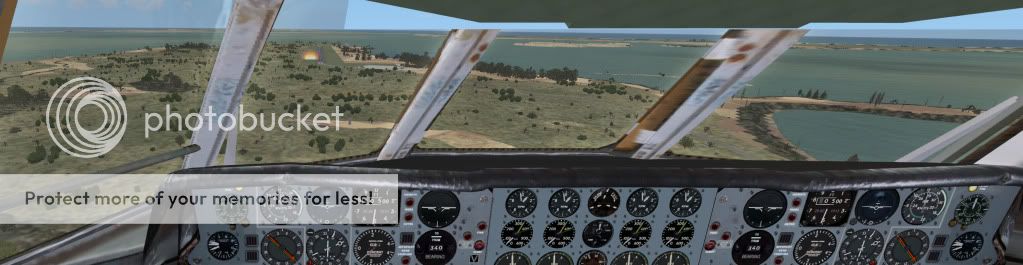
I have already pushed 70 a few years ago now but still enjoying my flying here are a couple on Triple screen shots.
Doug
Argosy on finals into Chatham Islands
Beech Barron 58 at Bay Of IslandsLast edited by dbcunnz on Fri Apr 16, 2010 12:32 am, edited 1 time in total.


-

dbcunnz - NZFF Pro
- Joined: Thu Feb 21, 2008 12:56 pm
- Posts: 4011
- Location: Blenheim New Zealand
by OGG1E » Fri Apr 16, 2010 4:30 pm
Don't give up hope, you are 99.9% of the way to success. Unfortunately, tweaking FSX is a never ending process.
Thanks to you and the next member - I will try these tips over the coming weekend. Thanks a million!
I have already pushed 70 a few years ago now but still enjoying my flying here are a couple on Triple screen shots.
Nice to see I am not alone (age-wise too). I will print our your reply and give it a atry over the coming weekend. Keep you both poster!
Thanks to you and the next member - I will try these tips over the coming weekend. Thanks a million!
I have already pushed 70 a few years ago now but still enjoying my flying here are a couple on Triple screen shots.
Nice to see I am not alone (age-wise too). I will print our your reply and give it a atry over the coming weekend. Keep you both poster!
-
OGG1E - Newbie
- Topic author
- Joined: Sun Mar 14, 2010 1:05 pm
- Posts: 5
- Location: Ellerslie. Auckland
6 posts
• Page 1 of 1
Who is online
Users browsing this forum: No registered users and 17 guests