FreeTrack

A place to converse about the general aspects of flight simulation in New Zealand

Postby mechaneer » Thu Jul 08, 2010 10:36 am

Sorry if this has already been posted on these boards (I did a quick search and didn't find any topics).

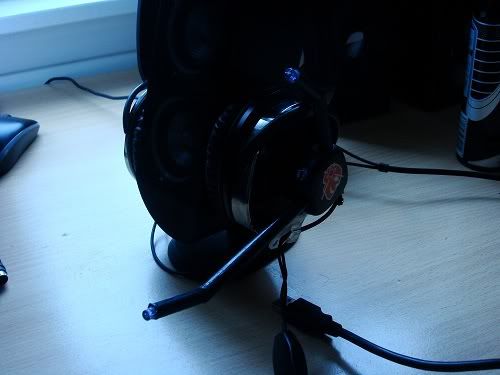
FreeTrack is a free software application, very similar to TrackIr (6DOF). The only thing is that you need to make your own track clip and have a webcam. The clip is relatively easy to make....I made mine out of a miniature tape measure, some irrigation risers and some electronics (see pic below)- it cost about $20 all up. Does anyone else on here use FreeTrack? It definitely adds alot to the immersion and realism!

Link:
http://www.free-track.net/english/

Some examples:
http://www.youtube.com/watch?v=LzY8Aa2lt9I
http://www.youtube.com/watch?v=GTmg1y0iXko

-Dan

Last edited by mechaneer on Thu Jul 08, 2010 12:19 pm, edited 1 time in total.
mechaneer
Member
 
Topic author
Joined: Wed Jul 07, 2010 11:31 am
Posts: 56
Location: Hamilton

Postby Splitpin » Thu Jul 08, 2010 11:10 am

thumbup1.gif Welcome aboard mechaneer......Im going to check it out, thanks for links........

Marty
User avatar
Splitpin
NZFF Pro
 
Joined: Mon Aug 03, 2009 12:15 pm
Posts: 21381
Location: Christchurch NZ

Postby mechaneer » Thu Jul 08, 2010 11:17 am

If anyone wants to build a tracking clip to use FreeTrack, let me know and I will give you all the details of how I built mine.... and where/what parts you need (if I can find the circuit schematics and invoice for the parts).
Last edited by mechaneer on Thu Jul 08, 2010 11:18 am, edited 1 time in total.
mechaneer
Member
 
Topic author
Joined: Wed Jul 07, 2010 11:31 am
Posts: 56
Location: Hamilton

Postby Splitpin » Thu Jul 08, 2010 11:37 am

mechaneer wrote:
QUOTE (mechaneer @ Jul 8 2010, 11:17 AM) <{POST_SNAPBACK}>
If anyone wants to build a tracking clip to use FreeTrack, let me know and I will give you all the details of how I built mine.... and where/what parts you need (if I can find the circuit schematics and invoice for the parts).

Cheers.......just pm me, if you get time....... thumbup1.gif
User avatar
Splitpin
NZFF Pro
 
Joined: Mon Aug 03, 2009 12:15 pm
Posts: 21381
Location: Christchurch NZ

Postby Ian Warren » Thu Jul 08, 2010 11:51 am

Be interesting to see your following up on this Marty , i did the cheat way out but worth it .. not so much me using it but my non flight sim Brother raves about it and brings his mates around to show em how .. TrackIR works biggrin.gif
Last edited by Ian Warren on Thu Jul 08, 2010 11:52 am, edited 1 time in total.
Image
User avatar
Ian Warren
NZFF Pro
 
Joined: Fri May 05, 2006 5:23 pm
Posts: 41187
Location: AREA 51

Postby NZ255 » Thu Jul 08, 2010 11:58 am

I made one and use it occasionally, I need a way to attach it to my new headset. I was thinking one of those sunglass clips maybe?
Nick
User avatar
NZ255
NZFF Pro
 
Joined: Wed Jun 20, 2007 12:57 pm
Posts: 2475

Postby Ian Warren » Thu Jul 08, 2010 12:08 pm

Should,nt say this this , he might be listening rolleyes.gif , Rob and I were discussing TrackIR this last week .. he said make sure you take the IR clip off your cap before going down to your corner dairy , the looks you get and people start wondering tongue.gif , mentioned this to Rick , dang him and Steve kept chuckling as i turned around pointing out it qualities .... laugh.gif
Image
User avatar
Ian Warren
NZFF Pro
 
Joined: Fri May 05, 2006 5:23 pm
Posts: 41187
Location: AREA 51

Postby mechaneer » Thu Jul 08, 2010 12:13 pm

I managed to find an email I had sent to someone else with all of the details, so for anyone that wants to make a USB tracking clip:

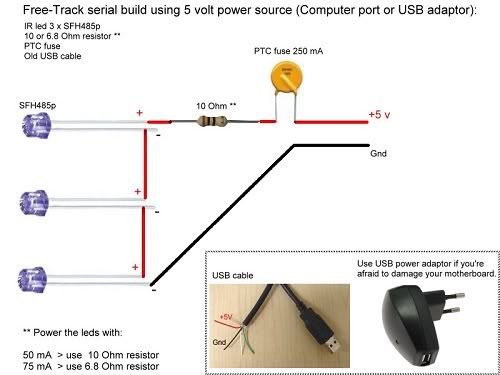
The key thing is to get wide beam IR diodes (OSRAM SFH485P is best). I found the best place to get all of the electronics was Farnell (I couldn't find anywhere in nz with the right diodes).

IR DIODES:
http://nz.farnell.com/jsp/search/productde...jsp?SKU=1212738

10 OHM RESISTOR:
http://nz.farnell.com/jsp/search/productde...jsp?SKU=1265059

PTC FUSE:
http://au.farnell.com/littelfuse/72r025xpr...479?Ntt=1757479

OPTIONAL USB ADAPTER:
http://www.trademe.co.nz/Electronics-photo...n-301317951.htm

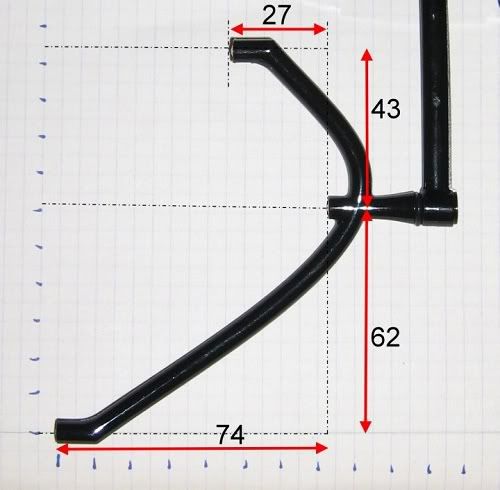
You just need to solder the parts together as in the schematic below and place them in some sort of casing. As you can see from my picture above, I used irrigation risers and a miniature tape measure case- both from bunnings. I cut a usb cable off some old blown headphones and wired this to the electronics. The PTC fuse is to protect your motherboard if plugging directly into your computer (in case you make a wiring mistake) and is not required if using the USB power adapter. Below is also some recommended dimensions (in mm) for the clip, although these can be whatever you like- but I would recommend trying to get relatively close to these dimensions as they have been trialled and work...

Let me know if you build one, and I can talk you through setting the software up and tuning the camera settings....

Any questions, please ask or pm me.


Last edited by mechaneer on Thu Jul 08, 2010 12:27 pm, edited 1 time in total.
mechaneer
Member
 
Topic author
Joined: Wed Jul 07, 2010 11:31 am
Posts: 56
Location: Hamilton

Postby mechaneer » Thu Jul 08, 2010 12:22 pm

NZ255 wrote:
QUOTE (NZ255 @ Jul 8 2010, 11:58 AM) <{POST_SNAPBACK}>
I made one and use it occasionally, I need a way to attach it to my new headset. I was thinking one of those sunglass clips maybe?


Yea, I was thinking about using those as well, but just ended up going with velcro-it seems to do the job...
mechaneer
Member
 
Topic author
Joined: Wed Jul 07, 2010 11:31 am
Posts: 56
Location: Hamilton

Postby Zacchaeus » Sun Jul 11, 2010 9:12 am

This is absolutely brilliant.
I am sooooo going to make one of these.
Planning to order some of the parts within the next few days.
Zacchaeus
 

Postby Syncop8r » Sun Jul 11, 2010 11:39 pm

I built a clip a while back but had trouble figuring out how to set up Freetrack.
I fastened it to my headset with cable ties; I prefer it there as the less I wear on my head the better.

I now have a Wii remote available but I have to find a bluetooth adapter that will work with it...

http://www.kiwisim.net.nz/phpBB3/viewtopic...53&start=15
Last edited by Syncop8r on Sun Jul 11, 2010 11:46 pm, edited 1 time in total.
Syncop8r
Forum Addict
 
Joined: Sun Nov 11, 2007 11:28 pm
Posts: 206

Postby Pato » Mon Jul 12, 2010 3:28 pm

Syncop8r wrote:
QUOTE (Syncop8r @ Jul 16 2010, 11:39 AM) <{POST_SNAPBACK}>
I built a clip a while back but had trouble figuring out how to set up Freetrack.
I fastened it to my headset with cable ties; I prefer it there as the less I wear on my head the better.

I now have a Wii remote available but I have to find a bluetooth adapter that will work with it...

http://www.kiwisim.net.nz/phpBB3/viewtopic...53&start=15


I thought I might have a go at this. I don't have a Camera at present. Can anyone recommend a suitable Camera please.?
CPU: Intel Core i5 760 @ 2.8GHz. Motherboard: Asus P7P55 LX. RAM: Kingston Hyper X 8GB 1600mhz DDR3 Non ECC. SSD: Samsung 250GB. HDD: WD !TB.
GRAPHICS: Asus GTX460, Direct CU 1GB GDDR5 256bit video graphics card. PSU: Cooler Master eXtreme Power Plus 650W. CASE: Cooler Master Gladiator.
User avatar
Pato
Forum Addict
 
Joined: Sat Nov 18, 2006 1:41 pm
Posts: 469
Location: Kapiti Coast

Postby Syncop8r » Mon Jul 12, 2010 10:46 pm

If you use a Wii remote and bluetooth instead of a webcam it hardly hits your frame rates and you don't have to sabotage a webcam.
Syncop8r
Forum Addict
 
Joined: Sun Nov 11, 2007 11:28 pm
Posts: 206

Postby Zacchaeus » Tue Jul 13, 2010 8:59 am

Syncop8r wrote:
QUOTE (Syncop8r @ Jul 12 2010, 10:46 PM) <{POST_SNAPBACK}>
If you use a Wii remote and bluetooth instead of a webcam it hardly hits your frame rates and you don't have to sabotage a webcam.


This option looks interesting, and I am all in favour of not hurting my precious framerates, heh. My precious....
Umm, anyways.

Have ordered the LEDs and other bits yesterday - will update here if it works or if it's all a big flop smile.gif
Zacchaeus
 

Postby markll » Tue Jul 13, 2010 9:19 pm

Syncop8r wrote:
QUOTE (Syncop8r @ Jul 12 2010, 10:46 PM) <{POST_SNAPBACK}>
If you use a Wii remote and bluetooth instead of a webcam it hardly hits your frame rates and you don't have to sabotage a webcam.


'course, I'd be surprised if a little wee tracking driver had much of an impact too... biggrin.gif

And hmmm...for me, I'd have to BUY a Wii (or the remote at least) and a bluetooth adapter, so I'd probably be better off just going straight for a full TrackIR.. ! smile.gif I came across FreeTrack abouit 18 months or so ago, but somehow, as it tends to, life came along and got in the way of me building myself one... Might have to have a look again, though with no Win7 driver for my old logitech cam I'd have to shell out for one of those as well...

Keen to hear about how it works out for others...
Image Image
User avatar
markll
Forum Addict
 
Joined: Wed Jun 04, 2008 6:19 am
Posts: 345
Location: Whitby

Postby Syncop8r » Tue Jul 13, 2010 9:37 pm

Honestly if I can build a clip anyone can - I know bugger all about electronics.
Probably cost me around $20 all up. The biggest cost was the courier for the LEDs, so if someone were to get a decent amount then split them up for interested people (in the same area) then that might work out even cheaper. If anyone could be bothered doing that. winkyy.gif

I bought a webcam for $20 not long ago to use for Freetrack but changed my mind when I remembered we have a Wii.
Last edited by Syncop8r on Tue Jul 13, 2010 9:40 pm, edited 1 time in total.
Syncop8r
Forum Addict
 
Joined: Sun Nov 11, 2007 11:28 pm
Posts: 206

Postby mechaneer » Tue Jul 13, 2010 10:25 pm

markll wrote:
QUOTE (markll @ Jul 13 2010, 09:19 PM) <{POST_SNAPBACK}>
'course, I'd be surprised if a little wee tracking driver had much of an impact too... biggrin.gif

And hmmm...for me, I'd have to BUY a Wii (or the remote at least) and a bluetooth adapter, so I'd probably be better off just going straight for a full TrackIR.. ! smile.gif I came across FreeTrack abouit 18 months or so ago, but somehow, as it tends to, life came along and got in the way of me building myself one... Might have to have a look again, though with no Win7 driver for my old logitech cam I'd have to shell out for one of those as well...

Keen to hear about how it works out for others...


What webcam do you have? I had a quite a bit of trouble getting my logitech quickcam for notebooks working on windows 7 64bit (was built for windows XP/ME 32Bit). But searched through a few forums and found out that logitech have recently created new drivers for there webcams . I recommend trying these steps for yours:

DO NOT PLUG IN YOUR WEB CAM UNTIL STEP 4

1. Go to http://www.logitech.com/en-roeu/584/5798?osid=14 and download the bundle

Unfortunately you have to download both LWS + Vid as a bundle, but I think you can choose to only install LWS (which you need).

2. Install LWS (or both) WITHOUT PLUGGING IN YOUR WEBCAM WHEN IT ASKS YOU TOO...

3. IMPORTANT: make sure that your windows update is set to automatically download and install drivers (click the icon when you plug in your webcam and there is an option there you can click if it is not set...).

4. Plug in your webcam

It should now download and automatically install drivers for your camera.

Let me know if you have any questions, I might have missed something in the steps...
Last edited by mechaneer on Tue Jul 13, 2010 10:28 pm, edited 1 time in total.
mechaneer
Member
 
Topic author
Joined: Wed Jul 07, 2010 11:31 am
Posts: 56
Location: Hamilton

Postby Pato » Wed Jul 14, 2010 4:04 pm

Syncop8r wrote:
QUOTE (Syncop8r @ Jul 17 2010, 10:46 AM) <{POST_SNAPBACK}>
If you use a Wii remote and bluetooth instead of a webcam it hardly hits your frame rates and you don't have to sabotage a webcam.
I have neither Wii remote or bluetooth so it would be better if I went the webcam way. Can anyone recommend a suitable webcam.?
Also what has to be done to sabotage the webcam.?
CPU: Intel Core i5 760 @ 2.8GHz. Motherboard: Asus P7P55 LX. RAM: Kingston Hyper X 8GB 1600mhz DDR3 Non ECC. SSD: Samsung 250GB. HDD: WD !TB.
GRAPHICS: Asus GTX460, Direct CU 1GB GDDR5 256bit video graphics card. PSU: Cooler Master eXtreme Power Plus 650W. CASE: Cooler Master Gladiator.
User avatar
Pato
Forum Addict
 
Joined: Sat Nov 18, 2006 1:41 pm
Posts: 469
Location: Kapiti Coast

Postby mechaneer » Wed Jul 14, 2010 5:20 pm

Pato wrote:
QUOTE (Pato @ Jul 14 2010, 04:04 PM) <{POST_SNAPBACK}>
I have neither Wii remote or bluetooth so it would be better if I went the webcam way. Can anyone recommend a suitable webcam.?
Also what has to be done to sabotage the webcam.?


There are alot of webcams that will do a good job , maybe have a look at the Freetrack website- as they have a list of tested webcams. A very important camera feature is to be able to turn auto-exposure off (alot of webcams allow for this, but I'm not sure which ones). Also it is important to get a webcam that can handle 30fps (most new ones can). You usually do not need to do anything to the webcam, but some people take the IR filter out to get better results. With the above voltage/current setup, your IR diodes should be bright enough without taking the filter out-I haven't needed to, and I get great results...I will post a video of my working tracking clip at some stage. Hope this helps....
Last edited by mechaneer on Wed Jul 14, 2010 5:32 pm, edited 1 time in total.
mechaneer
Member
 
Topic author
Joined: Wed Jul 07, 2010 11:31 am
Posts: 56
Location: Hamilton

Postby Pato » Wed Jul 14, 2010 5:30 pm

mechaneer wrote:
QUOTE (mechaneer @ Jul 19 2010, 05:20 AM) <{POST_SNAPBACK}>
There are alot of webcams that will do a good job , maybe have a look at the Freetrack website- as they have a list of tested webcams. A very important camera feature is to be able to turn auto-exposure off (alot of webcams allow for this, but I'm not sure which ones). Also it is important to get a webcam that can handle 30fps (most new ones can). You usually do not need to do anything to the webcam, but some people take the IR filter out to get better results. With the above voltage/current setup, your IR diodes should be bright enough without taking the filter out-I haven't needed to, and I get great results...I will post a video of my working tracking clip at some stage. Hope this helps....
Yes. That is a big help. Many thanks. Cheers.
CPU: Intel Core i5 760 @ 2.8GHz. Motherboard: Asus P7P55 LX. RAM: Kingston Hyper X 8GB 1600mhz DDR3 Non ECC. SSD: Samsung 250GB. HDD: WD !TB.
GRAPHICS: Asus GTX460, Direct CU 1GB GDDR5 256bit video graphics card. PSU: Cooler Master eXtreme Power Plus 650W. CASE: Cooler Master Gladiator.
User avatar
Pato
Forum Addict
 
Joined: Sat Nov 18, 2006 1:41 pm
Posts: 469
Location: Kapiti Coast

Next

Return to General

Who is online

Users browsing this forum: No registered users and 12 guests