Page 1 of 2

PostPosted: Fri Jun 15, 2007 9:54 am
by Jimmy
A few weeks ago my cord was caught around my leg, nasty things happened when I stood up in a hurry :lol:

The conection on the wire is going to be extremly difficult to fix, those tiny little wires, so its time for a new headset (I'm currently useing an old $2 shop headphones, only one ear works, and an little pc mic tapes to the side! It works quite well actuly, but I could do with some better sounds).

I have been trying to buy the eDimensional AudioFX Force Feedback Gaming Headset (cricky what a name :P ). Looking at pictures of it im begining to think it looks a bit heavy, I may stil get it but would be happier with something a bit more compact, soft and smooth and modern looking. B-) something light but with sensational quility.

I would also prefer it is USB.

Any ideas and recomendations please, postive or negative :D

Thanks
James

PostPosted: Fri Jun 15, 2007 10:55 am
by creator2003
i have a set of logitech wrap around the back of the head kind ,and after only spending $60 or something standing on them ,cord and all they have stood up to the challange with time ..
they are plug in but unsure if you can get them usb
they even have removeable ear covers,you can change the colours and look quite cool.
anyway i know acoulple here that use them and ive never heard of any problems :thumbup:

PostPosted: Fri Jun 15, 2007 4:32 pm
by Alex
I've got this pair;

user posted image

Good quality sound, and no problems at all so far (only had them for about 4 months), and I've been knocking them around a bit :rolleyes: . One problem is that your ears need a small break after about an hour or so, as they (headphones) seem to press against them harder than they need to...

Alex

PostPosted: Fri Jun 15, 2007 5:26 pm
by vatsim-aholic
Have the same pair Alex, and they very good. I tend to place the left ear piece behind my ear and just have the right on and use the mic which is on the right too. I find its easier to hear other things going on around me and my left ear gets really sore when on for too long.
All my sound comes from a hifi system including ATC, so really only using the mic. They are good size and value at $28.00 from dick smith.

PostPosted: Fri Jun 15, 2007 6:14 pm
by benwynn
Get Somthing Small and USB- LIke the ONe Above-

I have a big chunky Real Life Style one- I really like it -but somtimes I can hear myself talk :P

PostPosted: Fri Jun 15, 2007 6:30 pm
by Mattnz
I have a set similar to Alex's, but not exactly the same. They're Logitech, and from Gameplanet. Quite good, I've had no problems with them :)

PostPosted: Fri Jun 15, 2007 8:23 pm
by Jimmy
Thanks guys, I like the look of the Logitech headsets, the USB 350, the price isn't bad and it looks prety kool.

  I have a set similar to Alex's, but not exactly the same. They're Logitech


no wounder you too sound excatly the same, I can never tell the differance, thank goodness for IvAe :P :lol:

Thanks again, ill let you know how I get on.
James

PostPosted: Sat Jun 16, 2007 10:09 am
by creator2003
yup the logitech ones i use are are nothing but perfect for me ,they are very comfortble on the ears and eyes for that matter ,just hope that they have usb for you
mike
ps that 2 dollar set didnt do to badly last night :clap: amazing for that price

PostPosted: Thu Jun 21, 2007 8:17 pm
by Jimmy
Well much to my surprise it arived this monring, mm and it smells nice and new :P

The sound quility is great, not to mention the brilliant volume it goes too!

Alex has said im breaking up over the comms, but most likely just the good ol dial up conection :lol:

Its nice looking, light weight, and good quility.

Thanks guys!
James

PostPosted: Fri Jun 22, 2007 9:12 am
by cowpatz
Just out of curiosity what advantages, if any, are there in using a USB headset?

PostPosted: Fri Jun 22, 2007 11:28 am
by SUBS17
cowpatz wrote: Just out of curiosity what advantages, if any, are there in using a USB headset?

USB headset is the best as it allows only coms to pass through the headset speakers while ingame sounds are heard through the external speakers. Particularly handy especially if you are using games with alot of loud noises such as explosions or jet engines etc :plane: The only headset I'd consider slightly better is wireless headset which is very clear and can be worn anywhere in the house eg lounge, kitchen, toilet :D Really things you don't want to hear. lol

PostPosted: Tue Jul 10, 2007 12:17 pm
by HardCorePawn
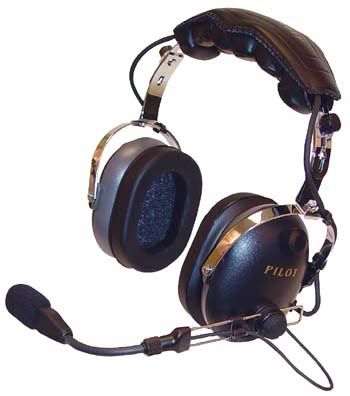
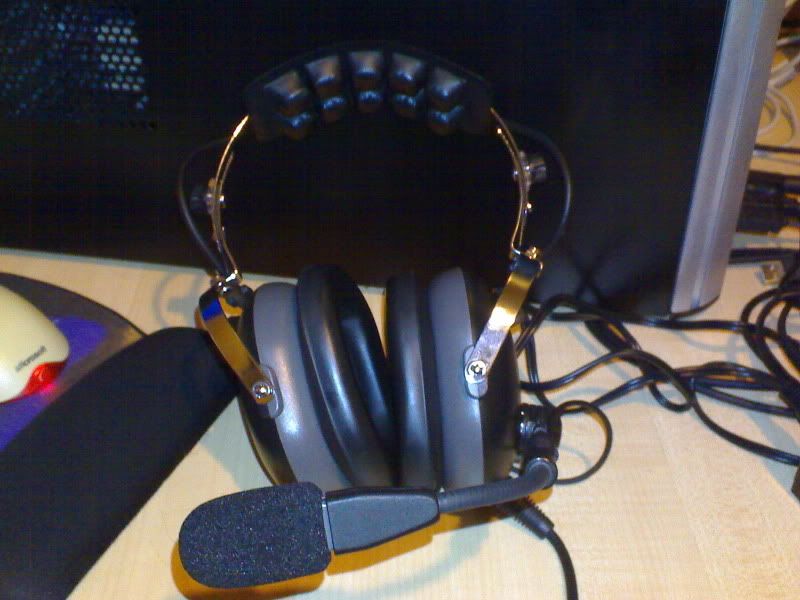
For those out there that fly and/or actually have 'real' aviation headsets... I have figured out how to use mine with the PC... I have a Pilot Avionics PA 11-60...
user posted image
user posted image

Not the worlds greatest aviation headset... but I'm going to treat myself to a nice noise cancelling one when I get my license :D Anyway... I figured I could either buy an adapter (something like this), but they seem to average around US$50!! or I could make one!! :ph43r: So I had a hunt around online.. and came up with this page and this page which showed me what i needed to know...
  • Headphone can probably be connected directly to PC (assuming stereo headset)
  • Microphone will need special sized jack
  • Microphone probably needs amp power
So, first up I tried the headphone connection. As the headphone plug is just a standard 6.5mm (1/4" inch) plug and mine is a stereo headset, I got a simple 6.5mm stereo to 3.5mm stereo converter for just a couple of $$ from from Dick Smith. Worked like a charm, and the added noise reduction of the headset means I can actually run at a lower volume and still hear things perfectly... BONUS!

Next was the microphone. Unfortunately, as mentioned on those websites, the microphone plug was an 'odd' size... in this case 5.3mm or .210" inch. Working off the part numbers from the websites, I found some online mail order places in the US that had them for like US$2... not too bad I thought, but they wanted like US$30 to ship them! WTH?!! :blink:

So i tried some of the avionics companies in NZ (a couple out at Ardmore etc.) and they wanted some ridiculous prices like NZ$20+GST.... pfft

Luckily I then found this New Zealand based site, RS Components... they have the Switchcraft S12B for like NZ$8+GST... and if you are in AKL, you can go pick it up at the trade counter in Penrose and dont have to worry about shipping costs! :clap: It took them about a week to ship it in but was definitely better than paying US$30!

So then it was down to Dick Smith to collect the other bits and pieces I would need:For the wiring, I figured i would not need anything too hefty, as the currents/voltages would be relatively small... I had some old ethernet cables lying around, so I hacked one up and used some short lengths of the wires inside.

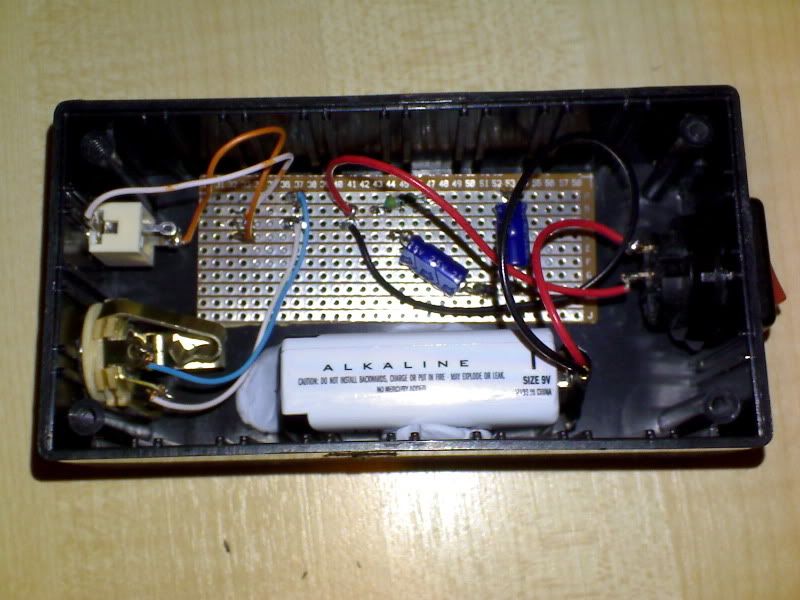
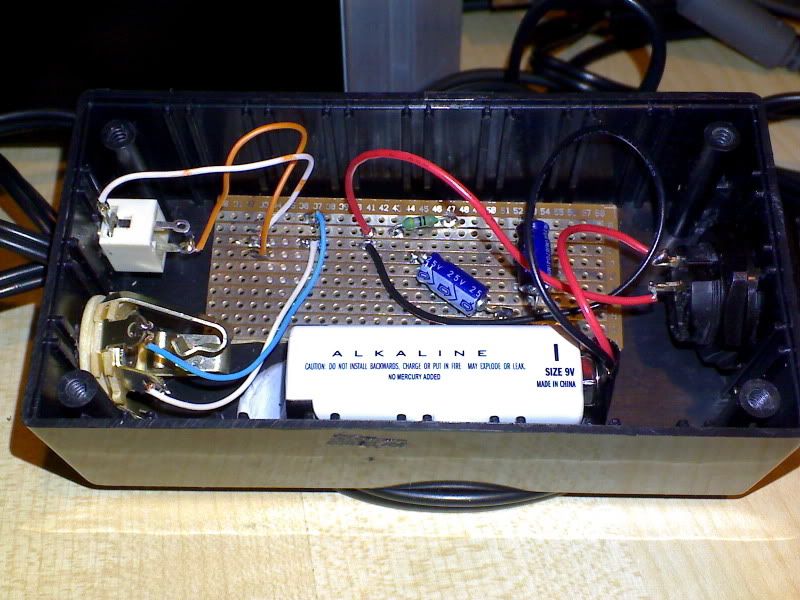
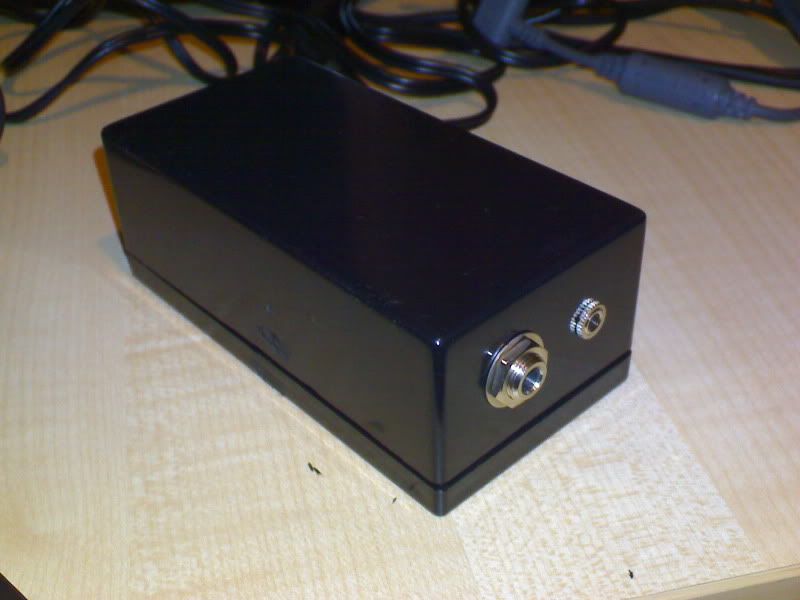
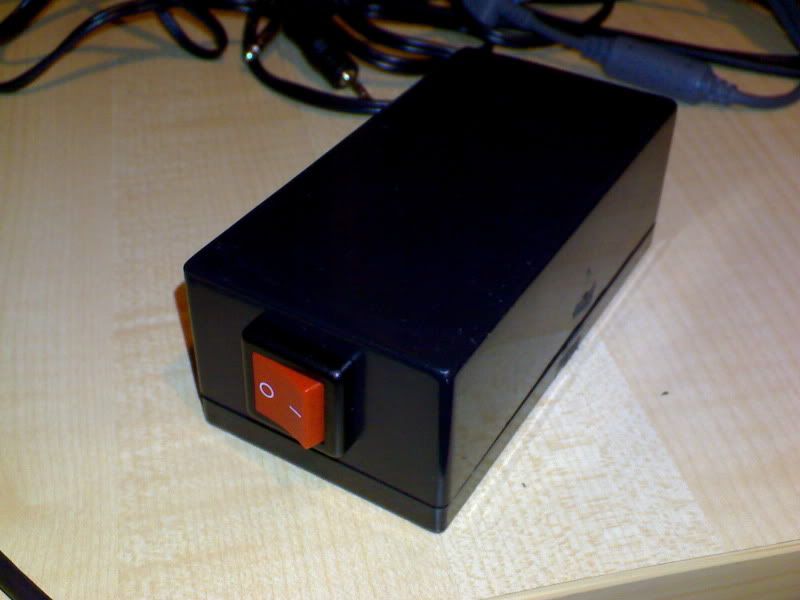
Bit of soldering here... bit of soldering there... some drilling/hacking on the project box and voila... one Aviation Headset to PC Adapter for less than NZ$25! :thumbup:

user posted image
user posted image
user posted image
user posted image

Now, to use my headset with the PC, I plug the headphone plug directly into the PC (using the 6.5mm to 3.5mm adapter) and I then put the microphone plug from the headset into the box, and use a 3.5mm to 3.5mm cable to connect the box to the PC.

Testing show far, indicates that other uses on Teamspeak can hear me OK (Mike reckons I sound like a pilot making announcements over the intercom on an airliner :unsure: ) and when I connected to the Friday Night Flight server, Christchurch Tower was reading Massey-120 at 5. :clap:

Notes:
If I had to do it again, I would probably used a different switch. The one I chose had to be mounted before you could solder it, due to its mounting design. Not a big thing, but made it a little more challenging.

Electrolytic Capacitors are required, as other types are not polarised. This is apparently, quite important, although I am not entirely sure why. I believe it has something to do with isolating the power from the PC sound card, so it does not interfere with the power supplied by the 9V battery.

I had to trim the circuit board down to fit it in the box, as I only required a small section of it for this really simple circuit and it didnt come in smaller sizes. Using a Stanley knife, I simply scored the board several times, between 2 of the circuit strips, and then snapped it. In hindsight, I probably should have done this BEFORE i actually soldered it all together, in case the board snapped badly, breaking the circuit.

Project boxes are a real P.I.T.A. to cut holes in... however, a drill with good bits, a sharp pair of scissors, a Stanley knife and a lot of patience will work. Take your time and measure often, as if you make the hole too big for your socket/switch, you're screwed!

Pros:
  • The 24db NRR of the headset means I cannot hear the wife yelling at me that I need to get off the computer and cook dinner/mow the lawns/wash the car/come to bed
  • Don't get sore ears from the 'on ear'-type headsets pushing against my ears on long flights
  • Good quality headphones and microphone
  • Added realism
  • Fun! Yay, I get to use my multi-meter and soldering iron ;)
Cons:
  • The 24db NRR of the headset means I cannot hear the wife yelling at me that I need to get off the computer and cook dinner/mow the lawns/wash the car/come to bed = T.R.O.U.B.L.E. <_<
  • Requires some electronics know how (and the ability to solder)
  • Availability of parts. Unfortunately, the mic jack is quite difficult to get.
  • Cost, you can probably get a USB headset for the cost of the parts (NZ$25). Not to mention the headset itself which was well over $150 when I got it about 3-4 years ago ;)

PostPosted: Tue Jul 10, 2007 4:17 pm
by pois0n
HardCorePawn wrote:

  • Headphone can probably be connected directly to PC (assuming stereo headset)

What if the headset isn't stereo? :(

I should've done more research before buying <_<

btw awesome guide! :bow:

PostPosted: Tue Jul 10, 2007 6:48 pm
by HardCorePawn
If you aviation headset is not stereo, all you really need to do, is get a stereo plug to mono socket adapter... This is to prevent one of the stereo connects from being shorted to ground. Not necessarily a 'bad thing'™, but it does have the potential to cause harm if done for a long period of time, or with large currents.

Unfortunately I dont think you can get a 3.5mm stereo plug to 6.3mm mono socket adapter... I havent been able to find one online. So you'll need to do the conversion in 2 stages:

6.3mm Mono -> 3.5mm Mono -> 3.5mm Stereo.

ie. You could get a 3.5mm mono plug to 6.3mm mono socket... and then get a 3.5mm stereo plug to 3.5mm mono socket... and just daisy chain them together. Not the most elegant solution in the world, but it should work.

They're both around $2 from surplustronics...

PostPosted: Fri Jul 20, 2007 11:21 pm
by Codge
I bought the Audio FX ones from the Flightsim.com pilot shop a year or so back. They have a USB plug but this is only used to power the force feedback side of things. They vibrate on your head along with the engine vibration.You can set the level for this or switch it off completely.
The sound quality is good, quite acceptable and the mike works well from what people tell me on Teamspeak. Just how good the quality is, is hard for me to say without having something to directly compare it with. It is in stereo and my vids and music sound just fine through it and I'm quite fussy when it comes to sound quality.
I do have to waer my woollen hat with them if I want really good comfort as my head seems to be a fraction too small! BTW I don't have a small head, maybe Americans do have large heads! That being where they come from. The NZ $50 they cost is pricey compared to what has been mentioned on this thread, but you do get the force feedback if you like that sort of thing. And they are reasonably bulky compared to these other ones and don't grip my head quite tight enough!
The exact opposite of the ones that are too tight.
I would like to buy a second pair with or without a mike boom for a second listener and because I'd like a lighter more compact pair just for listening. While I don't regret buying the Audio FX headset I don't know if I would get the same ones
if I was shopping for some for the first time. I did buy them as part of a package deal where I got the Buttkicker seat shaker and the Voice Buddy software along with the headphones all in one package.
Regards, Stephen

PostPosted: Sun Jul 22, 2007 11:24 am
by ooOO00OOoo
I have this one.. http://www.dse.co.nz/cgi-bin/dse.storefron...uct/View/XH9579
The headphones vibrate which is cool. Makes up for my non force feedback(i think) joystick.
It's a great buy but only usb for the vibration...otherwise they go in the soundcard jack.

PostPosted: Sun Jul 22, 2007 3:53 pm
by ZKTOM
I bought this awesome set from DSE. It costs 10 dollars. It's the skype pack, it contains a disc for skype,0.51 Euros of calling phones, and a headset. The headset is like a mobile hands-free and works really well for things like vatsim etc.

PostPosted: Sun Jul 22, 2007 4:30 pm
by Kelburn
ZKTOM, how do I set up the microphone you got me?

PostPosted: Sun Jul 22, 2007 4:33 pm
by ZKTOM
Plug it in and it goes, read the instructions

PostPosted: Sun Jul 22, 2007 4:40 pm
by Kelburn
where are the instructions for installing the mic?