Page 1 of 1

PostPosted: Thu Jun 21, 2007 10:06 pm
by Charl
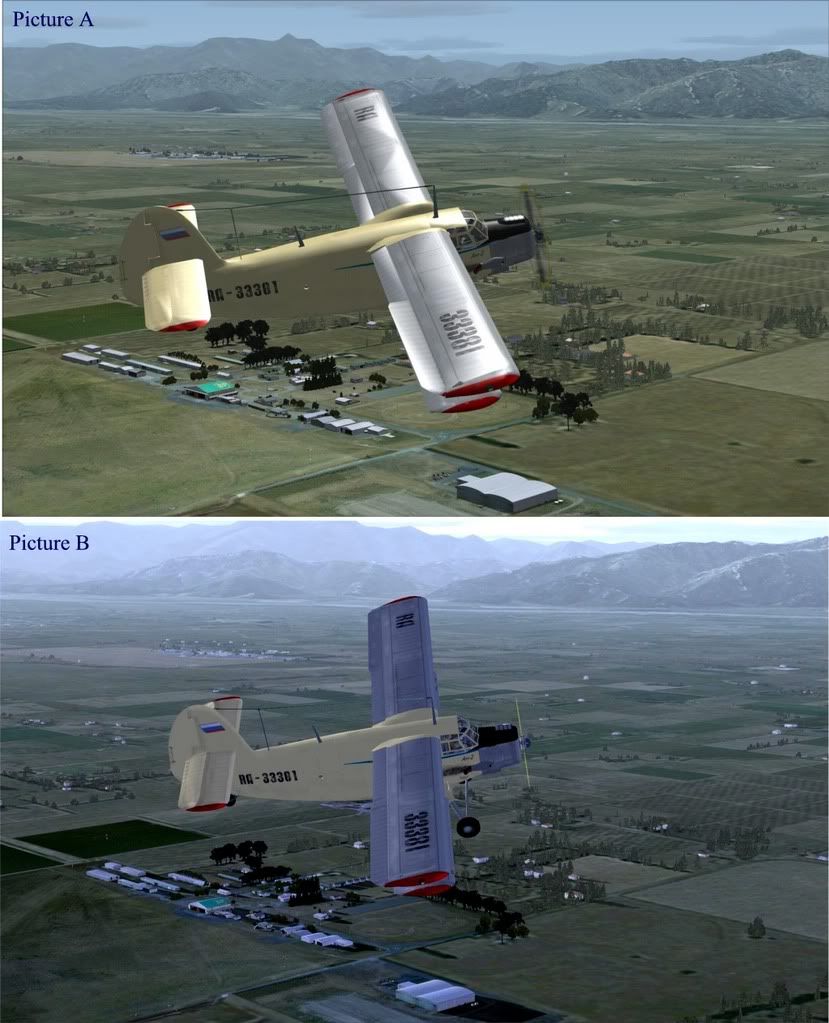
user posted image

PostPosted: Thu Jun 21, 2007 10:11 pm
by ZK-Brock
A FSX B FS9 :thumbup:

PostPosted: Thu Jun 21, 2007 10:22 pm
by Mattnz
I thought the other way round: A)FS9 B)FSX.


Edit: Looking closer at the mountains, it may actually be A)FSX, B)FS9

PostPosted: Thu Jun 21, 2007 10:27 pm
by Zöltuger
actually i've changed my mind too, I think A=FSX

on the basis of the autogen in the background.

PostPosted: Thu Jun 21, 2007 10:41 pm
by ardypilot
B) FS9- the mountains make me think so..

PostPosted: Fri Jun 22, 2007 12:16 am
by Ian Warren
MMMmmm , I look .. mm think (hell Ian do ya think ... who said that :unsure: ) ..mm lookin at the BP on the roof .. .. .. Arrrr 'BP' .. " BLOODY PERFECT " .. yeah , everybodies PC will show different results , from even 'i' my case a bad install off X to corupt 9 , but with all said hoping others read between the lines , the compare off screen shots (Super Charl) will give all a benchmark to work from :) ..... I now have a clean .. super PC , All i'm going say now is ...
if u have picture B AWESOME!
if u have picture A AWESOME!
if u have picture O ok old joke !
This latest Scenery is absoulutely Brilliant in both FSims :clap: Thought , Wellington B-) go a clear Day ..WOW REAL NZ WELLINGTON/MARLBOROUGH .. superb! :thumbup:

If u are serious for the want of NZphoto real , install Robins Kaikoura photo real scenery .. a Photoreal Freeware , that now pretty much cover s the area ... :ph43r:

PostPosted: Fri Jun 22, 2007 11:30 am
by toprob
There are a couple of things which really show the difference, one's been mentioned here, so I won't mention it again:)
The other is the new specular map support in FSX. This allows for variable light-reflective qualities on scenery objects. There are only a few buildings in Marlborough which use specular maps, as they do add considerably to the texture size and load. If I was working on a scenery with less texture load -- such as an airport without the huge aerial photo area -- I'd use them a lot more, though.
Specular maps give an extra degree of lighting realism. Different materials can reflect the light differently -- metal (such as railings), painted walls, glass, can all look more real than just a photo painted on.
One thing I noticed at Woodbourne when I was taking photos was the low sun reflecting off the painted tower -- it really made it difficult to take photos. I tried to reproduce this in the sim.
Here's an illustration:

user posted image

This is early morning and afternoon.

The main difference in Charl's pics for me is the specular map on the big hanger.

PostPosted: Fri Jun 22, 2007 11:47 am
by Christian
While we're on that topic Robin. Did you get a good effect for corrugated iron in FSX? I tried last weekend with bump & specular maps, but couldn't really get any satisfying results.

Charl - The clouds in A look FSX-ish

Christian

PostPosted: Fri Jun 22, 2007 12:11 pm
by toprob
Christian wrote: While we're on that topic Robin. Did you get a good effect for corrugated iron in FSX? I tried last weekend with bump & specular maps, but couldn't really get any satisfying results.

Charl - The clouds in A look FSX-ish

Christian

No, I can't get bump maps to work well. I did a lot of experimenting trying to get a 3D look to the Blenheim Terminal cladding, but gave up in the end.
The best I can manage is a rather plastic look, which reminds me of last century's video games.
Self-shading is another fizzer for me -- I still prefer the old shadows, they are a more realistic shade.