Dunedin

A forum specifically to discuss the latest and greatest of all flight simulators

Postby Redda03 » Mon Apr 13, 2009 8:31 pm

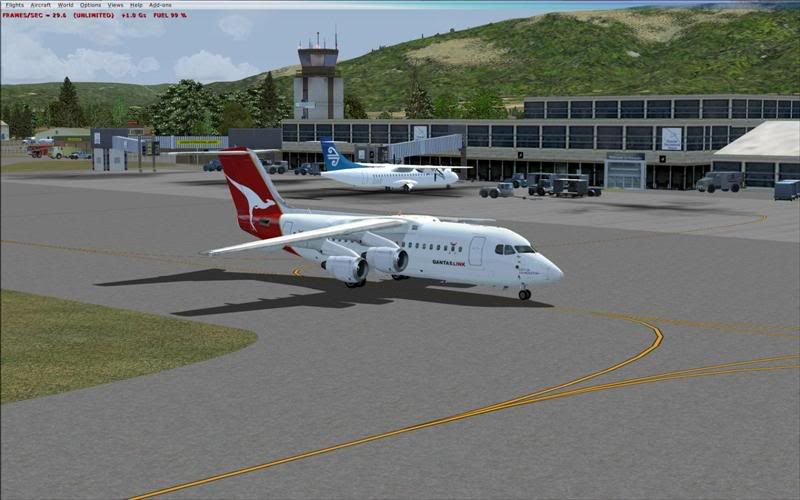
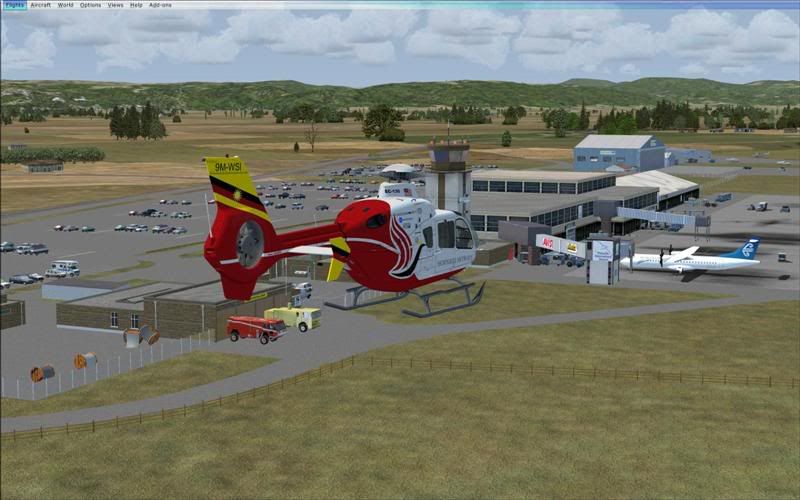
A couple of screenshots of Lawrie Roache's FS9 Dunedin Addon installed in FSX....with the tre.bgl's deleted from the Dunedin_NZDN\Scenery Folder....seems to sit OK apart from the lack of trees around the Airport (ensure that the NZDN_AF2.bgl is not copied to the FSX Scenery\World\Scenery Folder)....


Bob R
url="http://www.VectorLandclass.co.nz/"]
Image[/url]
Redda03
Forum Addict
 
Topic author
Joined: Tue Aug 08, 2006 12:31 pm
Posts: 205
Location: Waikanae Beach

Postby penguin1 » Tue Apr 14, 2009 2:11 am

Hi Redda03,
Good stuff. I always thought that Lawrie's jobs are top quality. Maybe I should snap up an FSX when I find it in the "Stimulus Sales", that are happening everywhere here in Oz.
Safe flights and Happy Landings
penguin1
penguin1
Newbie
 
Joined: Fri Mar 14, 2008 8:08 am
Posts: 8
Location: Rowville, Vic, AU

Postby simmersince81 » Fri Apr 17, 2009 2:52 pm
[quote name='Redda03' date='Apr 13 2009, 08:31 PM' post='8241387']
A couple of screenshots of Lawrie Roache's FS9 Dunedin Addon installed in FSX....with the tre.bgl's deleted from the Dunedin_NZDN\Scenery Folder....seems to sit OK apart from the lack of trees around the Airport (ensure that the NZDN_AF2.bgl is not copied to the FSX Scenery\World\Scenery Folder)....

Redda03,

Yes, appears to be a very nice rendition of my Home airport and a step above what I currently have. Did you need to load the pre-requisite (for FS9) EZ Scenery files when putting it into FSX?

Cheers,

Greg
Win 7 Ult. 64 Bit
Asus P6X58D with i7 950 CPU @ 3.07GHz
Corsair H70 CPU Water Cooler
Corsair 6GB RAM DDR3 1600 C6
Vertex Sandforce V2 120GB SSD (OS & FSX) and Seagate 240 GB HDD
Corsiar 850W PSU
2 x ATI Radeon 5850, Crossfire and Eyefinity on 3 x 24" (5268 x 1050)
User avatar
simmersince81
Newbie
 
Joined: Tue Jan 27, 2009 7:57 pm
Posts: 6
Location: NZDN

Postby Redda03 » Fri Apr 17, 2009 3:32 pm

Greg,

My FS9 Addons are installed directly into the FSX/Addon Scenery folder with all the tre.bgl files in the each of the "Addons" Scenery Folder deleted...the FS9 Static Objects Lib (SOL) must be installed and activated in FSX in the normal manner with individual "addons" placed below the SOL in the FSX Scenery Lib. There are No AirfieldAF2.bgl's placed in any of my other FSX folders.

Most of Laurie's FS9 addons appear to work ok ...the only downside is that the FSX default autogen buildings appear in most of the "addons" ....and of course, there are not so many trees!!

I customised many of my NZ FS9 airfield's (AF2's) to include "static" aircraft and they appear the same in FSX with the individual airfield FS9 Traffic.bgls installed in the FSX/Scenery/World/Scenery Folder)...and of course the appropriate aircraft must be installed in FSX.

Bob R
url="http://www.VectorLandclass.co.nz/"]
Image[/url]
Redda03
Forum Addict
 
Topic author
Joined: Tue Aug 08, 2006 12:31 pm
Posts: 205
Location: Waikanae Beach

Postby simmersince81 » Sat Apr 18, 2009 9:49 am

Cheers Rob,

Looks like a bit of work involved for someone that never had FS9 (one of only two MSFS's I've never had). The EZ-Scenery files are 212MB alone and I think you are suggesting I require the FS9 SOL files as well (or maybe they are one in the same?). Not having any legacy FS9 files at all, maybe I might be better to stick with what I currently have?

Appreciated your help and fast response though. clapping.gif

Greg
Win 7 Ult. 64 Bit
Asus P6X58D with i7 950 CPU @ 3.07GHz
Corsair H70 CPU Water Cooler
Corsair 6GB RAM DDR3 1600 C6
Vertex Sandforce V2 120GB SSD (OS & FSX) and Seagate 240 GB HDD
Corsiar 850W PSU
2 x ATI Radeon 5850, Crossfire and Eyefinity on 3 x 24" (5268 x 1050)
User avatar
simmersince81
Newbie
 
Joined: Tue Jan 27, 2009 7:57 pm
Posts: 6
Location: NZDN

Postby Redda03 » Sat Apr 18, 2009 2:32 pm

Greg,

Glad I could be of some help...FYI EZ Scenery and the SOL are one of the same...my SOL is currently 532Mb's and has been copied from my FS9....I will send you a MP later today.

Bob R
url="http://www.VectorLandclass.co.nz/"]
Image[/url]
Redda03
Forum Addict
 
Topic author
Joined: Tue Aug 08, 2006 12:31 pm
Posts: 205
Location: Waikanae Beach

Postby dnkiwi » Sun Apr 19, 2009 11:20 pm

hi Redda03 do u other fs9 scenery installed in fsx as i have tried to get peter lohrs queenstown on fsx but had no luck as i got a blackout affect on all building and trees would u know if your process for installing older sceneries would work

----------------------
many thanks
jason
Image
Image
User avatar
dnkiwi
Forum Addict
 
Joined: Thu Dec 28, 2006 12:49 pm
Posts: 267
Location: Mataura

Postby Redda03 » Mon Apr 20, 2009 3:16 pm

dnkiwi wrote:
QUOTE (dnkiwi @ Apr 24 2009, 11:20 AM) <{POST_SNAPBACK}>
hi Redda03 do u other fs9 scenery installed in fsx as i have tried to get peter lohrs queenstown on fsx but had no luck as i got a blackout affect on all building and trees would u know if your process for installing older sceneries would work

----------------------
many thanks
jason


Jason,

Lawrie Roache's FS9 Scenery only....unfortunately, Peter Lohr's FS9 Queenstown scenery doesn't "sit" properly in FSX....I guess someone will come up with a suitable FSX NZQN Addon in the near future!!

Bob R
url="http://www.VectorLandclass.co.nz/"]
Image[/url]
Redda03
Forum Addict
 
Topic author
Joined: Tue Aug 08, 2006 12:31 pm
Posts: 205
Location: Waikanae Beach

Postby Snowman » Mon Apr 20, 2009 3:22 pm

Redda03 wrote:
QUOTE (Redda03 @ Apr 20 2009, 03:16 PM) <{POST_SNAPBACK}>
Jason,

Lawrie Roache's FS9 Scenery only....unfortunately, Peter Lohr's FS9 Queenstown scenery doesn't "sit" properly in FSX....I guess someone will come up with a suitable FSX NZQN Addon in the near future!!

Bob R


Is that a hint Bob ........... ????? laugh.gif laugh.gif

Lawrie. New_Zealand_etc.gif
Image

Image
User avatar
Snowman
NZFF Pro
 
Joined: Wed Jul 26, 2006 3:52 pm
Posts: 2427
Location: Tauranga, NZ.

Postby dnkiwi » Mon Apr 20, 2009 8:16 pm

thanks for the advice i seen the pic s u posted of the new nzdn scenery and would like to know how i could get the same results and if u get unstable frame rates of poblems with it
Image
Image
User avatar
dnkiwi
Forum Addict
 
Joined: Thu Dec 28, 2006 12:49 pm
Posts: 267
Location: Mataura

Postby waka172rg » Tue Apr 21, 2009 12:45 am

dnkiwi wrote:
QUOTE (dnkiwi @ Apr 20 2009, 09:16 PM) <{POST_SNAPBACK}>
thanks for the advice i seen the pic s u posted of the new nzdn scenery and would like to know how i could get the same results and if u get unstable frame rates of poblems with it


Bring it on FSX New_Zealand_etc.gif
nice work Lawrie as allways cant wait to you get to fsx New_Zealand_etc.gif
Last edited by waka172rg on Tue Apr 21, 2009 4:10 pm, edited 1 time in total.
ImageImage
User avatar
waka172rg
Sim-holic
 
Joined: Wed Jan 23, 2008 2:45 pm
Posts: 796
Location: Motueka

Postby BigBird » Wed Apr 22, 2009 8:43 am

Mean! I now have NZDN, NZWP and NZNE running on my FSX. Cheers for the guide on how you got them working Redda03! Was a bit of a mission, but not bad enough to be a headache. I just have to get the fuel truck off Rwy3 at NZNE and all will be sweet. thumbup1.gif
Last edited by BigBird on Wed Apr 22, 2009 8:56 am, edited 1 time in total.
BigBird
Forum Addict
 
Joined: Mon Nov 10, 2008 6:15 pm
Posts: 422


Return to All Flight Simulators

Who is online

Users browsing this forum: No registered users and 8 guests

