Posted: Sat Oct 02, 2010 4:23 am
fsx_milford_sound_v100.zip
At www.flightsim.com
Looks decent. Not sure about accurate, but still nice...
At www.flightsim.com
Looks decent. Not sure about accurate, but still nice...
Posted: Sat Oct 02, 2010 4:23 amPosted: Sat Oct 02, 2010 5:02 amPosted: Sat Oct 02, 2010 7:50 am Posted: Sat Oct 02, 2010 9:24 amPosted: Sat Oct 02, 2010 10:13 am
madkudu wrote:QUOTE (madkudu @ Oct 2 2010, 10:24 AM) <{POST_SNAPBACK}>It looks pretty decent,
I followed the link on the youtube description (here) (you will have to google translate the page)
Looks like its a Japanese group called Lets Fly Association, they make A LOT of scenery addons, mainly in Japan but also in Canada, US, and Australia, with latest being in NZ.
It also seems like they make quite a few freeware gliders like the BrightStar Swift and Aeriane Swift'Light. they all look pretty decent, especially for freeware.
Might just have to check out some of these addons.
Cheers, Jimmy
So have you downloaded and installed the scenery? If yes, are you able to post a screen or 2? Did you have any probs with VLC compatibility?
Posted: Sat Oct 02, 2010 11:18 am Posted: Sat Oct 02, 2010 11:20 am
IslandBoy77 wrote:QUOTE (IslandBoy77 @ Oct 6 2010, 10:13 PM) <{POST_SNAPBACK}>So have you downloaded and installed the scenery? If yes, are you able to post a screen or 2? Did you have any probs with VLC compatibility?
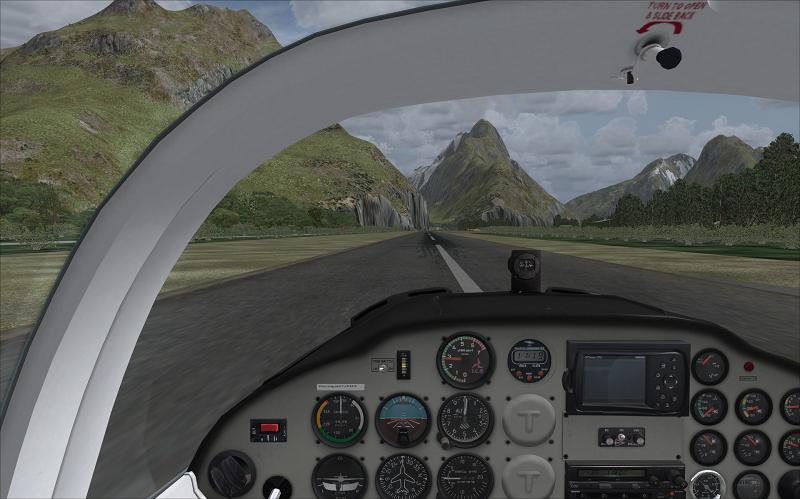
I am running SP2+acceleration and have VLC installed - with the "correct Milford Sound" option selected. I have downloaded and installed the VLA scenery. It is very good and the working Bowen Falls are really impressive. I do have a problem with the surface of the runway in that at the south end RWY29 the surface texture dissappears in front of the aircraft until it is airbourne. Obviously it is a coupling problem between the VLC mesh and that of the VLA production. Until I work out (or learn of) a suitable correction I will stick with my Milford Sound V3 scenery.
Clyde Williams
Levin
Posted: Sat Oct 02, 2010 12:37 pmrayclyde wrote:QUOTE (rayclyde @ Oct 2 2010, 12:20 PM) <{POST_SNAPBACK}>Until I work out (or learn of) a suitable correction I will stick with my Milford Sound V3 scenery.
Clyde Williams
Levin
This should be easy enough, just disable the VLC fix files in Addon Scenery:
NZMF_ADEX_VLC.bgl
NZMF_ADEX_VLC_CVX.bgl
and in Scenery\World\Scenery:
NZMF_ADEX_VLC_ALT.bgl
I've been trying to figure out how to make this work and still retain VLC, but it is tricky -- I think that these guys have 'fixed' the elevation issue by replacing the default AP file, which is very non-standard in FSX. It would be a lot easier if they hadn't done that...
Posted: Sat Oct 02, 2010 7:07 pmtoprob wrote:QUOTE (toprob @ Oct 7 2010, 12:37 AM) <{POST_SNAPBACK}>This should be easy enough, just disable the VLC fix files in Addon Scenery:
NZMF_ADEX_VLC.bgl
NZMF_ADEX_VLC_CVX.bgl
and in Scenery\World\Scenery:
NZMF_ADEX_VLC_ALT.bgl
I've been trying to figure out how to make this work and still retain VLC, but it is tricky -- I think that these guys have 'fixed' the elevation issue by replacing the default AP file, which is very non-standard in FSX. It would be a lot easier if they hadn't done that...
Tried that Rob but the VLA scenery immediately jumped to 842 feet. I have reverted to the first install and as long as I accept NZMS has half grass and half sealed strip (!!!) I guess I will accept the situation. It really is a lovely layout of NZMS. I worked there 1952-1954 when the first strip was put in.
Clyde Williams
Levin
Posted: Sat Oct 02, 2010 7:40 pmrayclyde wrote:QUOTE (rayclyde @ Oct 2 2010, 08:07 PM) <{POST_SNAPBACK}>Tried that Rob but the VLA scenery immediately jumped to 842 feet. I have reverted to the first install and as long as I accept NZMS has half grass and half sealed strip (!!!) I guess I will accept the situation. It really is a lovely layout of NZMS. I worked there 1952-1954 when the first strip was put in.
Clyde Williams
Levin
Although I didn't try it, I assumed tha the little supplied exe would fix the elevation. From the instructions, it looks like you can switch the elevation fix on and off?
Posted: Mon Oct 04, 2010 9:26 pm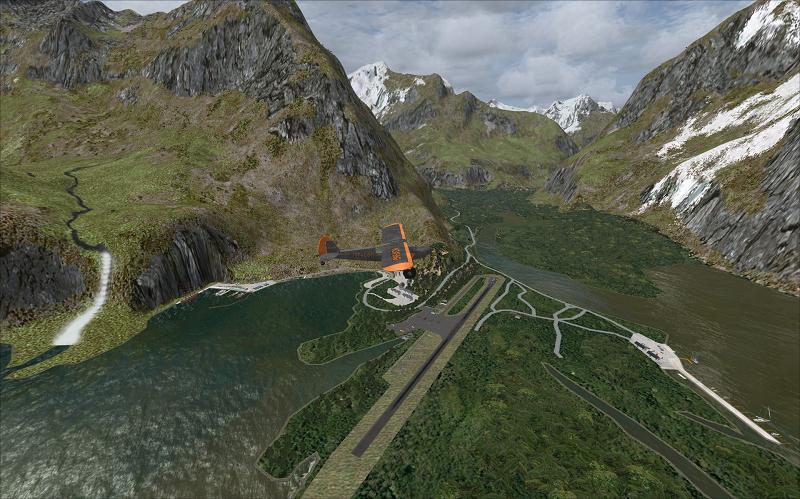
 Posted: Mon Oct 04, 2010 10:10 pm
rayclyde wrote:QUOTE (rayclyde @ Oct 2 2010, 08:07 PM) <{POST_SNAPBACK}>Tried that Rob but the VLA scenery immediately jumped to 842 feet. I have reverted to the first install and as long as I accept NZMS has half grass and half sealed strip (!!!) I guess I will accept the situation. It really is a lovely layout of NZMS. I worked there 1952-1954 when the first strip was put in.
Clyde Williams
Levin
Interestingly enough I ran that little exe in the package and there was no change, so I re re ran it and set it to default hit the execute button and it came right (scratches head), may work for you as well.
Posted: Tue Oct 05, 2010 8:29 pmRotordude wrote:QUOTE (Rotordude @ Oct 4 2010, 11:10 PM) <{POST_SNAPBACK}>Interestingly enough I ran that little exe in the package and there was no change, so I re re ran it and set it to default hit the execute button and it came right (scratches head), may work for you as well.
Alas, not for me. No amount of clicking will persuade the runway to reappear. If anybody has any other ideas I'll give them a go - but for now I think I will put up with this corruption!
Posted: Wed Oct 06, 2010 12:14 pmPosted: Thu Oct 14, 2010 4:11 pmtoprob wrote:QUOTE (toprob @ Oct 7 2010, 07:40 AM) <{POST_SNAPBACK}>Although I didn't try it, I assumed tha the little supplied exe would fix the elevation. From the instructions, it looks like you can switch the elevation fix on and off?
i tried to install the new milford sound scenery into fsx on win 7 machine. i have been unable to use the exe file for adjusting the .bgl. can anyone help me here? where is the bgl which is modified and hw can you unmodifyy if not satisfactory?
also, i seem to have lost the link to the earlier milford sound scenery which aalso had its own flattening trick to fix the elevtions. any help here?
many thanks.
steve chavin
Posted: Mon Oct 25, 2010 11:39 am
chavins wrote:QUOTE (chavins @ Oct 14 2010, 05:11 AM) <{POST_SNAPBACK}>i tried to install the new milford sound scenery into fsx on win 7 machine. i have been unable to use the exe file for adjusting the .bgl. can anyone help me here? where is the bgl which is modified and hw can you unmodifyy if not satisfactory?
also, i seem to have lost the link to the earlier milford sound scenery which aalso had its own flattening trick to fix the elevtions. any help here?
many thanks.
steve chavin
Hi There - New to the NZ Forums - Great Site! I have an interest in NZ scenery especially MF (since flying there whilst on holiday a few years ago) I tried the new Milford Sound scenery and had the same issue with the disappearing runway. I was not able to run the exe. file either until.................! I removed the file NZMF_ARP.bgl which I had installed when using Jared Yates Version 2.0. (cant find the link -sorry) This file is saved in the fsx folder - Scenery/world/scenery. When I removed it I was able to run the exe file and now the tarmac stays putt. (I am also using the Godzone 20m mesh, NZ Roads and rivers and NZ topo).
Hope this helps you guys
Shamrock040