See link below for details and pics,....................
http://nzff.org/forum/viewtopic.php?t=5939
Lawrie.

100% ad-free
 by Snowman » Sat Feb 16, 2008 12:19 am



by Bazza » Sat Feb 16, 2008 10:53 am


by Charl » Sat Feb 16, 2008 12:48 pm

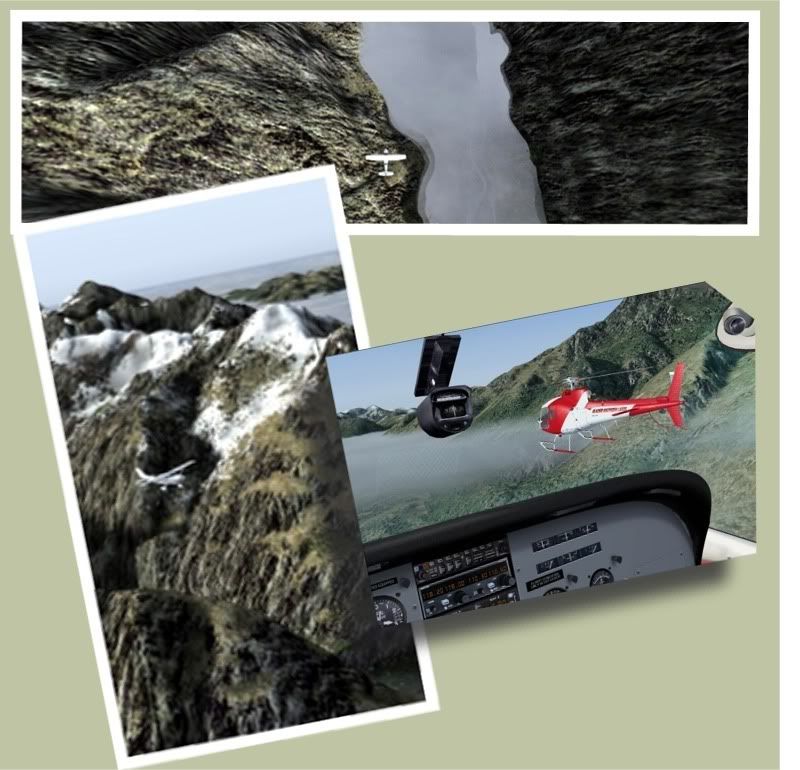

by Snowman » Sat Feb 16, 2008 2:52 pm
Bazza wrote:QUOTE (Bazza @ Feb 16 2008, 03:30 PM) <{POST_SNAPBACK}>Please disregard my previous post on this subject - I overlooked the placing the AFCAD copy into Scenery/World.
My Bad.
No worries.................
Only happy its all working well for you...............
Lawrie.
by Redda03 » Sat Feb 16, 2008 3:37 pm
 [/url]
by Snowman » Mon Feb 18, 2008 12:02 am
by trevorbee » Tue Feb 19, 2008 4:47 pm
Snowman wrote:QUOTE (Snowman @ Feb 16 2008, 12:19 AM) <{POST_SNAPBACK}>Just uploaded a scenery for Milford Sound Airport, NZMF, to Avsim.
See link below for details and pics,....................
http://nzff.org/forum/viewtopic.php?t=5939
Lawrie.
Lawrie, you are making a wonderful contribution to our flying experience in NZ. Milford Sound is great. Please keep them coming.
Cheers
Trevor
by Kelburn » Tue Feb 19, 2008 7:30 pm

by Snowman » Tue Feb 19, 2008 11:02 pm
NZCoffee wrote:QUOTE (NZCoffee @ Feb 19 2008, 08:56 PM) <{POST_SNAPBACK}>Does this work in FSX? If not, are there any workarounds?
Thanks!
I dont know if it will work in FSX. I doubt it will all show up properly in FSX.
Only one way to find out,............................ TRY IT !!
Lawrie.
by HardCorePawn » Wed Feb 20, 2008 10:44 am



by Snowman » Wed Feb 20, 2008 2:59 pm
HardCorePawn wrote:QUOTE (HardCorePawn @ Feb 20 2008, 11:44 AM) <{POST_SNAPBACK}>I spent some time blending the slopes in so it does not have the big 'cliff' that you can see upstream from the runway in Lawrie's pics... and I think it works well. Also, I'm not sure if it works with freeware or default mesh tho... i made it for the 20m mesh...
I MUST be getting "TOO OLD" for this stuff,.............................. i plain FORGOT about blending and tapering in the small "cliff" up the valley before i uploaded the scenery. Too late now.......................DAMN !!
Lawrie.
by Snowman » Thu Feb 21, 2008 12:10 am
s0cks wrote:QUOTE (s0cks @ Feb 20 2008, 05:21 PM) <{POST_SNAPBACK}>Excellent stuff. Love this airport. But I still get those damn blurry textures if I don't remove the fuel and fuel tank BGL's.
Blurries.................. have a read through this thread,
http://nzff.org/forum/viewtopic.php?t=5575
There are a couple of other threads about it as well. There is a known issue with a couple of textures from a couple of the object sets.
Go to the Static Objects Library "Texture" folder, and REMOVE the textures named "planter rims.bmp", "guages.bmp" , and any with the word ""zinc.bmp" in it. Also check through any other installed freeware addon sceneries "Texture" folders for these textures, and remove them. If you have VOZ, you will also find them in the various VOZ "Texture" folders, remove them too.
Once all done, place the 2 bgl files you mentioned back into the scenery, one at a time start FS, and see what happens.
Has worked for others, and also you will see some updated textures mentioned in one of the threads, with replacement textures as part of another scenery,................... all you need from it are the replacement textures.
Dont forget to create an empty "Texture" folder in any scenery that does not have a Texture folder in it.
If you have a fair number of my sceneries, then its a fair bet you will have most, if not all, of the texture sets i use.
If you have my NZKK Kerikeri, NZKT Kaitaia, NZWU Wanganui, YSNF Norfolk Island, sceneries, it is safe to remove the textures from the "Texture" folders in these sceneries, and leave behind an empty Texture folder, as the textures for these will already be in the Static Objects Library "Texture" folder, and any bgl file in any scenery from anyhwere in the FS world, will call up the textures from there.
Lawrie.Last edited by Snowman on Thu Feb 21, 2008 12:14 am, edited 1 time in total.
by s0cks » Thu Feb 21, 2008 10:31 am

by Snowman » Thu Feb 21, 2008 1:31 pm
s0cks wrote:QUOTE (s0cks @ Feb 21 2008, 11:31 AM) <{POST_SNAPBACK}>Lawrie, you're a legend. Alll fixed up.
If anyone else needs an up to date zinc.bmp it can be found here: http://edtruthan.com/sirpfixes/zinc.zip
Happy you got it all working properly..........
Looks nice,.................. looks like Ruud Faber's "Spring" grass textures in the pic (from FScene3).
Notice you are missing a LOT of trees in the pic..............................

Lawrie.
by Snowman » Thu Feb 21, 2008 2:14 pm
s0cks wrote:QUOTE (s0cks @ Feb 21 2008, 02:41 PM) <{POST_SNAPBACK}>So I am. Who chopped down all the trees?
Probably one of "them thar whirlybird" lovers like Charl or somebody...................
Didnt like the view, so decided to do some judicious "pruning"....
Seriously,................... im not sure,...................
Do you have this installed................
ag tree lib 11 by Arno Gerretson and Stephen Legg.
IMPORTANT NOTE !! This last set (ag tree lib 11),...... ONLY install the following 2 files
into the Static Objects Library "Scenery" folder,......
ag_tree_lib.BGL
ag_tree_lib.xml
Also, are you using ..............................
RECCOMMENDED DOWNLOADS.
---------------------
"Tree-X", FSX trees for FS9 by "Oscar",.......... filename......... treex_for_fs9.zip , freely available from Avsim.com.
Photoreal FSX style tree replacements for the FS9 default trees sets, very realistic looking, and lighter on fps than the original default ones.
Quotes from the Milford Sound INSTALL instructions..................................
Most (but not all) of the trees were placed using the fabulous "Tree-X" textures as replacements for the standard FS9 default trees.
Lawrie.
Users browsing this forum: No registered users and 41 guests