
Posted:
Sun Feb 24, 2008 11:38 amby iwik
Hi Lawrie,
Thanks a million for your Sceneries,beats arriving at an airport to be greeted by nothing but a runway.
can you tell me which texture or what i missing.The wooden brown railings that front the building opposite the Green hangars
dont appear.Im sure i put everything in.
Thanks again for your efforts.
Rgds
Les
Posted:
Sun Feb 24, 2008 2:21 pmby Snowman
iwik wrote:Hi Lawrie,
Thanks a million for your Sceneries,beats arriving at an airport to be greeted by nothing but a runway.
can you tell me which texture or what i missing.The wooden brown railings that front the building opposite the Green hangars
dont appear.Im sure i put everything in.
Thanks again for your efforts.
Rgds
Les
Hi Les.
Im not sure what you mean by "missing". A pic would be helpful.................
I assume you are talking about the fence in the red circle in the pic below....................
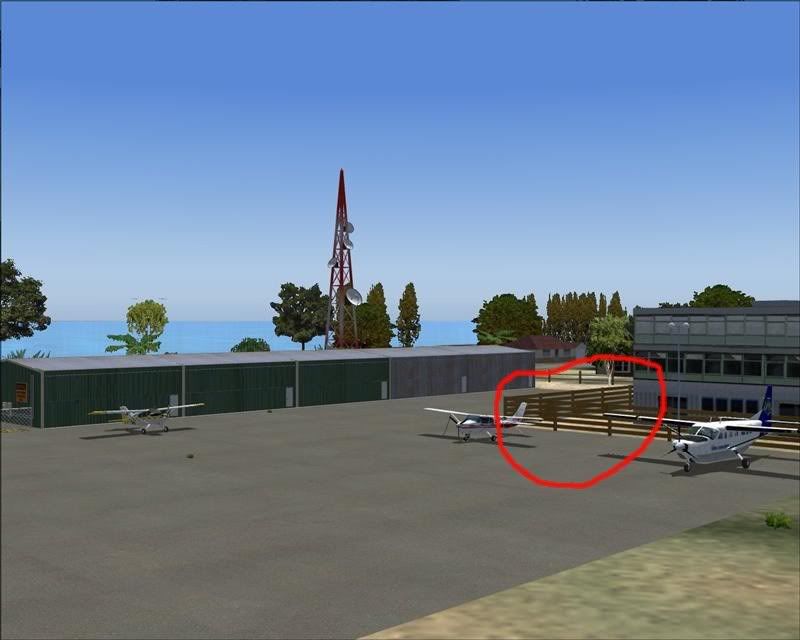
Is the fence just showing as a grey untextured fence, or is it just totally not there at all ???
If its just showing as a grey untextured fence, then you are missing the textures from the object library "lens ez walls & fences" , which is contained in "lens ez scenery" (filename lens_ez_scenery.zip), by Len Hickman. Available from Avsim.com (24.7mb).
If the fence is just totally not there at all, then for some reason you are missing the bgl file from Greymouth's "Scenery" folder named ..... NZGM_EngFce.bgl.
Lawrie.

Posted:
Sun Feb 24, 2008 4:12 pmby iwik
Thanks ,
Sorry for no pic but your pic was correct.I had none of those fences at all.The correct file was in the Greymouth folder and the textures were correct.
However i must have got lost with all the follders and sub folders he had.What i had forgotten to add was the scenery files to the Scenery folder in Static
Objects one.
im all ok now.
Les