iFly dumb question

Discuss aircraft addons and repaints for Flight Simulator here

Postby Splitpin » Sun Nov 24, 2013 6:03 pm

I would rather appear a dick at home than on their forum .... when i got the 73's i also downloaded all the paints they had.
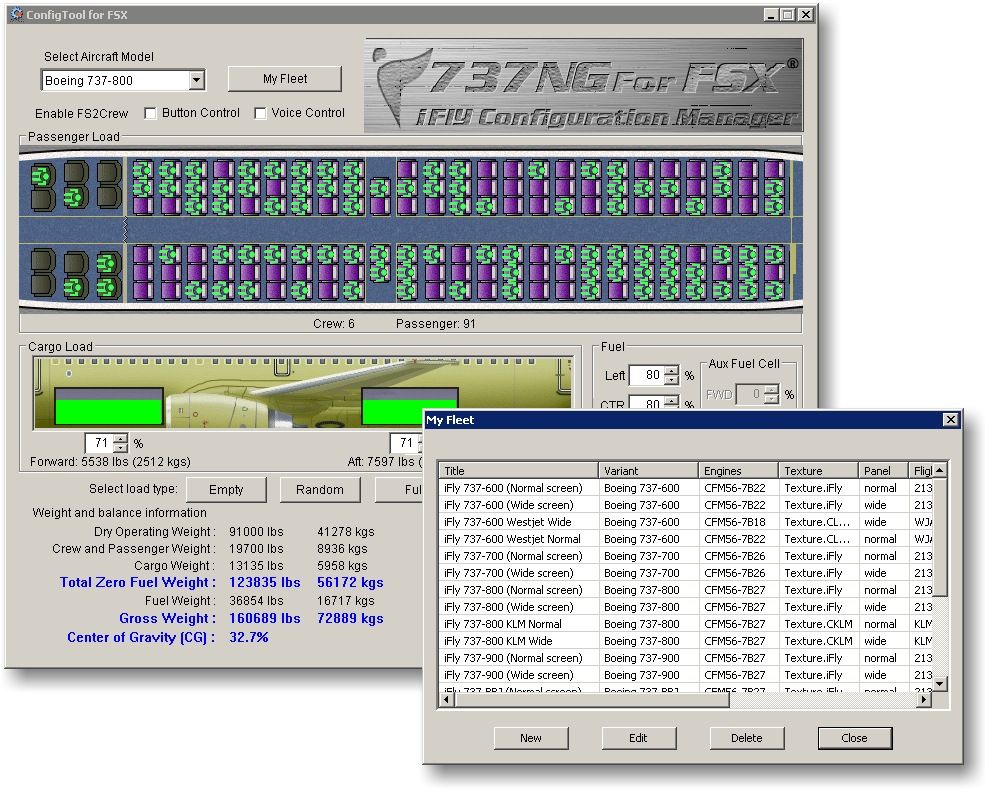
Question .... the repaint folders are there (texture), but i cant find the stuff to add to the a/c config file , and i cant find a "how to" in any of the docs , so i have lots of beautiful NG 73's ...but their all orange sad.gif .... what do i do ?
Last edited by Splitpin on Sun Nov 24, 2013 6:05 pm, edited 1 time in total.
User avatar
Splitpin
NZFF Pro
 
Topic author
Joined: Mon Aug 03, 2009 12:15 pm
Posts: 21332
Location: Christchurch NZ

Postby Adrian Brausch » Sun Nov 24, 2013 6:20 pm

found this on the net..ifly 737-800 cfg. dont know if this page will help...
User avatar
Adrian Brausch
Senior Member
 
Joined: Tue May 15, 2007 11:39 am
Posts: 1437
Location: Auckland

Postby Splitpin » Sun Nov 24, 2013 6:58 pm

Adrian Brausch wrote:
QUOTE (Adrian Brausch @ Nov 24 2013,7:20 PM) <{POST_SNAPBACK}>
found this on the net..ifly 737-800 cfg. dont know if this page will help...


Thanks AB .... Just noticed some of them dont have wheels ..... what am i doing wrong ..... DC-8 with just wings , 737's with no wheels , makes you wonder what you pay for sometimes laugh.gif
User avatar
Splitpin
NZFF Pro
 
Topic author
Joined: Mon Aug 03, 2009 12:15 pm
Posts: 21332
Location: Christchurch NZ

Postby AlisterC » Sun Nov 24, 2013 7:42 pm

SP use the config manager to install the planes to your hanger. Drop in the repaint folder to the correct plane, and use the config manager to add the repaint, and all the features you want, like winglets and panel features. I have never had no wheels. Make sure you load a default cessna before loading the ifly.


Or a video installing a Colin Lowe repaint, you'll have a few of his and he only installs them this way
http://www.youtube.com/watch?v=Fn2oKl_Z9gk
Last edited by AlisterC on Sun Nov 24, 2013 7:50 pm, edited 1 time in total.
Image
User avatar
AlisterC
NZFF Pro
 
Joined: Thu Jul 20, 2006 11:13 am
Posts: 2543
Location: Nelson, NZ

Postby Splitpin » Sun Nov 24, 2013 8:26 pm

AlisterC wrote:
QUOTE (AlisterC @ Nov 24 2013,8:42 PM) <{POST_SNAPBACK}>
SP use the config manager to install the planes to your hanger. Drop in the repaint folder to the correct plane, and use the config manager to add the repaint, and all the features you want, like winglets and panel features. I have never had no wheels. Make sure you load a default cessna before loading the ifly.

Or a video installing a Colin Lowe repaint, you'll have a few of his and he only installs them this way
http://www.youtube.com/watch?v=Fn2oKl_Z9gk


Thanks Al ....im onto it .... always in to much of a rush ... dont read anything. Cheers.
User avatar
Splitpin
NZFF Pro
 
Topic author
Joined: Mon Aug 03, 2009 12:15 pm
Posts: 21332
Location: Christchurch NZ

Postby cowpatz » Mon Nov 25, 2013 5:50 am

Take time with the install Marty and read everything on the forum about it...especially running in administration mode. Did you use the F1 download tool? This ensures a complete download. These are very sophisticated add ons that depend on a good install.
90 % of the problems can be traced to a bad install. If you have problems, like no wheels, uninstall and do it again step by step.
Remember the 50-50-90 rule. Anytime you have a 50-50 chance of getting something right, there's a 90% probability you'll get it wrong!

Image
User avatar
cowpatz
NZFF Pro
 
Joined: Wed Mar 07, 2007 3:28 pm
Posts: 3739

Postby Splitpin » Mon Nov 25, 2013 5:07 pm

CP & Al .... thanks for the heads up .... i will take it out and do it again ....rushing and not reading again rolleyes.gif

CP , yes it was through the F1 site , but i have few pc issues at the moment that may have contributed .
User avatar
Splitpin
NZFF Pro
 
Topic author
Joined: Mon Aug 03, 2009 12:15 pm
Posts: 21332
Location: Christchurch NZ


Return to Aircraft

Who is online

Users browsing this forum: No registered users and 2 guests