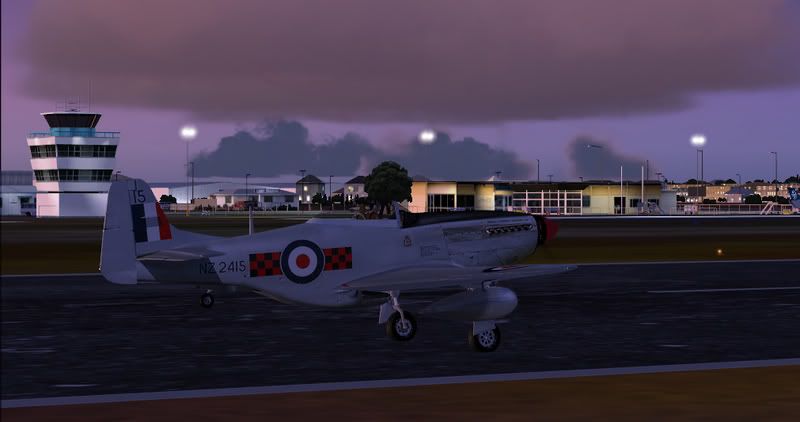
P-51 ZK-TAF

Discuss aircraft addons and repaints for Flight Simulator here

Postby Florian_S » Tue May 22, 2007 11:21 am

Forgive me if this has been mentioned on here before but I found this link over at the VOZ forums.

Textures at Screenshortart.com

You will need to register with Screenshotart.com to download the file. I'm yet to install it because I'm at work but it looks a beauty :D

Cheers
Florian - YSSY
VH-FLO & D-FLOZ B-)
Image
You haven't experienced Flight Simulator till you've flown NZ!
User avatar
Florian_S
Forum Addict
 
Topic author
Joined: Wed Apr 18, 2007 4:17 pm
Posts: 328
Location: EDDH / HAM - Hamburg, Germany

Postby Charl » Tue May 22, 2007 6:58 pm

Thanks for the pointer - you have to wonder why the repaint is hidden out of the public eye, so to speak.
I hate registering on sites for a one-night stand.
Of course Warwick's aircraft really shines in photoreal textures.
User avatar
Charl
NZFF Pro
 
Joined: Mon May 01, 2006 8:28 am
Posts: 9691
Location: Auckland

Postby Florian_S » Tue May 22, 2007 11:03 pm

Just installed ZK-TAF....the result:

user posted image

I think this could well be classified as a 'must have' for any Kiwi simmer! :D

Cheers
Florian - YSSY
VH-FLO & D-FLOZ B-)
Image
You haven't experienced Flight Simulator till you've flown NZ!
User avatar
Florian_S
Forum Addict
 
Topic author
Joined: Wed Apr 18, 2007 4:17 pm
Posts: 328
Location: EDDH / HAM - Hamburg, Germany

Postby deaneb » Tue May 22, 2007 11:18 pm

Looks great - are the drop tanks removable ??


Deane
Image
User avatar
deaneb
Senior Member
 
Joined: Sat Aug 12, 2006 4:40 pm
Posts: 1561
Location: Blenheim

Postby Ian Warren » Tue May 22, 2007 11:21 pm

Hello Florian .. looks brilliant , Cantab colours .. Ripper , I have not seen Warwick Carter's model yet , Screenie looks brill :thumbup:
Image
User avatar
Ian Warren
NZFF Pro
 
Joined: Fri May 05, 2006 5:23 pm
Posts: 41187
Location: AREA 51

Postby Naki » Tue May 22, 2007 11:25 pm

I agree!

Verrryyy nice repaint (and aircraft) :drool:

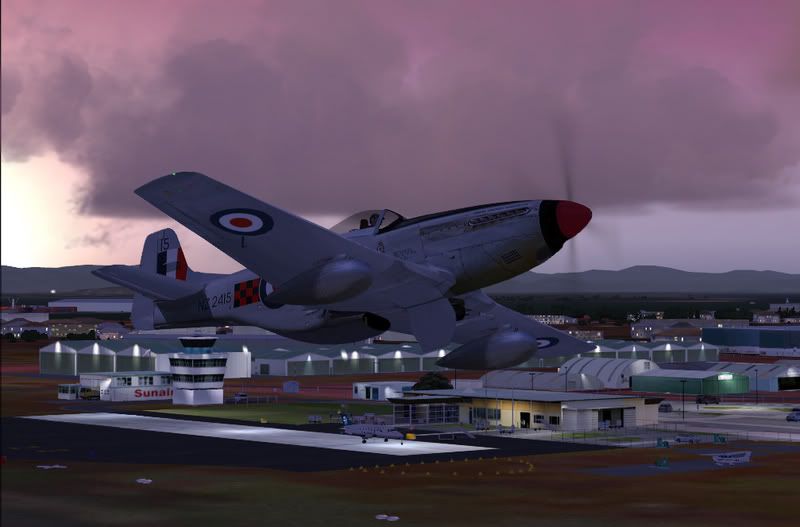
Here is a couple of shots of TAF taking off from NZTG

user posted image

user posted image
User avatar
Naki
NZFF Pro
 
Joined: Sat Aug 05, 2006 10:03 pm
Posts: 7170
Location: Tauranga

Postby Ian Warren » Tue May 22, 2007 11:27 pm

THANX paul ..was going to ask .. u supplied :) super extra screenis :thumbup:

Edit .. Deane mention'd .. can ya dump the tanks? :rolleyes:
Last edited by Ian Warren on Tue May 22, 2007 11:28 pm, edited 1 time in total.
Image
User avatar
Ian Warren
NZFF Pro
 
Joined: Fri May 05, 2006 5:23 pm
Posts: 41187
Location: AREA 51

Postby Naki » Tue May 22, 2007 11:35 pm

Thanks Ian - you have to get it - its one of the best freeware WW2 fighter (I now have a decent stable mate for my Realair Spit) out there IMO and made extra special with the repaint. VC is not as nice as the Realair Spit as you would expect but the external appearance is brilliant.

Edit: sorry drop tanks no I don't think you can dump them unfortunatley.

On a slightly different subject I also have that nice French freeware Corsair but I can't get the darn thing to take off as the Torque is too strong and I end up flipping it onto its back.
Last edited by Naki on Tue May 22, 2007 11:40 pm, edited 1 time in total.
User avatar
Naki
NZFF Pro
 
Joined: Sat Aug 05, 2006 10:03 pm
Posts: 7170
Location: Tauranga

Postby Naki » Wed May 23, 2007 12:00 am

Actually you can drop the tanks - you have to arm them and then pull a lever and they disappear!
User avatar
Naki
NZFF Pro
 
Joined: Sat Aug 05, 2006 10:03 pm
Posts: 7170
Location: Tauranga

Postby Florian_S » Wed May 23, 2007 12:16 am

Naki wrote: Actually you can drop the tanks - you have to arm them and then pull a lever and they disappear!

You learn something new every day!! I've had Warwick's P-51 for quite a few months and it never occured to me that you could drop the tanks on it!! :ph43r: :lol:
Image
You haven't experienced Flight Simulator till you've flown NZ!
User avatar
Florian_S
Forum Addict
 
Topic author
Joined: Wed Apr 18, 2007 4:17 pm
Posts: 328
Location: EDDH / HAM - Hamburg, Germany

Postby ardypilot » Wed May 23, 2007 8:17 am

:o TAF looks stunning!

I'm going to download this beast as soon as I get back from college today :D
User avatar
ardypilot
NZFF Pro
 
Joined: Wed Apr 26, 2006 10:01 am
Posts: 6802
Location: Auckland

Postby Adrian Brausch » Wed May 23, 2007 7:41 pm

i got the mussie too,..awesome model,...i dropped the front fwd gears suspension to make it sit a little less angled....sits as it should now !. If you want to remove the tanks permanentlt open the aircraft.cfg and delete the aux tanks line....
I re-painted it in the kiwi thunder 3/4 scale mustang replicas colours useing photoreal textures,..looks pretty cool !. I sampled the sound wavs from a vid on you tube showing the kiwi thunder from startup to take-off so it even sounds like it now too !.
User avatar
Adrian Brausch
Senior Member
 
Joined: Tue May 15, 2007 11:39 am
Posts: 1437
Location: Auckland

Postby Charl » Wed May 23, 2007 8:51 pm

Yeah it wants to sit slightly squatter, true.
How d'you get it to do that?
NZFF Member cbris has previously painted Kiwi Thunder on the WOP P51, but PR on Warwick's freeware one is definitely not misplaced.
You planning to upload?
Last edited by Charl on Wed May 23, 2007 8:52 pm, edited 1 time in total.
User avatar
Charl
NZFF Pro
 
Joined: Mon May 01, 2006 8:28 am
Posts: 9691
Location: Auckland

Postby ardypilot » Wed May 23, 2007 10:51 pm
Shes a beaut to fly- sounds splendid too.

I have had a few issues with it though:

1) I copied and pasted the aircraft.cfg section from the readme to the FSDS3_P51D cfg and could got get the aircraft to load in my aircraft preview window in FS. I had to change the "sim=P51D_mustang" line to "sim=P51D-25" like the other repaints included in the original install to make it work.

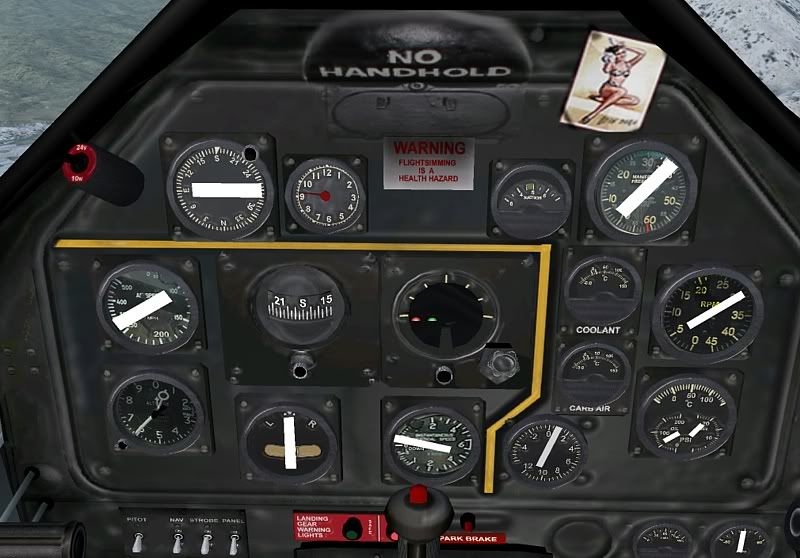
2) The needles in my gauges, plus the horizon background to my attiutude indicator are blank images as seen below:
user posted image
Not a big deal as I enjoy flying it from spot view more, but does anyone know of a fix?
User avatar
ardypilot
NZFF Pro
 
Joined: Wed Apr 26, 2006 10:01 am
Posts: 6802
Location: Auckland

Postby Naki » Wed May 23, 2007 10:59 pm

I wouldn't mind knowing how to make it slightly squater as well.

Andrew - have you downloaded version 2 ? - I had a problem with the putting the repaint on the model I had but soon realised I had the wrong version- I dumped this and downloaded ver 2 off sim-outhouse (you have to register though) file name "p-51dv2.zip"

Cheers

Paul
User avatar
Naki
NZFF Pro
 
Joined: Sat Aug 05, 2006 10:03 pm
Posts: 7170
Location: Tauranga

Postby Adrian Brausch » Thu May 24, 2007 12:32 am

to remove the drop tanks open the aircraft.cfg and replace the fuel section with these lines :

[fuel]
Center2 = -5, 0, 0, 65, 0
LeftMain = 0, -5.1, 0, 92, 0
RightMain = 0, 5.1, 0, 92, 0

fuel_type = 1
number_of_tank_selectors = 1
electric_pump=1

and to make her sit more squat replace the FIRST THREE LINES ONLY of the contact points section with these three lines :

point.0= 1, -14.000, 0.000, -2.60, 2550, 0, 0.510, 180.000, 0.150, 2.7, 0.850, 2.500, 2.000, 0
point.1= 1, 1.815, -5.450, -6.700, 2650, 1, 1.140, 0.000, 0.550, 0.5, 0.850, 7.200, 5.200, 2
point.2= 1, 1.815, 5.450, -6.700, 2650, 2, 1.140, 0.000, 0.550, 0.5, 0.850, 6.200, 3.300, 3.
Last edited by Adrian Brausch on Thu May 24, 2007 12:36 am, edited 1 time in total.
User avatar
Adrian Brausch
Senior Member
 
Joined: Tue May 15, 2007 11:39 am
Posts: 1437
Location: Auckland

Postby Adrian Brausch » Thu May 24, 2007 12:34 am

MAKE SURE TO BACK UP THE AIRCRAFT.CFG FIRST !!...(just incase something goes pear shaped !!.....
User avatar
Adrian Brausch
Senior Member
 
Joined: Tue May 15, 2007 11:39 am
Posts: 1437
Location: Auckland

Postby Naki » Thu May 24, 2007 8:43 am

Cheers thanks for that
User avatar
Naki
NZFF Pro
 
Joined: Sat Aug 05, 2006 10:03 pm
Posts: 7170
Location: Tauranga

Postby NormNZ » Thu May 24, 2007 10:31 am

Hi
As an oldie who started my RNZAF career in 3TAF and worked on these beautiful aircraft
it is great to have this model in my FSX collection.

Anyway, changed the aircraft config as given but I still have drop-tanks!!!!

[fuel]
Center2 = -5, 0, 0, 65, 0
LeftMain = 0, -5.1, 0, 92, 0
RightMain = 0, 5.1, 0, 92, 0
fuel_type = 1
number_of_tank_selectors = 1
electric_pump=1

Any thoughts as to what is wrong???

Norm
NormNZ
Member
 
Joined: Fri Nov 17, 2006 11:11 pm
Posts: 47
Location: Upper Hutt

Postby Adrian Brausch » Thu May 24, 2007 10:43 am

gidday norm,..only i can think of is that you are useing version 1 of the mustang package,..where version two has modifications done to it so that when fuel is reduced to 0 in the fuel load out screen within fs9 the tanks will dissapear.,..hence why my soulution to delete the aux tanks in the aircraft.cfg. Im pretty sure i got the V2 pack from flightsim or avsim..
User avatar
Adrian Brausch
Senior Member
 
Joined: Tue May 15, 2007 11:39 am
Posts: 1437
Location: Auckland

Next

Return to Aircraft

Who is online

Users browsing this forum: No registered users and 23 guests