
Posted:
Tue Mar 04, 2014 9:25 amby Adrian Brausch
Posted:
Tue Mar 04, 2014 9:38 amby Ian Warren
Hmm what you need is me in the cockpit with my trusty camera , really I will see what I can do, nudge some of my contacts

Posted:
Tue Mar 04, 2014 9:42 amby Adrian Brausch
Thanks Ian,..yea I no longer have any access,..old man has retired ..
Posted:
Thu Mar 06, 2014 9:09 amby tomkilpatrick
Good work Ade! Is there anywhere I can download the aircraft from? All links that I've found are dead. Thanks
Posted:
Thu Mar 13, 2014 11:45 amby BendyFlyer
Agree with you re the VC AB, it could do with some gauge shading and putting in working switches here and there but the whole systems stuff which would need a complete gauge write and development is beyond my talents at the moment, might have a look at what I can beg borrow and steal that would fit in.
Like the progress so far, like what you do with the painting stuff outside by talents that is for sure.
Posted:
Thu Apr 03, 2014 6:39 pmby BendyFlyer
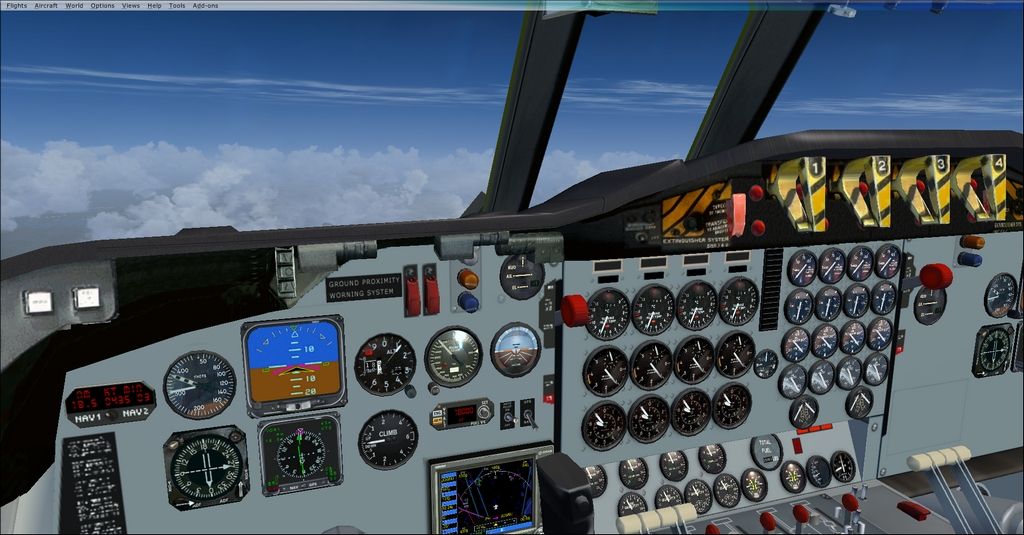
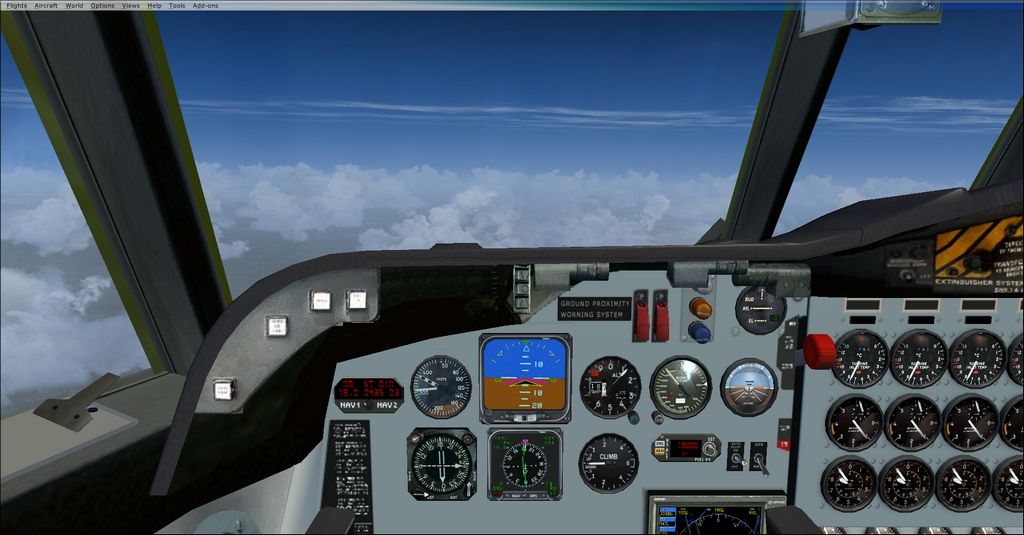
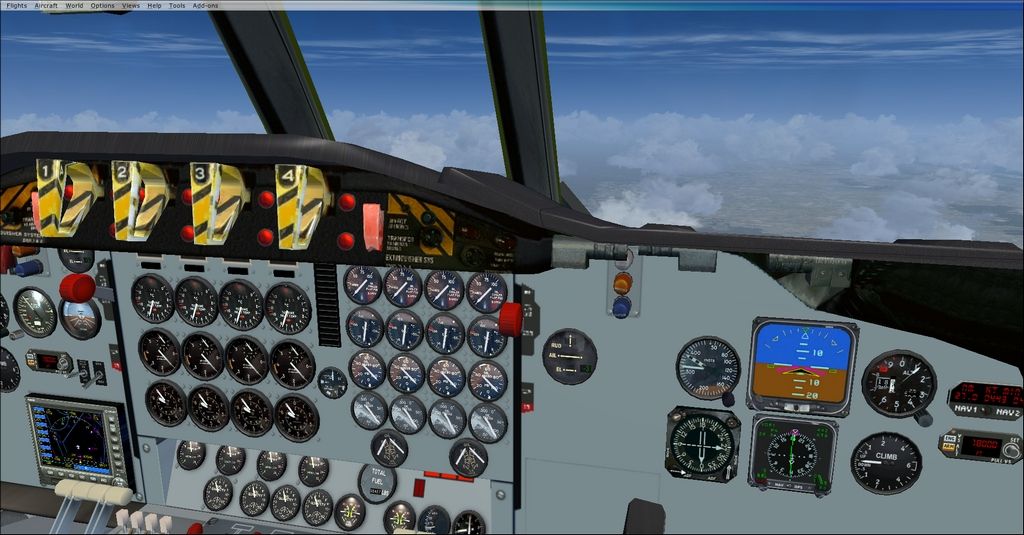
Adrian and others, I have shoehorned in a couple of the EFIS gauges from the King Air. They work fine and dont look to bad at least closer to the current RAAF P3s. The RNZAF P3s with their large screen displays are a pain and I had two displays (The FSX G1000 Baron) that would have worked but the holes in the panel mesh are such that what is there is what is there and I cannot make the holes or areas where the gauges go any bigger or smaller, the gauges turned up but were behind the panel and instrument holes as is, weird.
I also tried to fix the DME display but it did not matter what gauge I tried the outcome was the same a magnification of the gauge and the clickable areas not working as they otherwise would. I am not sure what is going on here but it seems there is something in the texture mesh at this point that creates some sort of barrier like an impervious membrane thats prevents any gauge working here including the 2D panel DME gaug3e. Have not had much success with the other switches either. Not sure about the overheap bitmaps looks like the originals were magnified a little too much too fit and hence the pixalation.
Anyway here are some pics of the current setup looks a bit more authentic and like the current RAAF P3's anyhow. Could be worse.
Posted:
Tue Apr 08, 2014 1:24 pmby Ian Warren
Bendy that dose look extra smooth, be worth getting Hi Res photos, I've sent a note away, no reply, may try another angle and catch one out at on the ramp at Christchurch.
Posted:
Tue Apr 15, 2014 11:27 amby BendyFlyer
OH and I forgot to mention it is easy to do at home. Find the KIng Air CAB with the EFIS guages in the King Air Panel folders and copy the CAB and the quage line entry across to the Orion Panel folder and the panel.cfg VC sections.
Edit out the current gauges with // and copy the the first two line entries for the gauge positions it it should all work . In case it doesn't here is the VC panel entry from my aircraf's panel config file (Oh make a copy of your original panel.cfg first, just in case:
//--------------------------------------------------------
[Vcockpit01]
file=Panel_Decal_01.bmp
Background_color=0,0,0
size_mm=512,512
visible=1
pixel_size=512,512
texture=$ELEC_1
gauge00=188!ATC Icon, 143,460,12,12
gauge01=188!Avionics Icon, 155,460,12,12
gauge02=188!GPS Icon, 167,460,12,12
gauge03=188!Hyd Blake, 420,11,79,79
gauge04=188!Kneeboard Icon, 179,460,12,12
gauge05=188!Map Icon, 192,460,12,12
gauge06=188!Oat, 420,178,79,79
gauge07=Cessna172!Clock, 451,301,54,54
gauge08=188!Autopilot Switch, 330,482,30,27
gauge09=KingAir!Attitude, 0,0,260,260
gauge10=KingAir!Hsi, 0,261,202,190
//gauge09=PS_L188!ADI, 0,0,260,260
//gauge10=PS_L188!HSI, 0,261,202,192
gauge11=PS_L188!VOR, 261,157,149,149
gauge12=PS_L188!L188_vsi, 261,0,149,156
gauge13=188!Airspeed, 203,309,143,144
gauge14=PS_L188!Anun_Deice1, 268, 478 ,60,32
gauge15=PS_L188!Anun_Pitot, 206,478,60,32
gauge16=PS_L188!DME, 345,308,100,48
gauge17=PS_L188!Fuel warning, 144,478,60,32
gauge18=PS_L188!L188 Altitude Select, 1,455,136,54
gauge19=188!Altimeter, 361,359,149,150
gauge20=shockwave_lights!SW Lights, 1,1,1,1 //shockwave light
Posted:
Tue Apr 22, 2014 4:55 pmby Eagleeye
Well Adrian I know I am newbie but the overhead panel certainly needed better resolution and the panel lighting looked a little unnatural.
Although I worked on these aircraft as a civilian I was not encouraged to take any photos of the interior as you can understand. It was strictly Verboten!
One other point about the aircraft cockpit model, I noticed that Shift+5 brings up the Radio stack which has three switches on the LH module which when the PNL button is pushed
reveals controls for crew entry door, Bomb bay & entry stairs but only the crew entry door is working. I know it is our favourite subject, but could these be activated as well in your quest for realism.
Finally I, as a new comer am somewhat mystified with your cockpit views from the first officers seat, how do you get that view. I only know the pilots view position?
Keep up the good work, much appreciated.
Posted:
Tue Apr 22, 2014 6:25 pmby Ian Warren
Eagleeye wrote:I am newbie but the overhead panel certainly needed better resolution and the panel lighting looked a little unnatural.
Keep up the good work, much appreciated.
Eagleeye .. Welcome home - our NZFF, great to see so much interest with Mr KBT and his Orion, after the years.
Posted:
Sun Jul 06, 2014 12:50 amby BendyFlyer
Team KBT have released their latest update to the Orion V.33 for FSX. Reworked some of the switches on the overhead and the main panel. I note an icing warning light has been incorporated into the centre annuniciator on the centre panel. Very smooth externally and the light fix is good. I have reverted to original instrumentation for a bit but the night cockpit is a mess with bitmap layer bleed through on the glareshield of earlier switch positions and the night colours on mine are a garish pink. Otherwise a great sim model getting better and better. Engine start is working fine and most guages seem ok but the VC disagrees with the 2D for some reason. Not sure why but never been able to get rid of the altimeter over-reading by 150 ft no matter what level if flown.
The RNAZF and RAAF textures i have ported over ok with no immediately apparent issues. Overall the VC is tidier but the night textures are terribly blurred on overheads etc.
Posted:
Sun Jul 06, 2014 8:58 amby Ian Warren
Yet to have a look at , Orion getting reworked over the last few months , PC getting rework over the last few weeks but KBT P3 has never let us down in any version, just a great model !
Just in case people missed it .... meet the guys here !
http://www.flightsim.com/vbfs/content.php?...T-FSX-Interview


