Page 1 of 1

PostPosted: Wed Sep 19, 2007 1:47 pm
by ardypilot
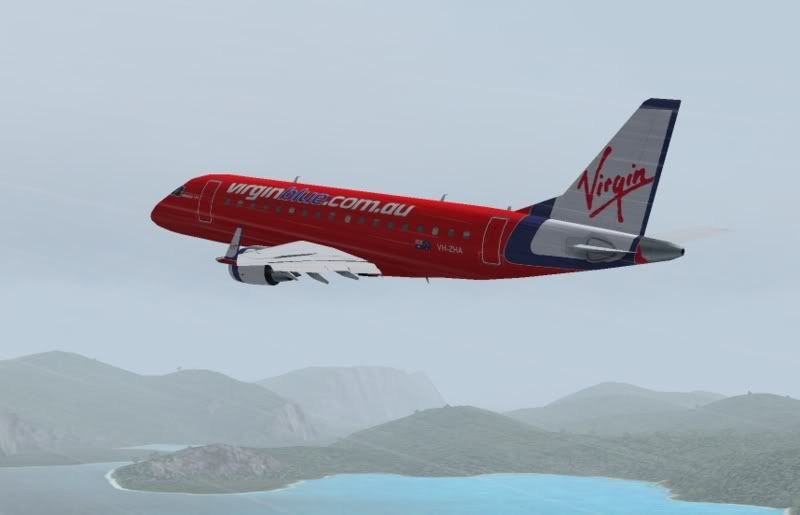
I just downloaded the AI Aardvark Embraer 170 with a Virgin Blue 'VH-ZHA' livery and would like to have it as a flyable aircraft in my fs2004 menu.

I've installed it as I install all other aircraft, but for some reason it won't show up. I think there is something in the aircraft.cfg that is messing it up for me, but I must be blind because I can't see it:
Code: Select all
[fltsim.0]
title=AI EMB170 AIA VOZ-Virgin Blue VH-ZHA
sim=aia_emb_170
model=reflective
panel=
sound=
texture=VOZ-Virgin Blue VH-ZHA
kb_checklists=Boeing747-400_check
kb_reference=Boeing747-400_ref
atc_id=VH-ZHA
atc_airline=VIRGIN
atc_flight_number=1123
atc_heavy=1
atc_parking_types=RAMP
atc_parking_codes=VOZ
ui_manufacturer=AI
ui_type=Embraer 170 AIA
ui_variation=VOZ-Virgin Blue VH-ZHA
description=AI Embraer 170 by AI Aardvark ::repaint by Carlo Priori::

Can any of ye land lubbers help me? pirate.gif

PostPosted: Wed Sep 19, 2007 2:00 pm
by Timmo
Arghh....aye, i think ye need a panel to be able to fly a model arghhh

PostPosted: Wed Sep 19, 2007 3:18 pm
by Charl
Urm aahhggh
Crikey there's spittle all over the monitor...
Trolly its in the airfile, get FS Aircraft Typer and change it to flyable.

PostPosted: Wed Sep 19, 2007 3:22 pm
by Snowman
Arrggg, ahoy ye land lubbers.................. pirate.gif
Timmo is partly correct, you need a panel, but if the aircraft was solely designed for AI only, it WONT show in the Aircraft menu.
You can change this with various little apps that let you do it, but the change needs to be made in the ".air" file, not the .cfg file.
In the .cfg file example you have shown, if an aircraft is to show in the selection menu, it will show using the tiltle or name in the line....

"ui_manufacturer= XXXXXXX", in the case of your example, that manufacturer is "AI" .

I take it you have looked in the selection menu under the name AI just in case the aircraft is actually there ???

Lawrie. New_Zealand_etc.gif

PostPosted: Wed Sep 19, 2007 4:20 pm
by ardypilot
Cheers guys.

I copied the default 737 panel and air file into the EMB folder, renamed them, and voila:


However, the exterior model isn't as nice as I expected. Anyone know of a better model with the new VB paint?

PostPosted: Wed Sep 19, 2007 4:39 pm
by steelsporran
Charl wrote:
QUOTE(Charl @ Sep 24 2007, 03:18 AM) <{POST_SNAPBACK}>
Trolly its in the airfile, get FS Aircraft Typer and change it to flyable.


Yeah, change it from 2 to 0.

PostPosted: Wed Sep 19, 2007 5:40 pm
by ZK-Brock
As far as I can see Trolly, the only other Embraer 170 model out there for flightsim is the dreamwings one. You could look at this thread

PostPosted: Wed Sep 19, 2007 10:11 pm
by ardypilot
Thanks for the link Brock- do you think that repaint would be FS9 compatable as well? I think the model is cross sim compatable ay?

Oh yeah, and is it available for download anywhere?

PostPosted: Mon Sep 24, 2007 3:31 pm
by Florian_S
A VB repaint for the Dreamwings Embraer 170 has become avaliable on avsim HERE

Not sure how good it is yet as haven't installed but I'm sure it's better than an AI version

Cheers
Florian - YSSY