Page 1 of 1

PostPosted: Thu Dec 13, 2007 7:24 pm
by hugh
I have a question for Lawrie and anyone else who is creating scenery with Rwy 12. I was wondering how steep you found the learning curve? I managed to place some objects once, but since then have got a series of error messages. At first I couldnt even start FS 9 (I got "computer has insufficient memory available, run disc clean-up and try again"Â￾.) Good old "System restore"Â￾ fixed that one, and after that I deleted then re-installed all the Rwy-12 associated programs, but all I get now when I open the Object placer interface is "An unhandled exception has occurred"Â￾ with a long exception text which says in part: "object reference not set to an instance of an object"Â￾ I've gone over the tutorials several times and sifted through the messages on the Rwy 12 Forum. Looks like a few people have had similar problems, but they don't seem to be responding to pleas for help there any more. Anyways"¦I'm thinking of reinstalling FS 9 to see if that fixes it, but before I do that I'd like to hear if any one has any other suggestions. Is this program buggy, or am I missing something obvious?

PostPosted: Thu Dec 13, 2007 8:18 pm
by creator2003
Have you got the msxml and dotnetfx installed i remeber these two bits of software are necessary for object places and so on ... ive updated now to the dotnetfx3.0 .but im sure these are needed and mite help ,
its been along time since i used rwy12 so i could be wrong ???
mike

PostPosted: Fri Dec 14, 2007 12:05 am
by Snowman
Mike is right, re the msxml and dotnet framework updates, there were some problems with the very early versions.
Also, there is a fix for a couple of the base Runway-12 library objects that were causing errors like you mention. (it happened to me).
If memory serves, it was caused by a couple of textures in the base sets, and a fix was put out for it a long time ago.
'If i remember rightly, the fix was available from Avsim ,and Flightsim .
Sorry, i cant remember the name of the fix file, too long ago now...............

Lawrie. >nzflag<

PostPosted: Fri Dec 14, 2007 12:15 am
by hugh
Dotnetfx and the other required programs were all installed before, and the object placer was basically working-but since I used system restore to get my old settings back, I can't seem to install dotnetfx again"“it acts like its going to install, gets to the "gathering required information"Â￾ stage and then quits. I searched my computer and all that turns up is the setup file and a 23 k prefetch file. I deleted it all and tried again, with the same result.

All I really want to do is add some basic VFR objects around some airstrips in the area around Lawries great Dargaville airport. Ruawai for example is a decent sized township with a nice airfield but the town is completely missing in FS 9, even with the Christian Stock Topo installed.

Mike, since you are no longer using rwy 12, did you find something you liked better?

PostPosted: Fri Dec 14, 2007 12:21 am
by Snowman
hugh wrote:
QUOTE (hugh @ Dec 14 2007, 01:15 AM) <{POST_SNAPBACK}>
All I really want to do is add some basic VFR objects around some airstrips in the area around Lawries great Dargaville airport. Ruawai for example is a decent sized township with a nice airfield but the town is completely missing in FS 9, even with the Christian Stock Topo installed.

Mike, since you are no longer using rwy 12, did you find something you liked better?


I hardly ever use the Runway-12 builder program these days either. I tend to favour the use of Abacus EZ Scenery, same as Mike.
A lot of the Runway-12 object libraries, also work in EZ Scenery.
Had noticed Ruawai was missing,.................. even started a basic airfield for it about 3 years ago. Still got the AFCAD somewhere on an old backup disc i think..........................

Lawrie. >nzflag<

PostPosted: Fri Dec 14, 2007 1:34 am
by hugh
Snowman wrote:
QUOTE (Snowman @ Dec 18 2007, 12:21 PM) <{POST_SNAPBACK}>
Had noticed Ruawai was missing,.................. even started a basic airfield for it about 3 years ago. Still got the AFCAD somewhere on an old backup disc i think..........................

Lawrie. >nzflag<


I would like to have a go at the town and surrounds but it sounds like I need to get EZ scenery first and spend some time getting up to speed with it- I'm not getting anywhere with Rwy 12 right now...

Abacus seems to be calling themselves "Halycon media" at Simmarket now, where EZ scenery is available as boxed product only.
I also find an "Abacus" site still up which offers a slightly different looking package you can download directly.
I guess they are the same product?

PostPosted: Fri Dec 14, 2007 2:19 am
by Snowman
hugh wrote:
QUOTE (hugh @ Dec 14 2007, 02:34 AM) <{POST_SNAPBACK}>
Abacus seems to be calling themselves "Halycon media" at Simmarket now, where EZ scenery is available as boxed product only.
I also find an "Abacus" site still up which offers a slightly different looking package you can download directly.
I guess they are the same product?


Yep, it is..................

PostPosted: Fri Dec 14, 2007 2:54 am
by hugh
Thanks, just downloaded the trial version and will try it out over the weekend.

PostPosted: Mon Dec 17, 2007 5:01 pm
by hugh
EZ scenery was a great purchase and I made a basic Ruawai with about 80 buildings , about a third of the real number, but it shows the shape of the town. Also added the pier and a couple of boats. Some of my objects might need changing, I get this unnatural "shimmer"Â￾ effect from a distance with the EZ scenery /rwy 12 objects. I don't care for that effect too much- maybe should sub lower res objects, like the default FS 2004 ones?

Lawrie, is that AFCAD for Ruawai still around? If not, maybe I could put something basic there until you do it properly. What tools do I need to add a surface? Also, dumb as it sounds, I'm not sure exactly where the airstrip is. Its been a while since I was up there and I am hopeless at finding NZ topo airstrips in the sim, although the geographx airstrip map shows it where I remember it, on the main highway just north of the town on the left as you head north. Is this it in the centre here?

PostPosted: Tue Dec 18, 2007 3:55 pm
by Snowman
hugh wrote:
QUOTE (hugh @ Dec 17 2007, 06:01 PM) <{POST_SNAPBACK}>
EZ scenery was a great purchase and I made a basic Ruawai with about 80 buildings , about a third of the real number, but it shows the shape of the town. Also added the pier and a couple of boats. Some of my objects might need changing, I get this unnatural "shimmer"Â￾ effect from a distance with the EZ scenery /rwy 12 objects. I don't care for that effect too much- maybe should sub lower res objects, like the default FS 2004 ones?

Lawrie, is that AFCAD for Ruawai still around? If not, maybe I could put something basic there until you do it properly. What tools do I need to add a surface? Also, dumb as it sounds, I'm not sure exactly where the airstrip is. Its been a while since I was up there and I am hopeless at finding NZ topo airstrips in the sim, although the geographx airstrip map shows it where I remember it, on the main highway just north of the town on the left as you head north. Is this it in the centre here?


From memory only, i think thats it.
Its been quite a few years since i was up that way as well. I will have a search through my old backup discs from a few years ago, and see if i can find the AFCAD. Is bound to be here somewhere..........................

I dont get a "Shimmer" effect from Rwy-12 and EZ buildings................ COuld be something to do with your video card settings maybe, ........... im not really sure...............
I usually avoid the default objects where i can, as they are low res, and with poor detail...............

Lawrie.

PostPosted: Wed Dec 19, 2007 7:21 am
by creator2003
QUOTE
I made a basic Ruawai with about 80 buildings , about a third of the real number, but it shows the shape of the town[/quote]

i would if i was having to put that many buildings in learn the agn tools this will help bigtime on the flps and the
QUOTE
unnatural "shimmer"Â￾ effect[/quote]

"shimmer"Â￾ could be from the models and texture maps not inculding mipmaps or there is so many objects there that all the maps loading from a distants just look white until you get right near them ..

PostPosted: Wed Dec 19, 2007 3:37 pm
by hugh
Snowman wrote:
QUOTE (Snowman @ Dec 23 2007, 03:55 AM) <{POST_SNAPBACK}>
COuld be something to do with your video card settings maybe,

creator2003 wrote:
QUOTE (creator2003 @ Dec 23 2007, 07:21 PM) <{POST_SNAPBACK}>
"shimmer"Â￾ could be from the models and texture maps not inculding mipmaps

And possibly my clunky computer doesn't help"¦Thanks for the tips and yes I guess I do need to learn about agn tools, although EZ scenery is so nice to work with its tempting to just keep adding objects.

I am playing around with AFCAD 2.21 now and its fun but I need to learn about flattens-I got FST flatten working i think and looks like Ruawai might end up with the Dargaville trench effect, but we'll see....

PostPosted: Fri Dec 28, 2007 3:44 pm
by hugh
Trying out the FS 2004 autogen sdk and the examples are very clear until this: "Ground textures that have previously been run through the resampler tool (available from the Microsoft Flight Simulator 2004 Terrain SDK) are loaded into the annotation tool"Â￾. So I go to the terrain sdk and it looks much less intuitive"¦ 5 separate tutorials and they seem to assume that you're going to be using custom photo scenery.
Right now I only want to add autogen to the default land class textures, to add townships and vfr landmarks. Can anyone point me to a clear tutorial on annotating default textures ?

PostPosted: Fri Dec 28, 2007 10:59 pm
by Snowman
hugh wrote:
QUOTE (hugh @ Dec 28 2007, 04:44 PM) <{POST_SNAPBACK}>
Trying out the FS 2004 autogen sdk and the examples are very clear until this: "Ground textures that have previously been run through the resampler tool (available from the Microsoft Flight Simulator 2004 Terrain SDK) are loaded into the annotation tool"Â￾. So I go to the terrain sdk and it looks much less intuitive"¦ 5 separate tutorials and they seem to assume that you're going to be using custom photo scenery.
Right now I only want to add autogen to the default land class textures, to add townships and vfr landmarks. Can anyone point me to a clear tutorial on annotating default textures ?


I always didnt get along with MSs SDK tools. I gave up on them a long time ago, seemed far too complicated at the time.
Perhaps posting your Question in the "Scenery" sub-forum, asking Robin, he's THE MAN when comes to scenery building !!

Lawrie. >nzflag<

PostPosted: Sat Dec 29, 2007 12:13 am
by creator2003
Try reading this topic i posted when i was learning them about page 13 in scenery topic http://nzff.org/forum/viewtopic.php?t=1445
good luck and dont give up,it is pretty easy after you get it all :thumbup:

PostPosted: Sat Dec 29, 2007 1:52 am
by Snowman
creator2003 wrote:
QUOTE (creator2003 @ Dec 29 2007, 01:13 AM) <{POST_SNAPBACK}>
Try reading this topic i posted when i was learning them about page 13 in scenery topic http://nzff.org/forum/viewtopic.php?t=1445
good luck and dont give up,it is pretty easy after you get it all :thumbup:


Thanks for that Mike,...................... I had forgotten about that topic........ I must be getting old !! :lol:

Lawrie. >nzflag<

PostPosted: Sun Dec 30, 2007 11:25 pm
by hugh
Thanks for the link and tips -yes Agn tools seems very intuitive to use, and Tcalc gives me the bmp file name no problem, but I just get "file not found" wherever I look. Looked in the texture files, did a search of my C drive but the guy I'm interested in, 121331023122111Su.bmp ,doesn't show up. Any ideas?

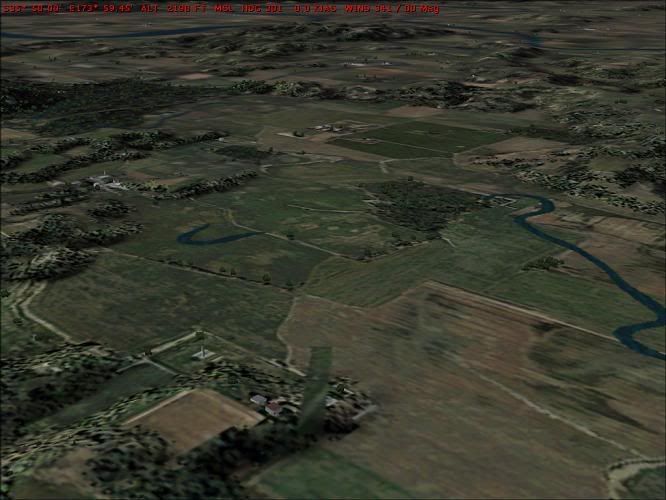
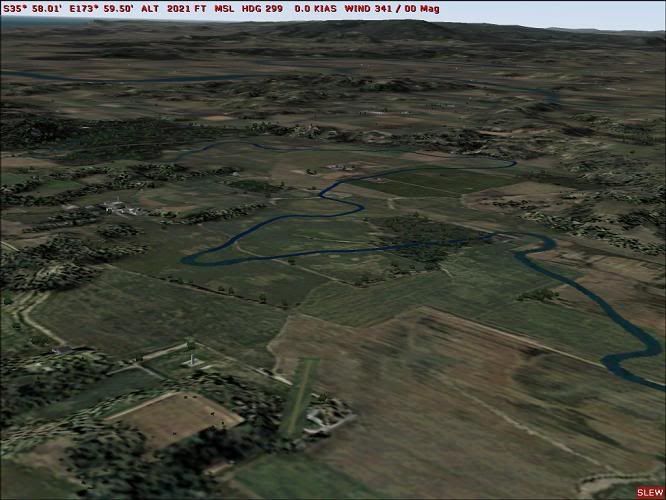
I did have more luck with AFCAD and FSFlatten and messed around with this airstrip near Dargaville. The Manganui stream peters out in the topo, so I drew in the missing bits with the AFCAD water runway tool


The effect doesn't look that convincing, and I probably need to lose the runway texture since there really isnt one there, just a sloping field. But since I cant find a simple bmp file I better put off trying to make sloping runways"¦

PostPosted: Mon Dec 31, 2007 3:34 pm
by creator2003
Sloping runways ,yeah took me along time to workout ,they have to be design with gmax as a model then harden as concrete the complied as a mdl /xml file using ezscenery to make a library and placed finally ..
Heres some that you can place with ezy scen that i didnt really go anywhere with ..Sloping beta funjust place them as you want around or there is a bgl file there with acouple of locations ,


Ian warren is the king of agn and it has been awhile since i did some so i leave that part un answered..

PostPosted: Tue Jan 01, 2008 12:43 am
by hugh
creator2003 wrote:
QUOTE (creator2003 @ Jan 5 2008, 03:34 AM) <{POST_SNAPBACK}>
Heres some that you can place with ezy scen that i didnt really go anywhere with

That shot is exactly what I had in mind, and that's the exact aircraft I was thinking of"¦ :bow:
With that great Fletcher around, some short sloping or uneven ag/farm strips are just the ticket; I tried to use FSFlatten to build a ramp up to an airstrip with several flattens, and then some "raisens" (raisins?)behind it so you would get a kind of slope effect but it didnt really work. I d/l a couple of sloping airstrip sceneries by Bill Pelk-north cascades washington-and they look really nice, but with those you might have to make allowances (set mipmapping at 6, maybe turn off crash detection etc)
going to be using these ones a lot :drool: