Time To Sort This Out

The place to ask for help or solve each others technical issues and discuss hardware

Postby gokanru » Tue Jan 30, 2007 8:51 am

You can James and it is the preferred method but what I said just gives you another option.turn off the computer and put your disk in and if it boots from the disk then you are on your way.If it boots your old system then you will have to change the order of the drives in the bios. :thumbup:

The order of your drives will read something like this,floppy,cd rom,hdd0,other
Last edited by gokanru on Tue Jan 30, 2007 8:59 am, edited 1 time in total.
gokanru
 

Postby ronwestnz » Tue Jan 30, 2007 10:31 am

Jimmy wrote: umm okay im confused now, I thoguht I coudl chose NTFS format dring the install of xp, by inserting the cd then restarting the pc and making it boot from cd at startup..

Correct Jimmy, once you have everything you need, pop the cd in and boot the pc, it should load the windows installer and take you thru the drive setup process, including the formatting. once the drive is formatted it will proceed with the xp install itself
Last edited by ronwestnz on Tue Jan 30, 2007 10:35 am, edited 1 time in total.
Image
ronwestnz
Member
 
Joined: Mon Jan 01, 2007 9:34 am
Posts: 73
Location: NZPM

Postby Jimmy » Tue Jan 30, 2007 11:26 am

well I did excacly that, poped the cd in then restarteed but the system just laods as normal.

I checked the BIOS boot options and its in the order of floopy cd hdd

Theres no key comand to boot from disc eathier during startup, is there a comman key command I could use? Shold I make the boot order just floppy cd cd? itd have no choice but to load cd then..
Last edited by Jimmy on Tue Jan 30, 2007 11:26 am, edited 1 time in total.
Jimmy
 

Postby ronwestnz » Tue Jan 30, 2007 11:52 am

if your using win 98 now (or any win os) hit the f8 key after the test screen disappears, you should then get an option on the type of boot up you can have.

normally the pc should check the floppy then the cd for a boot sequence, and if it finds a bootable cd it should prompt for a key press to boot the cd
Image
ronwestnz
Member
 
Joined: Mon Jan 01, 2007 9:34 am
Posts: 73
Location: NZPM

Postby Jimmy » Tue Jan 30, 2007 12:07 pm

okay I have win xp currently and pressed F8 and got to the OS selection screen, only gave the choice for xp witch just continued to load as usual, going to advanced options after pressing F8 had nothign to help eathier..
Jimmy
 

Postby Zöltuger » Tue Jan 30, 2007 12:38 pm

you have to follow the instructions to the letter, Jimmy.
press 'esc' at that OS selection screen
Zöltuger
 

Postby Jimmy » Tue Jan 30, 2007 12:49 pm

Yeah I tried that, nothign happens.. Any other key commands? I have no promt for a key to press to boot from cd eithier.
Jimmy
 

Postby gokanru » Tue Jan 30, 2007 1:57 pm

Okay James go for option 2.load up to your desktop and put the cd into your cdrom drive and do your install from there.you will be able to reformat as well.if the cd doesn't boot to your desktop just go into your cd rom drive,open up the cd and then click on setup.you will be on your way
gokanru
 

Postby Jimmy » Tue Jan 30, 2007 2:17 pm

So will doing that create a new partition for windows then delte the old one? That would leave me with a smaller than possible partition wouldn't it? I think I understand how to do it via the cd botting method, doing this other way has got me all confused again :s Will this method provide a jsut as clean system?
Jimmy
 

Postby Zöltuger » Tue Jan 30, 2007 2:18 pm

you can't format the hard disk from windows. you need to do it via the CD.
i understand the problem now, Jimmy. so you've gone into the BIOS and set it to boot from the CD rom and it still boots from the hard disk?
Last edited by Zöltuger on Tue Jan 30, 2007 2:18 pm, edited 1 time in total.
Zöltuger
 

Postby Jimmy » Tue Jan 30, 2007 2:21 pm

yup, when I fisrt went into the BIOS it was in this order:

1st: CD ROM
2nd: floppy
3rd HDD-0


I even made all three to cd rom, and much to my shock (in a somewhat warpt way it was funny) the pc just continued to start up as if nothign was differant!
Jimmy
 

Postby gokanru » Tue Jan 30, 2007 2:28 pm

This is what will happen james when you start from the desktop.The cd will boot up and give you a list of options.the one that you choose is to install xp.It's the first on the list.another option on the cd is what to do to install xp.but if you don't want to read it just go to install.during the install it will tell you that you have an operating system on your C drive,and ask if you want to install to that anyway.answer yes.and then it will take you to the format screen.go for an NTFS format.you will then be installing to the whole of the c drive.
gokanru
 

Postby Jimmy » Tue Jan 30, 2007 10:09 pm

Gokanru kindly phoned me and guided me right threw the whole prosses, got all the drivers installed and even some unnessacery background processes :D

I now have a nice fresh install, thanks a heap gokanru, and everyone else who has helped here :clap:

btw zoltuger, during the install of xp after starting it from the desktop we actuly got to the screen that was mentioned in the tutoirals that you can reformat at, I jsut continued and it removed the old xp files and installed the new anyway, so not a full reformat but seems like its just as good.

All files are still there on the C drive (in the documents and settings fodler all my old documents, pics music etc, had been put in a folder titled "prouser" what the user name was when I got this system) So I will just go and manualy delete the old files.

Seeing as the install did go by the format screen I suppose any time I want I could actuly do it all again but instead dleet the old partition and creae a whole new one, anyway im prety happy for now :P

Thanks again
James
Jimmy
 

Postby Zöltuger » Tue Jan 30, 2007 10:20 pm

good to hear, hope your flight sim performance improves B)
Zöltuger
 

Postby ZK-MAT » Tue Jan 30, 2007 10:37 pm

... and the crowd rejoiced!!
User avatar
ZK-MAT
Senior Member
 
Joined: Sun Apr 30, 2006 11:41 pm
Posts: 1690
Location: Papamoa

Postby Dreamweaver » Wed Jan 31, 2007 7:39 am

oops seen its fixed so advice below not required
Last edited by Dreamweaver on Wed Jan 31, 2007 7:40 am, edited 1 time in total.
Dreamweaver
 

Postby Jimmy » Wed Jan 31, 2007 8:04 am

  ... and the crowd rejoiced!!


:lol:


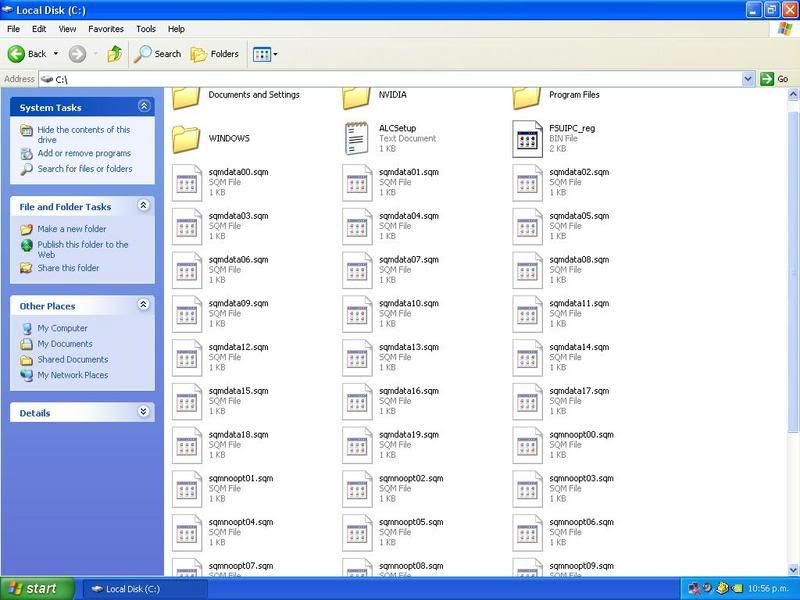
I thoguht I might as well ask what these files are in this picture, the uninstall then reinstall of windows didn't get rid of them, sqm files or somethign, just sitting there on the drive:

user posted image

Just woundering as they build up over time, when I firxt got my pc there were none..
Jimmy
 

Postby ronwestnz » Wed Jan 31, 2007 9:37 am

They are Software Quality Metrics data collection files. They are safe to delete.
Last edited by ronwestnz on Wed Jan 31, 2007 9:38 am, edited 1 time in total.
Image
ronwestnz
Member
 
Joined: Mon Jan 01, 2007 9:34 am
Posts: 73
Location: NZPM

Postby gokanru » Wed Jan 31, 2007 12:10 pm

We need to get that floppy drive of yours setup James so that you can use those 6 startup disks.I will also send you the partition magic boot recovery disks.these allow you to partition your hard drive and also allow you to format the partitions from dos.this is the preferred way to put a new system on,because it totally wipes all of the old info.You now have the experience of having put a system on,you just need to broaden that experience.Partition Magic is the only program that I know of that allows you to partition a hard drive with the info still on it.it also lets you resize your partitions.

try out the system that you have for now,I'm keen to hear if your fps have improved,I will get those floppies down to you,and If you need help I'll just ring you and lead you through the process again,no probs. :) :thumbup: brand new floppy drives are cheap and easy to install so that would be something that I would be looking at in your case.
gokanru
 

Postby Jimmy » Wed Jan 31, 2007 1:56 pm

okay, with the tutorials I linked to above that zoltuger got me to read they explain the bot from cd way of installing, take the links and have a look cos early in the explained install process it says you get to a particuler page I went past during the install last night, so if I put the disc in, do the instructions, then just delete the C partition from the menu it rebooted into then reate a new one and format it I would then just continue installing on that new made partition. ow anothor one of my nasty long sentances :P

So I don't think I shall need to floppys, but I have all six here in my draw now anyway incass I ever install on a differant machine.

But yeah I don't really think I need to reformat, I am about to install fs (after h/d has defraged) so thatl be the test :D
Jimmy
 

PreviousNext

Return to Technical Issues

Who is online

Users browsing this forum: No registered users and 9 guests