Hi all
I am looking for any input on this device as I'd love to get one.
1. How is FSX performance affected? As FSX is CPU bound, does the 3 screens not get affect FSX too much, and can the frame rate/smoothness be picked up or maintained by a better graphics card?
I have an i7 920 at 3.4Hgz, 6Gb RAM and GTX 260 video. Was looking at a GTX 480 video
2. Aspect Ratio. Is it better to have 3 4:3 LCD screens as compared to 3 wide screen LCD's, I don't want to have stretched or squashed images.
Keen to hear all and any information and experiences.
Cheers and thanks
Tony
CHC
Matrox Triplehead 2Go
24 posts
• Page 1 of 2 • 1, 2
 by tdale » Sun Aug 15, 2010 10:50 am
One other point.
3. I need to keep the LCD native resolution to keep that sharpness. If I maintain that 3 X native resolution on the Matrox THD 2Go that will retain that sharp native res look?
4. How does a 3 wide setup compare to one where the cetre screen is main view and 2 outer screens are the next view? I.e. with views there are 8, N S E and W and th diagnonal ones. I want to see how the ultra wide single view on matrox compares to centre screen showing the feont view and then the 2 diagonal next views?
Cheers and thanks
Tony
CHC
[/quote]
3. I need to keep the LCD native resolution to keep that sharpness. If I maintain that 3 X native resolution on the Matrox THD 2Go that will retain that sharp native res look?
4. How does a 3 wide setup compare to one where the cetre screen is main view and 2 outer screens are the next view? I.e. with views there are 8, N S E and W and th diagnonal ones. I want to see how the ultra wide single view on matrox compares to centre screen showing the feont view and then the 2 diagonal next views?
Cheers and thanks
Tony
CHC
[/quote]
- tdale
- Member
- Topic author
- Joined: Wed Mar 19, 2008 9:46 pm
- Posts: 37
by IslandBoy77 » Sun Aug 15, 2010 12:59 pm
Hey Tony
I sold one of these to a customer - the VGA-only one. His setup is FS9 only, running over 3 x 24" Samsung widescreen monitors. I saw no detectable drop in frame-rate. There are some issues with panels & stretching, but I think these can be ironed out (not sure on this, as the customer is not one to tinker, and thinks that the wide, stretched look is cool ). Anyway, your setup is good - if you're able, go up to 8GB to give FSX plenty of headroom. If you're an nVidia boy, stay with them, but I personally think the ATI HD5000 series is much better "bang for buck" and seems to have better driver performance and stability. Further, I'd be inclined to get the "digital" version of TH2G - the one with DVI outputs - you might as well get best possible speed from your vid card to your TH2G box.
Since the TH2G is just splitting the screen over 3 monitors, there is no real drop in performance, as it is "simply" altering the signal from the graphic card.
Sounds like you've got a great setup there - are you able to run with all FSX sliders to max? If yes, what is yr FPS when on approach / landing at, say, NZAA with Supercity installed?
I sold one of these to a customer - the VGA-only one. His setup is FS9 only, running over 3 x 24" Samsung widescreen monitors. I saw no detectable drop in frame-rate. There are some issues with panels & stretching, but I think these can be ironed out (not sure on this, as the customer is not one to tinker, and thinks that the wide, stretched look is cool
). Anyway, your setup is good - if you're able, go up to 8GB to give FSX plenty of headroom. If you're an nVidia boy, stay with them, but I personally think the ATI HD5000 series is much better "bang for buck" and seems to have better driver performance and stability. Further, I'd be inclined to get the "digital" version of TH2G - the one with DVI outputs - you might as well get best possible speed from your vid card to your TH2G box.Since the TH2G is just splitting the screen over 3 monitors, there is no real drop in performance, as it is "simply" altering the signal from the graphic card.
Sounds like you've got a great setup there - are you able to run with all FSX sliders to max? If yes, what is yr FPS when on approach / landing at, say, NZAA with Supercity installed?
-

IslandBoy77 - Senior Member
- Joined: Tue Feb 03, 2009 2:23 pm
- Posts: 1020
- Location: Napier, New Zealand
by tdale » Sun Aug 15, 2010 4:31 pm
Tks Islandboy, I appreciate the feedback.
Been out of FSX for a year or more, so yet to try with NZAA, but bit was great before. As VLC has been coming, Ive been waiting getting spare time together now that house is almost done.
About to get the 480 until I came across the TH2G. My main concern is that I wnat the native res to be used, LCD screens running off natve res are not nice, and the aspect ratio. Iwill reseach more tonite, need to see if it is better to run 3 19" at 1280x1024 or 3 22's at 1680x1050 if supported.
I think the digital version requires to use both graphic card DVI's? If so, will that impact FSX compared to using one DVI on a 3 x 1280 setup?
Hoping to locate some good forums tonite
Tks again
Been out of FSX for a year or more, so yet to try with NZAA, but bit was great before. As VLC has been coming, Ive been waiting getting spare time together now that house is almost done.
About to get the 480 until I came across the TH2G. My main concern is that I wnat the native res to be used, LCD screens running off natve res are not nice, and the aspect ratio. Iwill reseach more tonite, need to see if it is better to run 3 19" at 1280x1024 or 3 22's at 1680x1050 if supported.
I think the digital version requires to use both graphic card DVI's? If so, will that impact FSX compared to using one DVI on a 3 x 1280 setup?
Hoping to locate some good forums tonite
Tks again
- tdale
- Member
- Topic author
- Joined: Wed Mar 19, 2008 9:46 pm
- Posts: 37
by mfraser » Sun Aug 15, 2010 6:57 pm
Hi there Tony......
I am about to buy 3x Dell SP2309W widescreen LCD's purely for flight simming. I did ALOT of research to weigh up the pro's and con's of a TripleHead2Go versus 2x videocards....... for what its worth, here are my thoughts on the subject........
- First, I would stay away from ATI and Eyefinity. I bought a HD5770 and it performs worse for FS9 and FSX than my 6 year old 7900GTX!!
- FSX supports widescreen gaming natively, so if you always fly from the virtual cockpit you just need to select the appropriate resolution from the display settings and the aspect ratio will look fine. However, if you just have one large widescreen resolution - such as with the TH2GO/Eyefinity/Vision Surround - the 2d panels will need to be modified as they WILL stretch to fit the screen.
- With TH2GO, if you want 3x widescreen LCD's at native resolutions, you need the digital version and you will have to ensure the monitors operate at 57Hz. This could give you a resolution of 5040x1050 (3x 1680x1050). Else, you will be limited to 60Hz resolutions - the biggest being 4320x900 (3x 1440x900). There are no issues if you want to use standard 4:3 monitors - but if you're like me you'll probably want the biggest span you can get!! You'll only need one decent video card if you go this route.
- I have decided to go for 2x GTX460 video cards, which will provide outputs to four monitors - three for the visuals and one for instruments. If you follow this route then you'll need to modify your panel.cfg files to get the view points right, as each monitor is rendered individually
- Alternatively, Nvidia have released new drivers for Vision Surround widescreen gaming. This supports 3x monitors up to resolutions 2560x1600 each!! Thats a massive 7680x1600 pixels - and you'd definately want two GTX480's and a powerful CPU to run that!! The best thing about going this route is that the single resolution requires no FS tweaking, apart from the bezel management - but you can only output to 3 monitors.......
I could go on, but hopefully this gives you some idea's to think about and research. Of course, what suits me won't always suit everyone else. I'm curentlly building a new desk to support the three monitors and will post photo's in the following weeks of the new setup with some idea's on perfomance...... although I only FS9 at the moment.........
Best of luck!!
Mat
I am about to buy 3x Dell SP2309W widescreen LCD's purely for flight simming. I did ALOT of research to weigh up the pro's and con's of a TripleHead2Go versus 2x videocards....... for what its worth, here are my thoughts on the subject........
- First, I would stay away from ATI and Eyefinity. I bought a HD5770 and it performs worse for FS9 and FSX than my 6 year old 7900GTX!!
- FSX supports widescreen gaming natively, so if you always fly from the virtual cockpit you just need to select the appropriate resolution from the display settings and the aspect ratio will look fine. However, if you just have one large widescreen resolution - such as with the TH2GO/Eyefinity/Vision Surround - the 2d panels will need to be modified as they WILL stretch to fit the screen.
- With TH2GO, if you want 3x widescreen LCD's at native resolutions, you need the digital version and you will have to ensure the monitors operate at 57Hz. This could give you a resolution of 5040x1050 (3x 1680x1050). Else, you will be limited to 60Hz resolutions - the biggest being 4320x900 (3x 1440x900). There are no issues if you want to use standard 4:3 monitors - but if you're like me you'll probably want the biggest span you can get!! You'll only need one decent video card if you go this route.
- I have decided to go for 2x GTX460 video cards, which will provide outputs to four monitors - three for the visuals and one for instruments. If you follow this route then you'll need to modify your panel.cfg files to get the view points right, as each monitor is rendered individually
- Alternatively, Nvidia have released new drivers for Vision Surround widescreen gaming. This supports 3x monitors up to resolutions 2560x1600 each!! Thats a massive 7680x1600 pixels - and you'd definately want two GTX480's and a powerful CPU to run that!! The best thing about going this route is that the single resolution requires no FS tweaking, apart from the bezel management - but you can only output to 3 monitors.......
I could go on, but hopefully this gives you some idea's to think about and research. Of course, what suits me won't always suit everyone else. I'm curentlly building a new desk to support the three monitors and will post photo's in the following weeks of the new setup with some idea's on perfomance...... although I only FS9 at the moment.........
Best of luck!!
Mat
Last edited by mfraser on Sun Aug 15, 2010 6:58 pm, edited 1 time in total.
- mfraser
- Sim-holic
- Joined: Sun May 04, 2008 4:23 pm
- Posts: 537
- Location: Auckland, New Zealand
by IslandBoy77 » Sun Aug 15, 2010 8:37 pm
Interesting comment about the nVidia vs ATI. I'm using the ATI HD5750 - it easily beat my old 8800GTX, and for half the price. If you really want to know the "best" card to buy, you'll prob have to do some serious digging and find out exactly how things all stack up. But from my experience, the ATI's still represent better value for money and more stable drivers. As with all things computer-related, though, you'll always find "exceptions" to any "rule" - which makes things that much harder to definitively settle in one's mind... 
-
IslandBoy77 - Senior Member
- Joined: Tue Feb 03, 2009 2:23 pm
- Posts: 1020
- Location: Napier, New Zealand
by tdale » Sun Aug 15, 2010 8:40 pm
Hi Mat and thanks
I have been reading for a while this evening
The threads a few months back showed that there were issues with W7, Nvidia drivers and he Matrox Powerdesk version. There was a workaround, which revolved around at least this 19x driver at least that 2.xPowerdesk, and the trying various refersh rates, 59.4 was popular
I assume now its mature as Nvidia are at 250 drvers and Powerdesk is 4.0
What I did learn on this few month old thread is that THD2GO gives little or no frame rate hit. Seems odd. Perhaps the 2 screens "pretended" into one gives no extra CPU demand, the CPU des FSX as usual. As FSX is CPU bound, there seems no effect on the GPU delivering the extra 2 screens. Perhaps the GP& calcs stay the same s its merely the drawing, or maybe there is plenty of GPU unused. So that is all good.
I can see that if I went 3 1280x1024 screens there will be no issue. Maybe an issue on the 1680x1050. That supporting 57Hz is a worry? The 1280 screens will give me 300mm less span :-(
But I feel and hope that the later Nvidia and Powerdesk will make it all easy.
Your setup sounds interesting, but I will look at THD2GO as there is one card, no frame hit and I can use it for F1 too.
I will keep looking at the most recent posts I can find. I am sure I can get a return agreement on 3 new screens from my supplier just to be sure . Having said that Computer Lounge shows the resolutions for the digital version being Display driver supporting 1920 x 480, 2400 x 600, 3072 x 768 or 3840 x 1024 resolution. Odd
Who supplies these?
I have been reading for a while this evening
The threads a few months back showed that there were issues with W7, Nvidia drivers and he Matrox Powerdesk version. There was a workaround, which revolved around at least this 19x driver at least that 2.xPowerdesk, and the trying various refersh rates, 59.4 was popular
I assume now its mature as Nvidia are at 250 drvers and Powerdesk is 4.0
What I did learn on this few month old thread is that THD2GO gives little or no frame rate hit. Seems odd. Perhaps the 2 screens "pretended" into one gives no extra CPU demand, the CPU des FSX as usual. As FSX is CPU bound, there seems no effect on the GPU delivering the extra 2 screens. Perhaps the GP& calcs stay the same s its merely the drawing, or maybe there is plenty of GPU unused. So that is all good.
I can see that if I went 3 1280x1024 screens there will be no issue. Maybe an issue on the 1680x1050. That supporting 57Hz is a worry? The 1280 screens will give me 300mm less span :-(
But I feel and hope that the later Nvidia and Powerdesk will make it all easy.
Your setup sounds interesting, but I will look at THD2GO as there is one card, no frame hit and I can use it for F1 too.
I will keep looking at the most recent posts I can find. I am sure I can get a return agreement on 3 new screens from my supplier just to be sure . Having said that Computer Lounge shows the resolutions for the digital version being Display driver supporting 1920 x 480, 2400 x 600, 3072 x 768 or 3840 x 1024 resolution. Odd
Who supplies these?
- tdale
- Member
- Topic author
- Joined: Wed Mar 19, 2008 9:46 pm
- Posts: 37
by dbcunnz » Sun Aug 15, 2010 9:18 pm
I have been using Matrox TH2GO with 3 Asus 22 inch wide screen monitors for about 18 months now and have no problems using FSX DX10 most of the time don't like aircraft that don't have VC.
Here are a couple of pics of full 3 monitor width.
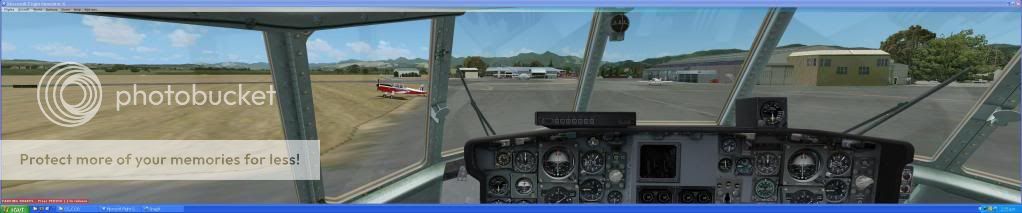
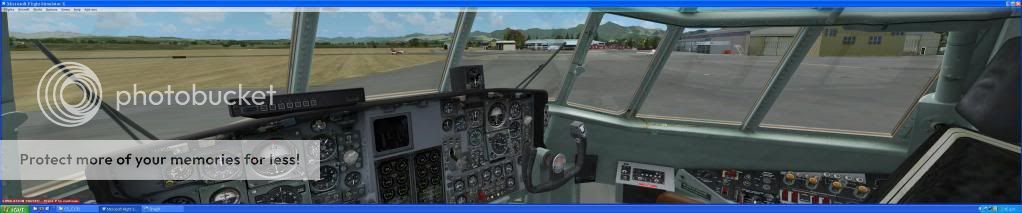
Here is a full size look
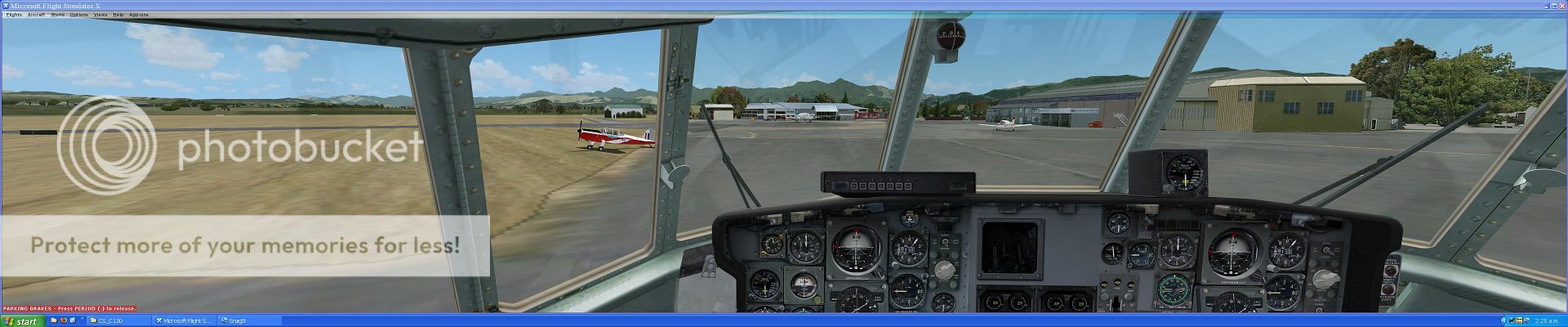
Doug
Here are a couple of pics of full 3 monitor width.
Here is a full size look
Doug
Last edited by dbcunnz on Sun Aug 15, 2010 9:24 pm, edited 1 time in total.

-


dbcunnz - NZFF Pro
- Joined: Thu Feb 21, 2008 12:56 pm
- Posts: 4016
- Location: Blenheim New Zealand
by mfraser » Sun Aug 15, 2010 9:25 pm
IslandBoy77 wrote:QUOTE (IslandBoy77 @ Aug 15 2010, 08:37 PM) <{POST_SNAPBACK}>Interesting comment about the nVidia vs ATI. I'm using the ATI HD5750 - it easily beat my old 8800GTX, and for half the price. If you really want to know the "best" card to buy, you'll prob have to do some serious digging and find out exactly how things all stack up. But from my experience, the ATI's still represent better value for money and more stable drivers. As with all things computer-related, though, you'll always find "exceptions" to any "rule" - which makes things that much harder to definitively settle in one's mind...
I know....... I've read similar posts and thought the exact same thing myself...... I totally agree with the 'bang for buck' and I'm hoping I can sort out its issues because I'm still using it for simming on the "family" pc!!
Doug - nice screens........... I can't wait to get mine up and running now!!!
- mfraser
- Sim-holic
- Joined: Sun May 04, 2008 4:23 pm
- Posts: 537
- Location: Auckland, New Zealand
by mfraser » Sun Aug 15, 2010 11:19 pm
tdale wrote:QUOTE (tdale @ Aug 15 2010, 10:47 PM) <{POST_SNAPBACK}>Tks Doug
SOLD!
Now I need to locate a LCD with small bezel and 1680 x 1050
That's what I'm doing too!! Plus 2ms response rates and at least 50,000:1 contrast.....
I get 10% off Dell prices through work so that's why I'm primarily looking at them. The price difference between 22" and 23" widescreens is negligable, so I'm looking at 23".
I'd be interested to know your monitor short list............
- mfraser
- Sim-holic
- Joined: Sun May 04, 2008 4:23 pm
- Posts: 537
- Location: Auckland, New Zealand
by tdale » Sun Aug 22, 2010 1:14 pm
Hi all
DBcunnz I am having trouble locating 3 1680x1050 monitors, I may go for 3 x 19" at 1280x1024.
How have you found the frame rate, or more importantly the smoothness when moving from 1 screen to 3?
I have an i7 920 at 3.4Ghz, 6Gb DDR3 memory and GTX 260 896Mb video.
I dont mind the THD2GO + 3 screen cost too much but I'd be disappointed if I then had smoothness issues to accept. Id almost be tempted to get a 24" 1920x1080 screen and upgrade to a GTX 480. I'd then get an extra 14% view and a better video. Is that 14% extra res going to give me a 14% more FOV, i.e. more view left and right? Im not at home so cannot test.
Cheers all and thanks
DBcunnz I am having trouble locating 3 1680x1050 monitors, I may go for 3 x 19" at 1280x1024.
How have you found the frame rate, or more importantly the smoothness when moving from 1 screen to 3?
I have an i7 920 at 3.4Ghz, 6Gb DDR3 memory and GTX 260 896Mb video.
I dont mind the THD2GO + 3 screen cost too much but I'd be disappointed if I then had smoothness issues to accept. Id almost be tempted to get a 24" 1920x1080 screen and upgrade to a GTX 480. I'd then get an extra 14% view and a better video. Is that 14% extra res going to give me a 14% more FOV, i.e. more view left and right? Im not at home so cannot test.
Cheers all and thanks
- tdale
- Member
- Topic author
- Joined: Wed Mar 19, 2008 9:46 pm
- Posts: 37
by mfraser » Sun Oct 24, 2010 9:33 pm
A question for Doug and any other users of TripleHead2Go...........
I now have 3x 22" LG2261VP widescreen LCD's. I'm running FS9 in widescreen/Nvidia surround through 2x GTX460's in SLI but I'm having MASSIVE stability problems. The graphics drivers keep shutting down, blanking the screens, and then recovering. Or in the worst case scenario, they're crashing completely and just hanging the system!! Not cool!!
I'm curious to know what refresh rate the TH2GO is running your 22" widescreen LCD's at........... mine won't support 59mHz which is one of the footnotes on the Matrox website - 60mHz would be fine though..........
It seems a shame to have to buy yet another component to get this simpit up and running, but I don't think I can wait for Nvidia to mature their drivers. I just want to FLY gosh darn it!! So I'm thinking about getting a TH2GO on a single GTX460 and using the other one in the family PC. I'd be interested to know your thoughts (Pity I can't grab one to test!!)..........
Any help would be appreciated!!
Cheers - MAT
I now have 3x 22" LG2261VP widescreen LCD's. I'm running FS9 in widescreen/Nvidia surround through 2x GTX460's in SLI but I'm having MASSIVE stability problems. The graphics drivers keep shutting down, blanking the screens, and then recovering. Or in the worst case scenario, they're crashing completely and just hanging the system!! Not cool!!
I'm curious to know what refresh rate the TH2GO is running your 22" widescreen LCD's at........... mine won't support 59mHz which is one of the footnotes on the Matrox website - 60mHz would be fine though..........
It seems a shame to have to buy yet another component to get this simpit up and running, but I don't think I can wait for Nvidia to mature their drivers. I just want to FLY gosh darn it!! So I'm thinking about getting a TH2GO on a single GTX460 and using the other one in the family PC. I'd be interested to know your thoughts (Pity I can't grab one to test!!)..........
Any help would be appreciated!!
Cheers - MAT
- mfraser
- Sim-holic
- Joined: Sun May 04, 2008 4:23 pm
- Posts: 537
- Location: Auckland, New Zealand
by dbcunnz » Sun Oct 24, 2010 10:08 pm
mfraser wrote:QUOTE (mfraser @ Oct 24 2010, 10:33 PM) <{POST_SNAPBACK}>A question for Doug and any other users of TripleHead2Go...........
I now have 3x 22" LG2261VP widescreen LCD's. I'm running FS9 in widescreen/Nvidia surround through 2x GTX460's in SLI but I'm having MASSIVE stability problems. The graphics drivers keep shutting down, blanking the screens, and then recovering. Or in the worst case scenario, they're crashing completely and just hanging the system!! Not cool!!
I'm curious to know what refresh rate the TH2GO is running your 22" widescreen LCD's at........... mine won't support 59mHz which is one of the footnotes on the Matrox website - 60mHz would be fine though..........
It seems a shame to have to buy yet another component to get this simpit up and running, but I don't think I can wait for Nvidia to mature their drivers. I just want to FLY gosh darn it!! So I'm thinking about getting a TH2GO on a single GTX460 and using the other one in the family PC. I'd be interested to know your thoughts (Pity I can't grab one to test!!)..........
Any help would be appreciated!!
Cheers - MAT
Hi Mat I am only using one video card a nvidia 9800GTX and did have the graphics drivers shutting down once or twice on an earlier version driver but I have updated the drivers a couple of times since then and had no more problems.
Doug
-
dbcunnz - NZFF Pro
- Joined: Thu Feb 21, 2008 12:56 pm
- Posts: 4016
- Location: Blenheim New Zealand
by mfraser » Sun Oct 24, 2010 11:02 pm
dbcunnz wrote:QUOTE (dbcunnz @ Oct 24 2010, 11:08 PM) <{POST_SNAPBACK}>Hi Mat I am only using one video card a nvidia 9800GTX and did have the graphics drivers shutting down once or twice on an earlier version driver but I have updated the drivers a couple of times since then and had no more problems.
Doug
Cool, thanks for that. I've run the Matrox TH2GO compatibility wizard and it says my FS PC can run 5040x1050 @ 59mHz which is great!! Its slightly less than the 5760x1080 I can run with Nvidia Surround, but right now I'm willing to sacrifice it for stability!!
Cheers again - MATLast edited by mfraser on Sun Oct 24, 2010 11:02 pm, edited 1 time in total.
- mfraser
- Sim-holic
- Joined: Sun May 04, 2008 4:23 pm
- Posts: 537
- Location: Auckland, New Zealand
by mfraser » Wed Oct 27, 2010 9:34 am
dbcunnz wrote:QUOTE (dbcunnz @ Oct 24 2010, 11:08 PM) <{POST_SNAPBACK}>Hi Mat I am only using one video card a nvidia 9800GTX and did have the graphics drivers shutting down once or twice on an earlier version driver but I have updated the drivers a couple of times since then and had no more problems.
Hey again Doug - can you tell me how hot the TH2GO box gets when it runs?? I'm sure its not an issue really but I'm curious to know.....
Cheers,
Mat
- mfraser
- Sim-holic
- Joined: Sun May 04, 2008 4:23 pm
- Posts: 537
- Location: Auckland, New Zealand
by dbcunnz » Wed Oct 27, 2010 2:31 pm
mfraser wrote:QUOTE (mfraser @ Oct 27 2010, 10:34 AM) <{POST_SNAPBACK}>Hey again Doug - can you tell me how hot the TH2GO box gets when it runs?? I'm sure its not an issue really but I'm curious to know.....
Cheers,
Mat
I am only running one monitor through it at the moment and it is cold I will check it again when I boot up my FSX and have the three monitors running and post you the answer again here.
DougLast edited by dbcunnz on Wed Oct 27, 2010 5:13 pm, edited 1 time in total.
-
dbcunnz - NZFF Pro
- Joined: Thu Feb 21, 2008 12:56 pm
- Posts: 4016
- Location: Blenheim New Zealand
by dbcunnz » Wed Oct 27, 2010 5:16 pm
Just run three monitors for 2 hours and TH2GO box is only just warm about 20 - 25C
Done a low flight down through the Buller gorge in the Cub will post some pics latter
Doug
Done a low flight down through the Buller gorge in the Cub will post some pics latter
Doug
-
dbcunnz - NZFF Pro
- Joined: Thu Feb 21, 2008 12:56 pm
- Posts: 4016
- Location: Blenheim New Zealand
by mfraser » Wed Oct 27, 2010 7:04 pm
dbcunnz wrote:QUOTE (dbcunnz @ Oct 27 2010, 06:16 PM) <{POST_SNAPBACK}>Just run three monitors for 2 hours and TH2GO box is only just warm about 20 - 25C
Cool and thanks heaps! I really appreciate your help with that!!
- mfraser
- Sim-holic
- Joined: Sun May 04, 2008 4:23 pm
- Posts: 537
- Location: Auckland, New Zealand
by hoki1185 » Wed Dec 01, 2010 5:17 pm
I am finally going to go with the tripleheadtogo digital version.Could anyone please advise the 3 monitors I should go for i.e specs and availability retail in NZ or mail order through Dell.Thanks,Ian.
- hoki1185
- Forum Addict
- Joined: Thu Aug 14, 2008 3:32 pm
- Posts: 236
24 posts
• Page 1 of 2 • 1, 2
Who is online
Users browsing this forum: No registered users and 25 guests