Hi Pete
I will point you to this post to have a look at as well:
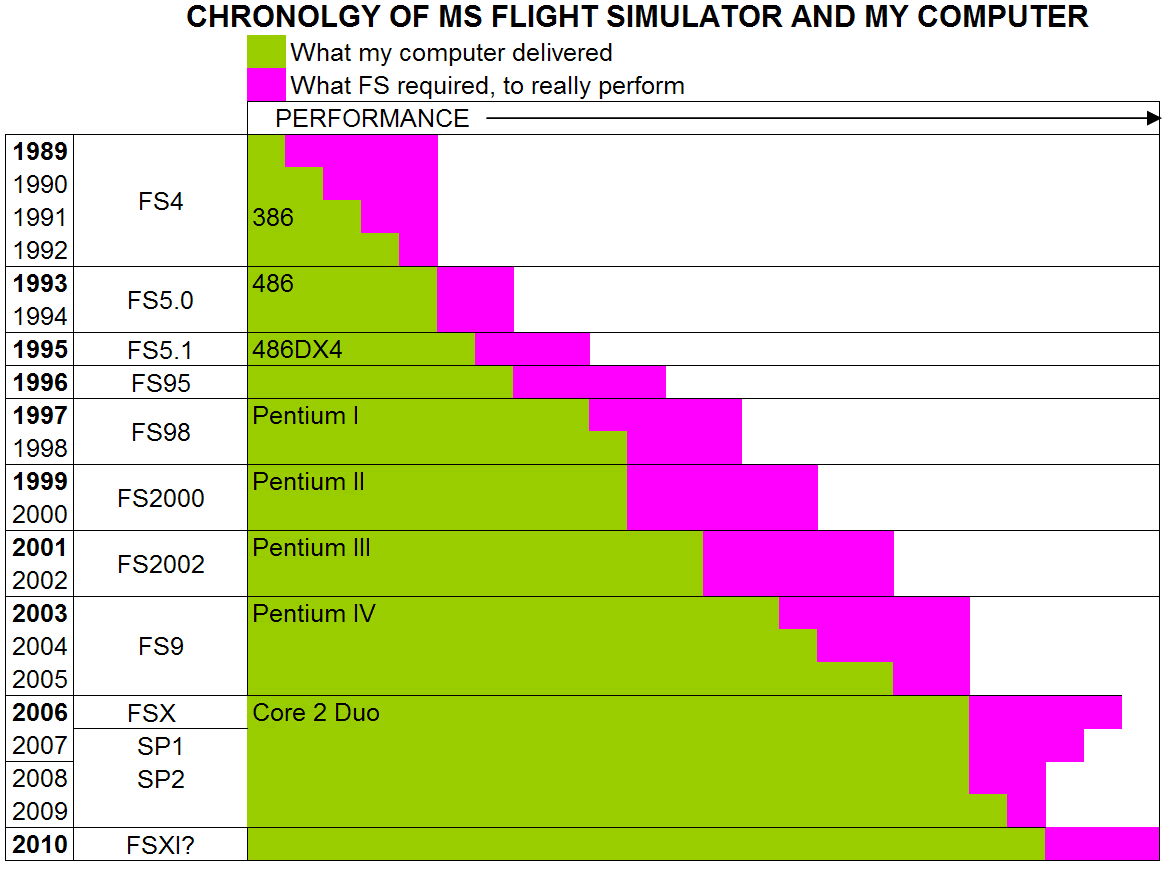
http://nzff.org/forum/viewtopic.php?t=...p;#entry8268397The thing of it is that FSX is one of the most intensive programs you can run on a PC, alongside heavy-end games like Crysis, CAD & video editing. To that end, if you want to have lots of eye-candy, hi resolution and good frame rates, you need the horse-power to make it happen. Of course it's possible to run FSX on the minimum specs that Microsoft lists on the box: so long as you want muddy, boring scenery and stuttering images (with the risk of the dreaded 'slide show' effect if the PC is just overworked). If you are one of those who simply can't cut the dollars free to get a high-end PC, you will have to settle for something 'in the middle' and get performance in line with that.
In terms of importance, it always goes in descending order like this: CPU, RAM, Graphics Card, Hard Drive, Motherboard (although arguably the motherboard is still very important, it's just the least of the 5)
So, since FSX is a 3D environment renderer, and since such is just a stack of very complex mathematical calculations computed repeatedly every micro-second, one needs a CPU that can crunch through the numbers as fast as possible (at the end of it all, a PC is nothing more than a glorified calculator anyway). Both Intel & AMD CPUs do identical jobs - one just has to decide if one wants to pay a 15-30% dollar premium for Intel or not. I went Intel for my current FSX rig and have been very disappointed with the results. Does the chip still do what it has to do? Yes. Was it worth the extra $100-odd over the equivalent AMD of the day (18 month's ago): No. The 'gurus' and those who feel the need to defend their purchasing decisions

will always swear black & blue that Intel is the only way to go blah blah blah. That is a lie. Intel does have more powerful CPUs than AMD - and they are priced accordingly. Are the AMD CPUs still capable of delivering a very good performance on FSX? Yes. The rule here is just spend as much as you can possibly afford, and then go 1 more model up...
Now that you have a kick-ass CPU, you need somewhere for it to 'lay out' all that stuff that it is processing so it can get it to the graphic card and then your screen - enter the RAM. I haven't done a heap of research on what the 'ideal' or 'maximum' is for RAM on FSX, but I can say from experience that 8GB yields about a 5-7 point increase in frame rates over 4GB where everything else is equal. It would pay to ask some hard questions on a technical forum (perhaps the FS Developer one?) to see if anyone actually knows what the ideal amount of RAM is for FSX, and whether it has an upper limit. In theory, more RAM (say, 16GB) should always be better, as the amount of data that is produced in rendering a 3D environment is huge. Therefore, provided FSX is able to make use of very large amounts of RAM (more than 8GB - which of course seems huge now but won't be in 2 years), one should just bung as much in there as money will allow. And since we want fast flow-through of data from the CPU to the RAM to avoid bottle-necking, you want at least 1600MHz speed DDR3 RAM (good stuff too like Kingston or Corsair) and with the highest CL rating you can get.
Next is one of the hottest points of contention in simming next to the Intel / AMD debate - graphics card. Now that you've got a cranking CPU and plenty of RAM for it to assemble your 3D environment, you need to get it up onto the screen as quickly and beautifully as possible - enter the graphics card. The nVidia vs ATI debate will rage on for some time I imagine: I've used both myself, and have always been disappointed with the relatively lack-lustre performance of the nVidias that cost more than a roughly equivalent ATI. I'm on ATI at the moment, and plan to stay there for the time being - I save myself 5-10% in dollars, use less electricity, and still get pretty good frame-rates. The short of this conversation is that you want to be spending $300-$500 in this department. Unlike the CPU & RAM, though, there is such a thing as spending too much on a graphics card. That's not to say that the $1500-$2000 models won't turn in blazing performance, it's just that in terms of value for money, they certainly won't yield a 400-600% increase in frame rates. Apparently the 'cards to get' for nVidia are the 470 & 480, where for ATI the least you want is an HD5770, preferably an HD5830. There is a major change on the way for ATI, with the imminent release of their 6000 series. Naturally, the 1st 3-6 months of their life will be expensive, so you need to decide now if you're happy to hang on to a 5000 series card for, say 9-12 months and then go to a 6000, or wait a few months until the bleeding-edgers have taken the full brunt of inflated prices and save yourself a few bucks (knowing of course that the prices will drop further as the weeks pass by). As is often the case with computer gear, you will find that hardware in certain price brackets are generally well-spec'd (or similarly spec'd). To that end, my $300-$500 bracket for the graphic cards will yield you a card with good specs to get decent frame rates in FSX. Generally, such a card will be 1GB of GDDR5 RAM - and all the rest of the specs will simply vary according to model and where in the range of dollars they sit. It would pay to go here
http://www.gpureview.com/ once you've settled on a couple of possible options: you can compare 2 cards side by side and see how they stack up. Remember that general gaming reviews of graphics cards are good, but unless they specifically have bench-marked FSX, the results will be somewhat 'out'. That being said, how well a card runs Crysis is often a fair indicator of good FSX performance.
Hard drives are also important, as they are the weakest link in the chain. By comparison to the other 3 categories, a hard drive is a car vs a fighter jet scenario. The very least you want to do for best performance is 2 x SATA3 64MB cache hard drives: 1 for Windows & general apps, 1 for FSX and all add-ons. FSX has to refer to the hard drive frequently for new data, especially where there are airports & other 'custom' objects, so you want the lag time between when the CPU calls for it and the hard drive can spit it out to be the lowest possible. The cache size on a hard drive is important - it is a small RAM 'anteroom' that allows data to be queued while it waits for the hard drive to get it's a into g. Ergo, bigger cache = faster performance. The interface on the drive is also important - we're now onto SATA3 which is theoretically capable of 600MB/sec. Of course, SATA2 was capable of 300MB/sec, but I've never seen anything even half that fast. I'm not sure why there is such a problem getting the good transfer rates - whether it's Windows or a driver problem - but it would still pay to have the hardware sorted in case 'they' ever get it sorted. There are SSD 'hard drives' - they have a massive variance in performance depending on price, but are typically much faster in real-world operation to their 'platter' mechanical cousins. If you opt to spend money here - and at this stage it gives a reasonable boost but not especially good in terms of bang for buck - you want a drive that is delivering at
least 200MB/sec to make it worth wasting the money. Bear in mind that SSDs are smaller in capacity than platter HDDs, but you wouldn't want anything less than a 64GB drive. If you plan to have masses of world-wide scenery, you're going to need at least a 128GB, possibly a 256GB. But if you're like me and plan to stay mainly with Aus / NZ & the various add-on sceneries for them, you should be able to get by with a 64GB SSD. A word of warning here: HDDs need defragging, SSDs apparently should NEVER be defragged.
Last on our list is the motherboard. The variables to consider here are has it got these:
- SATA3
- USB3
- 4 Banks of RAM slots (so you can buy smaller sizes of RAM that are cheaper i.e. cheaper to buy 4 x 2GB than 2 x 4GB)
- Max 16GB RAM (at least)
- DDR3 1600MHz (not overclocked), pref 2000MHz
- ATX form factor (you'll probably find that the mATX boards scrimp in places, esp with RAM slots)
Technically, if you are going with an Intel CPU you're better to go with an nVidia graphic card, as Intel-based motherboards tend to have nVidia chipsets. The same is true with AMD / ATI. Having said that, I don't have any real-world data or comparisons available to determine whether the theory actually makes any difference. As an aside, this is one of the things that really gets my goat with many who pontificate about Intel vs AMD & nVidia vs ATI: unless one can actually build identical systems, or swap parts in existing rigs (like swapping a similarly-priced or spec'd ATI for an nVidia) to see the actual real-world results, any high-horsing about Intel + nVidia actually providing better ROI is bollocks. I'd even question many of the actual levels of reported performance, as no 2 systems are identical, nor are any 2 Windows / FSX installations identical, nor are usage patterns nor expectations. To-whit, I've seen people post pics here and have others rave at how fantastic they look, and I'm sitting here thinking
"man, that's average - look at the jaggies on the edge or basic scenery or...": one person's treasure can be another's trash, and visa versa.
Your final considerations I didn't list above, but are no less important: a good quality 600W (at least) power supply and a physical case that can take an ATX-sized motherboard & the large length of higher-end graphic cards.
I've noted that some people here at NZFF have tweaked the living daylights out of their FSX installation, and are able to 'get by' with more modest systems than others. That tells me that if you spend enough time farting about 'under the hood', many things are possible in terms of performance. That being said, I think it's better to start with a 4 or 6 cylinder engine and tweak up to a 5 or 7 (were that possible - analogy only, you understand...), rather than start with a 3 or 5 and go 'up' to where it should be. Simming is always going to be a very 'intensive' application of computer hardware, and I don't think I'll ever see the day when I hear someone say
"Gee, I wish I'd spent less money on my FSX rig"...

Remember, it's pretty much always cheaper to build in more stuff to your rig now, rather than replacing a component in 6 month's time (as you get low re-sell value on the component PLUS to cost of the new one). The only possible exception to this is RAM, but only in terms of adding more, not removing smaller capacities and replacing them with bigger ones.
Well, there's $55 worth of free advice for you (an hour's worth of my time at no charge...) - I hope it gets you on the track you want to be on.
Cheers
Peter
 Posted: Tue Oct 12, 2010 9:39 pm




 Is the Auzentech Prelude ok? I hope so