Is it enough ?

The place to ask for help or solve each others technical issues and discuss hardware

Postby Splitpin » Wed Dec 01, 2010 1:06 pm

After seeing VLC on another system again, Im really wanting to get into some VFR flying (read, screens) but Im not sure if this system will run it.
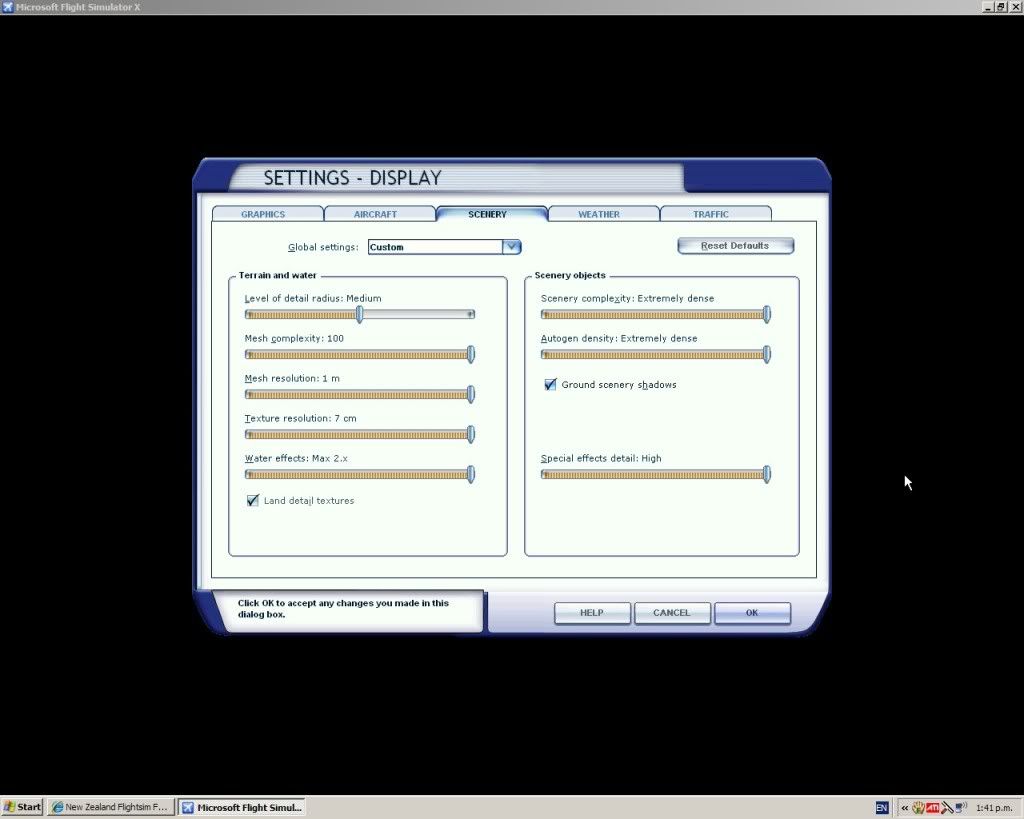
At the moment i can have the sliders set as per the screen shot.....and get ...not to bad frame rates (over land), but its the awfull default.... and real good frame rates in cloud or over water.I dont use traffic.

Im just a bit tired of all the cloud scapes (as you must be) .....so if i buy VLC, what other bits and pieces will i also need.? I have some of Robins early work but its really for FS2002/04! so i guess that will need upgradeing as well.

I think Im in for a new graphics card anyway. I know this has come up before, but i just need some grass roots info....Im easily blinded by science these days, so i cant get my head around to much tech stuff.

My system info is (dont laugh)

XP Home SP3
Celeron 2.66 brain
2gb RAM
ATI X1650 512MB card
Mother board is an ASUS MXP.....something.
I can run Mikes samples nicely...and i have some Samsoft (asian) landclass and mesh that works ok.....but i want to fly at home sad.gif


Cheers
User avatar
Splitpin
NZFF Pro
 
Topic author
Joined: Mon Aug 03, 2009 12:15 pm
Posts: 21332
Location: Christchurch NZ

Postby Ian Warren » Wed Dec 01, 2010 1:11 pm

Marty , I would say you would have a problem at all , sliders to just and a configuration switch .
Image
User avatar
Ian Warren
NZFF Pro
 
Joined: Fri May 05, 2006 5:23 pm
Posts: 41187
Location: AREA 51

Postby IslandBoy77 » Wed Dec 01, 2010 1:30 pm

Hey Marty
VLC will run fine on your system with no changes as far as I'm aware. As an overall improvement on your system - without breaking the bank - you really want to get off that Celeron: they are the "2-strokes" of the CPU world - you want a proper Pentium 4. It you download the CPU-Z program from here http://www.filehippo.com/download_cpuz/ and run it, and tell me what the proper motherboard model # is (under the Mainboard tab), I'll figure out what the best CPU is for your motherboard. Also, I'd seriously consider 3GB of RAM - I'll check if your board can do it once I know what it is. You'll need to click on the SPD tab, then the down arrow under Memory Slot Selection and let me know how many slots are on the board and how much is in each one. plane.gif
User avatar
IslandBoy77
Senior Member
 
Joined: Tue Feb 03, 2009 2:23 pm
Posts: 1020
Location: Napier, New Zealand

Postby Splitpin » Wed Dec 01, 2010 2:39 pm

IslandBoy77 wrote:
QUOTE (IslandBoy77 @ Dec 1 2010, 02:30 PM) <{POST_SNAPBACK}>
Hey Marty
VLC will run fine on your system with no changes as far as I'm aware. As an overall improvement on your system - without breaking the bank - you really want to get off that Celeron: they are the "2-strokes" of the CPU world - you want a proper Pentium 4. It you download the CPU-Z program from here http://www.filehippo.com/download_cpuz/ and run it, and tell me what the proper motherboard model # is (under the Mainboard tab), I'll figure out what the best CPU is for your motherboard. Also, I'd seriously consider 3GB of RAM - I'll check if your board can do it once I know what it is. You'll need to click on the SPD tab, then the down arrow under Memory Slot Selection and let me know how many slots are on the board and how much is in each one. plane.gif


Pete,what a great little file....anyway it told me this:
Asus P5VDC-MX AGP
Ram is DDR2
2 SLOTS @ 1024 MB each....thats odd, because there are 4 slots on the board...2 blue and 2 yellow....the ram is in the yellow slots.

Hope that helps.....thanks very much.
User avatar
Splitpin
NZFF Pro
 
Topic author
Joined: Mon Aug 03, 2009 12:15 pm
Posts: 21332
Location: Christchurch NZ

Postby IslandBoy77 » Wed Dec 01, 2010 2:52 pm

Splitpin wrote:
QUOTE (Splitpin @ Dec 1 2010, 03:39 PM) <{POST_SNAPBACK}>
Pete,what a great little file....anyway it told me this:
Asus P5VDC-MX AGP
Ram is DDR2
2 SLOTS @ 1024 MB each....thats odd, because there are 4 slots on the board...2 blue and 2 yellow....the ram is in the yellow slots.

Hope that helps.....thanks very much.

Cool - ta. Yep, she's a great little util: very handy.

Ok, so you're at max ram now: 2GB. The reason you've got 4 slots is that the 2 blue ones are for good old DDR 400 only. So, you can have either 2 x 1GR DDR2 800, or 2 x 1GB DDR 400, but not both.

Good news on the CPU front: you can use any socket LGA 775-class CPU so long as it has a 800MHz FSB (FSB = Front Side Bus). So, have a scrounge around TradeMe and see if you can scoop up a P4 3.4Ghz or similar. I know they're around - I've seen them, and even purchased a couple. Be ready to pay around $80-$110 for one without heatsink or fan. Your current H/S + fan should be fine, but if you find a 3.4Ghz that comes with it's own, certainly take it. Make sure whoever you buy from will give you at least a DOA warranty and has good FB - pref someone whos been trading for a few years. You want to ask (unless they state):
- Any bent pins?
- Any known or suspected issues?
- Will they give a DOA guarantee?

You could go with a Pentium D, but I'm fairly sure that the Pentium 4 LGA 775's are more powerful that their "D" older brothers. Having said that, the D's have a 4MB L2 cache, so it might be worth looking further into that... see what you come up with, anyway.

Have fun!

EDIT: Here's the link to your motherboard if you're interested: http://www.asus.co.nz/product.aspx?P_ID=Wv3U3hfa7ZbODqSr
Last edited by IslandBoy77 on Wed Dec 01, 2010 2:58 pm, edited 1 time in total.
User avatar
IslandBoy77
Senior Member
 
Joined: Tue Feb 03, 2009 2:23 pm
Posts: 1020
Location: Napier, New Zealand

Postby Ian Warren » Wed Dec 01, 2010 2:54 pm

Pete , would it not be better to run 4GB ? I no XP only uses 3 , but have full use off the RAM 2x2 is better for FS - is it not ?.
Image
User avatar
Ian Warren
NZFF Pro
 
Joined: Fri May 05, 2006 5:23 pm
Posts: 41187
Location: AREA 51

Postby Splitpin » Wed Dec 01, 2010 2:56 pm

Thank you master......i will let you know what i find, and run it by you before i buy anything.
Cheers Pete thumbup1.gif

marty
User avatar
Splitpin
NZFF Pro
 
Topic author
Joined: Mon Aug 03, 2009 12:15 pm
Posts: 21332
Location: Christchurch NZ

Postby IslandBoy77 » Wed Dec 01, 2010 3:53 pm

Ian Warren wrote:
QUOTE (Ian Warren @ Dec 1 2010, 03:54 PM) <{POST_SNAPBACK}>
Pete , would it not be better to run 4GB ? I no XP only uses 3 , but have full use off the RAM 2x2 is better for FS - is it not ?.

Hey Ian
Yes, it would be. But his motherboard can only take a maximum of 2GB total. Even if it would allow him to run DDR & DDR2 at the same time (which it won't, and I'd be surprised if any motherboard would attempt such), it would still limit him to 2GB. A bummer, but a very common restriction on motherboards of that era. People are running up against that same problem now with 4GB wanting to go to 8GB. And in a couple of year's time, we'll see that again with those wanting to go through to 16GB. It's not that there haven't always been motherboards around that have high memory limits, it's just that those boards are generally $200+ (and in days gone by, a lot more than that), and most people won't pay the extra - or may not even know there is an option. I guess that's what one gets if one shops on price...
Last edited by IslandBoy77 on Wed Dec 01, 2010 3:54 pm, edited 1 time in total.
User avatar
IslandBoy77
Senior Member
 
Joined: Tue Feb 03, 2009 2:23 pm
Posts: 1020
Location: Napier, New Zealand

Postby Splitpin » Thu Dec 02, 2010 9:41 am

Pete , am i looking at the right thing?

http://www.trademe.co.nz/Computers/Compone...n-336109712.htm
User avatar
Splitpin
NZFF Pro
 
Topic author
Joined: Mon Aug 03, 2009 12:15 pm
Posts: 21332
Location: Christchurch NZ

Postby IslandBoy77 » Thu Dec 02, 2010 9:51 am

Yep, that's the sort of thing you're after. Also, I just remembered - the LGA775's don't have any pins, so don't ask about that. If you can find a 3.2 or 3.4GHz, that would be better than the 3 in the link. Still, even that 3 is better than what you have.
User avatar
IslandBoy77
Senior Member
 
Joined: Tue Feb 03, 2009 2:23 pm
Posts: 1020
Location: Napier, New Zealand

Postby Splitpin » Thu Dec 02, 2010 9:54 am

IslandBoy77 wrote:
QUOTE (IslandBoy77 @ Dec 2 2010, 10:51 AM) <{POST_SNAPBACK}>
Yep, that's the sort of thing you're after. Also, I just remembered - the LGA775's don't have any pins, so don't ask about that. If you can find a 3.2 or 3.4GHz, that would be better than the 3 in the link. Still, even that 3 is better than what you have.

Cheers Pedro . winkyy.gif ...I'll keep looking...I'll pm you if i have any problems.
Thanks for the help.
User avatar
Splitpin
NZFF Pro
 
Topic author
Joined: Mon Aug 03, 2009 12:15 pm
Posts: 21332
Location: Christchurch NZ

Postby AlisterC » Thu Dec 02, 2010 10:17 pm

I can't believe you run your sliders why up there! biggrin.gif Wow.. I run mine like this, on a set up not much better than yours (I have a Core 2 Duo, 4gb of Ram on XP, and have a 512 7950GT graphics card. And I get 30 fps pretty much everywhere on FSX smile.gif And, it still looks good. My water setting is the best I find to still look good, yet not have an FPS drop, and same applies with autogen, which I find particularly tough on fps rates.


Image
User avatar
AlisterC
NZFF Pro
 
Joined: Thu Jul 20, 2006 11:13 am
Posts: 2543
Location: Nelson, NZ

Postby IslandBoy77 » Fri Dec 03, 2010 8:21 am

AlisterC wrote:
QUOTE (AlisterC @ Dec 2 2010, 11:17 PM) <{POST_SNAPBACK}>
I can't believe you run your sliders why up there! biggrin.gif Wow.. I run mine like this, on a set up not much better than yours (I have a Core 2 Duo, 4gb of Ram on XP, and have a 512 7950GT graphics card. And I get 30 fps pretty much everywhere on FSX smile.gif And, it still looks good. My water setting is the best I find to still look good, yet not have an FPS drop, and same applies with autogen, which I find particularly tough on fps rates.

What res are you running your screen at?
User avatar
IslandBoy77
Senior Member
 
Joined: Tue Feb 03, 2009 2:23 pm
Posts: 1020
Location: Napier, New Zealand

Postby AlisterC » Fri Dec 03, 2010 12:49 pm

1280 x 1024
Not widescreen. (19inch LCD)
Last edited by AlisterC on Fri Dec 03, 2010 1:00 pm, edited 1 time in total.
Image
User avatar
AlisterC
NZFF Pro
 
Joined: Thu Jul 20, 2006 11:13 am
Posts: 2543
Location: Nelson, NZ

Postby IslandBoy77 » Fri Dec 03, 2010 2:28 pm

Yep, sounds about right then. I'm running mine at 1920 x 1080 and find I have to (at the moment - still got mobo probs so haven't been able to see effect of SSD in system yet) have my sliders at about what you've got or less on a Quad 2.6Ghz system with 8GB RAM. If I run it back to to res you're using, I can max the sliders out pretty much. Still, great that you can get a good look on your system, and 1280 x 1024 is still pretty good res. thumbup1.gif plane.gif
Last edited by IslandBoy77 on Fri Dec 03, 2010 2:29 pm, edited 1 time in total.
User avatar
IslandBoy77
Senior Member
 
Joined: Tue Feb 03, 2009 2:23 pm
Posts: 1020
Location: Napier, New Zealand

Postby Splitpin » Fri Dec 03, 2010 2:33 pm

unsure.gif I just pushed them up there and took off.....but i can heat the whole house from my pc winkyy.gif
User avatar
Splitpin
NZFF Pro
 
Topic author
Joined: Mon Aug 03, 2009 12:15 pm
Posts: 21332
Location: Christchurch NZ

Postby IslandBoy77 » Fri Dec 03, 2010 2:38 pm

Splitpin wrote:
QUOTE (Splitpin @ Dec 3 2010, 03:33 PM) <{POST_SNAPBACK}>
.....but i can heat the whole house from my pc winkyy.gif

laugh.gif
User avatar
IslandBoy77
Senior Member
 
Joined: Tue Feb 03, 2009 2:23 pm
Posts: 1020
Location: Napier, New Zealand

Postby Ian Warren » Fri Dec 03, 2010 2:50 pm

Splitpin wrote:
QUOTE (Splitpin @ Dec 3 2010, 03:33 PM) <{POST_SNAPBACK}>
.....but i can heat the whole house from my pc winkyy.gif

Yip all you need is a blazing fire for your desktop screen , be so perfect , 'my place problem ' i d burn the place down tongue.gif
Image
User avatar
Ian Warren
NZFF Pro
 
Joined: Fri May 05, 2006 5:23 pm
Posts: 41187
Location: AREA 51

Postby AlisterC » Fri Dec 03, 2010 2:56 pm

Interesting you talk about heat.. laugh.gif
I had a problem with both FS9 and FSX in the last couple of months. Both sims were fine in winter however (big clue!). So I checked my GPU and CPU chip temperatures. Both through the roof. The sims would run fine for about 5 minutes max, before frame rates really struggled.
On the one hand I turned down my AA setting from "Super-sampling" to "combined" on Nhancer. That made a big difference to the workload of the graphics card (mine is low end now!) and dropped the heat it was making. Yet the sim still looks good!
Also I found my CPU fan had come loose and wasn't sitting tightly on. That resulted in CPU temps of 87 deg C running the sim (both CPU cores). I am thinking those temperatures might have caused the CPU to slow down and protect itself.
I've since resecured the fan, and moved my case to get some more air.
And what a performance difference it makes winkyy.gif Just goes to show sometimes slow downs aren't always caused by sliders I guess laugh.gif
Last edited by AlisterC on Fri Dec 03, 2010 3:05 pm, edited 1 time in total.
Image
User avatar
AlisterC
NZFF Pro
 
Joined: Thu Jul 20, 2006 11:13 am
Posts: 2543
Location: Nelson, NZ


Return to Technical Issues

Who is online

Users browsing this forum: No registered users and 5 guests