Hello fellow NZFFers,
Once again my lack of technical knowledge has led meto sk what may seem like a rather baisc question, however i wasnt 100% sure so thought i had better use somebody elses technical abilities to help me out.
A while ago now i had puchased the PMDG 1900D, then just recently i have discovred that it is missing the gauges in both 2D and VC, (my B350 is also). My question is am i able to transfer my panel and gauges from my Aeroworx B200 to both of these aircraft? (including throttle quad, Radio stack etc) and if so, can somebody please copy down a brief "how to" so i dont lose any more files un-willingly?
I am using FS9.
Thank you for your time in reading this
Kindest Regards
Transfering panels/gauges?
26 posts
• Page 1 of 2 • 1, 2
 by AlisterC » Mon Jan 24, 2011 11:58 am
have you just tried using an alias cfg for the pmdg across from the aeroworx king air? Not tried it myself, just suggesting.
I don't have my flight sim pc turned on at present, but I can provide a cfg for you late tonight if you can't do it yourself. Worth a try and the easiest method (though no promises it will work - payware things often aren't programmed to work in other aircraft other than the one it was sold with)
I don't have my flight sim pc turned on at present, but I can provide a cfg for you late tonight if you can't do it yourself. Worth a try and the easiest method (though no promises it will work - payware things often aren't programmed to work in other aircraft other than the one it was sold with)

-

AlisterC - NZFF Pro
- Joined: Thu Jul 20, 2006 11:13 am
- Posts: 2543
- Location: Nelson, NZ
by pacblue » Mon Jan 24, 2011 3:28 pm
AlisterC wrote:QUOTE (AlisterC @ Jan 24 2011, 12:58 PM) <{POST_SNAPBACK}>have you just tried using an alias cfg for the pmdg across from the aeroworx king air? Not tried it myself, just suggesting.
I don't have my flight sim pc turned on at present, but I can provide a cfg for you late tonight if you can't do it yourself. Worth a try and the easiest method (though no promises it will work - payware things often aren't programmed to work in other aircraft other than the one it was sold with)
Hey mate, that would be fantastic, greatly appreciated thank youCharl wrote:QUOTE (Charl @ Jan 24 2011, 01:47 PM) <{POST_SNAPBACK}>Not sure why you'd want to transplant panels... in FS9 the VC will not transfer, in any event.
Best to re-install the planes using the original Licensed installer
I did re-install (re-buy) from PMDG however the gauges still dont appear on both 2d and VC. instead there is just a big black circle where they should be, cheers
- pacblue
- Forum Addict
- Topic author
- Joined: Mon Jun 30, 2008 5:49 pm
- Posts: 186
- Location: just above cessna country
by AlisterC » Mon Jan 24, 2011 4:51 pm
have you deleted any of the default aircraft in your sim?
I've heard of this before I'm sure. Just a few years ago and I can't remember.
Anyway, you can try this if you like. Simply rename your PMDG 1900 panel folder to something like PANEL_BAK, and create a new folder called "panel".
Then you want to open a new notepad file, save it as panel.cfg (google how to change file name extensions in windows if you need help) and then cut and paste this into it:
[fltsim]
alias=Aeroworx Super King Air B200\Panel
That is of course providing you've not changed the default install name for the folder the Aeroworx King Air is in. And good luck, I'm not sure what sort of result you'll get!

I've heard of this before I'm sure. Just a few years ago and I can't remember.
Anyway, you can try this if you like. Simply rename your PMDG 1900 panel folder to something like PANEL_BAK, and create a new folder called "panel".
Then you want to open a new notepad file, save it as panel.cfg (google how to change file name extensions in windows if you need help) and then cut and paste this into it:
[fltsim]
alias=Aeroworx Super King Air B200\Panel
That is of course providing you've not changed the default install name for the folder the Aeroworx King Air is in. And good luck, I'm not sure what sort of result you'll get!
Last edited by AlisterC on Mon Jan 24, 2011 4:51 pm, edited 1 time in total.
-
AlisterC - NZFF Pro
- Joined: Thu Jul 20, 2006 11:13 am
- Posts: 2543
- Location: Nelson, NZ
by mfraser » Mon Jan 24, 2011 5:04 pm
Alister has the right idea - while the PMDG B1900C/D has a custom panel bitmap it actually uses the default Kingair gauges!! If you've moved or modified the default Kingair folders or gauges then that could be a source of your problems.
Hope this helps,
Mat
Hope this helps,
Mat
- mfraser
- Sim-holic
- Joined: Sun May 04, 2008 4:23 pm
- Posts: 537
- Location: Auckland, New Zealand
by pacblue » Mon Jan 24, 2011 5:32 pm
mfraser wrote:QUOTE (mfraser @ Jan 24 2011, 06:04 PM) <{POST_SNAPBACK}>Alister has the right idea - while the PMDG B1900C/D has a custom panel bitmap it actually uses the default Kingair gauges!! If you've moved or modified the default Kingair folders or gauges then that could be a source of your problems.
Hope this helps,
Mat
Hey mfraser.
That makes complete sence to me, as the default B350 also has its missing gauges, i must have played around once upon a time, any idea how i can get them back on the B350?
thank youAlisterC wrote:QUOTE (AlisterC @ Jan 24 2011, 05:51 PM) <{POST_SNAPBACK}>have you deleted any of the default aircraft in your sim?
I've heard of this before I'm sure. Just a few years ago and I can't remember.
Anyway, you can try this if you like. Simply rename your PMDG 1900 panel folder to something like PANEL_BAK, and create a new folder called "panel".
Then you want to open a new notepad file, save it as panel.cfg (google how to change file name extensions in windows if you need help) and then cut and paste this into it:
[fltsim]
alias=Aeroworx Super King Air B200\Panel
That is of course providing you've not changed the default install name for the folder the Aeroworx King Air is in. And good luck, I'm not sure what sort of result you'll get!
Thank you for your time AlisterC,
i have done that unfortunately it didnt fix it, it was a great thought though!
- pacblue
- Forum Addict
- Topic author
- Joined: Mon Jun 30, 2008 5:49 pm
- Posts: 186
- Location: just above cessna country
by Charl » Mon Jan 24, 2011 8:06 pm
So how about:
Do you have gauges in the default King Air?
If no, they can be found on your original FS9 install Disk2:
FS9\Disc2\MSGAME3.cab\Kingair.gau
Put that file in your folder
"C:\Program Files\Microsoft Games\Flight Simulator 9\Gauges"
Do you have gauges in the default King Air?
If no, they can be found on your original FS9 install Disk2:
FS9\Disc2\MSGAME3.cab\Kingair.gau
Put that file in your folder
"C:\Program Files\Microsoft Games\Flight Simulator 9\Gauges"
-

Charl - NZFF Pro
- Joined: Mon May 01, 2006 8:28 am
- Posts: 9745
- Location: Auckland
by pacblue » Mon Jan 24, 2011 9:17 pm
Charl wrote:QUOTE (Charl @ Jan 24 2011, 09:06 PM) <{POST_SNAPBACK}>So how about:
Do you have gauges in the default King Air?
If no, they can be found on your original FS9 install Disk2:
FS9\Disc2\MSGAME3.cab\Kingair.gau
Put that file in your folder
"C:\Program Files\Microsoft Games\Flight Simulator 9\Gauges"
That sounds like what im after thank you Charl. however over the years i seem to have misplaced disc 1,2 and 3, disc 4 stays in my computer religiously though.
Is there any way i could get around this?
thank you
- pacblue
- Forum Addict
- Topic author
- Joined: Mon Jun 30, 2008 5:49 pm
- Posts: 186
- Location: just above cessna country
by AlisterC » Mon Jan 24, 2011 9:18 pm
Hopefully you're all sorted now! Cheers for the help guys. I've remembered now I had this discussion with someone in another forum who was trying to install the PMDG B190 into FS2002, but because it was looking for FS2004 gauges, it had blank spots in the panel.
Cheers for the help guys. I've remembered now I had this discussion with someone in another forum who was trying to install the PMDG B190 into FS2002, but because it was looking for FS2004 gauges, it had blank spots in the panel.-
AlisterC - NZFF Pro
- Joined: Thu Jul 20, 2006 11:13 am
- Posts: 2543
- Location: Nelson, NZ
by pacblue » Mon Jan 24, 2011 10:00 pm
pacblue wrote:QUOTE (pacblue @ Jan 24 2011, 10:17 PM) <{POST_SNAPBACK}>That sounds like what im after thank you Charl. however over the years i seem to have misplaced disc 1,2 and 3, disc 4 stays in my computer religiously though.
Is there any way i could get around this?
thank you
I jus did a quick search in m fs9 gauges folder and there is no kingair.gau file, thank you for finding the problem mate, however i still cant find the FS9 disc, is tere any other way to get a copy of te applicable file?
Thank you for your time.
- pacblue
- Forum Addict
- Topic author
- Joined: Mon Jun 30, 2008 5:49 pm
- Posts: 186
- Location: just above cessna country
by Charl » Tue Jan 25, 2011 8:00 am
Probably worth investing in some new disks in case you need to re-install.
Amazon starts at $9
Amazon starts at $9
-
Charl - NZFF Pro
- Joined: Mon May 01, 2006 8:28 am
- Posts: 9745
- Location: Auckland
by pacblue » Tue Jan 25, 2011 6:27 pm
Charl wrote:QUOTE (Charl @ Jan 25 2011, 09:00 AM) <{POST_SNAPBACK}>Probably worth investing in some new disks in case you need to re-install.
Amazon starts at $9
Thank you for the help mate,
new discs ordered

- pacblue
- Forum Addict
- Topic author
- Joined: Mon Jun 30, 2008 5:49 pm
- Posts: 186
- Location: just above cessna country
by pacblue » Tue Jan 25, 2011 10:58 pm
The kingair.gau file is in the correct file now, however the panel still looks like this?
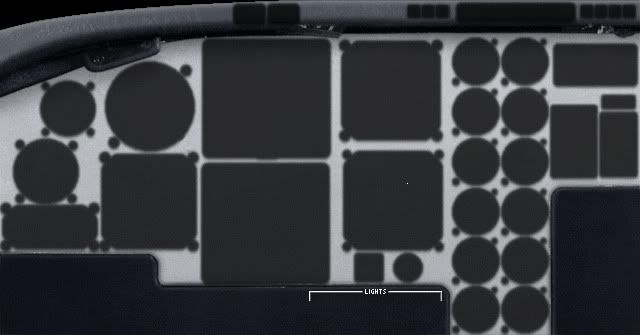
And 1900 panel still looks like this...
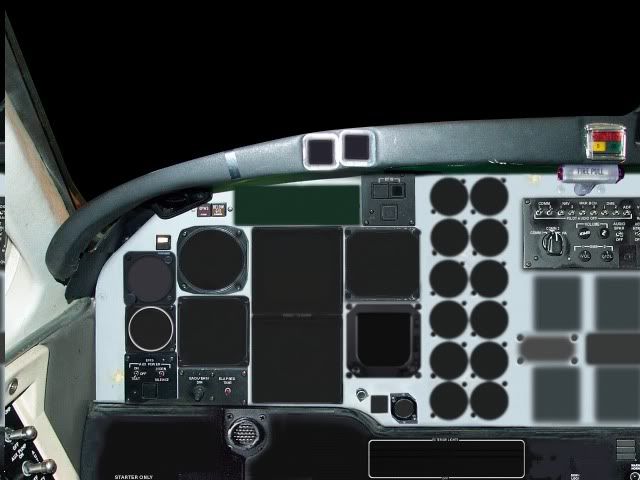
And 1900 panel still looks like this...
Last edited by pacblue on Tue Jan 25, 2011 11:05 pm, edited 1 time in total.
- pacblue
- Forum Addict
- Topic author
- Joined: Mon Jun 30, 2008 5:49 pm
- Posts: 186
- Location: just above cessna country
by Charl » Wed Jan 26, 2011 7:48 am
Sounds like the panel is not pointing to the gauges folder...
Confirm your FS folder structure looks like this:
"C:\Program Files\Microsoft Games\Flight Simulator 9\Aircraft\xxx"
with xxx the aircraft under discussion
and
"C:\Program Files\Microsoft Games\Flight Simulator 9\Gauges\xxx.gau"
And let's see the bit of your panel.cfg that describes gauges, e.g.
[Window01]
file=switchpanel_pic.bmp
size_mm=1098,499
position=6
visible=0
ident=5
gauge00=awb2006!sp1_master_sw, 59,271,221,83,sp1
gauge01=awb2006!sp1_close, 836,192,255,46,sp1
gauge02=awb2006!sp1_oxmic, 118,209,41,60,sp1
gauge03=awb2006!sp1_avionics_sw, 182,223,30,35,sp1
gauge04=awb2006!sp1_inverter_sw, 273,214,33,51,sp1
gauge05=awb2006!sp1_autoign_left_sw, 325,214,32,52,sp1
Confirm your FS folder structure looks like this:
"C:\Program Files\Microsoft Games\Flight Simulator 9\Aircraft\xxx"
with xxx the aircraft under discussion
and
"C:\Program Files\Microsoft Games\Flight Simulator 9\Gauges\xxx.gau"
And let's see the bit of your panel.cfg that describes gauges, e.g.
[Window01]
file=switchpanel_pic.bmp
size_mm=1098,499
position=6
visible=0
ident=5
gauge00=awb2006!sp1_master_sw, 59,271,221,83,sp1
gauge01=awb2006!sp1_close, 836,192,255,46,sp1
gauge02=awb2006!sp1_oxmic, 118,209,41,60,sp1
gauge03=awb2006!sp1_avionics_sw, 182,223,30,35,sp1
gauge04=awb2006!sp1_inverter_sw, 273,214,33,51,sp1
gauge05=awb2006!sp1_autoign_left_sw, 325,214,32,52,sp1
Last edited by Charl on Wed Jan 26, 2011 7:54 am, edited 1 time in total.
-
Charl - NZFF Pro
- Joined: Mon May 01, 2006 8:28 am
- Posts: 9745
- Location: Auckland
by mfraser » Wed Jan 26, 2011 2:06 pm
... or try putting the kingair.gau directly in the panel folder of the Kingair and B1900. Gauges will work from either location - being the /gauges folder in the main FS directory or the /panel folder in the aircraft directory...
Last edited by mfraser on Thu Jul 07, 2011 1:28 pm, edited 1 time in total.
- mfraser
- Sim-holic
- Joined: Sun May 04, 2008 4:23 pm
- Posts: 537
- Location: Auckland, New Zealand
by pacblue » Wed Jan 26, 2011 3:42 pm
mfraser wrote:QUOTE (mfraser @ Jan 26 2011, 03:06 PM) <{POST_SNAPBACK}>... or try putting the kingair.gau directly in the panel folder of the Kingair and B1900. Gauges will work from either location - being the /gauges folder in the main FS directory or the /panel folder in the aicraft directory...
Cheers mfraser, i did try that but to no avail unfortunately.
the mystery deepens..
- pacblue
- Forum Addict
- Topic author
- Joined: Mon Jun 30, 2008 5:49 pm
- Posts: 186
- Location: just above cessna country
by mfraser » Wed Jan 26, 2011 4:59 pm
Sorry... but I'm stumped!! I was sure that would have worked!! My only other guess would be to follow Charl's line of thought... that there's something amiss with the panel .cfg's. Otherwise a reinstall of either the aircraft or FS might be in order!!
Last edited by mfraser on Wed Jan 26, 2011 10:03 pm, edited 1 time in total.
- mfraser
- Sim-holic
- Joined: Sun May 04, 2008 4:23 pm
- Posts: 537
- Location: Auckland, New Zealand
26 posts
• Page 1 of 2 • 1, 2
Who is online
Users browsing this forum: No registered users and 5 guests