.NET framework error

The place to ask for help or solve each others technical issues and discuss hardware

Postby lowglow » Thu Jun 21, 2012 7:53 pm

Been getting this error alot lately, infact I had stopped flyinf FSX and went to play on Rise of Flight because of it.
It seems to have started after installing REX extreme2
I have also started having troble with the drop down menus freezing FSX and having to do a reboot to get out of it the follown message now always pops up when exiting FSX but I think only when I have REX wix running.
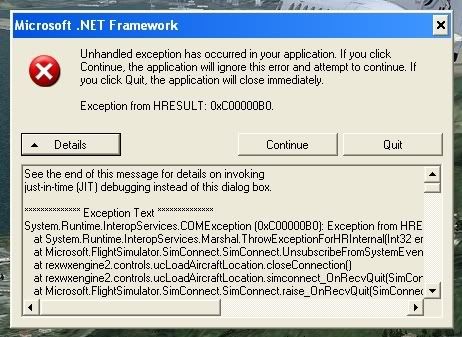


It basicly says this

See the end of this message for details on invoking
just-in-time (JIT) debugging instead of this dialog box.

************** Exception Text **************
System.Runtime.InteropServices.COMException (0xC00000B0): Exception from HRESULT: 0xC00000B0
at System.Runtime.InteropServices.Marshal.ThrowExceptionForHRInternal(Int32 errorCode, IntPtr errorInfo)
at Microsoft.FlightSimulator.SimConnect.SimConnect.UnsubscribeFromSystemEvent(Enum EventID)
at rexwxengine2.controls.ucLoadAircraftLocation.closeConnection()
at rexwxengine2.controls.ucLoadAircraftLocation.simconnect_OnRecvQuit(SimConnect sender, SIMCONNECT_RECV data)
at Microsoft.FlightSimulator.SimConnect.SimConnect.raise_OnRecvQuit(SimConnect value0, SIMCONNECT_RECV value1)
at Microsoft.FlightSimulator.SimConnect.SimConnect.OnReceiveMessage(SIMCONNECT_RECV pData, UInt32 cbData)
at Microsoft.FlightSimulator.SimConnect.CSignalProcDelegateMarshaler.CallSignalProc
(SIMCONNECT_RECV* pData, UInt32 cbData, Void* pContext)
at SimConnect_CallDispatch(Void* , IntPtr , Void* )
at Microsoft.FlightSimulator.SimConnect.SimConnect.ReceiveDispatch(SignalProcDelega
te pfcnSignal)
at Microsoft.FlightSimulator.SimConnect.SimConnect.ReceiveMessage()
at rexwxengine2.controls.ucLoadAircraftLocation.DefWndProc(Message& m)
at System.Windows.Forms.Control.WndProc(Message& m)
at System.Windows.Forms.ScrollableControl.WndProc(Message& m)
at System.Windows.Forms.ContainerControl.WndProc(Message& m)
at System.Windows.Forms.UserControl.WndProc(Message& m)
at System.Windows.Forms.Control.ControlNativeWindow.OnMessage(Message& m)
at System.Windows.Forms.Control.ControlNativeWindow.WndProc(Message& m)
at System.Windows.Forms.NativeWindow.Callback(IntPtr hWnd, Int32 msg, IntPtr wparam, IntPtr lparam)


************** Loaded Assemblies **************
mscorlib
Assembly Version: 2.0.0.0
Win32 Version: 2.0.50727.3634 (GDR.050727-3600)
CodeBase: file:///c:/WINDOWS/Microsoft.NET/Framework/v2.0.50727/mscorlib.dll
----------------------------------------
rexwxengine2
Assembly Version: 2.3.2010.38532
Win32 Version: 2.3.2010.1027
CodeBase: file:///C:/Program%20Files/Real%20Environment%20Xtreme%202.0/rexwxengine2.exe
----------------------------------------
System.Windows.Forms
Assembly Version: 2.0.0.0
Win32 Version: 2.0.50727.3637 (GDR.050727-3600)
CodeBase: file:///C:/WINDOWS/assembly/GAC_MSIL/System.Windows.Forms/2.0.0.0__b77a5c561934e089/System.Windows.Forms.dll
----------------------------------------
System
Assembly Version: 2.0.0.0
Win32 Version: 2.0.50727.3634 (GDR.050727-3600)
CodeBase: file:///C:/WINDOWS/assembly/GAC_MSIL/System/2.0.0.0__b77a5c561934e089/System.dll
----------------------------------------
System.Drawing
Assembly Version: 2.0.0.0
Win32 Version: 2.0.50727.3639 (GDR.050727-3600)
CodeBase: file:///C:/WINDOWS/assembly/GAC_MSIL/System.Drawing/2.0.0.0__b03f5f7f11d50a3a/System.Drawing.dll
----------------------------------------
Microsoft.FlightSimulator.SimConnect
Assembly Version: 10.0.61259.0
Win32 Version: 10.0.61637.0 (FSX-Xpack.20070926-1421)
CodeBase: file:///C:/WINDOWS/assembly/GAC_32/Microsoft.FlightSimulator.SimConnect/10.0.61259.0__31bf3856ad364e35/Microsoft.FlightSimulator.SimConnect.dll
----------------------------------------
msvcm80
Assembly Version: 8.0.50727.6195
Win32 Version: 8.00.50727.6195
CodeBase: file:///C:/WINDOWS/WinSxS/x86_Microsoft.VC80.CRT_1fc8b3b9a1e18e3b_8.0.50727.6195_x-ww_44262b86/msvcm80.dll
----------------------------------------
System.Xml
Assembly Version: 2.0.0.0
Win32 Version: 2.0.50727.3082 (QFE.050727-3000)
CodeBase: file:///C:/WINDOWS/assembly/GAC_MSIL/System.Xml/2.0.0.0__b77a5c561934e089/System.Xml.dll
----------------------------------------
System.Configuration
Assembly Version: 2.0.0.0
Win32 Version: 2.0.50727.3053 (netfxsp.050727-3000)
CodeBase: file:///C:/WINDOWS/assembly/GAC_MSIL/System.Configuration/2.0.0.0__b03f5f7f11d50a3a/System.Configuration.dll
----------------------------------------
System.Data
Assembly Version: 2.0.0.0
Win32 Version: 2.0.50727.3053 (netfxsp.050727-3000)
CodeBase: file:///C:/WINDOWS/assembly/GAC_32/System.Data/2.0.0.0__b77a5c561934e089/System.Data.dll
----------------------------------------

************** JIT Debugging **************
To enable just-in-time (JIT) debugging, the .config file for this
application or computer (machine.config) must have the
jitDebugging value set in the system.windows.forms section.
The application must also be compiled with debugging
enabled.

For example:

<configuration>
<system.windows.forms jitDebugging="true" />
</configuration>

When JIT debugging is enabled, any unhandled exception
will be sent to the JIT debugger registered on the computer
rather than be handled by this dialog box.


Any Ideas winkyy.gif
Image Image

Image


Image
User avatar
lowglow
Sim-holic
 
Topic author
Joined: Mon Jul 06, 2009 9:42 pm
Posts: 538
Location: Blenheim New Zealand

Postby Ian Warren » Thu Jun 21, 2012 9:51 pm

Jimmy Jillickers there Lowglow man .. its almost a Diseases , ... WWI it is ohmy.gif
Image
User avatar
Ian Warren
NZFF Pro
 
Joined: Fri May 05, 2006 5:23 pm
Posts: 41187
Location: AREA 51

Postby Sinz » Fri Jun 22, 2012 8:13 pm

lowglow wrote:
QUOTE (lowglow @ Jun 21 2012,7:53 PM) <{POST_SNAPBACK}>
Been getting this error alot lately, infact I had stopped flyinf FSX and went to play on Rise of Flight because of it.


Have you tried Add/Remove Programs...Remove All .net and reinstall. Have you missed a .net Version?

Theres four App's I always make sure I update on a regular basis:

Windows Update
AntiVirus
Java and Adobe

You may have jumped a .net version with Windows Update which REXE uses. More so if your using XP which seems to bypass a few versions here and there if you dont need them before the next comes out.

Just reloaded a old XP computer and Critical Updates have bypassed an older version Of .net which is sitting in the Custom Updates.
Sinz
Member
 
Joined: Tue Jan 03, 2012 9:26 pm
Posts: 142
Location: NZ

Postby dbcunnz » Fri Jun 22, 2012 9:11 pm

There is a net file that comes with REX Essential dotnetfx.exe maybe if you installed that file it might help
Image
User avatar
dbcunnz
NZFF Pro
 
Joined: Thu Feb 21, 2008 12:56 pm
Posts: 4009
Location: Blenheim New Zealand

Postby Sinz » Fri Jun 22, 2012 10:56 pm

dbcunnz wrote:
QUOTE (dbcunnz @ Jun 22 2012,9:11 PM) <{POST_SNAPBACK}>
There is a net file that comes with REX Essential dotnetfx.exe maybe if you installed that file it might help


What Version is the dotnetfx.exe fixing? Is that version installed?
Sinz
Member
 
Joined: Tue Jan 03, 2012 9:26 pm
Posts: 142
Location: NZ

Postby markll » Fri Jun 22, 2012 11:17 pm

Sinz wrote:
QUOTE (Sinz @ Jun 22 2012,10:56 PM) <{POST_SNAPBACK}>
What Version is the dotnetfx.exe fixing? Is that version installed?


The problem isn't with .net itself. It's an exception caused by something written using the .net framework that is attempting to "interop" with SimConnect. SimConnect is the standard interface to FSX, so it could well be REX if you only noticed it happening after installing that. I'd suggest uninstalling REX, and reinstalling.

Taking another look, it's definitely REX - see the bit about rexwxengine2.exe? As I said, uninstall and double check that you have installed all the required pre-requisites, including the correct version of the .net framework, and any required FSX service packs.
Image Image
User avatar
markll
Forum Addict
 
Joined: Wed Jun 04, 2008 6:19 am
Posts: 345
Location: Whitby

Postby lowglow » Sun Jun 24, 2012 12:22 pm

Well I tried a few of your suggestions, starting with checking to see if any .net updates had been missed out and there were 4. I installed these, I tryed to install the dotnetfx.exe from the essentials disc and it told me that it could not install as there was an issue with a previous version of .net that was installed and then it went ahead and installed it anyway.
Next I decided to install essentials, this turned out to be a major mission as it apears that it doesn't install over REX2 then you have both on the PC fighting between each other so I decided then to uninstall REX2 this didn't go well as half way through the uninstall for some reason the PC froze needing a reboot then when I tryed again to uninstall REX2 it said it was uninstalled yet it still worked fine. I reinstalled REX2 just so I could uninstall it this worked out fine but now something had been corupted in Essentuals I uninstalled essentuals using the uninstall feature in add/remove programs this didn't go good either as is said essentuals was not installed so I thought I would try to reinstall it this is when I discovered that you have to insert the disc with essentuals to uninstall it or repair it I decided to repair it then uninstall it just to make sure everything was fine. I think this all took about 5 hours, now I only have essentuals that seems to be working fine but one thing I have notice is that it does not load automatically when FSX opens like REX2 did you have to open essentuals first then let it open FSX. There does not seem to be an option to tick a box to have essentuals launch automatically when FSX is launced like there was with REX2.
So far I do not seem to have a .net error message going on, but after spending 5 hours to do the above I haven't really had much time to try it out.
Will keep you posted
Image Image

Image


Image
User avatar
lowglow
Sim-holic
 
Topic author
Joined: Mon Jul 06, 2009 9:42 pm
Posts: 538
Location: Blenheim New Zealand

Postby Ian Warren » Sun Jun 24, 2012 12:35 pm

Couple - well was recent a year back , an aircraft scenery required .Net framework update , hav'nt seen the error since and not sure if it dose an automatic update but maybe worth checking the latest and installing .
Image
User avatar
Ian Warren
NZFF Pro
 
Joined: Fri May 05, 2006 5:23 pm
Posts: 41187
Location: AREA 51

Postby lowglow » Sun Jun 24, 2012 12:57 pm

The .net files being supplied with these addons are well outdated and if you do unstall the .net updates through windows update you are well ahead of what is being supplyed with the addons. blink.gif
Image Image

Image


Image
User avatar
lowglow
Sim-holic
 
Topic author
Joined: Mon Jul 06, 2009 9:42 pm
Posts: 538
Location: Blenheim New Zealand


Return to Technical Issues

Who is online

Users browsing this forum: No registered users and 11 guests