Page 1 of 3

Posted:
Tue Apr 03, 2007 5:38 pmby ardypilot
Hi Guys,
I have a question which hopefully has an easy answer to it.
I uninstalled the Captainsim B757 basepack via the uninstaller in my Start Menu yesterday, yet whenever I double click the FS9 shortcut on my desktop, it hangs on the splash screen

I'm thinking that the program is searching for something in the sim that it can't find- any ideas on how to resolve this?
I also noticed when I had the CS 757 installed that a 'Captain Sim' sub menu had appeared in my ALT menu inside of FS2004- could this be anything to do with the problem?
Cheers!
Posted:
Tue Apr 03, 2007 7:07 pmby scon
Make sure you have the latest FSUIPC the 757 may have removed it
Posted:
Tue Apr 03, 2007 7:23 pmby ZK-MAT
Sheesh I wish you would just leave your sim alone!!

I would try the system restore option on your PC to take you back to the moment you deleted it, then take a look maybe on Captain Sim forums or support.
Posted:
Wed Apr 04, 2007 9:33 pmby ardypilot
Well I renamed my FS9.cfg and loaded up, forcing the sim to create a new one, and wohlah, it worked and I got to the main screen.
Anyhow, after I changed all my display and scenery settings to the way I liked them, I went to the select an aircraft screen and it was all black. I hit ALT+ENTER to go to full screen mode and my screen spazzed out, with giant rotating cessnas and squares everywhere. In the end I just hit the fly button, and went had a normal flight, except when I pressed ALT+ENTER again, the screen covered itself with jarred boxes. I pressed CTRL+C to close, went back to the desktop, which stayed fine for a few seconds, then went all boxy like FS and I couldnt do anything but press restart!
Is my video card fried? I'm running on the latest nvidia drivers with my FX5600 just as I was before I tried HCP's 6600... any ideas people?
Posted:
Wed Apr 04, 2007 9:58 pmby Bingobob
When you removed your graphics card did you remove the plug to the wall socket? Dont just mean switched off I mean physically removed power lead to monitor and PC.
Then did you pump the on/off switch on your PC to remove any residual static?
Then when your touched the graphics card did you wear a anti static strap?
Answer No to any of these and any self respecting tech with a ounce of common sense will say there is your problem and yes you most likely stuffed your graphics card.
Thats the worst case! The better scenario is your drivers are still a mess

Sorry best advice can give you on the internet other wise pop it down to me and I will have a look cost you $40 plus postage to diagnose.
Posted:
Thu Apr 05, 2007 8:00 amby ardypilot
When you removed your graphics card did you remove the plug to the wall socket? Dont just mean switched off I mean physically removed power lead to monitor and PC.
Of course.
Then did you pump the on/off switch on your PC to remove any residual static?
Then when your touched the graphics card did you wear a anti static strap?
Nope and nope. I've read that you can do take this two meausres as a precaution, but they are not nessissary, and I, and many others have changed PC components around fine in the past without doing so.
Posted:
Thu Apr 05, 2007 10:20 amby Bingobob
Nope and nope. I've read that you can do take this two meausres as a precaution, but they are not nessissary, and I, and many others have changed PC components around fine in the past without doing so.
Like the shoplifter who got away with it a few times until they got caught

And I and many other have change PC componants in the past and future and have/will trash one now and again because we did not take precautions.
You asked for advice I offered it and you take little heed so what is the problem then with your PC? Be interested in the results.
Posted:
Thu Apr 05, 2007 12:44 pmby HardCorePawn
sounds like a driver issue to me... but I assume you have not set conflicting settings in FS and in the windows GFX settings??
I had issues where my screen would do weird things in full screen mode as well at one point, and from memory it was things like having anti-aliasing set in FS and on windows GFX settings.
Also, might pay to make sure you have the hardware settings in FS set correctly (things like screen res and colour depth etc)
Posted:
Thu Apr 05, 2007 5:07 pmby Brennanx
You seem to have trouble with aircrafts dont you. Maybe its my mysterious grummans comeing back to get you?
Posted:
Fri Apr 06, 2007 12:30 pmby ardypilot
Like the shoplifter who got away with it a few times until they got caught
Gee thanks...

I was not trying to sound like a know it all btw- but I was just wondering why because I did not use an anti-static device, FS screws up yet I can surf the net and use desktop applications without problems?
but I assume you have not set conflicting settings in FS and in the windows GFX settings??
Is the windows GFX settings the ones you access via a right click on the desktop > properties > settings > advanced > GeForce 5600 > antialiasing/ansticoptic filtering etc?
As before, my AA and AS are both set to 4x, with AA turned off in the sim.
Would a fiddle in the BIOS solve this somehow?
Posted:
Fri Apr 06, 2007 3:06 pmby ZK-MAT
Trolly,
Try turning your AA and then AF back, one step at a time. I've had black squares and silly business on the select a plane screen when settings are too high. Also try in windowed mode, see whether that make a difference. I wouldn't say your card is bad if it runs ok once you are past the set up screens.
Posted:
Fri Apr 06, 2007 3:41 pmby Jimmy
yes try turning your gfx card settings to minimal, AA and AF off, I once tryed turning the AA on, and all I got was sim crashes and odd display things.. turning it off again fixed it.
James
Posted:
Fri Apr 06, 2007 5:36 pmby ardypilot
Thanks again for the tips. I took AA and AF right off, loaded the sim and the first 'create a flight' screen it ran fine in windowed mode and full screen. I loaded a flight but it only worked normally in minamized mode- when I went to full screen, the majority of the background with black, with heaps of odd colours pixels everywhere. When I took a screenshot to compare the differenced, it came out just fine like what I normally see in full screen before I changed my graphics cards around.
I tried sliding AA and AF up, and the same thing happened at 2x and 2xQ. At 4x, I got the nasty squarey things that compleatly froze my sim and desktop up and I had to restart.
Any further ideas?
Posted:
Fri Apr 06, 2007 6:23 pmby ardypilot
I also tried changing the AGP apature setting in my BIOS from 128 to 256- yet it made no difference.
It was set on 128mb before hand, and I'm guessing it should be set to the same amount of memory that is included on the card (mine being a 128mb one)...?
Man I really hope I can get this fixed up soon so I can enjoy the holidays simming!

Posted:
Sat Apr 07, 2007 12:05 pmby ardypilot
Well I just booted in safe mode- uninstalled my drivers, then used driver cleaner pro. Then booted up, reinstalled the 93.71 drivers and still have the same problem.
I'm out of ideas...
Posted:
Sat Apr 07, 2007 1:49 pmby ZK-MAT
Reinstall FS? Looks like your only option mate, at least your on holiday. Any other games mess up?
Posted:
Sat Apr 07, 2007 2:42 pmby ardypilot
I think I may have solved the issue-
I overclocked my FX5600 prior to removing it- by downloaded 'CoolBits.reg' so I could edit the clockspeed in my nvdia menu. I set it to the 'detect optimal settings frequency' and it worked good for me.
When I removed the drivers for the 6600, I must have removed this setting too, so when I reinstalled my FX5600 for the second time, I had forgotton to do this. I have just re-applied the coolbits.reg and altered the settings and will restart now to see if it makes a difference.
Posted:
Sat Apr 07, 2007 2:59 pmby ardypilot
UPDATE:

It didn't work. After re-over-clocking my card, I still get the same effect. I decided to take a photo of my screen and show you what I mean:
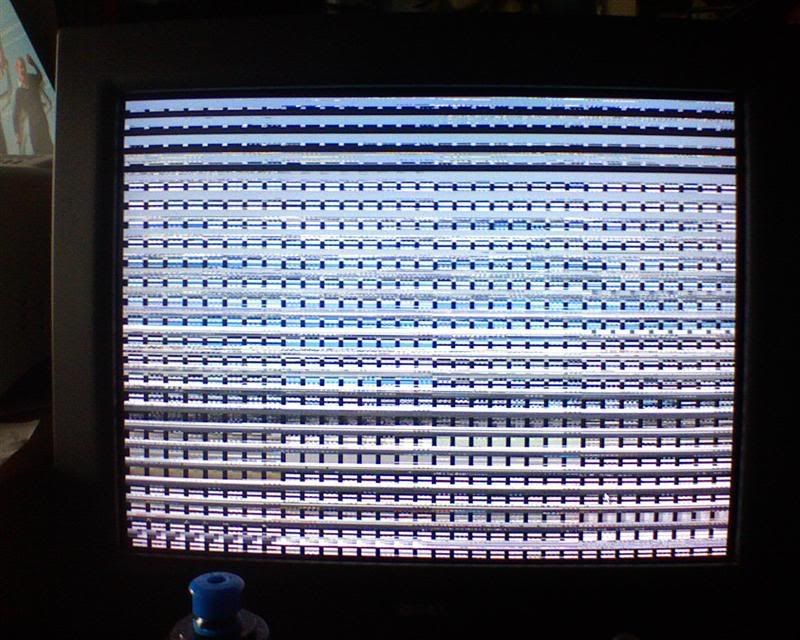
Anyone who can help me- please post here!
Posted:
Sat Apr 07, 2007 3:04 pmby ZK-MAT
Heat? Try blowing a fan into the side of the case, see if that makes a difference.
Have you got any other games you can test, see if they give the same issue. If not it's FS specific and I would reinstall.
Try the DX test. Start, run, dxdiag, go thru all the tests.
Good luck!
Posted:
Sat Apr 07, 2007 3:18 pmby ardypilot
Hi Matt.
Just to confirm that GTA San Andreas works fine in full screen mode. In DXdiag, all the tests for DirectDraw and Direct3D came back possitive.
My PC is in a corner of my desk right in the corner of a room with very little air flow. I will try taking it out and putting it near the middle of my room with a fan blowing at it and see what happens.
Cheers