MSFS 2020 Joystick Bindings

The place to ask for help or solve each others technical issues and discuss hardware

MSFS 2020 Joystick Bindings

Postby Charl » Thu Aug 01, 2024 11:37 pm

One of the frustrations in MSFS 2020 which has 1200 or so possible actions to map, is figuring out WHAT you should assign to your joystick.

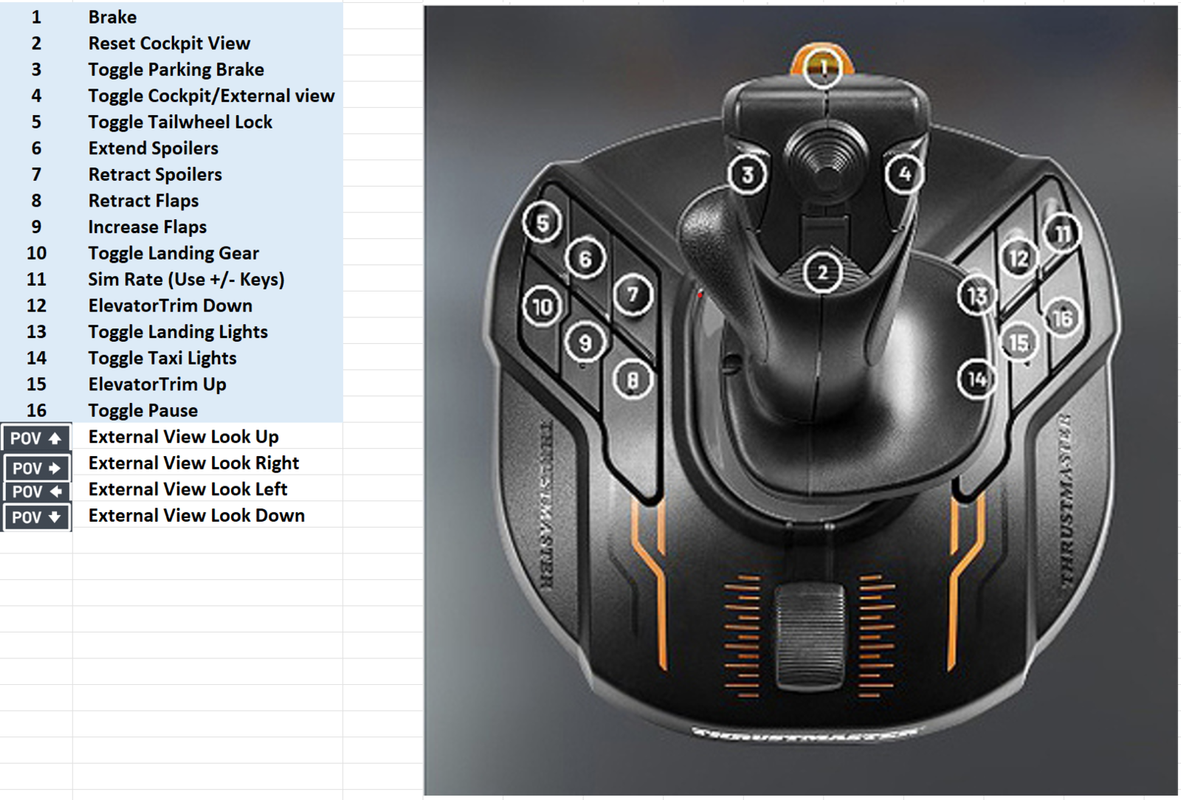
After rebuilding the bindings for my Thrustmaster T.16000M I thought I'd post this, a possible solution for GA/Warbird/general low and slow flying, which is what I mostly do.

Every joystick will of course be different, but having the function names to hand might be a help in setting up yours.
Image

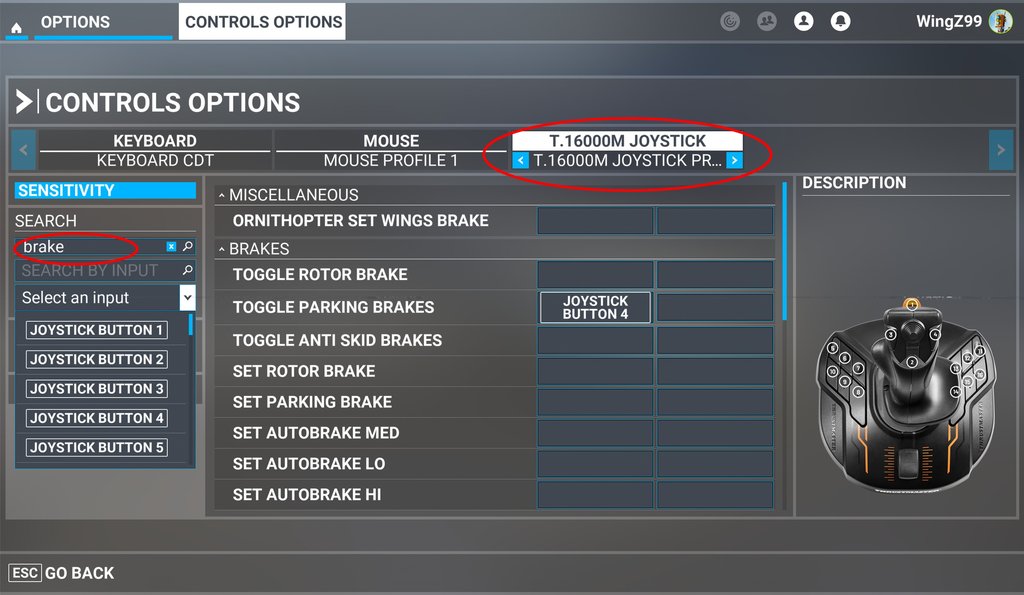
Here's an example in the sim, for assigning brakes, say, to the Joystick:
Search on BRAKE - here you see I already have chosen "Joystick Button 4" for parking brake but you can scroll through the options and then "Validate" your choice.
Image
User avatar
Charl
NZFF Pro
 
Topic author
Joined: Mon May 01, 2006 8:28 am
Posts: 9685
Location: Auckland

Re: MSFS 2020 Joystick Bindings

Postby cowpatz » Sat Aug 03, 2024 9:44 am

That is a good resource Charl. I have something similar set up on my sticks.
I run most of my stitching functions on my CH throttle unit ( which is getting close to end of life) or my Honeycomb Alpha yoke as well.
What you can do is to use the slider axis for either the spoiler axis or a brake action. It’s nice to have a proportional application rather than toggled on or off. The brake function is quite good as I find my CH rudder pedals difficult to get nice symmetrical braking but I still need the differential braking function.
There is a file located within the MSFS directory that stores all the controller setting and this is useful for a back up should an update corrupt your settings. I can’t recall exactly where but will have a hunt for it.
User avatar
cowpatz
NZFF Pro
 
Joined: Wed Mar 07, 2007 3:28 pm
Posts: 3739

Re: MSFS 2020 Joystick Bindings

Postby Charl » Sat Aug 03, 2024 6:46 pm

I'm afraid there is not a tidy solution...
In my Steam install, the MSFS 2020 joystick controller profile is stored here:

D:\Program Files (x86)\Steam\userdata\424538193\1250410\remote\inputprofile_0637663488

There are profiles for keyboard and mouse in the same folder.
I have copied and saved these in a desktop folder called, well I can't tell you, because the forum software won't allow the language usage.

These can be opened with Notebook, the contents for my joystick are as below.
Turns out the quickest way to change this is to overwrite everything below the first four highlighted lines, with info copied from some other existing profile.

<?xml version="1.0" encoding="UTF-8"?>
<Version Num="2819"/>
<FriendlyName PlatformAvailability="1">T.16000M Joystick profile 24 06 29</FriendlyName>
<Device DeviceName="T.16000M Joystick" GUID="{B28058D0-91B4-11ED-8002-444553540000}" ProductID="45322" CompositeID="0">

<Axes>
<Axis AxisName="X" AxisSensitivy="-50" AxisSensitivyMinus="-50" AxisNeutral="0" AxisDeadZone="2" AxisOutDeadZone="0" AxisResponseRate="-1"/>
<Axis AxisName="Y" AxisSensitivy="-50" AxisSensitivyMinus="-50" AxisNeutral="0" AxisDeadZone="0" AxisOutDeadZone="0" AxisResponseRate="-1"/>
<Axis AxisName="rZ" AxisSensitivy="-50" AxisSensitivyMinus="-50" AxisNeutral="0" AxisDeadZone="2" AxisOutDeadZone="0" AxisResponseRate="-1"/>
<Axis AxisName="SliderX" AxisSensitivy="1" AxisSensitivyMinus="1" AxisNeutral="0" AxisDeadZone="2" AxisOutDeadZone="0" AxisResponseRate="-1"/>
</Axes>
<Context ContextName="COCKPIT_CAMERA">
<Action ActionName="KEY_COCKPIT_QUICKVIEW3" Flag="2">
<Primary>
<KEY Information="Joystick Pov Right">257</KEY>
</Primary>
</Action>
<Action ActionName="KEY_COCKPIT_QUICKVIEW4" Flag="2">
<Primary>
<KEY Information="JoystickPov Left">259</KEY>
</Primary>
</Action>
</Context>
<Context ContextName="EXTERNAL_CAMERA">
<Action ActionName="KEY_CAMERACHASE_RESET" Flag="2">
<Primary>
<KEY Information="Joystick Button 2">1</KEY>
</Primary>
</Action>
<Action ActionName="KEY_CHASE_LOOK_DOWN" Flag="1">
<Primary>
<KEY Information="Joystick Pov Down">258</KEY>
</Primary>
</Action>
<Action ActionName="KEY_CHASE_LOOK_LEFT" Flag="1">
<Primary>
<KEY Information="JoystickPov Left">259</KEY>
</Primary>
</Action>
<Action ActionName="KEY_CHASE_LOOK_RIGHT" Flag="1">
<Primary>
<KEY Information="Joystick Pov Right">257</KEY>
</Primary>
</Action>
<Action ActionName="KEY_CHASE_LOOK_UP" Flag="1">
<Primary>
<KEY Information="Joystick Pov Up">256</KEY>
</Primary>
</Action>
</Context>
<Context ContextName="INSTRUMENTS_CAMERA">
<Action ActionName="KEY_COCKPIT_BACKCYCLE" Flag="2">
<Primary>
<KEY Information="JoystickPov Left">259</KEY>
</Primary>
</Action>
<Action ActionName="KEY_COCKPIT_CYCLE" Flag="2">
<Primary>
<KEY Information="Joystick Pov Right">257</KEY>
</Primary>
</Action>
</Context>
<Context ContextName="MENU">
<Action ActionName="MENU_BACK" Flag="2">
<Primary>
<KEY Information="Joystick Button 2">1</KEY>
</Primary>
</Action>
<Action ActionName="MENU_DOWN" Flag="1">
<Primary>
<KEY Information="Joystick Button 2">1</KEY>
</Primary>
</Action>
<Action ActionName="MENU_LEFT" Flag="1">
<Primary>
<KEY Information="JoystickPov Left">259</KEY>
</Primary>
</Action>
<Action ActionName="MENU_RIGHT" Flag="1">
<Primary>
<KEY Information="Joystick Pov Right">257</KEY>
</Primary>
</Action>
<Action ActionName="MENU_UP" Flag="1">
<Primary>
<KEY Information="Joystick Pov Up">256</KEY>
</Primary>
</Action>
<Action ActionName="MENU_VALID" Flag="2">
<Primary>
<KEY Information="Joystick Button 1">0</KEY>
</Primary>
</Action>
</Context>
<Context ContextName="MODE_PAUSE">
<Action ActionName="KEY_PAUSE_TOGGLE" Flag="2">
<Primary>
<KEY Information="Joystick Button 16">15</KEY>
</Primary>
</Action>
</Context>
<Context ContextName="MODES">
<Action ActionName="KEY_COCKPIT_RESET" Flag="2">
<Primary>
<KEY Information="Joystick Button 2">1</KEY>
</Primary>
</Action>
<Action ActionName="KEY_CYCLE_PILOTVIEW_BACK" Flag="2">
<Primary>
<KEY Information="Joystick Pov Down">258</KEY>
</Primary>
</Action>
<Action ActionName="KEY_CYCLE_PILOTVIEW_NEXT" Flag="2">
<Primary>
<KEY Information="Joystick Pov Up">256</KEY>
</Primary>
</Action>
<Action ActionName="KEY_SIM_RATE" Flag="2">
<Primary>
<KEY Information="Joystick Button 11">10</KEY>
</Primary>
</Action>
<Action ActionName="KEY_VIEW_MODE" Flag="2">
<Primary>
<KEY Information="Joystick Button 4">3</KEY>
</Primary>
</Action>
</Context>
<Context ContextName="PLANE">
<Action ActionName="KEY_AXIS_COLLECTIVE_SET" Flag="4">
<Primary>
<KEY Information="Joystick Slider X ">514</KEY>
</Primary>
</Action>
<Action ActionName="KEY_AXIS_RUDDER_SET" Flag="4">
<Primary>
<KEY Information="Joystick R-Axis Z ">802</KEY>
</Primary>
</Action>
<Action ActionName="KEY_BRAKES" Flag="2">
<Primary>
<KEY Information="Joystick Button 1">0</KEY>
</Primary>
</Action>
<Action ActionName="KEY_ELEV_TRIM_DN" Flag="1">
<Primary>
<KEY Information="Joystick Button 12">11</KEY>
</Primary>
</Action>
<Action ActionName="KEY_ELEV_TRIM_UP" Flag="1">
<Primary>
<KEY Information="Joystick Button 15">14</KEY>
</Primary>
</Action>
<Action ActionName="KEY_FLAPS_INCR" Flag="2">
<Primary>
<KEY Information="Joystick Button 9">8</KEY>
</Primary>
</Action>
<Action ActionName="KEY_FLAPS_UP" Flag="2">
<Primary>
<KEY Information="Joystick Button 8">7</KEY>
</Primary>
</Action>
<Action ActionName="KEY_GEAR_TOGGLE" Flag="2">
<Primary>
<KEY Information="Joystick Button 10">9</KEY>
</Primary>
</Action>
<Action ActionName="KEY_LANDING_LIGHTS_TOGGLE" Flag="2">
<Primary>
<KEY Information="Joystick Button 13">12</KEY>
</Primary>
</Action>
<Action ActionName="KEY_PARKING_BRAKES" Flag="2">
<Primary>
<KEY Information="Joystick Button 3">2</KEY>
</Primary>
</Action>
<Action ActionName="KEY_SPOILERS_OFF" Flag="2">
<Primary>
<KEY Information="Joystick Button 7">6</KEY>
</Primary>
</Action>
<Action ActionName="KEY_SPOILERS_ON" Flag="2">
<Primary>
<KEY Information="Joystick Button 6">5</KEY>
</Primary>
</Action>
<Action ActionName="KEY_THROTTLE_AXIS_SET_EX1" Flag="4">
<Primary>
<KEY Information="Joystick Slider X ">514</KEY>
</Primary>
</Action>
<Action ActionName="KEY_TOGGLE_TAILWHEEL_LOCK" Flag="2">
<Primary>
<KEY Information="Joystick Button 5">4</KEY>
</Primary>
</Action>
<Action ActionName="KEY_TOGGLE_TAXI_LIGHTS" Flag="2">
<Primary>
<KEY Information="Joystick Button 14">13</KEY>
</Primary>
</Action>
</Context>
<Context ContextName="SURFACES">
<Action ActionName="KEY_AXIS_AILERONS_SET" Flag="4">
<Primary>
<KEY Information="Joystick L-Axis X ">1026</KEY>
</Primary>
</Action>
<Action ActionName="KEY_AXIS_ELEVATOR_SET" Flag="4">
<Primary>
<KEY Information="Joystick L-Axis Y ">1042</KEY>
</Primary>
</Action>
</Context>
</Device>
User avatar
Charl
NZFF Pro
 
Topic author
Joined: Mon May 01, 2006 8:28 am
Posts: 9685
Location: Auckland


Return to Technical Issues

Who is online

Users browsing this forum: No registered users and 4 guests