Page 1 of 2

PostPosted: Thu Aug 09, 2007 9:00 pm
by victor_alpha_charlie
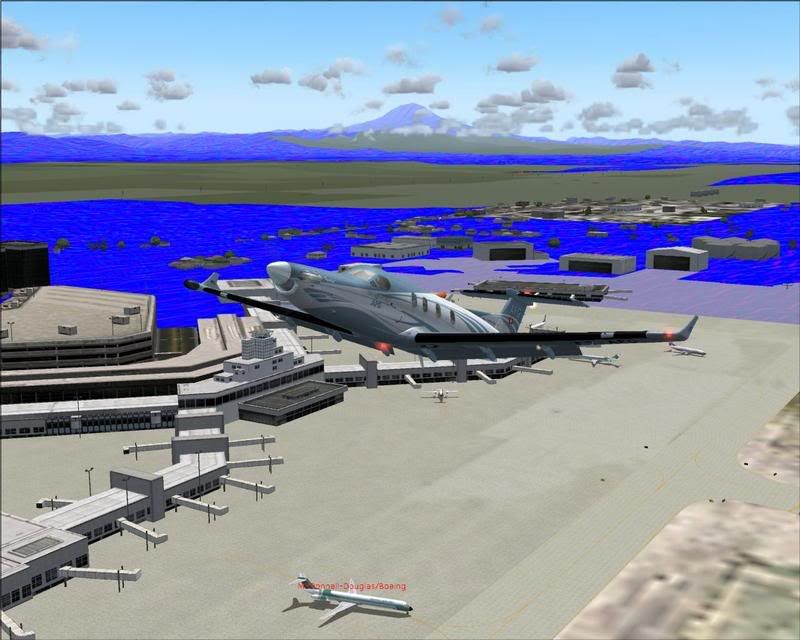
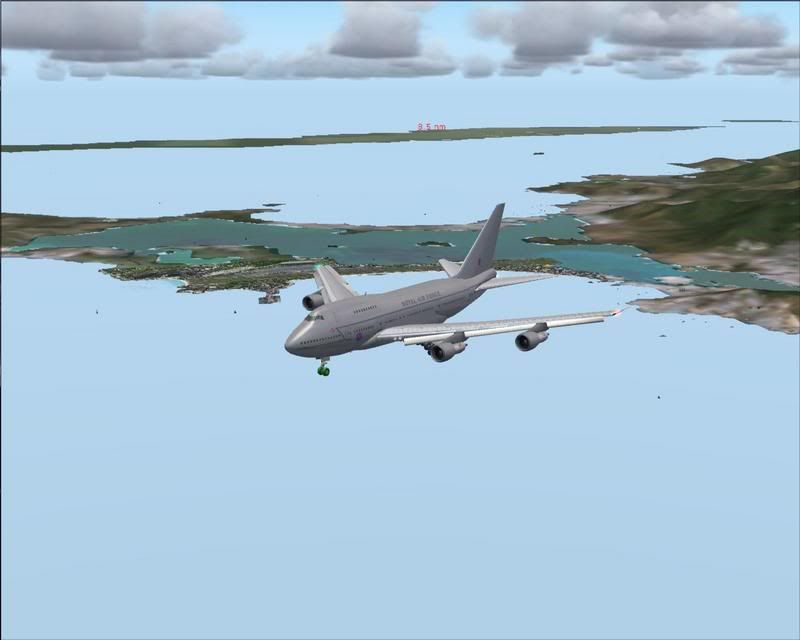
I've just done a fresh install of FS9, with only the Flytampa TNCM scenery and the Aeroworx Kingair (I finally got dad into fs so I might see some more payware biggrin.gif biggrin.gif biggrin.gif ) and I have stupid blue textures everywhere at dusk, then during the day I can't tell the difference between the sky and the sea.. . Well at least at NZWN and TNCM , which are the two places I've tried. Anyone know what's wrong? Screenies below.

Argh Photobucket is down so screens to follow. winkyy.gif
PostPosted: Thu Aug 09, 2007 9:17 pm
by victor_alpha_charlie
Ok I tried to get some shots of TNCM at dusk to show, but now it just CTD's whenever I try to start a flight. In the AFG PC-12 too if that helps.

EDIT:
Here are the shots.


PostPosted: Thu Aug 09, 2007 11:13 pm
by ardypilot
Reminds me what I saw on GTA Vice City a few years ago once- I fixed the problem by installing new graphics card drivers.

PostPosted: Fri Aug 10, 2007 4:09 pm
by victor_alpha_charlie
I'll give it a go now biggrin.gif

PostPosted: Fri Aug 10, 2007 4:50 pm
by victor_alpha_charlie
I tried it, And now they're just olive drab with no autogen or anything. The sea still looks like the sky too. It did say when installing FS9 that some of the .CAB files couldn't be installed, is there any way to fix this without reinstalling?

PostPosted: Fri Aug 10, 2007 5:01 pm
by ardypilot
Do you have another FS installed on another PC?

If so, just try copying over the main Texture folder from the original install directory (c:/program files/microsoft games/fs9)

PostPosted: Fri Aug 10, 2007 9:29 pm
by Alex
If you know exactly which cabinet files couldn't be extracted, you could try and do it from the CD...

Alex

PostPosted: Fri Aug 10, 2007 10:26 pm
by victor_alpha_charlie
OK I'll try that. The only name i remember was ASIA.CAB but there were others. Maybe I should just try them all?

PostPosted: Fri Aug 10, 2007 10:54 pm
by Alex
In that case it may be easier just to try a complete re-install. smile.gif

Alex

PostPosted: Mon Aug 13, 2007 4:34 pm
by victor_alpha_charlie
I'm doing that, but I'll virus scan all 4 discs just in case winkyy.gif

PostPosted: Mon Aug 13, 2007 4:37 pm
by Alex
I think a virus would be unlikely, as it would have to be written onto an already formatted disk - which is tricky (unless they are pirated or something). But its not a bad idea to give it a scan anyways. winkyy.gif

Alex

PostPosted: Mon Aug 13, 2007 4:55 pm
by victor_alpha_charlie
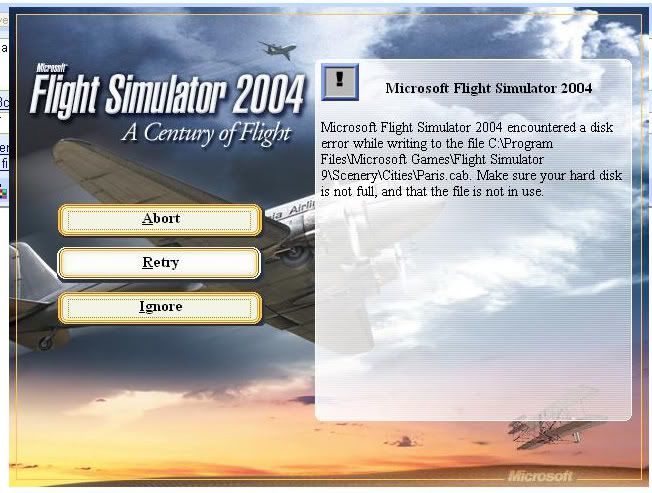
Ok, I'm on disc 3 and 66% and is saying "FS2004 encountered a disk error while writitng to the file: C:\Program Files\Microsoft Games\Flight Simulator9\Scenery\Cities\Dallas\t...03031002102222fa.bmp. Make sure Your Hard Disk is not full (which it is definitely not, 110 GB left) and the file is not in use."
I cant continue the install and just miss this file out, so where could that file be in use? angry.gif

Definitely not Pirated either winkyy.gif All the problems have been with disk 3, and nothing came up on the scan.

PostPosted: Tue Aug 14, 2007 9:11 am
by ooOO00OOoo
This may seem like a dumb question but oh well....
Have you restarted your computer?
I'm pretty sure you would have but you may have forgotten while trying to virus check etc?


Also is there a repair function on the fs9 disc? Like on fsx?

PostPosted: Tue Aug 14, 2007 8:42 pm
by victor_alpha_charlie
OK, I've tried it with my mates disks, and it gets to 81% and disk 4 when it says this S**t again.


My Hard drive is definitely NOT full, and how can the file be in use, when i cant even install the F**ing game! angry.gif angry.gif

PostPosted: Tue Aug 14, 2007 10:55 pm
by ardypilot
Perhaps your CD/DVD drive laser has got dirt on it or need cleaning?

This happened to me once, I was unable to copy any files from DVD's onto my HDD because of the lens and so I took my drive back to DSE and they repaired it for me smile.gif

PostPosted: Tue Aug 14, 2007 11:12 pm
by Ian Warren
Go to your 'My Computer' " My Documents" within that folder Microsoft Flight Sim has another folder , u will find previous saved flight files , Delete all .. you then would be able to reinstall smile.gif

PostPosted: Wed Aug 15, 2007 8:47 am
by HardCorePawn
Is this a 'clean' install? or are you installing over the top of a previous one?

If its a reinstall over an existing copy, backup whatever you think is necessary (config, scenery whatever) and then just delete the C:\program files\microsoft games\flight simulator 9 directory and do a 'clean' install. It may be that as the installer goes to read/write the file, your antivirus may be 'scanning' it and locking access to it just long enough to screw with the installer.

If its a clean install then either:

a. Your CD/DVD drive lens is dirty (and/or dying).

or

b. There may be bad sectors on your harddrive causing it to fail when it tries to write data.

If the install is consistently halting at the same place each time you try, then it is most likely reason 'a'. Get a lens cleaner or a new CD/DVD drive. If it is failing in a different spot with a different file... then again it could be either.

If cleaning/replacing the CD/DVD drive does not help, Try running scandisk:

open up My Computer icon_arrow.gif right click C:, select properties icon_arrow.gif Tools icon_arrow.gif Check Now... icon_arrow.gif Tick both boxes icon_arrow.gif click start icon_arrow.gif It should ask you if you want to schedule a disk check the next time you restart. Click Yes. icon_arrow.gif restart your machine.

During startup process you should get a lovely pale blue screen (not BSOD) showing you the status of the scandisk. The check for bad sectors will take a while... so be patient.

If it finds any bad sectors, my advice is to replace the HDD as soon as possible... once bad sectors start popping up, the drive will become very unreliable and you're putting data at risk.

PostPosted: Wed Aug 15, 2007 4:44 pm
by victor_alpha_charlie
Trolly wrote:
QUOTE(Trolly @ Aug 14 2007, 10:55 PM) <{POST_SNAPBACK}>
Perhaps your CD/DVD drive laser has got dirt on it or need cleaning?

This happened to me once, I was unable to copy any files from DVD's onto my HDD because of the lens and so I took my drive back to DSE and they repaired it for me smile.gif

I don't think it's this, as my sis just installed Zoo Tycoon (Yay..) on my comp. This was after the problems started occurring so I don't think that will have affected it.


Ian Warren wrote:
QUOTE(Ian Warren @ Aug 14 2007, 11:12 PM) <{POST_SNAPBACK}>
Go to your 'My Computer' " My Documents" within that folder Microsoft Flight Sim has another folder , u will find previous saved flight files , Delete all .. you then would be able to reinstall smile.gif

Thanks Ian, I'm trying that now winkyy.gif

EDIT:Didn't work.. sad.gif


HardCorePawn wrote:
QUOTE(HardCorePawn @ Aug 15 2007, 08:47 AM) <{POST_SNAPBACK}>
Is this a 'clean' install? or are you installing over the top of a previous one?

If its a reinstall over an existing copy, backup whatever you think is necessary (config, scenery whatever) and then just delete the C:\program files\microsoft games\flight simulator 9 directory and do a 'clean' install. It may be that as the installer goes to read/write the file, your antivirus may be 'scanning' it and locking access to it just long enough to screw with the installer.

If its a clean install then either:

a. Your CD/DVD drive lens is dirty (and/or dying).

or

b. There may be bad sectors on your harddrive causing it to fail when it tries to write data.

If the install is consistently halting at the same place each time you try, then it is most likely reason 'a'. Get a lens cleaner or a new CD/DVD drive. If it is failing in a different spot with a different file... then again it could be either.

If cleaning/replacing the CD/DVD drive does not help, Try running scandisk:

open up My Computer icon_arrow.gif right click C:, select properties icon_arrow.gif Tools icon_arrow.gif Check Now... icon_arrow.gif Tick both boxes icon_arrow.gif click start icon_arrow.gif It should ask you if you want to schedule a disk check the next time you restart. Click Yes. icon_arrow.gif restart your machine.

During startup process you should get a lovely pale blue screen (not BSOD) showing you the status of the scandisk. The check for bad sectors will take a while... so be patient.

If it finds any bad sectors, my advice is to replace the HDD as soon as possible... once bad sectors start popping up, the drive will become very unreliable and you're putting data at risk.

And thanks HCP, I'll try yours 2nd tongue.gif

EDIT 2:
Ok, I tried a DVD drive clean, as the install always stopped at the same point, and it didn't help. I found if I interchanged the disks i could get a bit further, all the way to 96% and getting an error message for WORLD.CAB. The set I have borrowed has a scratched disk 4, but it still won't work even with mine. My disk 4 is a bit scratched, but no more than the other three disks which all work fine. This is reeeeeeeally peeving me off now.. laugh.gif

PostPosted: Wed Aug 15, 2007 9:23 pm
by ooOO00OOoo
Reinstall windows/os(If you can). Put all your necessary files on a few DVDs then put them on after fs9

If worst comes to worst. Could be a small portion of a file/s that decided "I don't wanna die"


IF WORST COME TO WORST


Good luck

PostPosted: Thu Aug 16, 2007 10:13 am
by HardCorePawn
victor_alpha_charlie wrote:
QUOTE(victor_alpha_charlie @ Aug 15 2007, 04:44 PM) <{POST_SNAPBACK}>
EDIT 2:
Ok, I tried a DVD drive clean, as the install always stopped at the same point, and it didn't help. I found if I interchanged the disks i could get a bit further, all the way to 96% and getting an error message for WORLD.CAB. The set I have borrowed has a scratched disk 4, but it still won't work even with mine. My disk 4 is a bit scratched, but no more than the other three disks which all work fine. This is reeeeeeeally peeving me off now.. laugh.gif


You can try some of the many scratch removal products and/or techniques (I have even seen people suggest toothpaste! dry.gif)

Or if that is no good... what you may want to try doing is copying the discs using an ISO file creator like 'WinISO' or 'UltraISO'... i am fairly sure they both have fully functional trial versions... Alternatively, i think DVD-Decrypter should be able to image a CD... Or even Nero should let you create an image.

What you need to do is config them to read at the slowest possible speed you can... and to halt on read errors... hopefully by reading at a lower speed the drive will be able to pick up the 'dodgy' sectors on the CD.

Then you want to burn the image back to a CD and try using that.

But it really sounds like your drive may be dying a slow death... I know mine has started to act a little funny... it sometimes takes 2 or 3 go's before it recognises some CD's...