Page 1 of 1

PostPosted: Fri May 16, 2008 7:29 pm
by Kahu
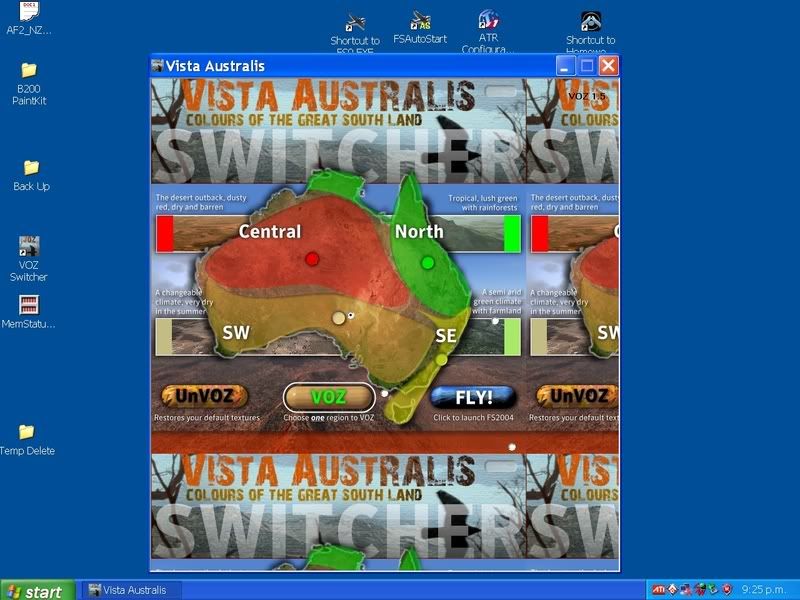
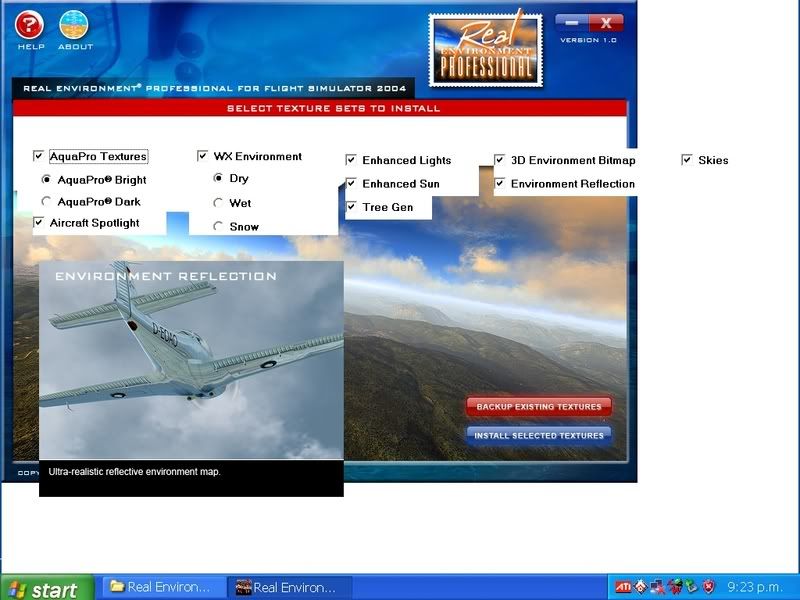
All of a sudden when I open applications like pictured below they will no longer open properly and appear as shown. I have updated windows and reinstalled these applications but nothing changes does any one know whats gone wrong?


PostPosted: Fri May 16, 2008 9:26 pm
by creator2003
Just looks like a video card thing to me ,just ram and loading the pixels etc ,i have this often when im moving alot around on my pc and yes my pc is catching up with me :P
I never really care much about it unless its stopping me doing something and is never has so i just live with it ,
,this only happens when im running FSXsim/ photoshop /video editing software /3dmax and all the other graphic suckers at the same time ...
i know it only looks like you are running the one app and from what i remember you have a pretty sweet pc so maybe the card is having a bad day or some other back program is somehow making it suck ??
im sure the techs will come in with the answer soon ..

PostPosted: Fri May 16, 2008 10:23 pm
by brownbox
try reinstalling video drivers?

PostPosted: Fri May 16, 2008 10:34 pm
by creator2003
Also one other thing what is your screen size and what setting are you running ? your icons and stuff look massive 800x600,that could also cause this effect i would think if the app is trying to run at a high screen res
hey now im just guessing :lol:

PostPosted: Sat May 17, 2008 10:11 am
by yak52dude
You might of deleted a programe that helps run another programe there for making that programe run funny.

PostPosted: Sat May 17, 2008 10:12 am
by NZ255
yak52dude wrote:
QUOTE (yak52dude @ May 17 2008, 10:11 AM) <{POST_SNAPBACK}>
You might of deleted a programe that helps run another programe there for making that programe run funny.

Aye?

PostPosted: Sat May 17, 2008 10:14 am
by yak52dude
NZ255 wrote:
QUOTE (NZ255 @ May 17 2008, 10:12 AM) <{POST_SNAPBACK}>
Aye?

I knew this would happen what I was meaning is you could have deleted a base programe that helps launch applications.

PostPosted: Sat May 17, 2008 10:15 am
by NZ255
Oh yeah (sorry) ;)

PostPosted: Sat May 17, 2008 10:16 am
by yak52dude
NZ255 wrote:
QUOTE (NZ255 @ May 17 2008, 10:15 AM) <{POST_SNAPBACK}>
Oh yeah (sorry) ;)

No don't be its cool

PostPosted: Sat May 17, 2008 10:16 am
by NZ255
Nah just joking kind of

PostPosted: Sat May 17, 2008 10:24 am
by yak52dude
NZ255 wrote:
QUOTE (NZ255 @ May 17 2008, 10:16 AM) <{POST_SNAPBACK}>
Nah just joking kind of

kind of aaaaaaaaaaa hmmmmm :lol:

PostPosted: Sun May 18, 2008 8:57 pm
by Kahu
I am pretty sure this problem has nothing to do with the video card etc, resolution is at 1280x1024.
The problem begin after I let windows do a disk clean up and it has deleted something I need but i dont know what.
The major problem is that the applications want work like when i go to click INSTALL SELECTED FEATURES button nothing happens. Reinstalling the apps still has the same problem.

PostPosted: Thu May 22, 2008 10:11 am
by HardCorePawn
At first glance, it looks like the font size is messed up... which I know has caused me issues with Apps looking wierd in the past...

(Start -> Settings -> Control Panel -> Display -> Appearance Tab... what is the Font Size set to? should be 'Normal')

However, you mention that the apps are not working properly... so maybe your .NET framework install is messed up... try reinstalling .NET and see how you get on... (I am assuming that these applications are using the .NET framework)...

PostPosted: Sat Aug 09, 2008 8:37 pm
by Kahu
QUICK UPDATE

Finally figured out what the problem is, its files missing from Internet Explorer, since I have been using Mozzila took a while to pick this up. A simple install of the latest IE fixed all the issues with these third party programs and there now usable again. biggrin.gif

PostPosted: Sat Aug 09, 2008 9:00 pm
by victor_alpha_charlie
Good to hear you got it sorted!

PostPosted: Sun Aug 10, 2008 3:05 am
by Adamski
Kahu Project wrote:
QUOTE (Kahu Project @ May 18 2008, 08:57 PM) <{POST_SNAPBACK}>
The problem begin after I let windows do a disk clean up and it has deleted something I need but i dont know what.


You did w-h-a-t?? winkyy.gif I never ever let Windows do *anything*!

It's kind of typical (looking at the solution) that an Internet BROWSER appears to have core OS files [sigh]. It's precisely why M$oft were *forced* to separate applications from the OS. Grrrrr.

I refuse to install any Windows Media Player "upgrades" for this sort of reason. All my applications have perfectly working sound - now, why would I want to mess that up winkyy.gif