Page 1 of 2

PostPosted: Sun Jan 03, 2010 11:04 pm
by Ian Warren
Hi ya all , we have been working away at making FS9-FSX and TS work better together .

Mike 'Creator2003' started us out here with TS teamspeak and is now starting to really takeoff ! from here , its up to you , a simple cheap microphone 'Mic' ... not the guy in the front rolleyes.gif .... here have continued multiplays

The address is now

NZFF flightsim multiplay

Teamspeak Server: fs.servegame.com:8767

Thanks to (ZK) - Matt we are up and running with Team Speak ,

PostPosted: Sun Jan 03, 2010 11:10 pm
by Adamski
Thanks for that - I'd asked for the info in some other thread I think. No excuse now, eh? Just don't take the p*ss out of my POM accent - I'm a Polak, really laugh.gif

I usually have to wait till SHE has gone to bed. Can't cope with her rolling her eyes and tapping her temple. She once told me that I hadn't said anything remotely intelligible (or intelligent) the whole time I was online. No change there, then laugh.gif laugh.gif laugh.gif

PostPosted: Sun Jan 10, 2010 2:15 pm
by kcgb
Are Everyone else's aircraft viewable in fs when using teamspeak?

PostPosted: Sun Jan 10, 2010 2:42 pm
by Adamski
kcgb wrote:
QUOTE (kcgb @ Jan 10 2010, 03:15 PM) <{POST_SNAPBACK}>
Are Everyone else's aircraft viewable in fs when using teamspeak?

I'm not 100% sure on what is viewable from what in FS multiplayer, but Teamspeak is totally independent of MSFS - and only handles voice chat. Depending on the CODEC selected (in Teamspeak), the bandwidth is quite low so it shouldn't impact framerate in FS much.

I used to go online quite a lot with TS and IL-2 (Pacific Fighters) and even with a fair few players on at once, there seemed little lag or warping. Having a *local* TS server helps.

PostPosted: Sun Jan 10, 2010 4:19 pm
by kcgb
How do i get onto the muiltiplays?

PostPosted: Sun Jan 10, 2010 7:04 pm
by leow5263
What Flight Simulator do you have kcgb?

PostPosted: Sun Jan 10, 2010 8:25 pm
by kcgb
FSX

PostPosted: Sun Jan 10, 2010 8:37 pm
by Ian Warren
OK , you have the connection , test your mic , Control panel /sound and audio properties .

PostPosted: Mon Jan 11, 2010 5:58 pm
by ShadowMystDK
Tried connecting to the Teamspeak server just now, and it won't connect. I can connect to other known servers though.
I've tried both of the following (with and without the password of maggie01:

202.125.37.130:8136
saturn.teamspeck.net.au:8136 (I've even tried correcting from "teamspeck" to "teamspeak" in hopes that might work)

Both give the error message "failed to connect to server"

Any ideas?

Also, what is the server IP for Multiplayer?

PostPosted: Mon Jan 11, 2010 8:08 pm
by ZK-MAT
I've just tried and it worked, using the IP addy huh.gif

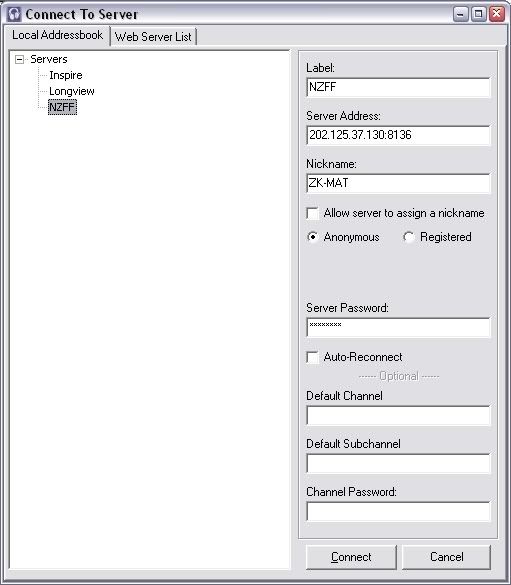
Using these settings in TS2 ...


No one said anything though sad.gif

Haven't tried the Multiplayer yet though.

PostPosted: Mon Jan 11, 2010 8:13 pm
by leow5263
sorry Mat, i didnt hear you come in, but i did hear the 'Player left'.
come in again and ill get you sorted out on FShost

PostPosted: Mon Jan 11, 2010 8:13 pm
by kcgb
ZK-MAT wrote:
QUOTE (ZK-MAT @ Jan 11 2010, 09:08 PM) <{POST_SNAPBACK}>
No one said anything though sad.gif


my mic isn't working sad.gif and Ian wasn't there but I dont know about leow5263

PostPosted: Mon Jan 11, 2010 8:27 pm
by ShadowMystDK
Im using Teamspeak 3, can't find a reliable copy of TS2 to download, will keep trying.

PostPosted: Mon Jan 11, 2010 9:06 pm
by ZK-MAT
Shadow, go here mate

http://www.tfkfiles.tk/

Click the Game files link, it's the ts2_client_rc2_2032.exe file you want

That's my IL2 page winkyy.gif

All worked fine for me when I tried again, both TS and FS Host... no worries at all.

PostPosted: Mon Jan 11, 2010 9:57 pm
by leow5263
Try Mat's link, if for some reason that doesnt work, just post here.
smile.gif

PostPosted: Tue Jan 12, 2010 8:01 pm
by Timmo
I cant seem to get on now but was on last night? Says my password or username is incorrect?

PostPosted: Tue Jan 12, 2010 8:07 pm
by Ian Warren
Tim , the server is down , we are looking at getting a new dedicated NZFF up and running , sorry for the inconvenience

PostPosted: Tue Jan 12, 2010 8:31 pm
by ZK-MAT
I have a server PC in my garage (hosts media files for the XBox and there's a TS server on it too) that's on 24/7 that I could load up FS Host, to be used until another more permanent solution is arranged...

ADSL2 connection, would set up a No Ip redirect to it.

Let me know if you want to try it.

Edit. I've installed FS Host and it could be worth seeing if it works, even as a back up for future use.

IP: fs.servegame.com - usual port number (23456 from memory??) Using FS Host so if you could connect to the server that was operable before change the IP to "fs.servegame.com" and it *should* work

Teamspeak 2 should also work with that IP and the relevant TS port (8767).

I can't try www ip's from inside my own network but I can connect to both FS and TS internally...

PostPosted: Tue Jan 12, 2010 9:51 pm
by Ian Warren
Thanks Matt , what we have in our garages , we should be fixed up prity quick fingers crossed

PostPosted: Tue Jan 12, 2010 11:02 pm
by Ian Warren
Thanks to (ZK) - Matt we are up and running with Team Speak ,

Sever IP: fs.servegame.com:8767
(121.72.242.115:9987)

Off course we will keep you posted on further updates and change's .