 Posted: Sat May 10, 2008 9:21 pm
Hey guys, I'm having a wee bit of trouble. I'm trying to do a repaint of the new VA 737-200, from a template from Jetabout, and I'm having trouble with doing the stripes. The logo worked fine, I just pasted it and lowered the opacity a bit so the cracks etc on the plane could be seen.
When making the stripes, I planned to Polygonal Lasso the area where one stripe would be, then copy and paste to make a new layer. By doing this I would be able to use a large paintbrush and color in the stripes, and only the area in the new layer I had made would be coloured. Once done, I then planned to lower the opacity as done with the logo to add realism, and do the other stripe.
Unfortunately I'm having trouble. Even with a new layer made, and with that new layer selected, the paintbrush will color whatever it touches, even though it should only colour in the new layer I made. I'll post a pic, please note I have the new layer selected, but the paintbrush will work anywhere on the picture:
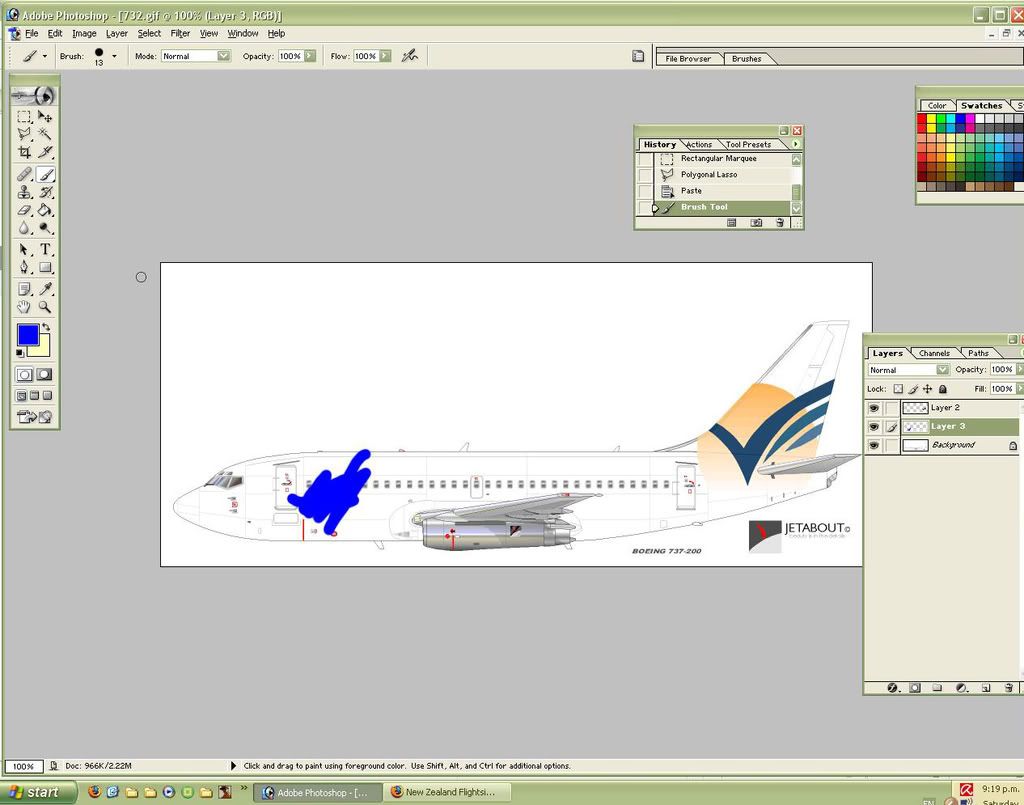
What should I do?
Any help appreciated!
When making the stripes, I planned to Polygonal Lasso the area where one stripe would be, then copy and paste to make a new layer. By doing this I would be able to use a large paintbrush and color in the stripes, and only the area in the new layer I had made would be coloured. Once done, I then planned to lower the opacity as done with the logo to add realism, and do the other stripe.
Unfortunately I'm having trouble. Even with a new layer made, and with that new layer selected, the paintbrush will color whatever it touches, even though it should only colour in the new layer I made. I'll post a pic, please note I have the new layer selected, but the paintbrush will work anywhere on the picture:
What should I do?
Any help appreciated!
