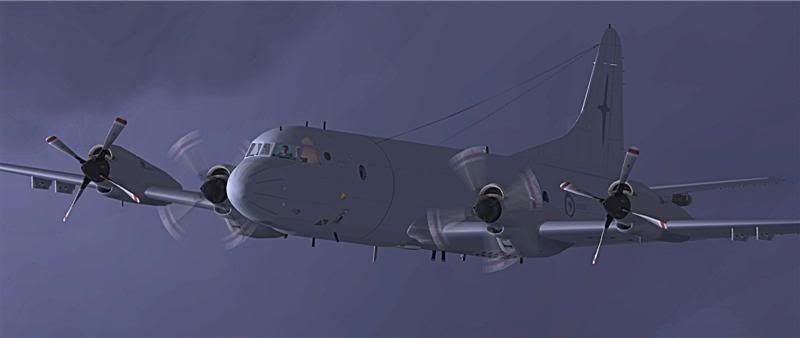
RNZAF Orion

Post and comment on screen captures from the beautiful game here. Home of the monthly screenshot competition

Postby ardypilot » Sat Jul 01, 2006 10:33 am

I recently downloaded the FS_KBT Lockheed P-3K Orion, and the RNZAF repaint, then took her up for a test flight from Whenuapi to Ohakea:

1. Bomb doors open, practising if a war against Portugal suddenly arrises ;)
user posted image

2. Banking in the clouds
user posted image

3. On top of the heavy weather
user posted image

4. A low down angle, making the P3 look menacing
user posted image

5. Cruising at 15,000 feet in the amazing Virtual Cockpit
user posted image

6. A close up on the shiny grey bodywork
user posted image

7. Blue skies in front as I charge along at over 300 knots
user posted image

8. Flaps out, gear down as I descend into land
user posted image

9. Taxing to parking
user posted image

10. Parked up in front of the tower
user posted image


Well after a 40 minute test flight, I have already drawn a few conclusions:

1) The detail on the model is amazing! The 70mb download was defiantly worth it.

2) For a plane of its size and power, it is very easy to land

3) For some reason, the aircraft accelerates abnormally fast from standstill.

4) Even when the throttle is at 0%, this model accelerates by itself, so if I left it on the runway with the throttle completely down, it would take itself off! This happens with no other aircraft, and I re-calibrated my joystick too. Anyone else had this problem or know how to fix it?


Cheers,
Trolly
Last edited by ardypilot on Sun Jul 02, 2006 5:30 pm, edited 1 time in total.
User avatar
ardypilot
NZFF Pro
 
Topic author
Joined: Wed Apr 26, 2006 10:01 am
Posts: 6802
Location: Auckland

Postby Charl » Sat Jul 01, 2006 11:56 am

Very nice, Trolly.
Your skies always look good, they're not stock MS I assume?
Last time I downloaded that aircraft it didn't have a VC - thanks for the shot, I'll head back there and correct the omission.
I can't recall having power setting issues, though there may be a problem with the newer version. I do seem to remember a post about fixing the FDE, though...
Certainly it is a fast aircraft - at airshow high-speed flyby's the ground shakes as it thunders on by.
User avatar
Charl
NZFF Pro
 
Joined: Mon May 01, 2006 8:28 am
Posts: 9691
Location: Auckland

Postby kismet » Sat Jul 01, 2006 3:41 pm

Very nice indeed B)

Where is that aircaft available?
kismet
 

Postby ardypilot » Sat Jul 01, 2006 7:32 pm

Thanks for the comments guys.


Kismet, you can get the aircarft here: http://www.flightinfo.jp/FS_KBT/d_y_a.htm and the RNZAF repaint here: http://library.avsim.net/search.php?Sea ... &Go=Search (Thanks to Charl for finding that for me ;) )


I can't recall having power setting issues, though there may be a problem with the newer version. I do seem to remember a post about fixing the FDE, though...

I have just read a review on AVSIM saying "Some of you who have already taken this plane up might field the complaint that she has too much power, resulting in shorter-than-average takeoff rolls and rocket-like climbs. The problem isn't incorrect modeling of the power output of those T-56 Allisons, but a very light aircraft. Check out the FUEL AND PAYLOAD window and you'll see that the aircraft is devoid of any payload "“ all you have is the empty aircraft and any gas in the tanks. Throw in some weight and the model will respond accordingly." so that sorts all that out.

Your skies always look good, they're not stock MS I assume?

I normally used the default "Building Storms" theme, but in these shots I used the "Koorby Clouds 1" weather theme included with VOZ 1.1.

And one more thing Charl, if you re-download the Orion, please tell me if your model rolls forward by iteself or not... that is the only un explained fault I now see.

Cheers
Last edited by ardypilot on Sun Jul 02, 2006 11:36 am, edited 1 time in total.
User avatar
ardypilot
NZFF Pro
 
Topic author
Joined: Wed Apr 26, 2006 10:01 am
Posts: 6802
Location: Auckland

Postby Charl » Sun Jul 02, 2006 10:07 am

This is one of those planes that gobbles up all available computer resources.
I remember now removing it because it brought a previous computer installation to its knees.
RealNZ Auckland is also a resource gobbler, so NZWP would compete heavily with the Orion. You may get weird effects like throttles becoming inactive, or stuck in the fully open position.
Try a flight out of Invercargill and you may find it flies as advertised.
And if you get it to work, see if you can simulate the Orion long-range party trick, engines 1 and 4 out, props fully feathered :blink:

user posted image
User avatar
Charl
NZFF Pro
 
Joined: Mon May 01, 2006 8:28 am
Posts: 9691
Location: Auckland

Postby ardypilot » Sun Jul 02, 2006 5:29 pm

Great picture Charl!

How did you manage to only cut engines 1 and 4? When I open up the throttle panel and use my mouse to slide the engine lever down, the other 3 move at the same time for some reason! <_<

From your pic I am guessing you got it re-downloaded and running ok?

Mine is still playing up, rolling forward and accelerating extremely fast by itself, even with a full payload. I tried holding down F2 to reverse the engines, but the aircraft jumps up and down like a boyracer car with hydraulics... :blink:

A resource gobbler? It seems to work fine on my 2.4 GHz system. Have you tried using the non-VC model, I expect it will run smoother for you ;)
User avatar
ardypilot
NZFF Pro
 
Topic author
Joined: Wed Apr 26, 2006 10:01 am
Posts: 6802
Location: Auckland

Postby Charl » Sun Jul 02, 2006 10:12 pm

Well, it does what you describe when I depart Whenuapai, and works just fine out of Invercargill, maybe the XML coding is strange that way....
To stop the props:
Press E1...4 to command only the outer engines.
Press CTRL-Shift-F1 to cut them.
Press CTRL-F1 to feather.
Press E2...3 to command inner 2 engines.
Wait patiently for the No. 1 & 4 fans to wind down.
Take screenshot!
User avatar
Charl
NZFF Pro
 
Joined: Mon May 01, 2006 8:28 am
Posts: 9691
Location: Auckland


Return to Screenshots

Who is online

Users browsing this forum: No registered users and 17 guests