Raw P3Dv2

Post and comment on screen captures from the beautiful game here. Home of the monthly screenshot competition

Postby 000rick000 » Sat Mar 08, 2014 10:45 pm

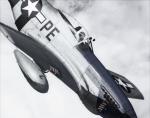
I recently upgraded to a GTX 770 graphics card, and needless to say EVERYTHING looks better! including P3Dv2...meaning I can actually run the thing now! haha...

here's some port overs from some classics...just to see what they look like. No editing but on one..and only slight...guess which... winkyy.gif I didn't remove any text either so you can see my actual raw experience while taking the screens...still getting the right settings


in the clouds


Rick Mackintosh
Commercial AS/MEL & Instrument
Certified aeroplane Nut
Image
User avatar
000rick000
Sim-holic
 
Topic author
Joined: Sat Apr 14, 2012 7:45 am
Posts: 560

Postby Ian Warren » Sun Mar 09, 2014 8:30 am

Great Screens Rick cool.gif , strange the AGN seems a little sparse - is this what you mean RAW - sliders not turned up? .. to great models tho the 86 and 109 COOL !

Image
User avatar
Ian Warren
NZFF Pro
 
Joined: Fri May 05, 2006 5:23 pm
Posts: 41187
Location: AREA 51

Postby Bugdani » Sun Mar 09, 2014 8:52 am

Very good !!!
W10 P3D v3.4.9, FSX SP2 DX10 Steve 2.9 , Intel I7 Sandy Bridge 2600K GTX1080 372.90 Nvidia inspector 1.9.7.6 8Gb Corsair2000 SSD 480Go Intel SSD 512 Crucial Philips 21:9 Ultra wide Logitech Z906 CH product set TrackIR 4 Pro.
User avatar
Bugdani
Senior Member
 
Joined: Mon Aug 31, 2009 10:55 pm
Posts: 1702
Location: Belgium, EBLG

Postby Splitpin » Sun Mar 09, 2014 9:51 am

Wow ... thumbup1.gif thumbup1.gif
User avatar
Splitpin
NZFF Pro
 
Joined: Mon Aug 03, 2009 12:15 pm
Posts: 21339
Location: Christchurch NZ

Postby 000rick000 » Sun Mar 09, 2014 11:31 am

Ian Warren wrote:
QUOTE (Ian Warren @ Mar 8 2014,12:30 PM) <{POST_SNAPBACK}>
Great Screens Rick cool.gif , strange the AGN seems a little sparse - is this what you mean RAW - sliders not turned up? .. to great models tho the 86 and 109 COOL !


I'm tuning the sliders. P3D's sliders don't do the same thing compared to FSX. So moving the sliders to the same places doesn't give the same results...I'm still fine tuning that part of it. I've got all other graphics settings pretty much maxed out. But I've got to find the balance...it's FS9 to FSX all over again!
Rick Mackintosh
Commercial AS/MEL & Instrument
Certified aeroplane Nut
Image
User avatar
000rick000
Sim-holic
 
Topic author
Joined: Sat Apr 14, 2012 7:45 am
Posts: 560

Postby deeknow » Sun Mar 09, 2014 4:05 pm

Beautiful Rick !!! ... am sorely tempted by P3D just for the cockpit shadows.. divine.
Deans repaints: http://www.deeknow.com/
X570 Mini-ITX m/b - Ryzen7 5700X3D (8c/16t) - RTX 2060-super - 32GB 3600MHz DDR4 - Win10 - P3Dv5.3
User avatar
deeknow
NZFF Pro
 
Joined: Tue Sep 18, 2007 10:15 pm
Posts: 4449
Location: NZHN

Postby Ian Warren » Sun Mar 09, 2014 4:35 pm

000rick000 wrote:
QUOTE (000rick000 @ Mar 9 2014,12:31 PM) <{POST_SNAPBACK}>
I'm tuning the sliders. P3D's sliders don't do the same thing compared to FSX. So moving the sliders to the same places doesn't give the same results...I'm still fine tuning that part of it. I've got all other graphics settings pretty much maxed out. But I've got to find the balance...it's FS9 to FSX all over again!

Wodger Dodger on that then, I can't wait .. I had both Greg and Marty here this afternoon .. now beginning I wish I had P3D downloaded and up and running .
Image
User avatar
Ian Warren
NZFF Pro
 
Joined: Fri May 05, 2006 5:23 pm
Posts: 41187
Location: AREA 51


Return to Screenshots

Who is online

Users browsing this forum: No registered users and 20 guests