Four Times CAP10
34 posts
• Page 2 of 2 • 1, 2
 by Charl » Wed Jan 16, 2008 9:10 am
Trolly wrote:QUOTE (Trolly @ Jan 15 2008, 08:09 PM) <{POST_SNAPBACK}>Charl, this was with the setting '$Offset: -40 0 0' where I thought the camo Hunter would be following the yellow and black one at the same altitute, 40 feet to the rear of the tail. But for some reason it started at postion roughly at a 315 degree heading, and swapped all around the place during the twisty flight around Dubai, staying at that angle of 315 degrees no matter what heading it was flying... I reckon this something to do with the 'Co-ordinate settings' you mentioned?
To make the offsets relative to the lead aircraft you add pbh (pitch, bank, heading) to the offset line:
$Offset: -40 0 0 pbh
Otherwise the offsets are along the world axes, where x is longitude, y is altitude and z is latitude.
Try a few combinations like
$Offset: -40 0 0 h
$Offset: -40 0 0 bh
$Offset: -40 0 0 ph
These can be less realistic in the sim, as the a/c behave more like a single unit.victor_alpha_charlie wrote:QUOTE (victor_alpha_charlie @ Jan 15 2008, 08:49 PM) <{POST_SNAPBACK}>That is cool. How many planes will it work with?
I don't think the software is limited, your computer may fall over after a few dozen clones though!Last edited by Charl on Wed Jan 16, 2008 9:12 am, edited 1 time in total.
Charl- NZFF Pro
- Topic author
- Joined: Mon May 01, 2006 8:28 am
- Posts: 9759
- Location: Auckland
by ardypilot » Wed Jan 16, 2008 1:24 pm
QUOTE
To make the offsets relative to the lead aircraft you add pbh (pitch, bank, heading) to the offset line:
$Offset: -40 0 0 pbh
Otherwise the offsets are along the world axes, where x is longitude, y is altitude and z is latitude.[/quote]
Ah that makes much more sense, thanks for the extra PBH codes, that adds lots more control. After a bit of experimenting, I've found that just "p" works best for close formations, I'm guessing that's the offset you chose for the CAP formation at the beginning of this thread?
This really is a lot of fun and has opened a whole new window to my simming experience, I can see myself spending a lot of time tweaking and fiddling around to get that perfect shot now
EDIT:
I think I figured out what was causing me troubles before- the X and Y correlations from your diagram were round the wrong way so I was getting long. and lat. distances mixed up. When I swapped them around, I've managed to get my Hawker Hunters flying along side one another like I originally planned:
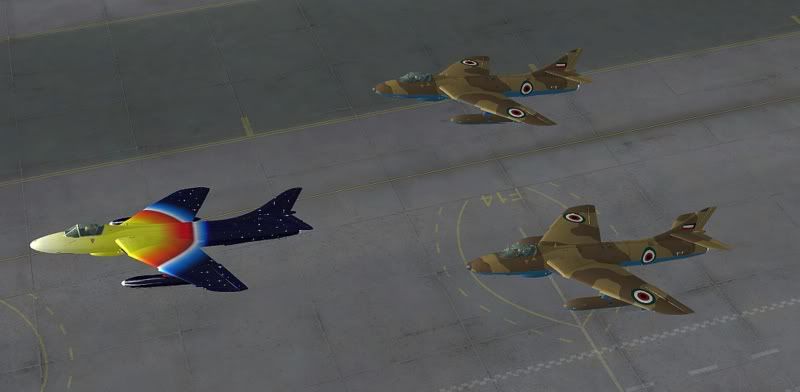
Now to tackle the Jasta 11 formation!
$Offset: -40 0 0 pbh
Otherwise the offsets are along the world axes, where x is longitude, y is altitude and z is latitude.[/quote]
Ah that makes much more sense, thanks for the extra PBH codes, that adds lots more control. After a bit of experimenting, I've found that just "p" works best for close formations, I'm guessing that's the offset you chose for the CAP formation at the beginning of this thread?
This really is a lot of fun and has opened a whole new window to my simming experience, I can see myself spending a lot of time tweaking and fiddling around to get that perfect shot now
EDIT:
I think I figured out what was causing me troubles before- the X and Y correlations from your diagram were round the wrong way so I was getting long. and lat. distances mixed up. When I swapped them around, I've managed to get my Hawker Hunters flying along side one another like I originally planned:
Now to tackle the Jasta 11 formation!
Last edited by ardypilot on Wed Jan 16, 2008 3:53 pm, edited 1 time in total.
-

ardypilot - NZFF Pro
- Joined: Wed Apr 26, 2006 10:01 am
- Posts: 6802
- Location: Auckland
by Charl » Wed Jan 16, 2008 8:15 pm
Trolly wrote:QUOTE (Trolly @ Jan 16 2008, 02:24 PM) <{POST_SNAPBACK}>the X and Y correlations from your diagram were round the wrong way so I was getting long. and lat. distances mixed up.
I think it depends on what you use in the sim under "International/Settings".
If you use "Northern/Western" it will be reversed from my diagram.
No matter, once you know how the stuff behaves in your sim, it's quite easy to adjust things.
Next step is to apply a time lag offset, which gives a very realistic feel to the sim while in motion.
This is simply a line which follows the previous offset entry, with a delay in seconds:
// Track 2
#Aircraft: "ALPHA T-6 Texan RNZAF NZ1015"
#StaticCGtoGround: 5.44
#Data: latitude longitude altitude pitch bank heading onground velocityX velocityY velocityZ throttle1 throttle2 throttle3 throttle4 elevators ailerons rudder spoilers flaps gear lights parkbrake engine1 engine2 engine3 engine4 timestamp
$Offset: -30 0 15
$TimeOffset: 3.5
-

Charl - NZFF Pro
- Topic author
- Joined: Mon May 01, 2006 8:28 am
- Posts: 9759
- Location: Auckland
by ardypilot » Wed Jan 16, 2008 9:02 pm
QUOTE
I think it depends on what you use in the sim under "International/Settings".
If you use "Northern/Western" it will be reversed from my diagram.
No matter, once you know how the stuff behaves in your sim, it's quite easy to adjust things.[/quote]
Sorry, didn't mean to criticise your instructions- thanks very much for continually explaining each step of this program to me. I really do appreciate it
If you use "Northern/Western" it will be reversed from my diagram.
No matter, once you know how the stuff behaves in your sim, it's quite easy to adjust things.[/quote]
Sorry, didn't mean to criticise your instructions- thanks very much for continually explaining each step of this program to me. I really do appreciate it
QUOTE
Next step is to apply a time lag offset, which gives a very realistic feel to the sim while in motion.[/quote]
Ah, I never knew about this one! At the moment, my formation craft look like they are invisibly joint together like rollercoaster cars on a giant aerial ride.. I was just thinking it would be great if I could somehow 'imperfect' it a little.. I'll send you through the fokker .frc and let you work your magic
Ah, I never knew about this one! At the moment, my formation craft look like they are invisibly joint together like rollercoaster cars on a giant aerial ride.. I was just thinking it would be great if I could somehow 'imperfect' it a little.. I'll send you through the fokker .frc and let you work your magic
-
ardypilot - NZFF Pro
- Joined: Wed Apr 26, 2006 10:01 am
- Posts: 6802
- Location: Auckland
by ardypilot » Wed Jan 16, 2008 11:39 pm
I admit it, I'm impatient! So I gave the timelag offset a trial with my Harvard's:
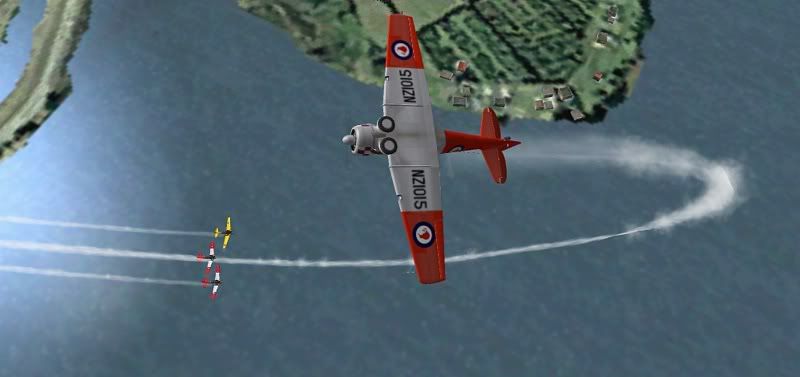
I tried out the '$TimeOffset: 3.5' and the separation between the leading aircraft and the rest of the pack was huge, so I toned it down to '0.15', '0.18' and '0.20' so the pack would remain close, but each movement would happen at slightly different times per aircraft. The result I received, as shown in the screenie above, is still far too much separation- am I doing something wrong?
I tried out the '$TimeOffset: 3.5' and the separation between the leading aircraft and the rest of the pack was huge, so I toned it down to '0.15', '0.18' and '0.20' so the pack would remain close, but each movement would happen at slightly different times per aircraft. The result I received, as shown in the screenie above, is still far too much separation- am I doing something wrong?
-
ardypilot - NZFF Pro
- Joined: Wed Apr 26, 2006 10:01 am
- Posts: 6802
- Location: Auckland

by Charl » Thu Jan 17, 2008 8:25 am
Trolly wrote:QUOTE (Trolly @ Jan 17 2008, 12:39 AM) <{POST_SNAPBACK}>I tried out the '$TimeOffset: 3.5' and the separation between the leading aircraft and the rest of the pack was huge... am I doing something wrong?
You've reached just about my limit of experimentation now, so I think I'll be learning from you from now on!
I have other stuff on the go at the moment which is why I dive into the forum at odd times - hence haven't gotten to your frc file yet.
For what it's worth, these are the offsets I used for this video clip:
// Track 2
$Offset: -15 0 -15
$TimeOffset: 0.5
// Track 3
$Offset: -30 0 -30
$TimeOffset: 1.0
Not a very good clip, but if you pay attention, you'll see the delays which add to the realism.
Try something similar, see what you get.atc_unit wrote:QUOTE (atc_unit @ Jan 17 2008, 02:28 AM) <{POST_SNAPBACK}>Does this work with FS9 as well as FSX?
Absolutely, above clip was FSX but Trolly is doing this in FS9.Last edited by Charl on Thu Jan 17, 2008 8:26 am, edited 1 time in total.
Charl- NZFF Pro
- Topic author
- Joined: Mon May 01, 2006 8:28 am
- Posts: 9759
- Location: Auckland

by victor_alpha_charlie » Thu Jan 17, 2008 5:51 pm
I can see this livening up a 737 WN-CH flight.. Instead of increasing capacity with a 767, just use 2 737's!
-

victor_alpha_charlie - NZFF Pro
- Joined: Wed Jan 10, 2007 11:09 am
- Posts: 2372
by atc_unit » Thu Jan 17, 2008 9:16 pm
Charl wrote:QUOTE (Charl @ Jan 22 2008, 05:43 AM) <{POST_SNAPBACK}>Well done, now live a little and get those Cessnas to rub paint...
LOL watch this spaceLeon Gibbs
VATNZ Deputy Director
NZ CPL(A)+MEIR, B-Cat
Stewart Island Flights - IVC
-
atc_unit - Member
- Joined: Sat Nov 18, 2006 4:09 pm
- Posts: 34
- Location: Invercargill, NZ
by victor_alpha_charlie » Fri Feb 01, 2008 8:42 pm
EDIT: dw, I've got it now I think.
EDIT2:
Umm.. I can get it working great.. but I'm not flying the lead a/c.. the trio fly past me and only fly as far as the recording i made. Is this all it will do or am I doing something wrong?
Ok LAST EDIT:
Working I clicked 'Play as traffic' rather than 'play'
EDIT2:
Umm.. I can get it working great.. but I'm not flying the lead a/c.. the trio fly past me and only fly as far as the recording i made. Is this all it will do or am I doing something wrong?
Ok LAST EDIT:
Working
I clicked 'Play as traffic' rather than 'play'Last edited by victor_alpha_charlie on Fri Feb 01, 2008 9:59 pm, edited 1 time in total.
-
victor_alpha_charlie - NZFF Pro
- Joined: Wed Jan 10, 2007 11:09 am
- Posts: 2372
34 posts
• Page 2 of 2 • 1, 2
Who is online
Users browsing this forum: No registered users and 52 guests