 Posted: Sun Jun 17, 2012 6:53 pm
I have found a free pic re-sizer that will be replacing the one on the screenshot comp page I find it easier to use than the old one.
http://www.faststone.org/FSResizerDownload.htm
A quick tuition on using.
Open and select the folder with the pics you want to re-size.
Fig 1
1: Select Batch Convert
2: Select Folder with images to be resized
3: Select output folder
4: Select files to re-size
5: Add to resizing list
6: Go to Advanced Options

Fig 2
Advanced Options
1: Select Resize
2: Select in Pixels
3: Select Preserve Aspect Ratio
4: Select Pick a Standard Size
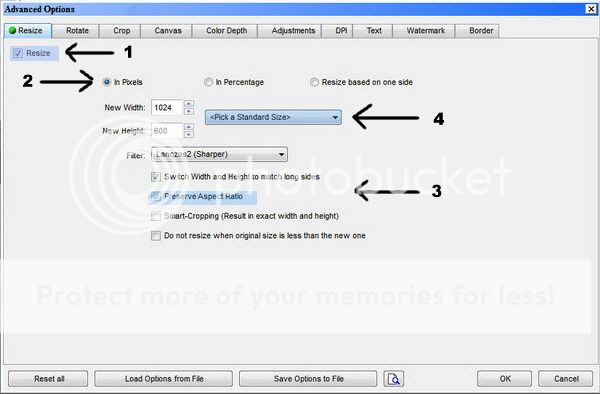
Fig 3
1: Select the 1024 x 600
2: Hit the OK Button

Fig 4
1: Convert and all should be done.

http://www.faststone.org/FSResizerDownload.htm
A quick tuition on using.
Open and select the folder with the pics you want to re-size.
Fig 1
1: Select Batch Convert
2: Select Folder with images to be resized
3: Select output folder
4: Select files to re-size
5: Add to resizing list
6: Go to Advanced Options
Fig 2
Advanced Options
1: Select Resize
2: Select in Pixels
3: Select Preserve Aspect Ratio
4: Select Pick a Standard Size
Fig 3
1: Select the 1024 x 600
2: Hit the OK Button
Fig 4
1: Convert and all should be done.
 another program related to doing screenshots and was DSB Studio -Walk and follow .


