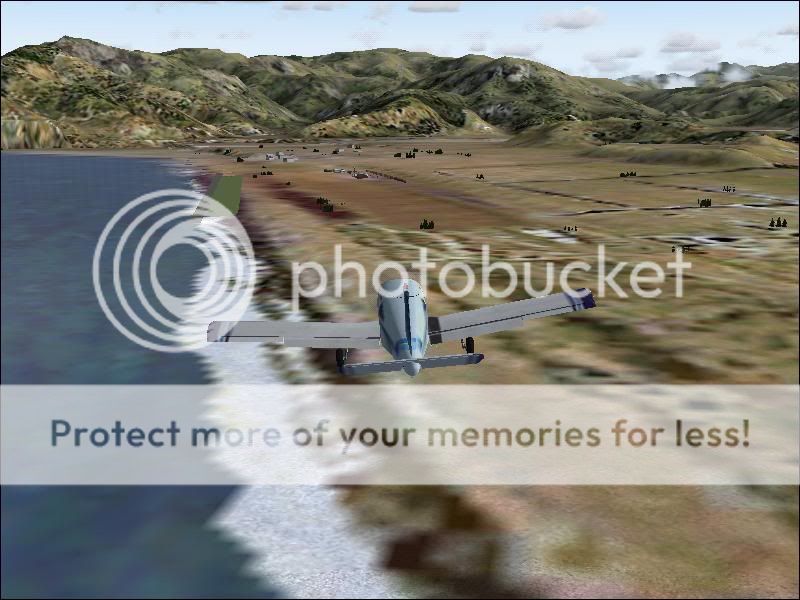
Eg: Kaikoura:
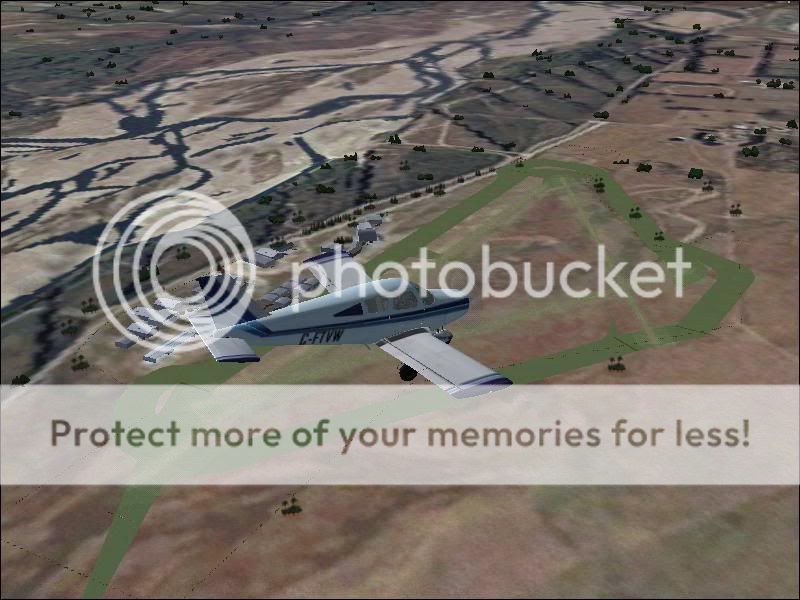
and Rangiora:

100% ad-free
 by Syncop8r » Sun Jul 26, 2009 12:14 pm
by Snowman » Sun Jul 26, 2009 3:35 pm
Syncop8r wrote:QUOTE (Syncop8r @ Jul 26 2009, 12:14 PM) <{POST_SNAPBACK}>I am using the RBE 20m mesh and topo and also freeware airfields such as Snowman's, the problem I have in many places appears to be runways from both sceneries appearing.
Eg: Kaikoura:
and Rangiora:
Part of the explanation for your problems ( Rangiora anyway) is here.... http://nzff.org/forum/viewtopic.php?t=10352
You may want to also check in the FS9 / Addon Scenery / Scenery folder for duplicate AFCADs ( from GNZLAP for instance if you have it), and remove them.
Always ONLY use the AFCAD that comes with the scenery, not a 3rd party one.
Lawrie.Last edited by Snowman on Sun Jul 26, 2009 3:37 pm, edited 1 time in total.

by Syncop8r » Tue Jul 28, 2009 11:13 pm

by Snowman » Wed Jul 29, 2009 3:20 pm
Syncop8r wrote:QUOTE (Syncop8r @ Jul 28 2009, 11:13 PM) <{POST_SNAPBACK}>Fixed them - there were AFCADs for a handful of NZ airfields in my Static Objects Library (which, of course, is at the top of my sceneries list).
Don't know how they got there or why.
The strange thing is I have never seen some of those astroturf runways before.
So I got rid of those AFCADs and all is fixed.
Also found there was no AFCAD in the Kaikoura/Scenery folder so grabbed one from a previous install (which had given me the same problem) and it works sweet.
Thanks for your help Lawrie.
Your welcome for any help................
Just happy you got it sorted, and are now, hopefully, able to enjoy the sceneries.
Lawrie.
by captainherc » Wed Jul 29, 2009 5:54 pm
by Snowman » Thu Jul 30, 2009 3:28 pm
captainherc wrote:QUOTE (captainherc @ Jul 29 2009, 05:54 PM) <{POST_SNAPBACK}>Would doubling up on Afcads also cause my problem. At NZWK when at end of runway I have grass hills in front of me. I can taxi through and then when airborne at say 50 feet I can see the sealed runway. I have two Afcads for this airport. On in the NZWK scenery folder located in AddonScenery and one in this "scenery AFCAD's etc" folder in Addon Scenery. Please help.
Never heard of a folder in FS9 named "Scenery AFCADs etc" in FS9s Addon Scenery folder.
This is obviously something you have created yourself for whatever obscure reason................
If you have my NZWK version-2 scenery installed, for example, you should have the AFCAD that came with the scenery in the NZWK "Scenery" folder, and
a COPY of that same AFCAD in the FS9 / Scenery / World / Scenery folder, as per the CLEAR install instructions provided with my scenery.
It also states CLEARLY...............
NOTE !!
Please make sure you have NO other AFCADs for NZWK (from GNZLAP for instance),
in places such as FS9 / Addon Scenery /Scenery folder.
"NO other AFCADs" Being the operative words here............. no others anywhere but the places mentioned.............
When you install any airport scenery ( not just mine, but any), ONLY use the AFCAD that comes with the scenery, and follow the install instructions exactly.
DO NOT use any other AFCAD for any particular airport, other than the one that comes with that scenery. Its designed for that scenery, others wont be.
Also, if you have GNZLAP installed, DO NOT use the AFCADs from that, if you already have airport sceneries for any of them installed.
If you install a new scenery for NZ , AFTER you have installed GNZLAP, REMOVE the AFCAD of the same name for that particular airport from the FS9 / Addon Scenery / Scenery folder, which is where GNZLAP places them.
The AFCADs with GNZLAP were only provided for basically a default FS9, as a lot of the NZ airports and airfeilds have no parking in default FS9, therefore AI flights will not work properly where there are no parks at a given airport, or in some cases, not even a runway for AI.
Also, if you are using my NZWK scenery for instance, if you do not have Christian Stock's 20 m mesh and NZ Topo ( payware) installed, you may run into elevaion problems. All my work is designed to fit the 20m mesh............
Lawrie.
Users browsing this forum: No registered users and 7 guests


