Really great! That lake shot is especially good. But one of those screenshots really needs an explanation....
Your screenshot here.
96 posts
• Page 2 of 5 • 1, 2, 3, 4, 5
Re: Your screenshot here.
 by toprob » Thu Aug 20, 2020 5:10 pm
Really great! That lake shot is especially good. But one of those screenshots really needs an explanation....
-

toprob - NZFF Pro
- Joined: Sat Apr 29, 2006 4:56 pm
- Posts: 6718
- Location: Upper Hutt
Re: Your screenshot here.
by Kelvinr » Thu Aug 20, 2020 5:15 pm
[quote="toprob"][quote="Kelvinr"]Here's my few.
https://imgur.com/a/Uvabnmq[/quote]
Really great! That lake shot is especially good. But one of those screenshots really needs an explanation....[/quote]
Dolly did it.
https://imgur.com/a/Uvabnmq[/quote]
Really great! That lake shot is especially good. But one of those screenshots really needs an explanation....[/quote]
Dolly did it.
-

Kelvinr - Sim-holic
- Joined: Sat May 03, 2008 1:06 pm
- Posts: 904
Re: Your screenshot here.
by Adamski » Thu Aug 20, 2020 7:41 pm
Wow! I especially love the high altitude/icing ones #6 and #8!!!Kelvinr wrote:Here's my few.
https://imgur.com/a/Uvabnmq
BTW - what app are you using for monitoring (top right of some of the shots)?
I know scenery is "your thing" ... how do you rate what you're seeing in MS?
Adam.

-

Adamski - NZFF Pro
- Joined: Thu Nov 01, 2007 2:22 am
- Posts: 5047
- Location: Birkenhead, Auckland
Re: Your screenshot here.
by Splitpin » Thu Aug 20, 2020 8:08 pm
Amazing shots guys ..Im living the dream via your posts 
-

Splitpin - NZFF Pro
- Topic author
- Joined: Mon Aug 03, 2009 12:15 pm
- Posts: 21383
- Location: Christchurch NZ
Re: Your screenshot here.
by Charl » Thu Aug 20, 2020 8:22 pm
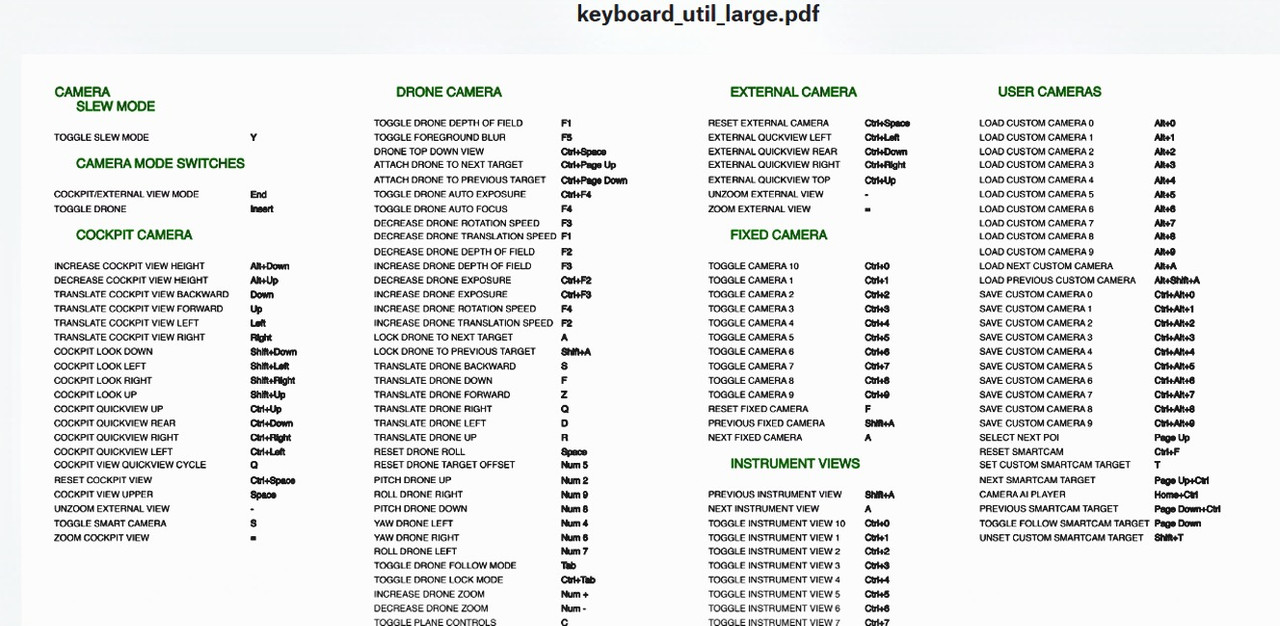
Marty does your trigger finger not mightily itch??
This:
I am not going to rush into MSFS 2020, there will be plenty of chatter as seen above, allowing one to dip the toe as and when.
I will fly that lovely AFS2 helicopter as solace (if and when sorted) and enjoy looking and learning.
NZ will have lots to add by way of 3rd party addon (Hooray!) but it's a great balance to have such a lovely base sim to build it on.
Given I went nigh on 15 years with FS9, this sim could last the rest of my flightsimming life!
And, Thanks for the pics so far!
emfrat wrote:What more do you need?
This:
I am not going to rush into MSFS 2020, there will be plenty of chatter as seen above, allowing one to dip the toe as and when.
I will fly that lovely AFS2 helicopter as solace (if and when sorted) and enjoy looking and learning.
NZ will have lots to add by way of 3rd party addon (Hooray!) but it's a great balance to have such a lovely base sim to build it on.
Given I went nigh on 15 years with FS9, this sim could last the rest of my flightsimming life!
And, Thanks for the pics so far!
-

Charl - NZFF Pro
- Joined: Mon May 01, 2006 8:28 am
- Posts: 9747
- Location: Auckland
Re: Your screenshot here.
by emfrat » Thu Aug 20, 2020 8:58 pm
Thankyou Charl - The drone thing seems to be just the old chase plane view, tarted up with depth of field, and foreground blur - welcome improvements for sure. I am quite sure I can mimic them in AFS2, so we shall see.
ATB
Mike
ATB
Mike
MikeW
'Propliner' is actually short for 'Proper airliner, with big rumbly radials'

'Propliner' is actually short for 'Proper airliner, with big rumbly radials'
-

emfrat - NZFF Pro
- Joined: Sat May 07, 2011 7:41 pm
- Posts: 4129
- Location: 50 DME YBBN
Re: Your screenshot here.
by Splitpin » Thu Aug 20, 2020 9:21 pm
Charl ...yes indeed ..my finger itches, but my wallet puckers.
I am tempted to buy and just see what happens with my stone age set up ...but, good God, whatever became of the old "V" key
I am tempted to buy and just see what happens with my stone age set up ...but, good God, whatever became of the old "V" key
-
Splitpin - NZFF Pro
- Topic author
- Joined: Mon Aug 03, 2009 12:15 pm
- Posts: 21383
- Location: Christchurch NZ
Re: Your screenshot here.
by Kelvinr » Thu Aug 20, 2020 9:22 pm
[quote="Adamski"][quote="Kelvinr"]Here's my few.
https://imgur.com/a/Uvabnmq[/quote]Wow! I especially love the high altitude/icing ones #6 and #8!!!
BTW - what app are you using for monitoring (top right of some of the shots)?
I know scenery is "your thing" ... how do you rate what you're seeing in MS?
Adam.[/quote]
Thanks. For the monitoring app, we'll it's built in. Soenthing people haven't yet discovered and I've been able to discover that there is an fps counter built in.
Just go to general / developer and turn on the developer settings which will give you a bar st the top of the sim screen, in there is an options menu and in there you'll enable fps counter.
Another cool tip: in the windows menu on the same bar, you will see a teleport option for changing location, and you will find an aircraft selection option to change aircraft on the fly. Great convenience.
As for the buildings, we'll I'm extremely impressed with the placement although I have to say, xplane does a slightly better job in modelling the actual footprint as I've seen FS2020 place buildings with autogen that don't fill the whole footprint but all things considered I am not turning back, there's too much to love.
The way they have done the roof top colouring is amazing, it's like they take a few points in the photo and the most frequent colour gets priority and blended into the roof. However they have done it, it really works quite well.
https://imgur.com/a/Uvabnmq[/quote]Wow! I especially love the high altitude/icing ones #6 and #8!!!
BTW - what app are you using for monitoring (top right of some of the shots)?
I know scenery is "your thing" ... how do you rate what you're seeing in MS?
Adam.[/quote]
Thanks. For the monitoring app, we'll it's built in. Soenthing people haven't yet discovered and I've been able to discover that there is an fps counter built in.
Just go to general / developer and turn on the developer settings which will give you a bar st the top of the sim screen, in there is an options menu and in there you'll enable fps counter.
Another cool tip: in the windows menu on the same bar, you will see a teleport option for changing location, and you will find an aircraft selection option to change aircraft on the fly. Great convenience.
As for the buildings, we'll I'm extremely impressed with the placement although I have to say, xplane does a slightly better job in modelling the actual footprint as I've seen FS2020 place buildings with autogen that don't fill the whole footprint but all things considered I am not turning back, there's too much to love.
The way they have done the roof top colouring is amazing, it's like they take a few points in the photo and the most frequent colour gets priority and blended into the roof. However they have done it, it really works quite well.
-
Kelvinr - Sim-holic
- Joined: Sat May 03, 2008 1:06 pm
- Posts: 904
Re: Your screenshot here.
by Adamski » Thu Aug 20, 2020 10:15 pm
Thanks for the tips!!! Just did a M/P at Courchevel ... what a blast!!! You have to keep your speed up after touchdown on landing or you'll slide back downhill (in the under-powered Robin at least)!
Adam.
Adam.
-
Adamski - NZFF Pro
- Joined: Thu Nov 01, 2007 2:22 am
- Posts: 5047
- Location: Birkenhead, Auckland
Re: Your screenshot here.
by Kelvinr » Thu Aug 20, 2020 10:18 pm
[quote="Adamski"]Thanks for the tips!!! Just did a M/P at Courchevel ... what a blast!!! You have to keep your speed up after touchdown on landing or you'll slide back downhill (in the under-powered Robin at least)!
Adam.[/quote]
Multiplayer is awesome, just had a four player flight starting at Fran Josef and heading to Milford Sound with a detour at Tekapo. A few mericans and an Aussie. Joined on discord and had audio, it was so cool. Haven't done that in years.
Thanks for the Courchevel tip.
Adam.[/quote]
Multiplayer is awesome, just had a four player flight starting at Fran Josef and heading to Milford Sound with a detour at Tekapo. A few mericans and an Aussie. Joined on discord and had audio, it was so cool. Haven't done that in years.
Thanks for the Courchevel tip.
-
Kelvinr - Sim-holic
- Joined: Sat May 03, 2008 1:06 pm
- Posts: 904
Re: Your screenshot here.
by toprob » Sat Aug 22, 2020 1:32 am
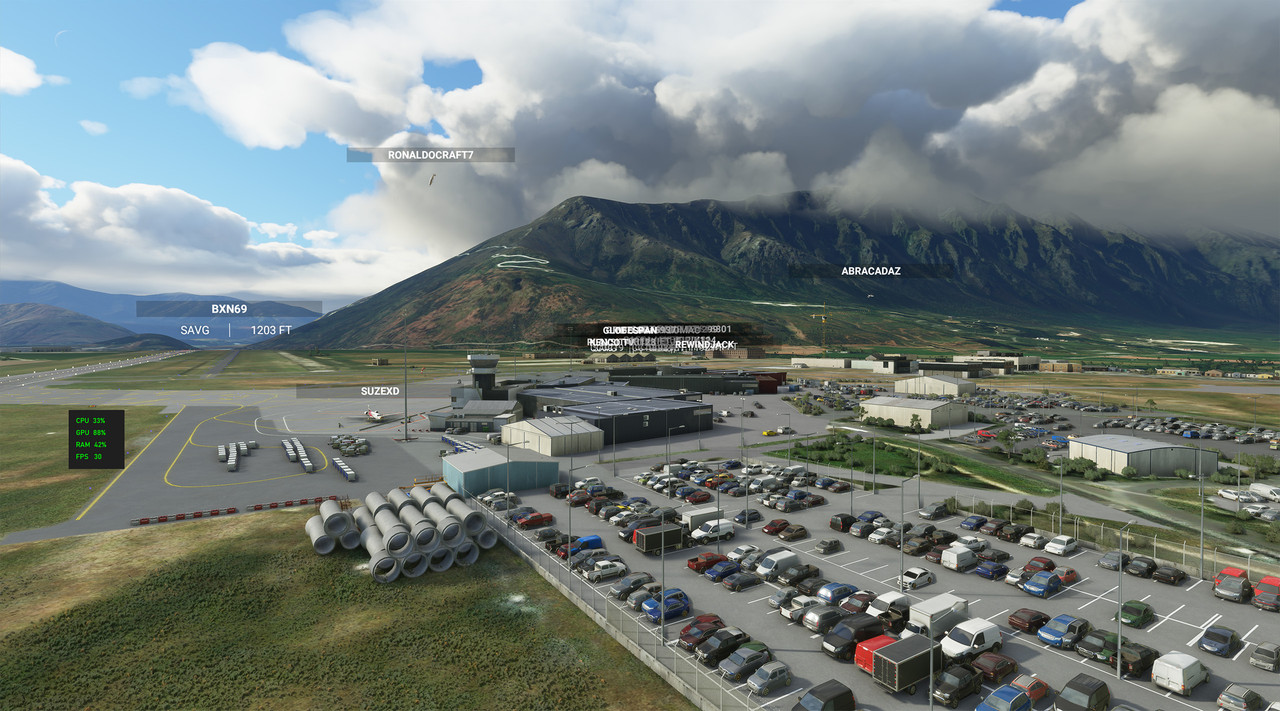
Another busy time at NZQN -- I really should get to bed, but this is just mind-boggling!
-
toprob - NZFF Pro
- Joined: Sat Apr 29, 2006 4:56 pm
- Posts: 6718
- Location: Upper Hutt
Re: Your screenshot here.
by Aharon » Sat Aug 22, 2020 2:05 am
What and why are the words on the screenshots???
Regards,
Aharon
Regards,
Aharon
- Aharon
- NZFF Pro
- Joined: Sun Jul 23, 2017 11:39 am
- Posts: 2013
Re: Your screenshot here.
by toprob » Sat Aug 22, 2020 9:46 am
Aharon wrote:What and why are the words on the screenshots???
Regards,
Aharon
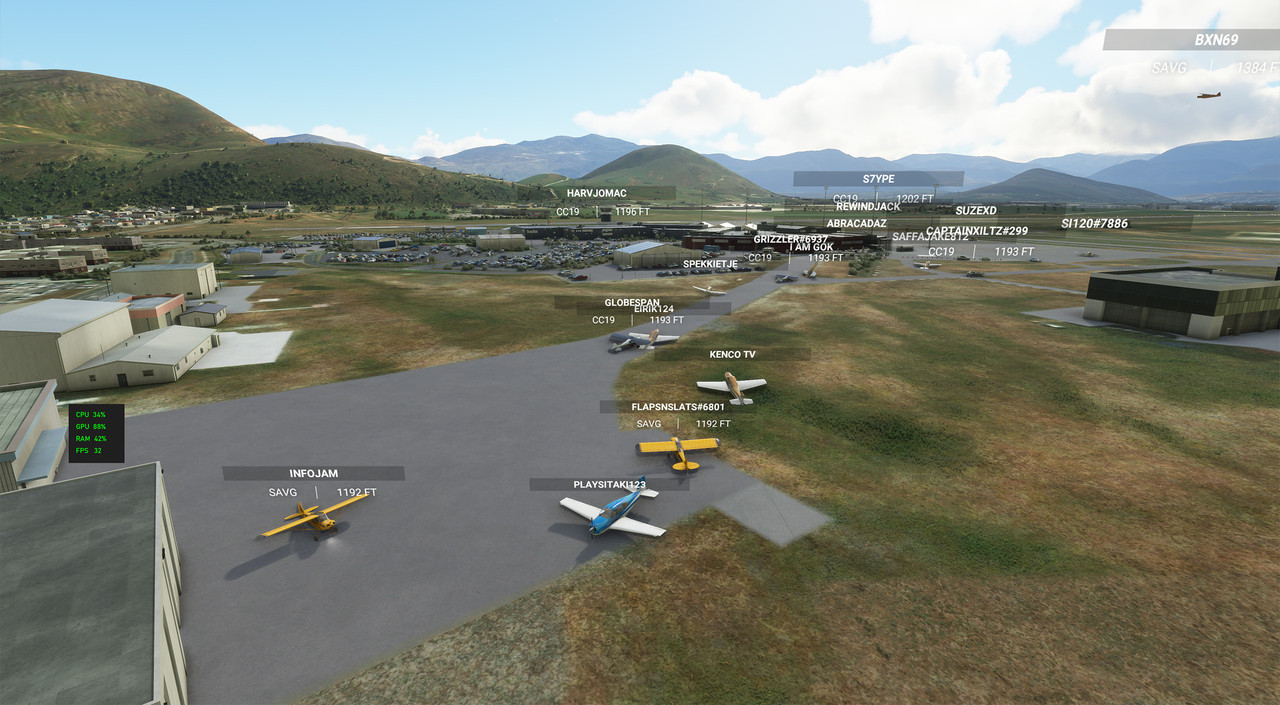
Those are other user's labels. Here's a close-up shot. They were swarming all over NZQN like ants! You can turn the labels off if you want, but I just want to know who else is about. This is not any special multi-player mode, this is just the shared world of MSFS.
-
toprob - NZFF Pro
- Joined: Sat Apr 29, 2006 4:56 pm
- Posts: 6718
- Location: Upper Hutt
Re: Your screenshot here.
by Kelvinr » Sat Aug 22, 2020 10:16 am
[quote="toprob"][quote="Aharon"]What and why are the words on the screenshots???
Regards,
Aharon[/quote]
Those are other user's labels. Here's a close-up shot. They were swarming all over NZQN like ants! You can turn the labels off if you want, but I just want to know who else is about. This is not any special multi-player mode, this is just the shared world of MSFS.
[img]https://i.postimg.cc/85S1fJ6v/NZQNcrowd2.jpg[/img][/quote]
Love it. It's alive!
Regards,
Aharon[/quote]
Those are other user's labels. Here's a close-up shot. They were swarming all over NZQN like ants! You can turn the labels off if you want, but I just want to know who else is about. This is not any special multi-player mode, this is just the shared world of MSFS.
[img]https://i.postimg.cc/85S1fJ6v/NZQNcrowd2.jpg[/img][/quote]
Love it. It's alive!
-
Kelvinr - Sim-holic
- Joined: Sat May 03, 2008 1:06 pm
- Posts: 904
Re: Your screenshot here.
by emfrat » Sat Aug 22, 2020 10:42 am
That does look good - how much bandwidth is it using?
MikeW
'Propliner' is actually short for 'Proper airliner, with big rumbly radials'
'Propliner' is actually short for 'Proper airliner, with big rumbly radials'
-
emfrat - NZFF Pro
- Joined: Sat May 07, 2011 7:41 pm
- Posts: 4129
- Location: 50 DME YBBN
Re: Your screenshot here.
by toprob » Sat Aug 22, 2020 10:53 am
emfrat wrote:That does look good - how much bandwidth is it using?
Checking the data in-sim data usage, it says 4.4GB, although I don't know if that includes the manual cache I did for Wakatipu as a test. My data monitoring is set up for the previous 24 hours, I may increase that period and see how much total in a month:)
-
toprob - NZFF Pro
- Joined: Sat Apr 29, 2006 4:56 pm
- Posts: 6718
- Location: Upper Hutt
Re: Your screenshot here.
by emfrat » Sat Aug 22, 2020 12:26 pm
toprob wrote:emfrat wrote:That does look good - how much bandwidth is it using?
Checking the data in-sim data usage, it says 4.4GB, although I don't know if that includes the manual cache I did for Wakatipu as a test. My data monitoring is set up for the previous 24 hours, I may increase that period and see how much total in a month:)
Thanks Robin - I suspect data usage is going to replace FPS as the standard bone of contention
ATB
Mike
MikeW
'Propliner' is actually short for 'Proper airliner, with big rumbly radials'
'Propliner' is actually short for 'Proper airliner, with big rumbly radials'
-
emfrat - NZFF Pro
- Joined: Sat May 07, 2011 7:41 pm
- Posts: 4129
- Location: 50 DME YBBN
Re: Your screenshot here.
by toprob » Sun Aug 23, 2020 4:35 pm
I'll pop this here, even though it's a video, rather than a screenshot, but I think this is another look at NZQN shots I posted above. This guy doesn't have labels showing, but he gives a good close-up look at the participants:)
https://www.youtube.com/watch?v=a-rMJLwGDwk
https://www.youtube.com/watch?v=a-rMJLwGDwk
-
toprob - NZFF Pro
- Joined: Sat Apr 29, 2006 4:56 pm
- Posts: 6718
- Location: Upper Hutt
Re: Your screenshot here.
by Splitpin » Mon Aug 24, 2020 10:33 am
Great video Rob ...it really is amazing, but I dont think I could stand all that traffic  , Ive always prefered flying alone.
Is that multi thing an option ? surley your able to have the place to yourself?
, Ive always prefered flying alone.Is that multi thing an option ? surley your able to have the place to yourself?
-
Splitpin - NZFF Pro
- Topic author
- Joined: Mon Aug 03, 2009 12:15 pm
- Posts: 21383
- Location: Christchurch NZ
Re: Your screenshot here.
by toprob » Mon Aug 24, 2020 11:29 am
These are the options:
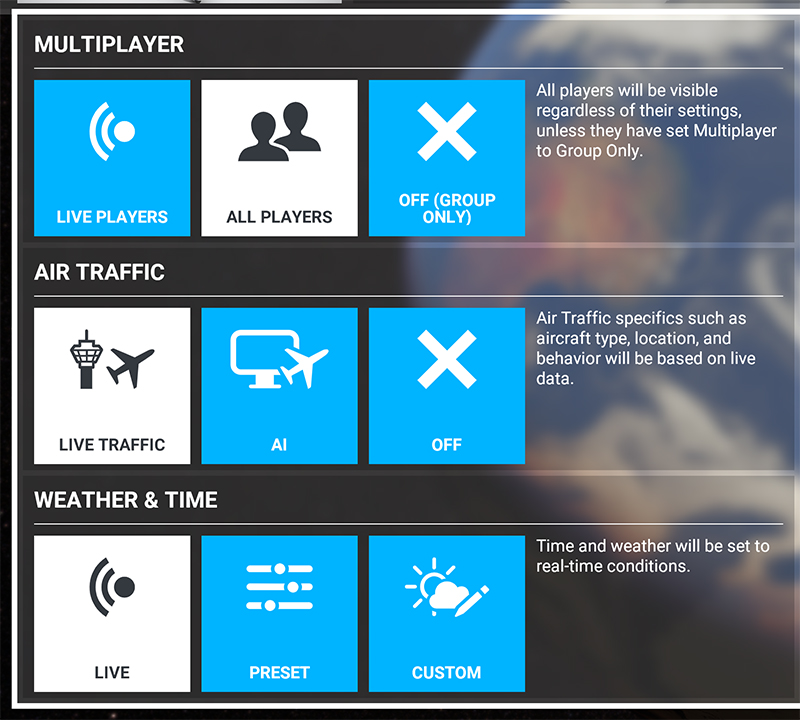
'Live players' is for like a proper multiplayer session -- everyone needs to have the same traffic settings, and live weather. 'All players' is a free-for-all, wild-west arrangement. Or you can turn it all off....
The video was a get-together, it won't always be like that:) This morning I've been experimenting with the SDK at NZCH, and there are normally two or three people showing up. If I turned the labels off, I wouldn't know they were there until they taxi past me.
'Live players' is for like a proper multiplayer session -- everyone needs to have the same traffic settings, and live weather. 'All players' is a free-for-all, wild-west arrangement. Or you can turn it all off....
The video was a get-together, it won't always be like that:) This morning I've been experimenting with the SDK at NZCH, and there are normally two or three people showing up. If I turned the labels off, I wouldn't know they were there until they taxi past me.
-
toprob - NZFF Pro
- Joined: Sat Apr 29, 2006 4:56 pm
- Posts: 6718
- Location: Upper Hutt
96 posts
• Page 2 of 5 • 1, 2, 3, 4, 5
Who is online
Users browsing this forum: No registered users and 27 guests