Updated Scenery map

Read and report on flightsim developers progress of upcoming or completed products

Postby Timmo » Mon Sep 01, 2008 8:46 pm

Gidday guys- Ive just been playing around a bit more with my Scenery finder map and added a few new features that may be of interest.
The map can be found here: http://www.nzff.org/maps/
1) Ive done a spruce up of the map interface
  • The overlay layers no longer load by default. A small check box is shown in order to turn the layer on or off. This should speed up the initial map load time.
  • Added nice images/icons and formatted things in tables
  • Changed the colour to better match the NZFF colour scheme
  • Removed the overview map to help speed things up
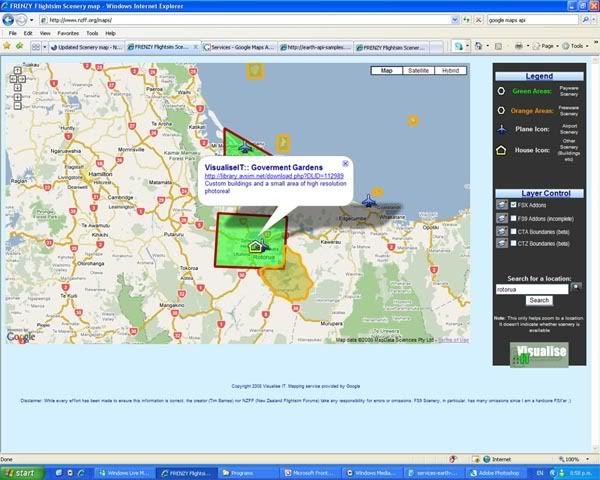


2) Ive got about halfway through adding the airspace boundaries of New Zealand from the VNC charts. At this stage I have only digitised the Control Areas and Control Zones. It is a little tricky to display these as polygon areas because they have to be considered in three dimensions.....anyway, you should be able to click on the polygon overlay and be presented with a pop-up containing:
  • The frequency of the controlling authority you need to talk to
  • The lower and upper altitude of that piece of airspace
  • The class of Airspace (i.e. C or D)
  • Whether the Airspace has a requirement for a Transponder to be fitted


The colours of the boundaries/areas match the colours on the VNC charts. The boundaries match fairly closely
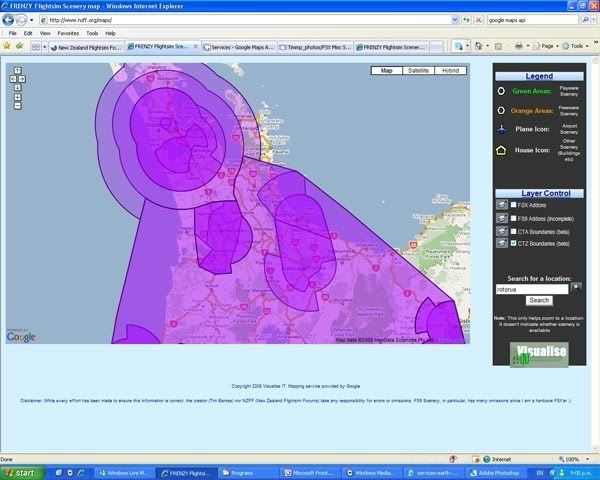

Disclaimer: I hope it goes without saying but, these cannot of course be used for real-world flying. The boundaries may not be accurate and I can't take any responsibility for errors or omissions. It is a work in progress and I'll be adding the South Island boundaries and other information in the future.

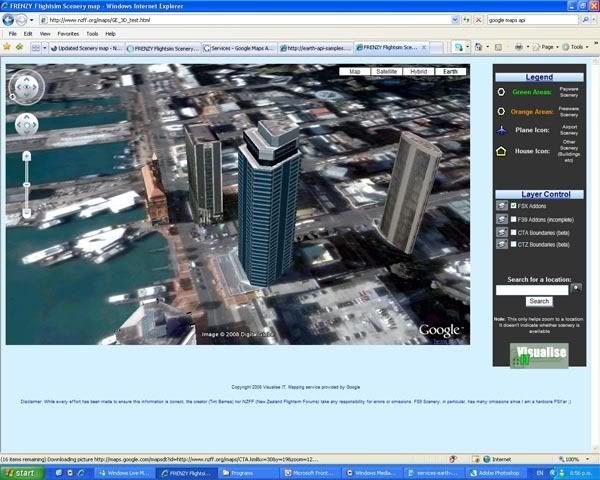
3) So, if airspace boundaries need to be viewed in three dimensions, why not do that? Google has just released a plugin which allows you to experience FULL THREE DIMENSIONAL mapping and display within your web browser without the need for Google Earth! This is cool!

As a beta preview, I've created a map using this new functionality and placed it here. There is a new button at the top right of the map called 'Earth'. Clicking this the first time will prompt install of the plugin (this may take a while to load). Then you will be able to view the map in three dimensions- Im still working out how to invoke the display of 3D polygons so at the moment only the markers work. Like the 2D map, clicking on the marker will bring up a link to download the scenery from Avsim.

Hope you enjoy it- Let me know of any obvious problems.
Last edited by Timmo on Mon Sep 01, 2008 9:06 pm, edited 1 time in total.
Timmo
NZFF Pro
 
Topic author
Joined: Wed Oct 25, 2006 6:28 pm
Posts: 2056
Location: Tauranga

Postby Charl » Tue Sep 02, 2008 12:33 pm

Timmo this is really cool stuff, and looks like becoming a brilliant resource.

I loaded up the bits - found that if I clicked an icon the second time the text didn't show up??
I have a habit of breaking things... sad.gif

Also, some user feedback: be nicer if you could have popups with mouse hover over the icon, click on the link to go to the download.
Last edited by Charl on Tue Sep 02, 2008 12:42 pm, edited 1 time in total.
User avatar
Charl
NZFF Pro
 
Joined: Mon May 01, 2006 8:28 am
Posts: 9691
Location: Auckland

Postby Alex » Tue Sep 02, 2008 2:56 pm

Very cool Tim, I haven't checked out the 3D thingy yet, but sounds awesome. clapping.gif

Alex
Alex
NZFF Pro
 
Joined: Fri Jul 14, 2006 3:39 pm
Posts: 3620

Postby Timmo » Tue Sep 02, 2008 3:01 pm

Yeah I found that issue a couple of times too.....but I just tried to replicate it and couldnt? So I guess it is kind of random.
I dont think it is something I can fix as it is handled by the inbuilt event which I just call.


One thing I might look into though loading the pop-up details into a seperate pane in the browser- When you click on the point in google Earth, it actually loads the first link (So, in the case of Robins scenery, it loads the site as I've just listed that....which looks good)

Ill look into that mouse over event.....currently use onMouseClick.

Oh and if there are any volunteers to help add the FS9 Scenery that would be appreciated- Just digitise them in Google earth and put the download link in the details box for the point.
Last edited by Timmo on Tue Sep 02, 2008 3:02 pm, edited 1 time in total.
Timmo
NZFF Pro
 
Topic author
Joined: Wed Oct 25, 2006 6:28 pm
Posts: 2056
Location: Tauranga

Postby Charl » Wed Sep 03, 2008 7:28 pm

Timmo wrote:
QUOTE (Timmo @ Sep 2 2008, 03:01 PM) <{POST_SNAPBACK}>
...Oh and if there are any volunteers to help add the FS9 Scenery that would be appreciated- Just digitise them in Google earth and put the download link in the details box for the point.
Sounds like a good idea...how d'you go about it?
User avatar
Charl
NZFF Pro
 
Joined: Mon May 01, 2006 8:28 am
Posts: 9691
Location: Auckland

Postby Yak52aholic » Wed Sep 03, 2008 7:46 pm

Uh, I'm not getting the right panel next to the map- it's to the right below it instead because the panel is wider than the gap between the map and the side- I'm running Firefox 3. But it's working for me otherwise.
Let the music be your master... Will you heed the master's call?
Yak52aholic
Forum Addict
 
Joined: Sat May 19, 2007 3:08 pm
Posts: 196
Location: Blenheim

Postby Timmo » Wed Sep 03, 2008 8:58 pm

Oh ok- Yeah I think I am using a window percentage for the map portion and a fixed number of pixels for the menu.....if you expand your window it should fit?
Timmo
NZFF Pro
 
Topic author
Joined: Wed Oct 25, 2006 6:28 pm
Posts: 2056
Location: Tauranga

Postby Yak52aholic » Wed Sep 03, 2008 9:02 pm

No, I got rid of the bookmarks on the left and pressed F11 and still no luck, but it's just 2 pixels away from fitting.
Let the music be your master... Will you heed the master's call?
Yak52aholic
Forum Addict
 
Joined: Sat May 19, 2007 3:08 pm
Posts: 196
Location: Blenheim

Postby Timmo » Thu Sep 25, 2008 12:13 pm

Charl- If you want I can send you what I have done for FS9 so far (pretty much only robins payware stuff and godzone releases that also have been done for FSX). It is simply a case of using the digitising tools in Google Earth, symbolising the right way and pasting the link from Avsim into the description box....I've also added a brief description about what is included in the download too.

Originally (before i figured out how to add the 'table of contents' and switchable layers, I was using a different symbol for combinations of payware/freeware/Fsx/Fs9 but now I can simplify those.

For the releases that come with an aerial photo, i also digitise that boundary (as best I can) and just give it a simple name to relate it to the airport point. You can then just upload it and replace the one that is there- The map will automatically update.
Last edited by Timmo on Thu Sep 25, 2008 12:17 pm, edited 1 time in total.
Timmo
NZFF Pro
 
Topic author
Joined: Wed Oct 25, 2006 6:28 pm
Posts: 2056
Location: Tauranga


Return to Announcements

Who is online

Users browsing this forum: No registered users and 8 guests