Moving gates in fs10????

A forum specifically to discuss the latest and greatest of all flight simulators

Postby Jimmy » Fri Nov 10, 2006 8:45 pm

Hi

Seeing theres a key comand for atach the airbridge and im sure I'v heard about the gates moving, iv just flown from NZQN to NZCH in the defualt A321 (yeah ms actuly aknogledged airbuses excistance this time round :lol: ) and now I want to move the gate up to the aircraft so my dear passengers don't have to jump! (btw I turned all autogen off and got a good 10-15 fps for the whole flight, in the vc! (hold on,m 10aint good grr lol))

I'v lined up perfectly and just wana know how to do it, I reasigned the key command to just one key press so I know I'm doing it right.

Thanks
James
Jimmy
 

Postby toprob » Fri Nov 10, 2006 9:12 pm

I think you need to enable Advanced Animations to get it working.
User avatar
toprob
NZFF Pro
 
Joined: Sat Apr 29, 2006 4:56 pm
Posts: 6711
Location: Upper Hutt

Postby Zöltuger » Fri Nov 10, 2006 10:16 pm

i was disappointed not to see any airbridges at NZAA. especially considering they're at both NZWN and NZCH too.

as for the A321, it took me a good 10 minutes to work out the autopilot in that thing. what a nightmare, you can almost tell it's french. stick to boeing i say.
Zöltuger
 

Postby toprob » Fri Nov 10, 2006 11:15 pm

There are some at Auckland, maybe you need to turn the settings up a bit since this is one of the high detail airports.
User avatar
toprob
NZFF Pro
 
Joined: Sat Apr 29, 2006 4:56 pm
Posts: 6711
Location: Upper Hutt

Postby Zöltuger » Fri Nov 10, 2006 11:27 pm

ok, i'll do that, thanks
Zöltuger
 

Postby Jimmy » Sat Nov 11, 2006 2:02 pm

hmm turning on the advanced animations doesn't do anything except for making my wings look really bad :unsure:

I can't find anything in the learning center eathier.

Maby well have to wait for fs11 lol or a fs10 patch.......
Jimmy
 

Postby towerguy » Sun Nov 12, 2006 10:06 am

airbus ??!!!

IF IT AIN'T BOEING - i AIN'T GOIN !!!!!


how do you restart an airbus - push CRTL ALT DEL twice!


how does an A340 get airborne - they don't - the earth curves away beneath them!


tower controllers LOVE airbus's - YEAH RIGHT! (thanks Tui's.) :lol:
CPU- i7 4790K @4.0Gb Cooler- Noctua NH-D15 M/B- Z97 ProGamer P/S- 750W RAM- 16Gb
Graphics- Nvidia GTX970 16Gb Drives- 2x 120Gb SSD Samsung 850EVO, 1x 2Tb HD, 1x DVD-RW
Sound- on M/B Logitec 5.1 surround sound system OS- Win 10 pro , all wrapped in a black Corsair case Display - Panasonic UHD 4k 50" Flatscreen TV.( 3840x2160 Res)
User avatar
towerguy
Sim-holic
 
Joined: Mon Aug 07, 2006 4:27 pm
Posts: 886

Postby Ellipsis » Wed Feb 21, 2007 8:32 pm

I want to know the same thing man. I think you set your Frequency on NAV1 to something, Im not too sure.

EDIT: I have had a look on other forums, and someone said it is Control+J. I will try it out when I next fly.
Last edited by Ellipsis on Wed Feb 21, 2007 8:33 pm, edited 1 time in total.
Ellipsis
 

Postby JonARNZ » Wed Feb 21, 2007 9:02 pm

CTRL+J is correct, J is for Jetway. NAV1 etc is for the FS9 folk. Jimmy, if you reassigned you keys, then maybe you need to press the key you assigned it to? :P
ARNZX flightsim.co.nz
Asus Sabretooth X79 MB | i73930K CPU | 8GB DDR3 1600 C7 Ram | GTX 560Ti DCII OC | Corsair H80 Water Cooling
User avatar
JonARNZ
Senior Member
 
Joined: Sat Oct 21, 2006 12:49 pm
Posts: 1523
Location: Auckland

Postby ZK-TJL » Thu Feb 22, 2007 9:22 am

Hi there team. Jimmy, make sure you have animations up high as Tim said, If its still not working try refreashing your scenery. I found this to work for me. Hope this helps. :)

PS Tower guy this is classsic
IF IT AIN'T BOEING - i AIN'T GOIN !!!!!


how do you restart an airbus - push CRTL ALT DEL twice!

:D :clap:
ZK-TJL
Forum Addict
 
Joined: Sun Jan 07, 2007 12:20 pm
Posts: 490
Location: Christchurch

Postby ZK-TJL » Thu Feb 22, 2007 9:23 am

Zöltuger wrote: i was disappointed not to see any airbridges at NZAA. especially considering they're at both NZWN and NZCH too.

as for the A321, it took me a good 10 minutes to work out the autopilot in that thing. what a nightmare, you can almost tell it's french. stick to boeing i say.


Tim, I've got working airbridges at NZAA :blink: ???

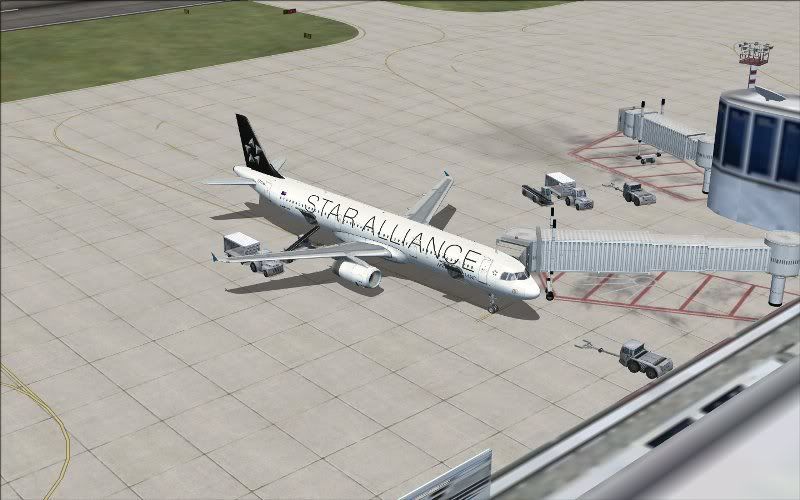
Shot taken just in front of the 'Auckland' sign
user posted image
(Repaint of default A321 by Tim Clark(Zoltuger))
Last edited by ZK-TJL on Thu Feb 22, 2007 9:44 am, edited 1 time in total.
ZK-TJL
Forum Addict
 
Joined: Sun Jan 07, 2007 12:20 pm
Posts: 490
Location: Christchurch

Postby Captain James Wrig » Thu Feb 22, 2007 10:02 am

Quote "hmm turning on the advanced animations doesn't do anything except for making my wings look really bad "

My 2cents worth......

Advanced animations turned on - Scenery set to dense or normal at least

Ctrl + J when parked at gate.

There are a couple of things that I have found out re jetways that may or may not apply here:

1) Have you got any local FS9 airport scenery installed ? Because if you have the jetways won't work !

2) Based on the quote above, what is your video card? because some of them don't support the requirements to show the animations, and those I have read about saying the jetways won't work also complain about the wings going funny ???
Last edited by Captain James Wrig on Thu Feb 22, 2007 10:03 am, edited 1 time in total.
Captain James Wrig
 

Postby Zöltuger » Thu Feb 22, 2007 11:22 am

ZK-TJL wrote:
Zöltuger wrote: i was disappointed not to see any airbridges at NZAA. especially considering they're at both NZWN and NZCH too.


Tim, I've got working airbridges at NZAA :blink: ???

Shot taken just in front of the 'Auckland' sign
user posted image
(Repaint of default A321 by Tim Clark(Zoltuger))

haha, that's an old post. i've got airbridges now, you just have to turn up the building detail. like toprob says, the detail is high at auckland, so i get about 6 airbridges in auckland and about 15 at WLG/CHC on my current settings. if i turn it up all the way, they're at every gate.

(p.s. awesome repaint B) )
Zöltuger


Return to All Flight Simulators

Who is online

Users browsing this forum: No registered users and 3 guests