I took out my card, and vaccumed the dust of its fan- and put it back in.
It makes no diff in FS- accept it will run perfectly in 800x600 mode for some reason...
FS2004 wont start up
45 posts
• Page 2 of 3 • 1, 2, 3
 by ardypilot » Sun Apr 08, 2007 11:29 am
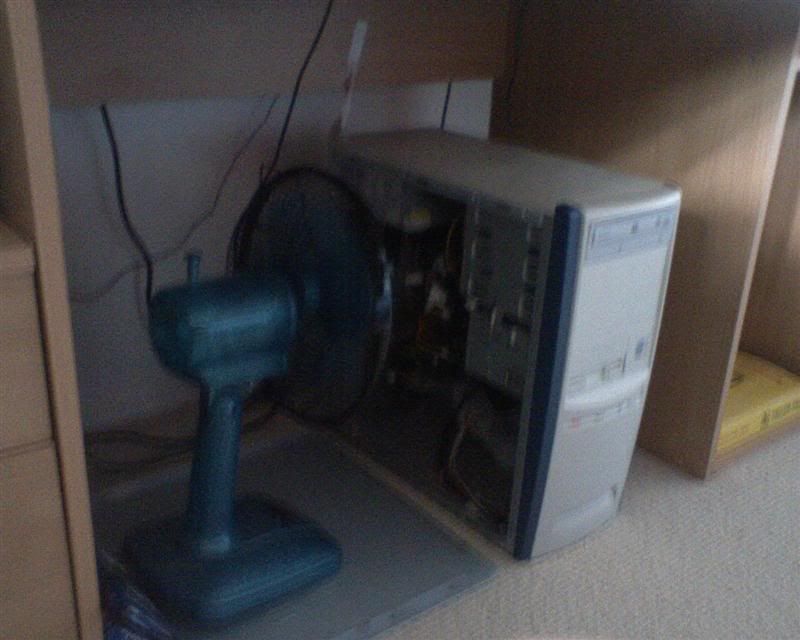
With side open and fan on high power, about 20cm from graphics card- I still get the same square issue with FS.
I've noticed that the fan onboard my graphics card has been making a louder noise than usual once I reinstalled it after my 6600, but it makes a noticable gurgerling/whining noise with the side down- would this be the cause of the problem??
-

ardypilot - NZFF Pro
- Topic author
- Joined: Wed Apr 26, 2006 10:01 am
- Posts: 6802
- Location: Auckland
by Jimmy » Sun Apr 08, 2007 11:44 am
Did you recive that PM from mike andrew? I passed your message on to craig last night and mike said he sent you a PM about the overclocking.
Perhaps thats a problem with the 5600s, thats what happened with the one you sold me, when I installed it the fan was unbearable loud, so I simply unluged it and brought a 10dollar PCI fan.. I shoudln't be getting to hot, your proably only hearing that extra noise when the case is open, cos theres no case to stop you hearng it.. lol sorry I have no real helpful information
Perhaps thats a problem with the 5600s, thats what happened with the one you sold me, when I installed it the fan was unbearable loud, so I simply unluged it and brought a 10dollar PCI fan.. I shoudln't be getting to hot, your proably only hearing that extra noise when the case is open, cos theres no case to stop you hearng it.. lol sorry I have no real helpful information
- Jimmy
by ZK-MAT » Sun Apr 08, 2007 11:47 am
It wouldn't seem to be a heat issue then. Either it's the card or your FS installation. Go into System Restore and pick a restore point back before you had problems, you can always undo it.
If it's fine then, then, for the last time, re-install FS
If it's fine then, then, for the last time, re-install FS
-

ZK-MAT - Senior Member
- Joined: Sun Apr 30, 2006 11:41 pm
- Posts: 1690
- Location: Papamoa
by Bingobob » Sun Apr 08, 2007 11:50 am
Probably to late to say this or you know better
Using a Vacuum cleaner is not a good idea, Static build up created by the molecules of air rushing past the Vaccum Nozzle.
Have you considered reformatting XP? This will give you a clean slate and make determining if its hardware related easier.
Its hard to diagnose this fault over the internet you most likely wont take much notice anyways or accept that it could be a hardware failure. My advice to you now is take it to a Computer repair specialist and tell them exactly what you have done. The reaction you may get you might not like.
I took out my card, and vaccumed the dust of its fan- and put it back in
Using a Vacuum cleaner is not a good idea, Static build up created by the molecules of air rushing past the Vaccum Nozzle.
Have you considered reformatting XP? This will give you a clean slate and make determining if its hardware related easier.
Its hard to diagnose this fault over the internet you most likely wont take much notice anyways or accept that it could be a hardware failure. My advice to you now is take it to a Computer repair specialist and tell them exactly what you have done. The reaction you may get you might not like.
Last edited by Bingobob on Sun Apr 08, 2007 11:52 am, edited 1 time in total.
- Bingobob
by ardypilot » Sun Apr 08, 2007 12:29 pm
Did you recive that PM from mike andrew? I passed your message on to craig last night and mike said he sent you a PM about the overclocking.
Yep, thanks. As I mentioned above, "I have just re-applied the coolbits.reg" (that was what Mike instructed me to do).
Perhaps thats a problem with the 5600s, thats what happened with the one you sold me
Odd, because my both my 5600's (the one I sold you, and the one I have currently) both used to work perfectly quietly!
Go into System Restore and pick a restore point back before you had problems, you can always undo it.
Thanks for the tip- I've been thinking of doing this as a last resort if I can't find any soultion in the next day or so.
Using a Vacuum cleaner is not a good idea, Static build up created by the molecules of air rushing past the Vaccum Nozzle.
Whoops! I didn't actually touch the vacuum on the hardware- so does that make any difference?
Have you considered reformatting XP? This will give you a clean slate and make determining if its hardware related easier.
That may waste a lot of time and effort for nothing. I think I might as well just call it quits if the restore point doesn't work, and just wait untill I have enough $$$ to buy a new system instead of wasting money trying to patch my slow old one up... maybe I'll try and win some money at Bingo

Thanks for the continued support everyone

Last edited by ardypilot on Sun Apr 08, 2007 12:29 pm, edited 1 time in total.
-
ardypilot - NZFF Pro
- Topic author
- Joined: Wed Apr 26, 2006 10:01 am
- Posts: 6802
- Location: Auckland
by Charl » Sun Apr 08, 2007 12:32 pm
Overclocking software has something akin to this, somewhere in the package:

It would take more money than I am willing to spend, and more hours than I potentially have free, to click "I agree" on something like that.
It would take more money than I am willing to spend, and more hours than I potentially have free, to click "I agree" on something like that.
-

Charl - NZFF Pro
- Joined: Mon May 01, 2006 8:28 am
- Posts: 9801
- Location: Auckland
by ZK-MAT » Sun Apr 08, 2007 8:04 pm
Trolly mate, just try system restore. It does not lose any documents, emails etc and is entirely reversable. If in doubt create a restore point before winding the clock back.
It would have been the first thing I tried.
PS I have heard of vacuum issues with static (all that charged air rushing past plastic must be a hazard) but perhaps I've been lucky, so far I've never fried anything giving the system a good old vacuum after attacking all surfaces with a paintbrush first....
It would have been the first thing I tried.
PS I have heard of vacuum issues with static (all that charged air rushing past plastic must be a hazard) but perhaps I've been lucky, so far I've never fried anything giving the system a good old vacuum after attacking all surfaces with a paintbrush first....
-
ZK-MAT - Senior Member
- Joined: Sun Apr 30, 2006 11:41 pm
- Posts: 1690
- Location: Papamoa
by Jimmy » Sun Apr 08, 2007 9:32 pm
well, you could try the complet reformat and windows reinstall, you have two drives ae? Just move everything to the secondary, and reformat the primary.. If nothign else works seriosly consider it, if you have to wait to buy a new system, then its somehting to fill the time.. I did the reinstall, improved a few things..
James
James
- Jimmy
by brownbox » Sun Apr 08, 2007 9:32 pm
Overclockings fine, you just gotta know how far is too far. Just look at my signature!
Using the detect optimal frequency setting in coolbits is not such a good idea, as it puts the card way up to its max overclocking point.
If this was happening to me I would
a) Re install the Nvidia drivers
B) Reset BIOS settings (just incase something you dont know about has been altered)
c) Turn off all AA, AF, overclocking, and anything else.
I really dont know. It is nice to have someone elses computer problems to think about for a change.
Best of luck
Using the detect optimal frequency setting in coolbits is not such a good idea, as it puts the card way up to its max overclocking point.
If this was happening to me I would
a) Re install the Nvidia drivers
B) Reset BIOS settings (just incase something you dont know about has been altered)
c) Turn off all AA, AF, overclocking, and anything else.
I really dont know. It is nice to have someone elses computer problems to think about for a change.
Best of luck
Desktop:Core 2 Duo E4300 1.8@ 3.0Ghz@ 1.36v. 4Gb Supertalent DDR2-800 2.1v@ 5-5-5-15. Asus P5N-E SLI Pencil Modded. Corsair TX 650. 512MB Palit Geforce 8800GT. 2x200GB IDE+640GB SATAII. Windows Vista Ultimate X86. Samsung SH-S222A
Phone:Nokia N900 Vodafone
Car:1993 Mitsubishi Mirage Asti Z. Steel Blue Pearl
1996 Toyota Curren 2.0L 5 Spd Manual Silver. 205/50/R16 on Enkei K-95. Lowered on Jamex Superlows. Remote locking. Remote boot release. Cruise control
1996 Mitsubishi GTO MR

Phone:Nokia N900 Vodafone
Car:
1996 Mitsubishi GTO MR
-

brownbox - Senior Member
- Joined: Thu Apr 27, 2006 10:55 pm
- Posts: 1318
by gokanru » Mon Apr 09, 2007 9:29 pm
It's A process of elimination Trolly.So, forget FS for the moment.Does your graphics card perform ok in every other respect with normal operation.If so,then it's obvious that the FS install needs looking at.If however,You are not getting normal operation then I would be looking at graphics card and or drivers.Check out the silly little things like refresh rates coupled with resolution,you have no doubt already done this.Vacuum cleaners are ok to use if you are careful,but only use the nozzle not the brush as they have nylon. I have used a vacuum cleaner for the last 10 years on my computers with a horse hair paint brush and never had a problem
- gokanru
by ardypilot » Mon Apr 09, 2007 11:22 pm
Well, this evening as advised by an American fella on MSN, I tried turing AA off in my graphics card again and on in my sim, and it worked fine 
The only problem now is, I cannot open the 'select a flight screen' (my saved flights) in either the normal start up mode (with the menu down the side) or in mid flight (with the ALT screen)... the computer just freezes.
Matt, could you please explain this restore point thing again? I've never done it before. In my system restore program, I have 22 different restore points for March, and 5 for April already, none of which I created myself (does it do it automatically). If I do a system restore- what exactly do I loose, what changes, and how does it effect FS2004?
Cheers
The only problem now is, I cannot open the 'select a flight screen' (my saved flights) in either the normal start up mode (with the menu down the side) or in mid flight (with the ALT screen)... the computer just freezes.
Matt, could you please explain this restore point thing again? I've never done it before. In my system restore program, I have 22 different restore points for March, and 5 for April already, none of which I created myself (does it do it automatically). If I do a system restore- what exactly do I loose, what changes, and how does it effect FS2004?
Cheers
-
ardypilot - NZFF Pro
- Topic author
- Joined: Wed Apr 26, 2006 10:01 am
- Posts: 6802
- Location: Auckland
by brownbox » Tue Apr 10, 2007 7:22 am
system restore simply reverts all your files (except documents etc) to the date you choose. So, you would restore back to the point when you noticed the problem. It doesnt matter what happens, as this restore can be undone, and everything would be back to how it was. Hope this helps
Desktop:Core 2 Duo E4300 1.8@ 3.0Ghz@ 1.36v. 4Gb Supertalent DDR2-800 2.1v@ 5-5-5-15. Asus P5N-E SLI Pencil Modded. Corsair TX 650. 512MB Palit Geforce 8800GT. 2x200GB IDE+640GB SATAII. Windows Vista Ultimate X86. Samsung SH-S222A
Phone:Nokia N900 Vodafone
Car:1993 Mitsubishi Mirage Asti Z. Steel Blue Pearl
1996 Toyota Curren 2.0L 5 Spd Manual Silver. 205/50/R16 on Enkei K-95. Lowered on Jamex Superlows. Remote locking. Remote boot release. Cruise control
1996 Mitsubishi GTO MR
Phone:Nokia N900 Vodafone
Car:
1996 Mitsubishi GTO MR
-
brownbox - Senior Member
- Joined: Thu Apr 27, 2006 10:55 pm
- Posts: 1318
by Charl » Tue Apr 10, 2007 8:06 am
Remember System Restore eats new aircraft.cfg files, so make a copy on removable media of any you installed after the date you are restoring to.
Then put them back after the Restore operation.
Then put them back after the Restore operation.
-
Charl - NZFF Pro
- Joined: Mon May 01, 2006 8:28 am
- Posts: 9801
- Location: Auckland
by ardypilot » Tue Apr 10, 2007 1:00 pm
Alrighty, I'm just backing up my c.fgs then I'm gonna try this system restore.
BTW- It's defenitly the AA which was causing the squary screen. When I set it to Application Controlled, FS runs fine but with jagged edges on my aircraft and scenery. Set to 2xQ, the main screen is fine, but in flight is all pixely and grey. Set to 4x (which was the norm before), I get the squares.
In reguard to the freezing when I click 'Select A Flight', I get this non responsive program error. Can anyone interpret it for me:
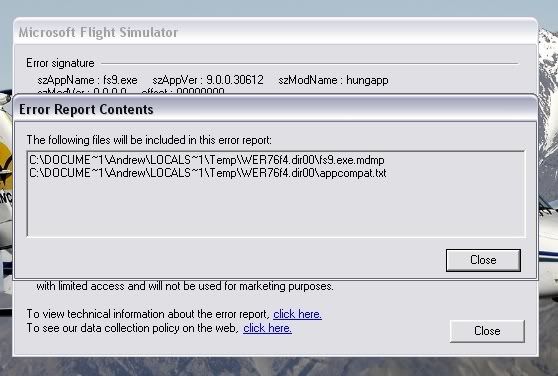
BTW- It's defenitly the AA which was causing the squary screen. When I set it to Application Controlled, FS runs fine but with jagged edges on my aircraft and scenery. Set to 2xQ, the main screen is fine, but in flight is all pixely and grey. Set to 4x (which was the norm before), I get the squares.
In reguard to the freezing when I click 'Select A Flight', I get this non responsive program error. Can anyone interpret it for me:
-
ardypilot - NZFF Pro
- Topic author
- Joined: Wed Apr 26, 2006 10:01 am
- Posts: 6802
- Location: Auckland
by ardypilot » Tue Apr 10, 2007 1:42 pm
Argh! What the heck:
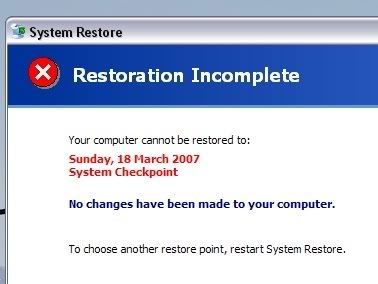
I have removed my graphics card, removed all its drivers, installed a new graphics card, installed three new bunches of drivers, removed that graphics card and replaced my original card and installed two new sets of drivers since this day!!!
I have removed my graphics card, removed all its drivers, installed a new graphics card, installed three new bunches of drivers, removed that graphics card and replaced my original card and installed two new sets of drivers since this day!!!
-
ardypilot - NZFF Pro
- Topic author
- Joined: Wed Apr 26, 2006 10:01 am
- Posts: 6802
- Location: Auckland
by ardypilot » Tue Apr 10, 2007 4:39 pm
I had a look in the directory listed in the error report:
'C:\DOCUME~1\Andrew\LOCALS~1\Temp\WER7027.dir00\fs9.exe.mdmp'
And found a file called 'fs9.exe.hdmp' which was 319mb in size. What the heck is it? And would deleting it solve me problems?
'C:\DOCUME~1\Andrew\LOCALS~1\Temp\WER7027.dir00\fs9.exe.mdmp'
And found a file called 'fs9.exe.hdmp' which was 319mb in size. What the heck is it? And would deleting it solve me problems?
-
ardypilot - NZFF Pro
- Topic author
- Joined: Wed Apr 26, 2006 10:01 am
- Posts: 6802
- Location: Auckland
by Jimmy » Tue Apr 10, 2007 5:04 pm
hmm, what was this other graphics card you installed? Did that not work eathier?
I had a look on my system and that file doesn't exsist,the "WER7027" folder does not eathier.
I would seriosly recomend you reinstall your sim We all do it sometime or anothor, fs can get really stuffed up after a while..
I had a look on my system and that file doesn't exsist,the "WER7027" folder does not eathier.
I would seriosly recomend you reinstall your sim
We all do it sometime or anothor, fs can get really stuffed up after a while..- Jimmy
45 posts
• Page 2 of 3 • 1, 2, 3
Who is online
Users browsing this forum: No registered users and 31 guests