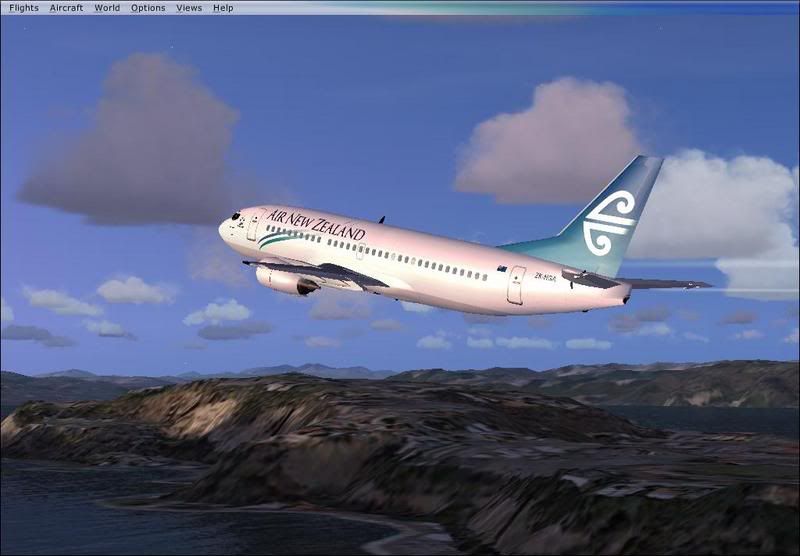
VL 737 ANZ Repaint

Discuss aircraft addons and repaints for Flight Simulator here

Postby ooOO00OOoo » Tue May 01, 2007 8:34 am

Ok so i have done an Air New Zealand Repaint of the Vista Liners 737-300
I want some feedback on so any would be appreciated :D This is only my second repaint so don't be too mean.
Model from here

user posted image

user posted image

user posted image

user posted image

The tail turns light blue when the sun is on it
ooOO00OOoo
 

Postby jastheace » Tue May 01, 2007 11:11 am

say that looks good, nice job, constructive comment, the air new zealand writing doesn't look right to my eye, not quite the right font maybe? other than that looks great!!
In the ongoing battle between objects made of aluminum going hundreds of miles per hour and the ground going zero miles per hour, the ground has yet to lose.

Image
User avatar
jastheace
Senior Member
 
Joined: Sun Aug 13, 2006 1:33 pm
Posts: 1032
Location: Hastings

Postby ooOO00OOoo » Tue May 01, 2007 3:32 pm

jastheace wrote: say that looks good, nice job, constructive comment, the air new zealand writing doesn't look right to my eye, not quite the right font maybe?  other than that looks great!!

yeah i kone the writing isn't quite wright. I looked at airliners.net photos and the writing looks blue, but when i eyedropper the writing colour it is completly different. Too dark. Would black writing look better? Like on Jon's?

Also is the font wright? I'm not too sure and i don't have access to my fsx computer.
Is the white white or just a nearly white?
Last edited by ooOO00OOoo on Tue May 01, 2007 3:33 pm, edited 1 time in total.
ooOO00OOoo
 

Postby Zöltuger » Tue May 01, 2007 3:46 pm

Couple of pointers for you:
The font is more like Times New Roman, with the A N and Z all bigger than the rest of the letters
like:
AIR NEW ZEALAND
As for font colour, it should be the same as the blue wave.
I also notice that the wave goes over the windows. And I think the Star Alliance logo goes on the cockpit window side of the front door, but I might be wrong.
Zöltuger
 

Postby ooOO00OOoo » Tue May 01, 2007 3:53 pm

Zöltuger wrote: Couple of pointers for you:
The font is more like Times New Roman, with the A N and Z all bigger than the rest of the letters
like:
AIR NEW ZEALAND
As for font colour, it should be the same as the blue wave.
I also notice that the wave goes over the windows. And I think the Star Alliance logo goes on the cockpit window side of the front door, but I might be wrong.

Thanks Zolt. I could never get the words right. You are right about the Star alliance symbol. Does the Star alliance symbol include the writing? and is it on both sides?

I am glad i got some advice from one(not sure about justheace because i don't have any from him (not trying to leave you out)) of the repainting experts! Thanks for the help guys!
ooOO00OOoo
 

Postby ooOO00OOoo » Tue May 01, 2007 4:54 pm

here is an update. Air New Zealand is times new roman and the A...N...Z are size 52 compared to 48. The letters still look slightly wrong with the colours so if someone can post a colour that would suit on here(if possible) so i can take a snapshot and edit in in photoshop

user posted image

user posted image

user posted image

Any more ideas would be appreciated.
Thanks
ooOO00OOoo
 

Postby ooOO00OOoo » Tue May 01, 2007 5:04 pm

Ok i just realized what Zoltuger really said and here it is

user posted image

user posted image
ooOO00OOoo
 

Postby Brennanx » Tue May 01, 2007 6:55 pm

that looks better :thumbup:
Brennanx
Sim-holic
 
Joined: Thu Jan 25, 2007 6:47 pm
Posts: 795

Postby Mattnz » Tue May 01, 2007 6:55 pm

That looks much better ooOO00OOoo :thumbup: .
Image
Mattnz
Sim-holic
 
Joined: Sun Feb 25, 2007 6:13 pm
Posts: 810
Location: Dunedin

Postby jastheace » Tue May 01, 2007 7:11 pm

yup thats nailed it. looking good
In the ongoing battle between objects made of aluminum going hundreds of miles per hour and the ground going zero miles per hour, the ground has yet to lose.

Image
User avatar
jastheace
Senior Member
 
Joined: Sun Aug 13, 2006 1:33 pm
Posts: 1032
Location: Hastings

Postby Zöltuger » Tue May 01, 2007 8:28 pm

I agree, nice work ooOO00OOoo :clap:
a few minor pointers: the flag always points with the union jack towards the nose, and change the font of the registration to MS Sans Serif
Zöltuger
 

Postby scon » Tue May 01, 2007 11:01 pm

good work, you may also want to make the exit above the wing bolder.
scon
Sim-holic
 
Joined: Mon Oct 16, 2006 7:16 pm
Posts: 963
Location: NZ

Postby hinch » Wed May 02, 2007 9:47 am

the writing is more of a purpley blue, not green.

If you want an .eps file of the logo (vector format so you can resize as you wish) head over to brandsoftheworld.com and search for it, then you know it's perfect!

also if you are saving in DXTBmp (i presume you are) uncheck the include mip maps when saving box on the right - no horrible blurries!

keep up the good work.
hinch
 

Postby Alex » Wed May 02, 2007 4:14 pm

I'd do what hinch said, the "Air New Zealand" text looks a bit large to me. ;)

Alex
Alex
NZFF Pro
 
Joined: Fri Jul 14, 2006 3:39 pm
Posts: 3620

Postby Jimmy » Wed May 02, 2007 8:44 pm

user posted image

The ffx model works well in fsx, as does the ps panel.

I thought fsx was ment to be more detailed? Looks like an AI model :lol: your repaint is looking a bit better, can we have a close up on the reg? the text on that looks a bit odd to.

I would recomend you try copying off photos, might not be best for larger areas but for the rego it could work well.

Wounder if you can find out any where what the real RGB number thingys are for the real aircraft.... you seem to be getting there with the colour scheme thow

Pity the model your useing aint the best..

James
Jimmy
 

Postby scon » Wed May 02, 2007 10:29 pm

Jimmy do get that horrid red becon light at night. The one that lights up the ground for a square mile. That is the only reason i do not use the FFX aircraft.

At the moment I am using the 50 north one waiting for the Wilco 737 to be patched.
scon
Sim-holic
 
Joined: Mon Oct 16, 2006 7:16 pm
Posts: 963
Location: NZ

Postby ooOO00OOoo » Thu May 03, 2007 7:59 am

Thanks for being honest Jimmy. If you read the top post it said what model it was.
You say
"I thought fsx was ment to be more detailed"
Do you mean FSX or FSX planes? I was trying to cut back on copy and paste this time so i didn't copy the writing. Last time (the one THAT was in my avatar) i copied and pasted everything. You don't get as much satisfaction. Next time you come on to post about this please say why e.g. the reg looks wierd. please say why. And the model looks like an AI aircraft. Well I wanted a 733 that had working flaps and spoilers and rudder. All the AI models i used didn't have any of these features(not saying this isn't ai). And also this is only my SECOND repaint and i have only been flight simming since January.
(not meant to be snappy/angry/etc^^^^^)

What does the REG numers mean? Is it colours?


Thanks for the posts guys
ooOO00OOoo
 

Postby Jimmy » Thu May 03, 2007 5:30 pm

  Jimmy do get that horrid red becon light at night. The one that lights up the ground for a square mile. That is the only reason i do not use the FFX aircraft.

At the moment I am using the 50 north one waiting for the Wilco 737 to be patched.


I'v never been to concerned about that particular light, its a nice model. I use the Wilco/Feelthere PIC733 now, absolutly awsome model, the VC is wounderful, as are the systems, its all there, a few more systems than the PMDG ng, like a fuctioning IRS.

Don't quite think the light is for a square mile with the ffx model :P never wroied me, if it is a bother just go delete that line in the aircraft cfg.


Do you mean FSX or FSX planes?


both :P

What does the REG numers mean? Is it colours?


If you mean the "RGB": Yes the red green and blue, don't ask me the proper term for it, but youl find it in the photoshop colour picker, you can do it in ms paint I think aswell, for example, black is R-0 G-0 B-0 and white is R-255 G-255 B-255.

Also you can get plenty of satasfaction from cuting and pasteing from photos, if you do it so it looks okay then it can take a bit of work. Often you may cut and paste something from a photograph then spend an hour touching it up with the good ol brush tool :D

James
Jimmy
 

Postby scon » Thu May 03, 2007 5:44 pm

I wish I could deleat the line in the CFG file but that doesn't work.
scon
Sim-holic
 
Joined: Mon Oct 16, 2006 7:16 pm
Posts: 963
Location: NZ

Postby ardypilot » Thu May 03, 2007 11:39 pm

I love both oO0's (amended text) repaint and the FFS model!

Jimmy, how do you remove the rotating red becon from the aircraft.cfg?
User avatar
ardypilot
NZFF Pro
 
Joined: Wed Apr 26, 2006 10:01 am
Posts: 6802
Location: Auckland

Next

Return to Aircraft

Who is online

Users browsing this forum: No registered users and 12 guests