I'm having simular troubles controlling Milton Shupe's Dash-7 as I was with the Vistaliners 737.
Milton told me that the DHC 7 should climb out at 1800fpm to 8/10,000 feet at 150kias, then I should lower my vertical climb speed to 1000fpm when passing that altitude to maintain that airspeed. However, the airspeed ticks away, one knot at a time untill it gets down to 80 kias then stalls, even with the autopilot IAS set to 150.. does anyone know what I am doing wrong?
What am I doing wrong?
6 posts
• Page 1 of 1
 by Charl » Thu Nov 22, 2007 1:07 pm
Trolly wrote:QUOTE (Trolly @ Nov 22 2007, 01:18 PM) <{POST_SNAPBACK}>I'm having simular troubles controlling Milton Shupe's Dash-7 as I was with the Vistaliners 737.
Milton told me that the DHC 7 should climb out at 1800fpm to 8/10,000 feet at 150kias, then I should lower my vertical climb speed to 1000fpm when passing that altitude to maintain that airspeed. However, the airspeed ticks away, one knot at a time untill it gets down to 80 kias then stalls, even with the autopilot IAS set to 150.. does anyone know what I am doing wrong?
You flying in the frozen wastelands?
Check all the "Heats" are on in the model - pitot especially, wing de-ice etc
-

Charl - NZFF Pro
- Joined: Mon May 01, 2006 8:28 am
- Posts: 9801
- Location: Auckland
by ardypilot » Thu Nov 22, 2007 6:05 pm
QUOTE
You flying in the frozen wastelands?
Check all the "Heats" are on in the model - pitot especially, wing de-ice etc[/quote]
Yeah, I've been doing a lot of flying in Finland lately. Thanks for the tip, I tried it out but it made no difference, I think my realism sliders aren’t set high enough for that to take effect.
Anyway, after long discussions with Jimmy about propeller feathering, I found out that engine #4 RPM lever was set down to 0- so no wonder I wasn't getting sufficient lift. This also accounted for the slight right hand banking I was experiencing I guess.
So, later on I took the Dash up for a test flight around lapland- ascent went just according to plan. When I levelled off at 14,000 feet I set autothrottle on to keep me at 214kias, but I started getting a speed decrease again, one knot at a time. I turned AT off and just flew along with the throttle at about 80% to maintain the speed I wanted.
Next I tried to figure out the 'RWYINFO' button/gauge that was included in the model, but hadn't found any documentation so I was just experimenting. I still can't figure it out however, could anyone give me some instructions? Also, via hitting various buttons on this, I managed to stuff up the throttle controls so that my joystick throttle slider was only operating #1 engine, and I had to slide the remaining 3 with my mouse one at a time, which made for a rather interesting landing. I had locked onto the ILS frequency at local airport, had NAV selected and course set, but it didn't seem to catch on. I'll go and test it at other airports in other countries in the future.
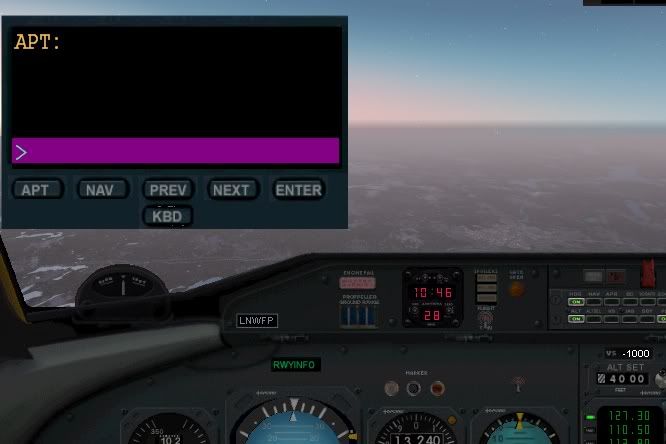
After this flight, I closed the sim down, and took another flight out of Greymouth, made a T&G in a paddock then returned to GM. The throttles worked fine this time, although autothrottle still acted up. I didn't touch the RWYINFO this time, and I'm yet to use any other ILS's yet.
If you have the Dash installed and can help me, please post here!
Check all the "Heats" are on in the model - pitot especially, wing de-ice etc[/quote]
Yeah, I've been doing a lot of flying in Finland lately. Thanks for the tip, I tried it out but it made no difference, I think my realism sliders aren’t set high enough for that to take effect.
Anyway, after long discussions with Jimmy about propeller feathering, I found out that engine #4 RPM lever was set down to 0- so no wonder I wasn't getting sufficient lift. This also accounted for the slight right hand banking I was experiencing I guess.
So, later on I took the Dash up for a test flight around lapland- ascent went just according to plan. When I levelled off at 14,000 feet I set autothrottle on to keep me at 214kias, but I started getting a speed decrease again, one knot at a time. I turned AT off and just flew along with the throttle at about 80% to maintain the speed I wanted.
Next I tried to figure out the 'RWYINFO' button/gauge that was included in the model, but hadn't found any documentation so I was just experimenting. I still can't figure it out however, could anyone give me some instructions? Also, via hitting various buttons on this, I managed to stuff up the throttle controls so that my joystick throttle slider was only operating #1 engine, and I had to slide the remaining 3 with my mouse one at a time, which made for a rather interesting landing. I had locked onto the ILS frequency at local airport, had NAV selected and course set, but it didn't seem to catch on. I'll go and test it at other airports in other countries in the future.
After this flight, I closed the sim down, and took another flight out of Greymouth, made a T&G in a paddock then returned to GM. The throttles worked fine this time, although autothrottle still acted up. I didn't touch the RWYINFO this time, and I'm yet to use any other ILS's yet.
If you have the Dash installed and can help me, please post here!
Last edited by ardypilot on Thu Nov 22, 2007 6:09 pm, edited 1 time in total.
-

ardypilot - NZFF Pro
- Topic author
- Joined: Wed Apr 26, 2006 10:01 am
- Posts: 6802
- Location: Auckland
by Mattnz » Thu Nov 22, 2007 6:30 pm
Trolly wrote:QUOTE (Trolly @ Nov 22 2007, 07:05 PM) <{POST_SNAPBACK}>Next I tried to figure out the 'RWYINFO' button/gauge that was included in the model, but hadn't found any documentation so I was just experimenting. I still can't figure it out however, could anyone give me some instructions? Also, via hitting various buttons on this, I managed to stuff up the throttle controls so that my joystick throttle slider was only operating #1 engine, and I had to slide the remaining 3 with my mouse one at a time, which made for a rather interesting landing. I had locked onto the ILS frequency at local airport, had NAV selected and course set, but it didn't seem to catch on. I'll go and test it at other airports in other countries in the future.
I can't help with the Dash7 problem I'm afraid, but I can with the RWYInfo gauge...
After a while of messing around with it myself, and also stuffing up my throttle controls etc lol, I found this tutorial:
http://www.fsbuild.com/rwyinfo/
It's a very basic program actually, as long as you remember to press the 'KDB' key to select the keyboard in the gauge, then you can type ine info in;) . You might have already tried this...I don't know.
All it basically does, is give you relative information for runways at airports, as well as the ILS frequency etc.
With regards to the ILS, did you have the NAV1 radio selected, and/or the APP mode on the autopilot? Were you getting the tone from the ILS, and could you verify it as the correct one?

- Mattnz
- Sim-holic
- Joined: Sun Feb 25, 2007 6:13 pm
- Posts: 810
- Location: Dunedin
by ardypilot » Thu Nov 22, 2007 6:35 pm
Thanks Matt, yeah I had got as far as entering in the airports ICAO code, but when I hit enter on the keyboard/ the ENTER button, nothing happened.
I usually use FSNAV to look up the airport runway details, which includes the coarse and heading if it uses ILS. I entered these as usual into my AP and radio, but didn't even get the signal.
I usually use FSNAV to look up the airport runway details, which includes the coarse and heading if it uses ILS. I entered these as usual into my AP and radio, but didn't even get the signal.
-
ardypilot - NZFF Pro
- Topic author
- Joined: Wed Apr 26, 2006 10:01 am
- Posts: 6802
- Location: Auckland
by ardypilot » Fri Nov 23, 2007 6:29 pm
Whoops- I didn't realise there was an update on sim-outhouse.com (two infact, and a special Ice Recon model version)
QUOTE
d7vcmdla_update_1.zip (3.35 Meg) (downloaded 1299 times)
Corrects or updates gauges or callouts, corrects AP AutoThrottle/IAS Hold and Flight Director/FD. Adds newer Runway Information (Rwyinfo) gauge by Ernie Alston to the panel. For the FS2004 version only.[/quote]
http://www.sim-outhouse.com/index.php?lloc...=Milton%20Shupe
I installed these packs, two the Dash up for a test flight and everything works perfectly. I have the ILS system working at two airports where I made perfect landings, great cruise control with the auto throttle hold, and even the RWYINFO module is working!
Corrects or updates gauges or callouts, corrects AP AutoThrottle/IAS Hold and Flight Director/FD. Adds newer Runway Information (Rwyinfo) gauge by Ernie Alston to the panel. For the FS2004 version only.[/quote]
http://www.sim-outhouse.com/index.php?lloc...=Milton%20Shupe
I installed these packs, two the Dash up for a test flight and everything works perfectly. I have the ILS system working at two airports where I made perfect landings, great cruise control with the auto throttle hold, and even the RWYINFO module is working!
-
ardypilot - NZFF Pro
- Topic author
- Joined: Wed Apr 26, 2006 10:01 am
- Posts: 6802
- Location: Auckland
6 posts
• Page 1 of 1
Who is online
Users browsing this forum: No registered users and 30 guests