Joystick Help

The place to ask for help or solve each others technical issues and discuss hardware

Postby NZ255 » Sat Jan 19, 2008 9:17 pm

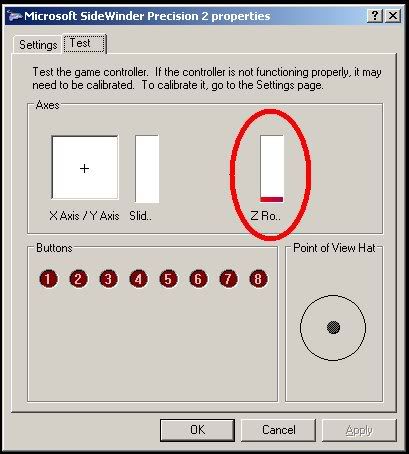
I have been recalibrating and recalibrating but I cant seem to get it right. This picture shows the Yaw level not centered but the stick is centered. Does anyone know what I'm doing wrong? It's bee fine in the past but just gone bad now.


I have a MS Sidewinder Precision 2 J/S


Thanks in advance


Nick
Nick
User avatar
NZ255
NZFF Pro
 
Topic author
Joined: Wed Jun 20, 2007 12:57 pm
Posts: 2475

Postby Alex » Sat Jan 19, 2008 9:23 pm

Your Z axis is the rotary bit. An old Sidewinder Force Feedback joystick I used to have ended up doing this as well, although it's probably a different story with your model there...

Alex
Last edited by Alex on Sat Jan 19, 2008 9:24 pm, edited 1 time in total.
Alex
NZFF Pro
 
Joined: Fri Jul 14, 2006 3:39 pm
Posts: 3620

Postby brownbox » Mon Jan 21, 2008 7:18 am

my sidewinder 3d pro has this problems sometimes(seems to be fixed in vista). To fix it i unplug it, restart the pc,and plug it into another usb port. Then it seems to reset the configuration. Just an idea
Desktop:Core 2 Duo E4300 1.8@ 3.0Ghz@ 1.36v. 4Gb Supertalent DDR2-800 2.1v@ 5-5-5-15. Asus P5N-E SLI Pencil Modded. Corsair TX 650. 512MB Palit Geforce 8800GT. 2x200GB IDE+640GB SATAII. Windows Vista Ultimate X86. Samsung SH-S222A
Phone:Nokia N900 Vodafone
Car: 1993 Mitsubishi Mirage Asti Z. Steel Blue Pearl

1996 Toyota Curren 2.0L 5 Spd Manual Silver. 205/50/R16 on Enkei K-95. Lowered on Jamex Superlows. Remote locking. Remote boot release. Cruise control
1996 Mitsubishi GTO MR

Image
User avatar
brownbox
Senior Member
 
Joined: Thu Apr 27, 2006 10:55 pm
Posts: 1318

Postby HardCorePawn » Mon Jan 21, 2008 8:32 am

Thats really odd... calibrating it should allow it to work out the min, max and centre points for your axises...

As the Z-axis is the 'grip-twist' for rudder, when it is centred, the red line should sit about halfway up the scale... when fully twisted tp one side (eg. left) it should drop to the bottom and when fully twisted the other way it should raise to the top (or vice versa... I cant remember offhand which way it actually goes)...

so try what brownbox has suggested... only when you unplug it, let it sit for a while as I remember reading about issues with the precision 2 having a metal base and building up a static charge that does weird things to it...

Once you plug it back in and run through the calibration routine, if the joystick is centred, and the redline is all the way at the bottom like that... then I think it might be stuffed... :(
Last edited by HardCorePawn on Mon Jan 21, 2008 8:37 am, edited 1 time in total.
"Son, we are about the break the surly bonds of gravity, and punch the face of God." -- Homer Simpson

Image
User avatar
HardCorePawn
Senior Member
 
Joined: Fri Sep 01, 2006 4:18 pm
Posts: 1277
Location: 2500' above Godzone

Postby NZ255 » Mon Jan 21, 2008 10:14 am

Thanks BB and HCP, I accuially have now got it working, I uninstalled it and reinstalled it, then calibrated it. Works fine now :clap:

Thanks again Nick
Nick
User avatar
NZ255
NZFF Pro
 
Topic author
Joined: Wed Jun 20, 2007 12:57 pm
Posts: 2475

Postby brownbox » Tue Jan 22, 2008 6:46 pm

Nice to see you got it sorted
Desktop:Core 2 Duo E4300 1.8@ 3.0Ghz@ 1.36v. 4Gb Supertalent DDR2-800 2.1v@ 5-5-5-15. Asus P5N-E SLI Pencil Modded. Corsair TX 650. 512MB Palit Geforce 8800GT. 2x200GB IDE+640GB SATAII. Windows Vista Ultimate X86. Samsung SH-S222A
Phone:Nokia N900 Vodafone
Car: 1993 Mitsubishi Mirage Asti Z. Steel Blue Pearl

1996 Toyota Curren 2.0L 5 Spd Manual Silver. 205/50/R16 on Enkei K-95. Lowered on Jamex Superlows. Remote locking. Remote boot release. Cruise control
1996 Mitsubishi GTO MR

Image
User avatar
brownbox
Senior Member
 
Joined: Thu Apr 27, 2006 10:55 pm
Posts: 1318


Return to Technical Issues

Who is online

Users browsing this forum: No registered users and 9 guests