AI
10 posts
• Page 1 of 1
 by Charl » Fri Mar 28, 2008 7:06 am
Good to hear good things about GNZLAP in FSX 
BK see this post about getting AI in your virtual worldwide skies.
I haven't done this in FSX, so be interested to hear your experience.
BK see this post about getting AI in your virtual worldwide skies.
I haven't done this in FSX, so be interested to hear your experience.
Last edited by Charl on Fri Mar 28, 2008 7:07 am, edited 1 time in total.
-

Charl - NZFF Pro
- Joined: Mon May 01, 2006 8:28 am
- Posts: 9801
- Location: Auckland
by BK-117 » Fri Mar 28, 2008 9:28 am
Charl, thanks for your reply. I will let you know when I install. With the PAI aircraft do I have downdown load each airline separately or is there a bulk instailment you can download?

- BK-117
- Forum Addict
- Topic author
- Joined: Wed Sep 06, 2006 8:08 pm
- Posts: 247
- Location: Africa
by BK-117 » Mon Apr 07, 2008 1:56 pm
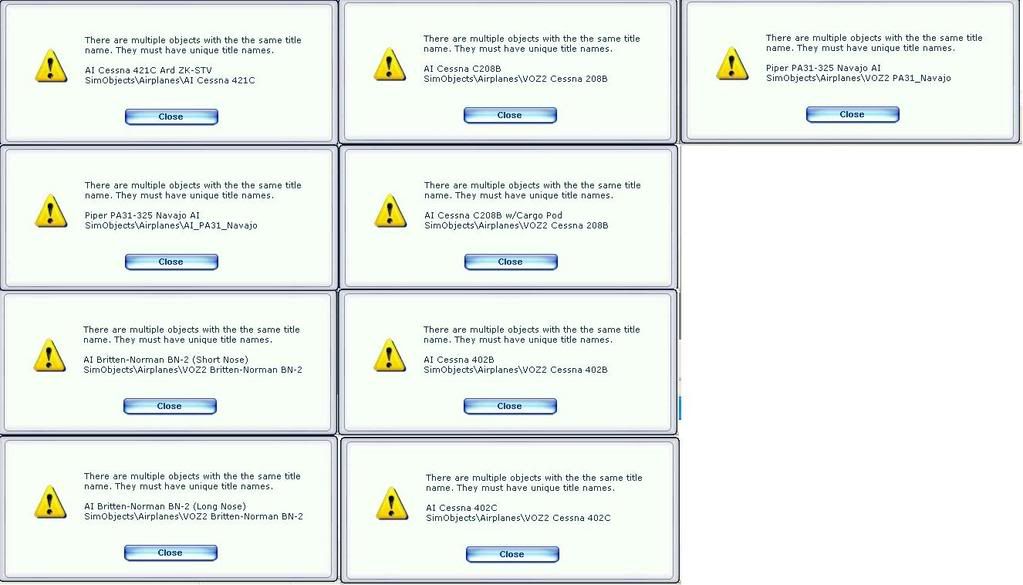
I have not installed your GNZLAP packages into FSX along with the VOZ ai packages. Just about to check it out but get the following messages when I open flightsim. Is this because there are double ups?
- BK-117
- Forum Addict
- Topic author
- Joined: Wed Sep 06, 2006 8:08 pm
- Posts: 247
- Location: Africa
by Charl » Mon Apr 07, 2008 1:59 pm
Yep.
The first 2 look very much like GNZLAP, and there were double-up problems reported with those.
FS9 ignores it, but for FSX you need to delete one of them.
It's probably a good way of checking the integrity of the files, this. In FS9 it wasn't possible.
The first 2 look very much like GNZLAP, and there were double-up problems reported with those.
FS9 ignores it, but for FSX you need to delete one of them.
It's probably a good way of checking the integrity of the files, this. In FS9 it wasn't possible.
Last edited by Charl on Mon Apr 07, 2008 2:01 pm, edited 1 time in total.
-
Charl - NZFF Pro
- Joined: Mon May 01, 2006 8:28 am
- Posts: 9801
- Location: Auckland
by Timmo » Mon Apr 07, 2008 5:07 pm
ITs been a long time since I installed VOZ but I think you are supposed to put the VOZ objects in a completely different folder from your flyable aircraft and then add a line to one of the config files?
- Timmo
- NZFF Pro
- Joined: Wed Oct 25, 2006 6:28 pm
- Posts: 2056
- Location: Tauranga
by Charl » Mon Apr 07, 2008 5:52 pm
BK-117 wrote:QUOTE (BK-117 @ Apr 7 2008, 02:02 PM) <{POST_SNAPBACK}>does it matter which one I delete?No you just have to dig a little to find which 2 a/c are being referred to.
Timmo's right, best to create a new folder for non-FSX a/c, see here
-
Charl - NZFF Pro
- Joined: Mon May 01, 2006 8:28 am
- Posts: 9801
- Location: Auckland
10 posts
• Page 1 of 1
Return to All Flight Simulators
Who is online
Users browsing this forum: No registered users and 40 guests