Some FPS Comparisons

Post and comment on screen captures from the beautiful game here. Home of the monthly screenshot competition

Postby jastheace » Wed Jun 11, 2008 11:35 pm

Hi Guys,

herer are four shots showing the differences in frame rates between FSX, FSX SP1, FSX SP2 and FSX SP2 and tweaks that i have found

First

FSX clean install
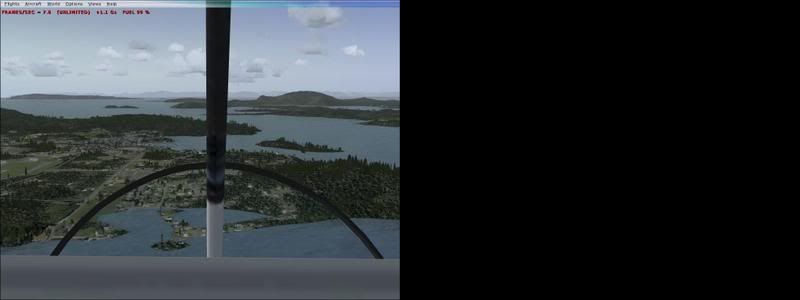

7.9FPS


FSX SP1
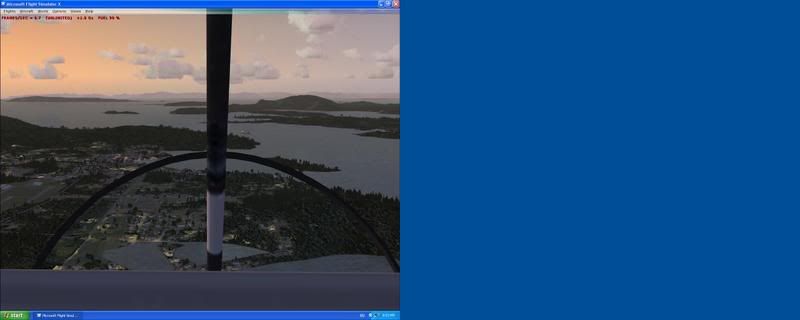

8.7FPS


FSX SP2

6.6FPS


And FSX SP2 with Tweaks
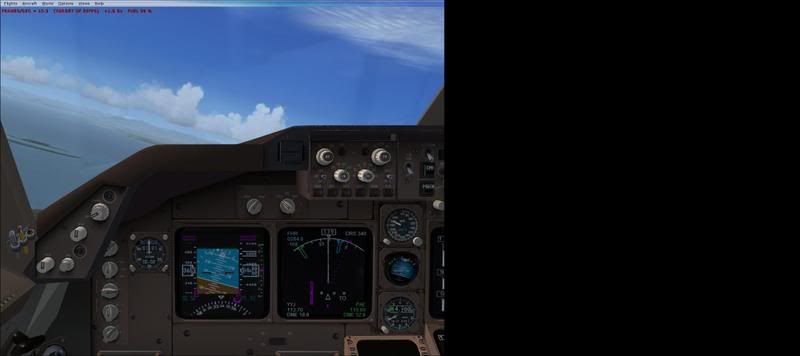

13.3FPS


sorry for the funny screen capture, the right screen was when i was using two screens, which i am not anymore
All the setting pages are set to ultra high
My current system speca are as follows:

Pentium 2.8 on a HP/asus p4d motherboard (not the best)
1.5gig ddr 400 ram
512 nvidia 7600gs
and two 40gig ide hard drives

this is an example that you can get average performance from high settings, for me it is a bit to slow, so i have tweaked settings, see my other post with the leveld 767 to see how good it looks, you also get more FPS with full screen, it is good for another 1-5FPS

Edit: added FPS Info to the post, sorry about that
Last edited by jastheace on Thu Jun 12, 2008 7:35 pm, edited 1 time in total.
In the ongoing battle between objects made of aluminum going hundreds of miles per hour and the ground going zero miles per hour, the ground has yet to lose.

Image
User avatar
jastheace
Senior Member
 
Topic author
Joined: Sun Aug 13, 2006 1:33 pm
Posts: 1032
Location: Hastings

Postby Alex » Thu Jun 12, 2008 6:26 pm

Can't quite see the numbers there... maybe you could blow them up or type them in for us? :)

Alex
Alex
NZFF Pro
 
Joined: Fri Jul 14, 2006 3:39 pm
Posts: 3620

Postby ardypilot » Thu Jun 12, 2008 9:34 pm

Yeah, I can't quite see them either- your screenshots suggust you are running duel screens perhaps, with the large blank areas to the right of each FS window- looks like the quality of your flight simulation just stepped up a notch whatever the case winkyy.gif
User avatar
ardypilot
NZFF Pro
 
Joined: Wed Apr 26, 2006 10:01 am
Posts: 6802
Location: Auckland

Postby jastheace » Thu Jun 12, 2008 10:23 pm

yes, i was using duel screens for fs9, but with FSX, the dual screens are redundant (well the 15" one anyway), i am loving FSX
In the ongoing battle between objects made of aluminum going hundreds of miles per hour and the ground going zero miles per hour, the ground has yet to lose.

Image
User avatar
jastheace
Senior Member
 
Topic author
Joined: Sun Aug 13, 2006 1:33 pm
Posts: 1032
Location: Hastings

Postby AlisterC » Fri Jun 13, 2008 3:45 am

Search this name at avsim, and then sort the results by most downloads.
The name is: Bart Dylkiewicz
You need to look for file resautogentexfsx.zip

This release includes resized textures for autogen buildings in FSX. Textures were resized from 1024x1024 to 512x512, cutting filesize from 683kb to 171kb each. All resized textures have mip-maps included and are in DDS format. Resized textures decrease loading time and increase framerate (FPS).

This might help you get some more FPS out of your machine. He has a vegetation fix as well resvegetationtexfsx.zip that you might like.

I for one am hanging out for him to resize the cloud textures for FSX smile.gif
Image
User avatar
AlisterC
NZFF Pro
 
Joined: Thu Jul 20, 2006 11:13 am
Posts: 2543
Location: Nelson, NZ

Postby jastheace » Fri Jun 13, 2008 9:26 am

Albatross wrote:
QUOTE (Albatross @ Jun 17 2008, 04:45 PM) <{POST_SNAPBACK}>
Search this name at avsim, and then sort the results by most downloads.
The name is: Bart Dylkiewicz
You need to look for file resautogentexfsx.zip

This release includes resized textures for autogen buildings in FSX. Textures were resized from 1024x1024 to 512x512, cutting filesize from 683kb to 171kb each. All resized textures have mip-maps included and are in DDS format. Resized textures decrease loading time and increase framerate (FPS).

This might help you get some more FPS out of your machine. He has a vegetation fix as well resvegetationtexfsx.zip that you might like.

I for one am hanging out for him to resize the cloud textures for FSX smile.gif


thanks for that i will check them out, i have put disabled the default.xml in the autogen folder, and am using reduced texture sizes for the clouds, makes them a little fuzzy round the edges but i can live with that.

i am wondering if the active sky and graphics will help the coulds and weather like it did for fs9? anyone able to answer that, i am thinking about putting AS6.5 on to fsx and see what that does
Last edited by jastheace on Fri Jun 13, 2008 9:27 am, edited 1 time in total.
In the ongoing battle between objects made of aluminum going hundreds of miles per hour and the ground going zero miles per hour, the ground has yet to lose.

Image
User avatar
jastheace
Senior Member
 
Topic author
Joined: Sun Aug 13, 2006 1:33 pm
Posts: 1032
Location: Hastings

Postby AlisterC » Fri Jun 13, 2008 11:06 am

I don't know if AS grpahics will work in FSX, but I use AS6.5 in both FS9 and FSX everytime, and works fine smile.gif
Image
User avatar
AlisterC
NZFF Pro
 
Joined: Thu Jul 20, 2006 11:13 am
Posts: 2543
Location: Nelson, NZ

Postby jastheace » Fri Jun 13, 2008 11:30 am

Albatross wrote:
QUOTE (Albatross @ Jun 17 2008, 11:06 PM) <{POST_SNAPBACK}>
I don't know if AS grpahics will work in FSX, but I use AS6.5 in both FS9 and FSX everytime, and works fine smile.gif

I know that AS Graphics and the AS radar do not work, so i will give AS6.5 a try

thanks
Last edited by jastheace on Fri Jun 13, 2008 4:50 pm, edited 1 time in total.
In the ongoing battle between objects made of aluminum going hundreds of miles per hour and the ground going zero miles per hour, the ground has yet to lose.

Image
User avatar
jastheace
Senior Member
 
Topic author
Joined: Sun Aug 13, 2006 1:33 pm
Posts: 1032
Location: Hastings


Return to Screenshots

Who is online

Users browsing this forum: No registered users and 7 guests
