New NVidia Drivers

The place to ask for help or solve each others technical issues and discuss hardware

Postby Charl » Wed Jul 02, 2008 5:15 pm

In tandem with this, I downloaded the latest NHancer (nHancer32_2.4.1_Setup.exe)

Doesn't happen often, when I opened the sim it went "BLING!"
And I went "Jeepers" out loud.
Very crisp, colour rendition tops - literally, brilliant.

I then tried something I hadn't done before: I backed off the AA one notch, since the textures were so clear, up to infinity.
This gives a slightly furry look to edges in the middle and far distance, creating some depth of field which I quite like.
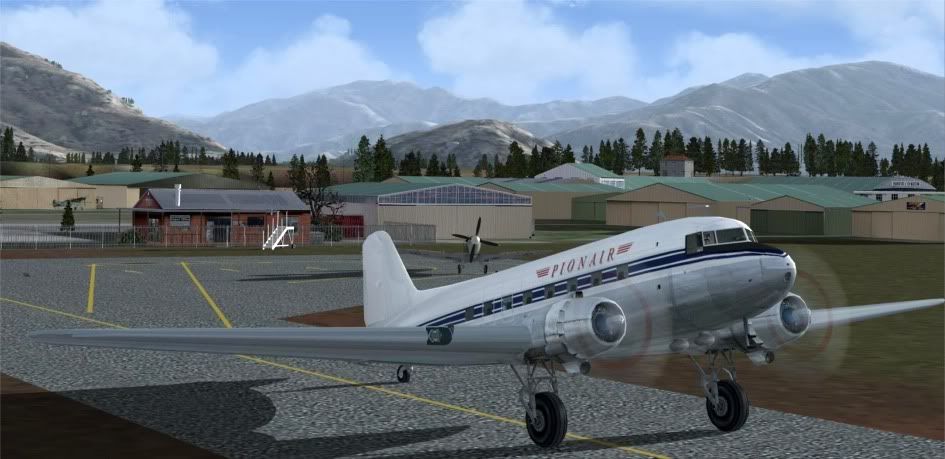
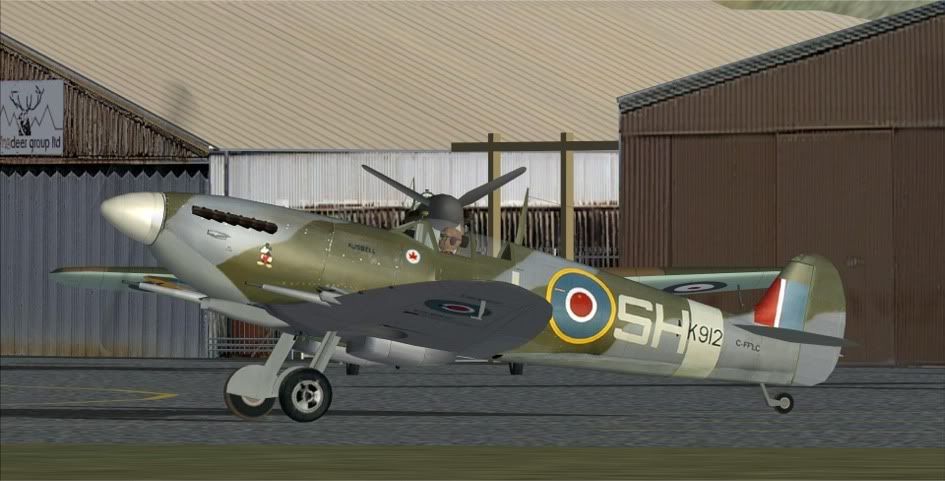


It's been a while since I've been pleased with a new NVidia driver set, but these are keepers.
Last edited by Charl on Wed Jul 02, 2008 5:33 pm, edited 1 time in total.
User avatar
Charl
NZFF Pro
 
Topic author
Joined: Mon May 01, 2006 8:28 am
Posts: 9691
Location: Auckland

Postby Naki » Wed Jul 02, 2008 5:24 pm

mmm nice - what site did you download the Nhancer & drivers from? I did have nhancer a while back but discarded it for reasons i have forgotten about
Last edited by Naki on Wed Jul 02, 2008 5:27 pm, edited 1 time in total.
User avatar
Naki
NZFF Pro
 
Joined: Sat Aug 05, 2006 10:03 pm
Posts: 7170
Location: Tauranga

Postby Charl » Wed Jul 02, 2008 5:38 pm

Naki wrote:
QUOTE (Naki @ Jul 2 2008, 05:24 PM) <{POST_SNAPBACK}>
mmm nice - what site did you download the Nhancer & drivers from? I did have nhancer a while back but discarded it for reasons i have forgotten about
Can't remember, just Google the filenames and you'll get there.
User avatar
Charl
NZFF Pro
 
Topic author
Joined: Mon May 01, 2006 8:28 am
Posts: 9691
Location: Auckland

Postby creator2003 » Wed Jul 02, 2008 6:20 pm

Thanks for the heads up charl ill go get them both later on tonight thumbup1.gif
User avatar
creator2003
NZFF Pro
 
Joined: Fri Jun 16, 2006 12:08 am
Posts: 4633
Location: Cant U C im LOCO

Postby HardCorePawn » Thu Jul 03, 2008 8:30 am

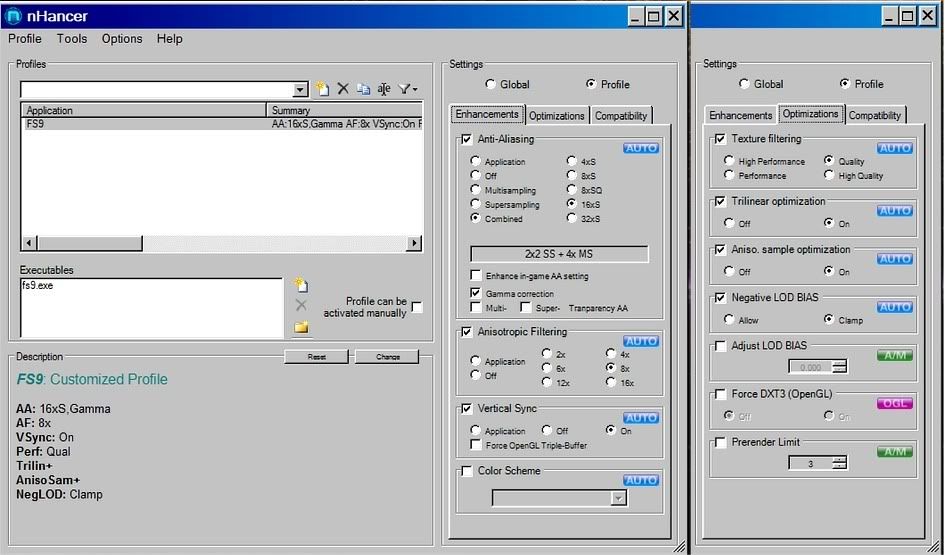
Having recently been playing with drivers and nHancer (I just reinstalled XP so figured I did not have much to lose), can I ask what your nHancer settings actually are?

They say, on the nHancer homepage, "self explantory settings"... <insert tui billboard here>, but in all honesty I am completely lost... I fiddle with the settings and nothing much seems to happen (unless I set the AA quite low, and then it is just a jagfest)... and I do not know what half of them even do!!? huh.gif

Also, I was reading that a lot of people think with the new nVidia Control Panel, there is no need for nHancer anymore... as you can change everything there unsure.gif

I should note that I spent 2 hours trying to figure out why my aircraft skins were so ugly... and was trying all sorts of nHancer settings... only to discover I had set the global texture res in FSX to medium! icon_redface.gif

Also, I assume you are running Vista? The 175.19 drivers (despite the winxp in the filename) are vista only it would appear... the latest I can find for XP are the 175.16 drivers... unsure.gif

EDIT: According to this article (see the updates at the bottom), nVidia pulled the .19 drivers due to some issues...
Last edited by HardCorePawn on Thu Jul 03, 2008 8:42 am, edited 1 time in total.
"Son, we are about the break the surly bonds of gravity, and punch the face of God." -- Homer Simpson

Image
User avatar
HardCorePawn
Senior Member
 
Joined: Fri Sep 01, 2006 4:18 pm
Posts: 1277
Location: 2500' above Godzone

Postby creator2003 » Thu Jul 03, 2008 1:25 pm


they seem to work right with these setting though there is proberly more i could do but im happy with it ,plus i still have old drivers 69.21 or something
User avatar
creator2003
NZFF Pro
 
Joined: Fri Jun 16, 2006 12:08 am
Posts: 4633
Location: Cant U C im LOCO

Postby Charl » Thu Jul 03, 2008 1:48 pm

One of the advantages of FS9 is you simply max everything, then get on and see what the video card can deliver.
This is what I'm using on an 8800GTS:

User avatar
Charl
NZFF Pro
 
Topic author
Joined: Mon May 01, 2006 8:28 am
Posts: 9691
Location: Auckland

Postby Bazza » Thu Jul 03, 2008 2:38 pm

Thanks for the post Charl, I'm considering this but some reviews on other forums weren't indicating as good a result as you seem to have got.

Is this program uninstallable without a major drama if there seems to be no apparent advantage.

My current set-up is reasonably good, but no doubt could be improved upon.

I have an Invidia 8600GT so the card should cope.

Cheers..
Image
User avatar
Bazza
Sim-holic
 
Joined: Sat Jul 15, 2006 1:44 pm
Posts: 983
Location: Tauranga

Postby creator2003 » Thu Jul 03, 2008 2:39 pm

I suppose i mite crank it up to 16X but i like it 8x plus i have a lower card than that 8600GTS 256mb and i do all the other filtering settings with in the sim ,plus i dont really have to have it all cranked up to improve FSX as it looks better in general and when i do get a grunter card ill be able to put more setting into it because there are so many i still havent fully tapped into ..so i guess ill look forward to something new
User avatar
creator2003
NZFF Pro
 
Joined: Fri Jun 16, 2006 12:08 am
Posts: 4633
Location: Cant U C im LOCO

Postby Charl » Thu Jul 03, 2008 5:08 pm

Bazza wrote:
QUOTE (Bazza @ Jul 3 2008, 02:38 PM) <{POST_SNAPBACK}>
...Is this program uninstallable without a major drama if there seems to be no apparent advantage....

NHancer is just a front end to tweak the video card settings in a slightly more user-friendly fashion.
You can uninstall it with no drama.
It tells you what it means to change settings which I found useful.
It does have some non-stock settings too, if you want to play.
I use it because you just call it up and click a button end of story...
User avatar
Charl
NZFF Pro
 
Topic author
Joined: Mon May 01, 2006 8:28 am
Posts: 9691
Location: Auckland

Postby Adamski » Fri Jul 04, 2008 12:42 am

Charl wrote:
QUOTE (Charl @ Jul 3 2008, 05:08 PM) <{POST_SNAPBACK}>
NHancer is just a front end to tweak the video card settings in a slightly more user-friendly fashion.
You can uninstall it with no drama.
It tells you what it means to change settings which I found useful.
It does have some non-stock settings too, if you want to play.
I use it because you just call it up and click a button end of story...


Thanks for the info on nHancer. I must say I was struggling a bit with the nVidia control panel. Since installing it I've been able to ramp up my detail settings quite significantly. Still a bit of a slide show (FSX) but at least I'm getting better screengrabs winkyy.gif
Image
User avatar
Adamski
NZFF Pro
 
Joined: Thu Nov 01, 2007 2:22 am
Posts: 5029
Location: Birkenhead, Auckland

Postby NZ255 » Thu Jul 10, 2008 7:29 pm

Just a HU, been reading about these drivers, and when installed (for FSX, not sure about FS9) it creates a second display setting, resulting in lower frame rates.....
QUOTE
had noticed the same thing, for one or other obscure reason there where two [Display] sections, I didn't give it to much tought just deleted the second one somewhere at the bottom of the fsX.cfg and whent fiddling again, I think it's related to the latest nVidia drivers 175.xx, alltough I must admit that since installing those, things look very much nicer at this end and the sim runs a lot smoother[/quote]
Nick
User avatar
NZ255
NZFF Pro
 
Joined: Wed Jun 20, 2007 12:57 pm
Posts: 2475

Postby ardypilot » Fri Jul 11, 2008 3:25 am

Not that I can be bothered updating drivers any longer for my old FX5600, but those are some stunning screenshots Charl, real soft and un-computer-generated-looking. I can't wait for the day I upgrade my rig to get results like you have!
User avatar
ardypilot
NZFF Pro
 
Joined: Wed Apr 26, 2006 10:01 am
Posts: 6802
Location: Auckland

Postby HardCorePawn » Sun Jul 20, 2008 8:41 pm

OK... well it looks like they have re-released 175.19 for WinXP... downloading now...
"Son, we are about the break the surly bonds of gravity, and punch the face of God." -- Homer Simpson

Image
User avatar
HardCorePawn
Senior Member
 
Joined: Fri Sep 01, 2006 4:18 pm
Posts: 1277
Location: 2500' above Godzone


Return to Technical Issues

Who is online

Users browsing this forum: No registered users and 4 guests