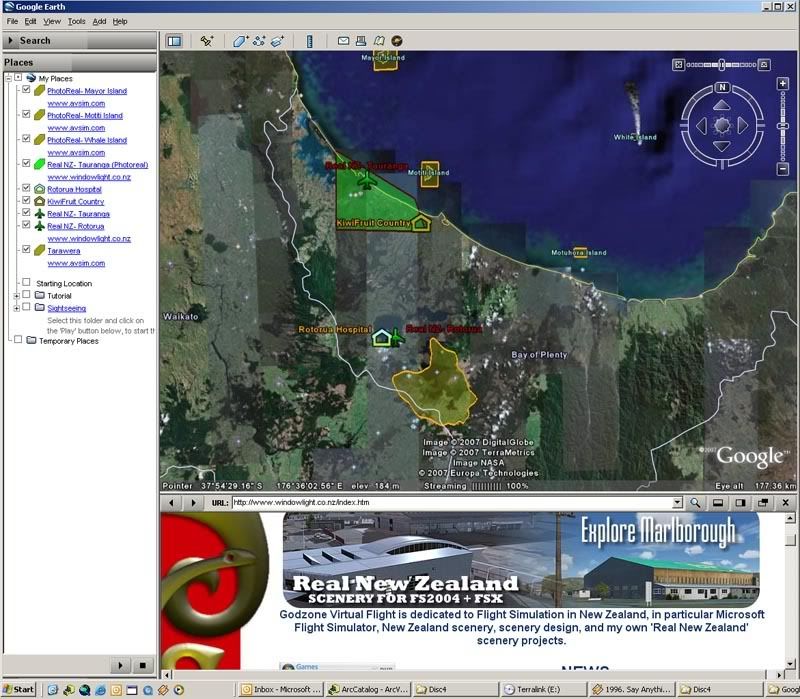
The map can be found here http://nzff.org/maps/
Each piece of scenery has a polygon or icon (to denote photoreal or airport scenery respectively) coloured depending on if the scenery is payware or Freeware. Clicking on the icon or polygon will bring up information about the scenery and provide the link for download from Avsim.
Future features:
As well as the map embedded in a webpage, the user will also have the option of downloading the file for use in Google Earth which gives better display of icons and text boxes
I'm currently working on digitising the airspace boundaries for New Zealand so users without charts can get information about airspace (frequencies, boundaries, altitudes etc)
Eventually, if possible, Id like to add the option for the user to click on the map, enter their altitude and have the map return information on frequency, airspace class and type, restrictions (TM, Military etc). This could be used by student pilots to self test themselves on ATC requirements for their local area.