Where is good help when you need it?

A place to converse about the general aspects of flight simulation in New Zealand

Postby kiwibarguy » Mon Feb 09, 2009 1:09 pm

While i push myself by raising the 'realism' settings, i find that fsx learning centre isn't cutting the mustard! Last night i spawned with the
Cessna Grand Caravan C208B at Whangarei Airport, pulled out my fsx checklist and went through each step. Now i dont have a PPL so i'm madly looking at my checklist and then tring to find each switch but as i'm a nube when it comes to complete realism, many questions started to appear. I headed off to the learning centre which is good but doesn't really cover in depth.
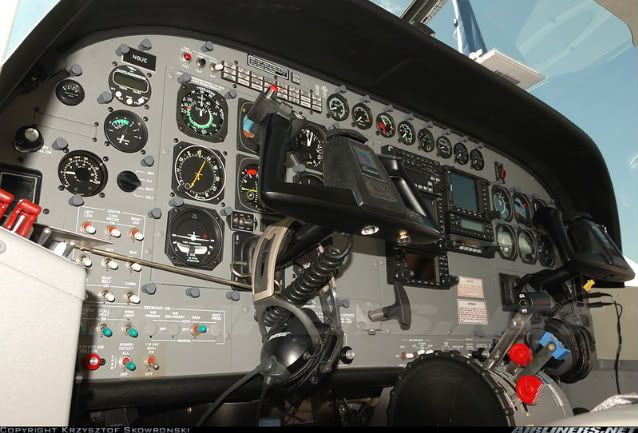

So my question is where can i find helpful sites on the cockpit side of things. Information on start ups or what needs to be done to get the planes going. Any sites that have help guides would be great! Thanks Paul.
Image
User avatar
kiwibarguy
Sim-holic
 
Topic author
Joined: Fri Sep 21, 2007 1:50 pm
Posts: 629
Location: Auckland

Postby Chairman » Mon Feb 09, 2009 2:00 pm

If there are payware versions of what you're trying to fly or something close to it see if the developers have made the manuals available - often a good place to start.

Maybe also see what google can find under "owners manual", and if there's anything on youtube about "startup" or "cold and dark" ?

HTH
Gary
The above post is in the public domain and is guaranteed by the manufacturer to contain no references to anything illegal or discussion of piracy, although this signature may contain traces of nuts.
Chairman
Sim-holic
 
Joined: Wed Feb 13, 2008 8:07 pm
Posts: 912

Postby dbcunnz » Mon Feb 09, 2009 3:17 pm

kiwibarguy wrote:
QUOTE (kiwibarguy @ Feb 9 2009, 02:09 PM) <{POST_SNAPBACK}>
So my question is where can i find helpful sites on the cockpit side of things. Information on start ups or what needs to be done to get the planes going. Any sites that have help guides would be great! Thanks Paul.


Found this it may help http://www.pdfoo.com/resultpage2~c208-manu...oad-cessna.html
You will have to register to download from this site
Image
User avatar
dbcunnz
NZFF Pro
 
Joined: Thu Feb 21, 2008 12:56 pm
Posts: 4011
Location: Blenheim New Zealand

Postby kiwibarguy » Mon Feb 09, 2009 4:03 pm

THanks guys for your help! That PDF site is awesome, it never knew it existed till now! Thanks again. Paul.
Image
User avatar
kiwibarguy
Sim-holic
 
Topic author
Joined: Fri Sep 21, 2007 1:50 pm
Posts: 629
Location: Auckland

Postby kiwibarguy » Tue Feb 10, 2009 12:25 pm

While i was on my searches for more information i came across this PDF from the Federal Aviation Administration which covers pretty much everything!
http://www.faa.gov/library/manuals/aviatio...lying_handbook/

Thanks again to the gentlemen who helped me, to see the prop finally turn on realistic settings was awesome. Does anyone know also how to spawn with the plane 'cold'. Do i have to spawn, shut everything down save flight everytime?
Image
User avatar
kiwibarguy
Sim-holic
 
Topic author
Joined: Fri Sep 21, 2007 1:50 pm
Posts: 629
Location: Auckland

Postby mjrhealth » Sun Feb 15, 2009 1:01 pm

Just create a flight, shut everything down, when you save it tic the " save as default", box and then all your flights should start cold and dark.
Intel 4790K 4.6Gig
8 Gig 1600 Meg ram,
Gigabyte GTX 680 2 Gig Ram
Gigabyte GAZ87X-UD3H
Win 7 64 Bit
mjrhealth
Member
 
Joined: Mon Oct 01, 2007 10:21 am
Posts: 116

Postby SUBS17 » Sun Feb 15, 2009 9:58 pm

Check the kneeboard on some aircraft the startup procedure can be found there.
User avatar
SUBS17
Senior Member
 
Joined: Mon Jun 05, 2006 11:16 am
Posts: 1745


Return to General

Who is online

Users browsing this forum: No registered users and 11 guests
