Problem with the fog .. help

An area to discuss scenery addons for virtual NZ

Postby dornier228 » Fri Apr 03, 2009 2:57 am

hi...
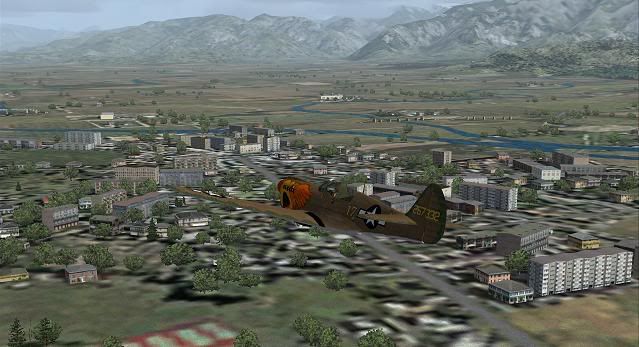
...I have a problem with fs2004, when flying in areas with low visibility ( fog ) this happens to me :

You know help me !!??

Thanks
Joseph
dornier228
 

Postby spongebob206 » Fri Apr 03, 2009 4:04 am

Cannot seee pic.

link not working
Image
spongebob206
Senior Member
 
Joined: Thu Jan 10, 2008 6:04 pm
Posts: 1526
Location: Wanganui

Postby dornier228 » Fri Apr 03, 2009 7:33 am


thumbup1.gif thumbup1.gif
dornier228
 

Postby spongebob206 » Fri Apr 03, 2009 3:13 pm

Sorry mate,
Never seen this.


Guys?
Image
spongebob206
Senior Member
 
Joined: Thu Jan 10, 2008 6:04 pm
Posts: 1526
Location: Wanganui

Postby Ian Warren » Fri Apr 03, 2009 4:01 pm

Do 28 , what other scenery are you using , in that shot i see some photoreal or least part another .
Image
User avatar
Ian Warren
NZFF Pro
 
Joined: Fri May 05, 2006 5:23 pm
Posts: 41187
Location: AREA 51

Postby dornier228 » Fri Apr 03, 2009 8:03 pm

Scenary of Italia (Monte Argentario no photoreal)
Ian still happens to me all the scenarios when there is fog !!!
dornier228
 

Postby Ian Warren » Sat Apr 04, 2009 12:24 am

Could i get you to copy all the textures from Scenary of Italia and paste into the main flight sim texture folder .
Image
User avatar
Ian Warren
NZFF Pro
 
Joined: Fri May 05, 2006 5:23 pm
Posts: 41187
Location: AREA 51

Postby creator2003 » Sat Apr 04, 2009 1:08 pm

Id say you mite have a problem with the fog cloud set, the way it displays through them etc ,have you got any addon cloud upgrades to your sim or environment addons youve added ??

I cant imagine that it would be a lack of textures on the buildings as this is the way it looks to me in your shot ,im guessing you only have this white building look when you have a fog settings and not when you have a nice sunny day ..
User avatar
creator2003
NZFF Pro
 
Joined: Fri Jun 16, 2006 12:08 am
Posts: 4633
Location: Cant U C im LOCO

Postby ardypilot » Sat Apr 04, 2009 5:10 pm

Considering the aircraft textures are blank white also- I'd say it's either an issue with the graphics card (overheating?) or a whole heap of your texture folders from your main directories have gone missing- you may wish to reinstall FS2004 to another location on your computer, then just copy all the folders into your current installation, and allow them to overwrite.
User avatar
ardypilot
NZFF Pro
 
Joined: Wed Apr 26, 2006 10:01 am
Posts: 6802
Location: Auckland

Postby Dan » Sun Aug 09, 2009 10:32 pm

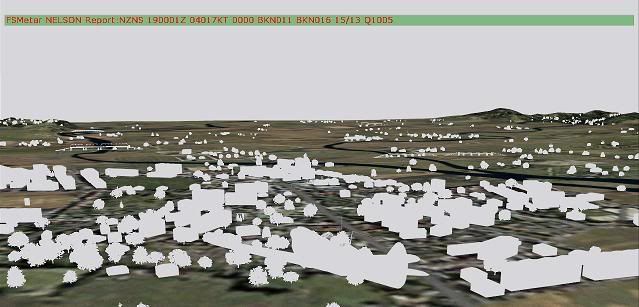
The problem isn't with your scenery. It's with your weather programme. FS9 can display visibility from unlimited right down to nine feet. With visibility less that nine feet, FS9 doesn't know what to do and displays 3D objects in white. The minimum you can normally set your visibility with the FS9 weather function is 0.1km.

I use FSMETAR for my weather and occaisionally I get a poorly formatted METAR for an airfield. FSMETAR gets confused and sends a VISIBILITY=0 message to FS9, which displays the errors you have seen. I put some made-up METAR files into FSMETAR to give a demonstration.

Visiblity set to about 20km;


Visibility set to 50 feet (pretty much pea soup);


Visibility artificially set to zero;


Hope this helps.
Last edited by Dan on Sun Aug 09, 2009 10:32 pm, edited 1 time in total.
User avatar
Dan
Member
 
Joined: Tue Jul 25, 2006 7:07 pm
Posts: 78
Location: Waitakere


Return to Scenery

Who is online

Users browsing this forum: No registered users and 5 guests