Strange Issue....False Heading Info

The place to ask for help or solve each others technical issues and discuss hardware

Postby mavman » Wed Jul 01, 2009 9:09 pm

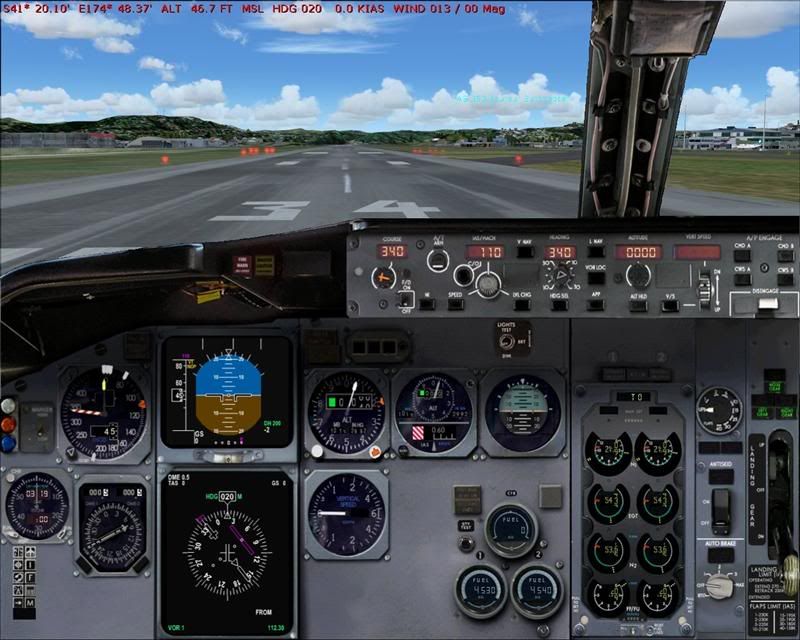
Not sure how it happened however i've just discovered my airports/runways/navaids aren't aligned the way they should be. Sound confusing?? I'm not sure how to describe this problem so i'll show an example....

As you can see, i'm sitting on RWY34 at NZWN, I have tuned the WN VOR (112.3) and have selected course 340 however, the sim is saying that i'm on a heading of 020 (note red text at top of pic). Needless to say my navigation is all up the creek without the proverbial!
Heres a closeup....note sitting on RWY34....sim thinks its heading 020!!
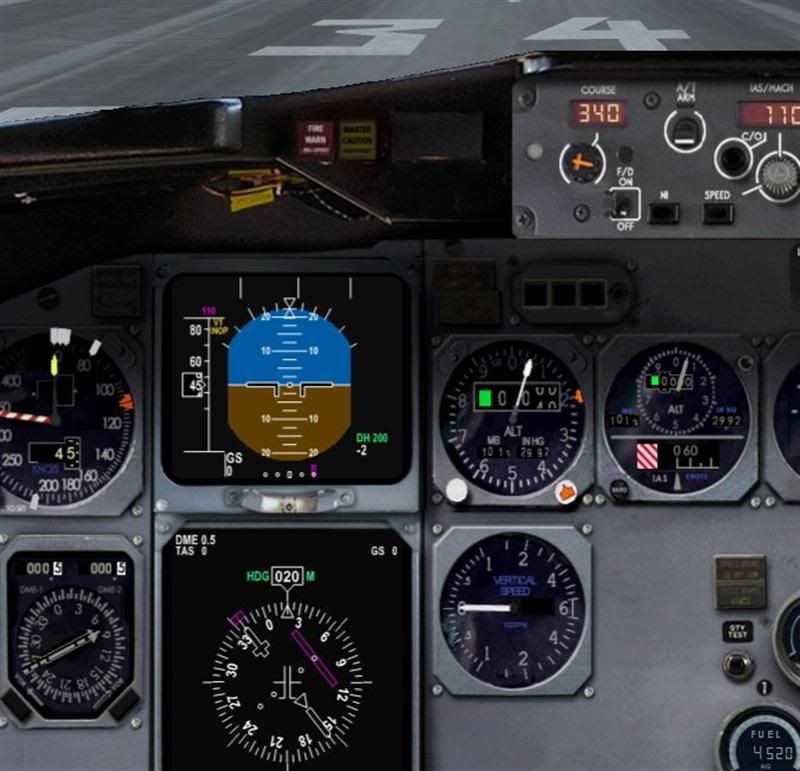
Also, when I bring up the GPS, it too shows an incorrect heading. All was fine up until recently, not sure what I could have done to stuff this up (only installed a couple of aircraft over the last few days) and this problem occurs with any aircraft I try to use at any airport. Any Ideas?? Please help!!

I'm using FS9 and don't have any other problems....starts up fine no error messages....aircraft and scenery show fine just this erroneous nav data!! Would a reset of FS9.cfg return my settings to normal??
User avatar
mavman
Forum Addict
 
Topic author
Joined: Sun Apr 30, 2006 7:27 pm
Posts: 320
Location: Dunedin

Postby AlisterC » Wed Jul 01, 2009 9:56 pm

Heading reset is the "D" key. Have you tried pressing that?
Edit: Search "incorrect heading fs9" in google comes up with a post at IFDG forums - in his case an addon airport was to blame (does not mention which airport)
Last edited by AlisterC on Wed Jul 01, 2009 10:04 pm, edited 1 time in total.
Image
User avatar
AlisterC
NZFF Pro
 
Joined: Thu Jul 20, 2006 11:13 am
Posts: 2543
Location: Nelson, NZ

Postby ZKTOM » Wed Jul 01, 2009 10:03 pm

That's happened to me aswell in the wilco 737 and the wilco 777... I think it may be something to do with the alignment of the IRS?
ZKTOM(FS)-Qualified Flight Simmer

"If it ain't Boeing, It ain't going"
Image
ZKTOM
Forum Addict
 
Joined: Wed Mar 21, 2007 4:53 pm
Posts: 328
Location: Computer Room

Postby mavman » Wed Jul 01, 2009 10:16 pm

Happens in all aircraft thought thats the thing....even the default aircraft. It seems like the whole flightsim has aligned itself with a false direction. unsure.gif
User avatar
mavman
Forum Addict
 
Topic author
Joined: Sun Apr 30, 2006 7:27 pm
Posts: 320
Location: Dunedin

Postby Timmo » Fri Jul 03, 2009 5:43 pm

what does your compass say ? winkyy.gif
Timmo
NZFF Pro
 
Joined: Wed Oct 25, 2006 6:28 pm
Posts: 2056
Location: Tauranga

Postby mavman » Fri Jul 03, 2009 11:12 pm

Timmo wrote:
QUOTE (Timmo @ Jul 3 2009, 05:43 PM) <{POST_SNAPBACK}>
what does your compass say ? winkyy.gif

Compass was also aligned incorrectly with the DI.....weird!! However I had a play around, deleted an AFCAD that i'd modified for YBCS as thats the only modification I'd made to FS over that time and lo and behold all returned to normal!! thumbup1.gif So i guess it was a corrupt AFCAD that caused my FS world to be un-aligned with reality......??

User avatar
mavman
Forum Addict
 
Topic author
Joined: Sun Apr 30, 2006 7:27 pm
Posts: 320
Location: Dunedin

Postby Dan » Sat Jul 04, 2009 1:36 pm

I've had the same problem. Your compass is incorrectly showing a true heading instead of a magnetic heading (in NZ, there is about a 20 degree difference, which is huge). Runway markings and default FS9 ATC only use magnetic bearings so you will encounter all kinds of problems, especially in non-precision approaches.

The main cause for this in my experience is too many AFCAD files in the highest add-on scenery layer. I have over 100 scenery layers and I think I'm starting to find FS9 limits. AFCAD files contain magnetic deviation data and the magnetic deviation is slightly different everywhere in the world. When the top layer has too many of these, FS9 gives up and doesn't include any magnetic deviation.

As a rule I now don't have any AFCAD files or any .bgl files which may contain magnetic deviation data in the top layer of addon scenery. If you use the static object libraries needed for Lawrie's scenery then then the static object libraries should be in the highest layer by themselves so its a pretty easy rule to follow.

I Hope this helps,

Here's a little bit on magnetic deviation so everyone knows what I'm on about:
Wikipedia: Magnetic Deviation
Wikipedia: Magnetic Declination
User avatar
Dan
Member
 
Joined: Tue Jul 25, 2006 7:07 pm
Posts: 78
Location: Waitakere

Postby cowpatz » Sun Jul 05, 2009 6:40 am

If it is a magnetic deviation error then it is being applied twice. Mag dev in this part of the world is 20 degrees, as you pointed out, however the error here is 40 degrees. in what folder was the offending file? I am surprised that it affected every airport.
Remember the 50-50-90 rule. Anytime you have a 50-50 chance of getting something right, there's a 90% probability you'll get it wrong!

Image
User avatar
cowpatz
NZFF Pro
 
Joined: Wed Mar 07, 2007 3:28 pm
Posts: 3739

Postby mavman » Sun Jul 05, 2009 3:18 pm

My Static Object Library is at the top of my list....and i'm still guessing that it was a rogue AFCAD. I'm still scratching my head as to why this error occured though...oh well at least all seems well again!
User avatar
mavman
Forum Addict
 
Topic author
Joined: Sun Apr 30, 2006 7:27 pm
Posts: 320
Location: Dunedin


Return to Technical Issues

Who is online

Users browsing this forum: No registered users and 7 guests
