Technical

The place to ask for help or solve each others technical issues and discuss hardware

Postby Barrington » Wed Dec 02, 2009 3:16 pm

sad.gif I am having issues with so called 'memory' where FSX is shutting down and a message like.......there is insufficient memory (doesn't state what kind) - please change your graphic settings, or application settings etc'.
This is new to me and I have tried changing settings as they have suggested but still have the problem.

My system is as follows....
XP Home SP3
Intel Core Duo2, CPU E6850 @3.00GHz
3 x HHD including Western Digital 640 Gig dedicated to FSX and associated applications/programs
4 Gig Kingtron DDR3 Ram
Galaxy GeForce GTX 260+ with896mb on board-448bit- DDr3
550 watt power supply
Gigabyte S-series GA-P35-DS4 Motherboard
23"Samsung flat screen 50,000:1 dynamic contrast and 2ms refresh rate.

I have noticed of late that on a long flight (say 1 to 2 hours) occasionally I see spikes of colour before it crashes.
Since posting this I am now also having issues with running the program.......I click on the FTX icon, then it goes through the normal processes to bring up the opening page. I create a flight and when it goes to load
the screen goes back to my normal desktop. I can sometimes get it back by hitting the escape key a couple of time but more often than not, the program has crashed.
I have also done a repair to FSX with the results that I now cannot open the program
Sounds a mess and it is, but wondered if anyone can offer some help before I have to go to the obvious - do an uninstall, defrag and then a completely new install and start all over again.............. unsure.gif
Image
Barrington
Forum Addict
 
Topic author
Joined: Thu Jul 13, 2006 11:42 pm
Posts: 215
Location: Levin New Zealand

Postby toprob » Wed Dec 02, 2009 3:41 pm

Do you have FSX service patches up to date?
User avatar
toprob
NZFF Pro
 
Joined: Sat Apr 29, 2006 4:56 pm
Posts: 6711
Location: Upper Hutt

Postby Barrington » Wed Dec 02, 2009 9:37 pm

toprob wrote:
QUOTE (toprob @ Dec 7 2009, 03:41 AM) <{POST_SNAPBACK}>
Do you have FSX service patches up to date?

Yes all service patches that I know of are up to date
Image
Barrington
Forum Addict
 
Topic author
Joined: Thu Jul 13, 2006 11:42 pm
Posts: 215
Location: Levin New Zealand

Postby Ian Warren » Wed Dec 02, 2009 9:58 pm

A thought , your Hard Drive , this is not split up 'petitioned ', been divided were your OS has been placed on a lest than normal size , example , petition 1 , 20 gigs 'C' drive and the 'D' or whats left on the other side , the Flightsim on that HD .
Image
User avatar
Ian Warren
NZFF Pro
 
Joined: Fri May 05, 2006 5:23 pm
Posts: 41187
Location: AREA 51

Postby Adamski » Thu Dec 03, 2009 3:03 am

After more than a year of problem-free flying, I suddenly got all of those symptoms - pretty well exactly as you describe them.

I tried every voodoo trick I could think of - gleaned from *many hours* of surfing - both for Vista and FSX solutions.

Sadly, none of them worked. My conclusion was that my FSX was pretty well "knackered". Just too many add-ons, I think - many of which may have been originally for FS9 etc. .... and not all seemed that easy to remove/clean up. I went through all the usual .CFG files, modules ... you name it ... nothing worked.

I got so angry (I was pretty fed up with Vista as well) I went out and bought Win7 (64 bit) and did a complete reinstall on a fresh drive. FSX was the first thing I installed (so far it's the *only* thing laugh.gif) - but this time I left off Acceleration (I was too cheesed off by the texture problems it introduces). Gradually, I've been reinstalling all my payware add-ons and only installing the odd freeware repaints.

It's difficult to make a true comparison - as my old FSX really was loaded up to the gills - and the new install is pretty "lean 'n' mean", but the difference is really quite amazing. Not a single lock up, CTD or OOM error yet - honest. I wish I could reformat my own body in the same way laugh.gif

Seriously, though ... Win7 may be a large part of that. It installed a treat. Absolutely no pratting about. All I added was AVG Free and the (free) Comodo firewall then removed some eye candy. I was up and running in no time at all. I did one defrag after the first stage of FSX install then added all Rob's sceneries and my favourite aircraft. I haven't defragged a 2nd time yet.

At the end of the day, there are only so many hours in the day and I got fed up of most of my leisure "flying" time being soaked up by endless fiddling.

I'd go for the reinstall option! If you can afford it, I'd also think about Win7 - but XP is still pretty good.
Image
User avatar
Adamski
NZFF Pro
 
Joined: Thu Nov 01, 2007 2:22 am
Posts: 5029
Location: Birkenhead, Auckland

Postby creator2003 » Thu Dec 03, 2009 8:08 am

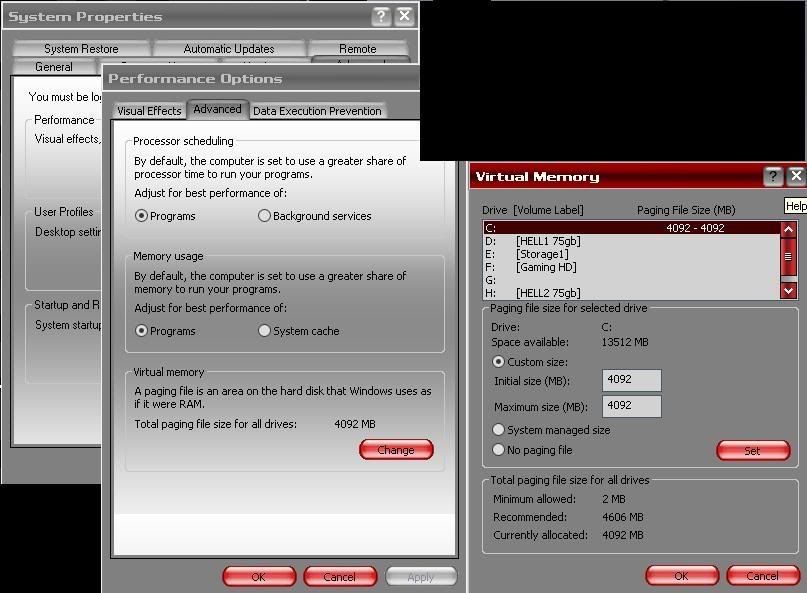
I had this problem awhile ago, i just simply changed virtual memory settings and its worked ever since ,not sure what it has to do with the problem but it worked for me each time this has happened ...

User avatar
creator2003
NZFF Pro
 
Joined: Fri Jun 16, 2006 12:08 am
Posts: 4633
Location: Cant U C im LOCO

Postby Barrington » Thu Dec 03, 2009 10:13 am

Ian Warren wrote:
QUOTE (Ian Warren @ Dec 7 2009, 10:58 AM) <{POST_SNAPBACK}>
A thought , your Hard Drive , this is not split up 'petitioned ', been divided were your OS has been placed on a lest than normal size , example , petition 1 , 20 gigs 'C' drive and the 'D' or whats left on the other side , the Flightsim on that HD .

No Ian,
FSX and XP on dedicated 640gig HHD

creator2003 wrote:
QUOTE (creator2003 @ Dec 7 2009, 09:08 PM) <{POST_SNAPBACK}>
I had this problem awhile ago, i just simply changed virtual memory settings and its worked ever since ,not sure what it has to do with the problem but it worked for me each time this has happened ...


Hi Creator,
what OS are you using - XP or Vista or 7?
I have never seen this screen before hence my asking.
If it's not XP then where do I go to find those options in XP?
Thanks

Adamski wrote:
QUOTE (Adamski @ Dec 7 2009, 04:03 PM) <{POST_SNAPBACK}>
After more than a year of problem-free flying, I suddenly got all of those symptoms - pretty well exactly as you describe them.

I tried every voodoo trick I could think of - gleaned from *many hours* of surfing - both for Vista and FSX solutions.

Sadly, none of them worked. My conclusion was that my FSX was pretty well "knackered". Just too many add-ons, I think - many of which may have been originally for FS9 etc. .... and not all seemed that easy to remove/clean up. I went through all the usual .CFG files, modules ... you name it ... nothing worked.

I got so angry (I was pretty fed up with Vista as well) I went out and bought Win7 (64 bit) and did a complete reinstall on a fresh drive. FSX was the first thing I installed (so far it's the *only* thing laugh.gif) - but this time I left off Acceleration (I was too cheesed off by the texture problems it introduces). Gradually, I've been reinstalling all my payware add-ons and only installing the odd freeware repaints.

It's difficult to make a true comparison - as my old FSX really was loaded up to the gills - and the new install is pretty "lean 'n' mean", but the difference is really quite amazing. Not a single lock up, CTD or OOM error yet - honest. I wish I could reformat my own body in the same way laugh.gif

Seriously, though ... Win7 may be a large part of that. It installed a treat. Absolutely no pratting about. All I added was AVG Free and the (free) Comodo firewall then removed some eye candy. I was up and running in no time at all. I did one defrag after the first stage of FSX install then added all Rob's sceneries and my favourite aircraft. I haven't defragged a 2nd time yet.

At the end of the day, there are only so many hours in the day and I got fed up of most of my leisure "flying" time being soaked up by endless fiddling.

I'd go for the reinstall option! If you can afford it, I'd also think about Win7 - but XP is still pretty good.
Thanks for the reply and great that your system is working well now.
I suspec that i will have to do a clean install for peace of mind alone - let alone the hours spent but will wait a little longer and see if anything else comes up that's worth a last ditch try.....


Adamski wrote:
QUOTE (Adamski @ Dec 7 2009, 04:03 PM) <{POST_SNAPBACK}>
After more than a year of problem-free flying, I suddenly got all of those symptoms - pretty well exactly as you describe them.

I tried every voodoo trick I could think of - gleaned from *many hours* of surfing - both for Vista and FSX solutions.

Sadly, none of them worked. My conclusion was that my FSX was pretty well "knackered". Just too many add-ons, I think - many of which may have been originally for FS9 etc. .... and not all seemed that easy to remove/clean up. I went through all the usual .CFG files, modules ... you name it ... nothing worked.

I got so angry (I was pretty fed up with Vista as well) I went out and bought Win7 (64 bit) and did a complete reinstall on a fresh drive. FSX was the first thing I installed (so far it's the *only* thing laugh.gif) - but this time I left off Acceleration (I was too cheesed off by the texture problems it introduces). Gradually, I've been reinstalling all my payware add-ons and only installing the odd freeware repaints.

It's difficult to make a true comparison - as my old FSX really was loaded up to the gills - and the new install is pretty "lean 'n' mean", but the difference is really quite amazing. Not a single lock up, CTD or OOM error yet - honest. I wish I could reformat my own body in the same way laugh.gif

Seriously, though ... Win7 may be a large part of that. It installed a treat. Absolutely no pratting about. All I added was AVG Free and the (free) Comodo firewall then removed some eye candy. I was up and running in no time at all. I did one defrag after the first stage of FSX install then added all Rob's sceneries and my favourite aircraft. I haven't defragged a 2nd time yet.

At the end of the day, there are only so many hours in the day and I got fed up of most of my leisure "flying" time being soaked up by endless fiddling.

I'd go for the reinstall option! If you can afford it, I'd also think about Win7 - but XP is still pretty good.

unsure.gif Thanks for the reply and great that your system is working well now.
I suspect that I will have to do a clean install for peace of mind alone - let alone the hours spent but will wait a little longer and see if anything else comes up that's worth a last ditch try.....
Image
Barrington
Forum Addict
 
Topic author
Joined: Thu Jul 13, 2006 11:42 pm
Posts: 215
Location: Levin New Zealand

Postby HueyTeam » Thu Dec 03, 2009 10:40 am

Here is your help:

I think you have a 32bit XP. Than you have to make a entry in the boot.ini. This is:

/3GB

So there is more memory free for applications.

Watch here:
http://www.microsoft.com/whdc/system/platf...PAE/PAEmem.mspx

For example:

01.[boot loader]
02.timeout=15
03.default=multi(0)disk(0)rdisk(0)partition(1)\WINDOWS
04.[operating systems]
05.multi(0)disk(0)rdisk(0)partition(1)\WINDOWS="Microsoft Windows XP Professional" /noexecute=optin /fastdetect /3GB /USERVA=2990
06.multi(0)disk(0)rdisk(0)partition(1)\WINDOWS="Microsoft Windows XP Professional" /noexecute=optin /fastdetect

With /userva=2990 you can less a little bit RAM (use this if windows will crashes again)

More Infos you will find with google

Vista 32bit users have to googling too (if FSX crash with memory failure)
Last edited by HueyTeam on Thu Dec 03, 2009 10:48 am, edited 1 time in total.
----------------------------------------------
I´ve never said my english is good ;-)
----------------------------------------------
happyness is a huey chopper

regards
Andy

Image
User avatar
HueyTeam
Forum Addict
 
Joined: Fri Jun 08, 2007 8:47 am
Posts: 430
Location: Germany

Postby creator2003 » Thu Dec 03, 2009 11:08 am

Above sounds like the best advice ,im using XP32bit for FSX install ,i have themes installed on my folders to give it a cool look ,tuneup utilitys is the software i use to change these settings within windows ,though you can also do it by clicking desktop properties /appearances and import your own themes downloaded from the net

the above screens i showed is found in the control panel/system /advanced tab /performance , visual, memory tab advanced settings of those pop up windows ,

i do think you should try the above posting by HueyTeam first
User avatar
creator2003
NZFF Pro
 
Joined: Fri Jun 16, 2006 12:08 am
Posts: 4633
Location: Cant U C im LOCO

Postby Adamski » Thu Dec 03, 2009 11:25 am

creator2003 wrote:
QUOTE (creator2003 @ Dec 3 2009, 12:08 PM) <{POST_SNAPBACK}>
Above sounds like the best advice ,im using XP32bit for FSX install ,i have themes installed on my folders to give it a cool look ,tuneup utilitys is the software i use to change these settings within windows ,though you can also do it by clicking desktop properties /appearances and import your own themes downloaded from the net

the above screens i showed is found in the control panel/system /advanced tab /performance , visual, memory tab advanced settings of those pop up windows ,

i do think you should try the above posting by HueyTeam first

I tried all the USERVA tweaks as well (on my Vista) as well as checking my pagefile was set OK etc. I even did an offline defrag of the swapfile itself (as well as a regular defrag). No difference at all sad.gif
Image
User avatar
Adamski
NZFF Pro
 
Joined: Thu Nov 01, 2007 2:22 am
Posts: 5029
Location: Birkenhead, Auckland

Postby Barrington » Thu Dec 03, 2009 6:07 pm

rolleyes.gif Thanks everyone who provided some feedback........
I think I am now forced to do a complete new install as FSX.exe is no longer working and now comes up with an error message each time.
I have sent the message to Microsoft so will see if they have an answer, but otherwise it looks like a new install.
Thanks again....... sad.gif
Image
Barrington
Forum Addict
 
Topic author
Joined: Thu Jul 13, 2006 11:42 pm
Posts: 215
Location: Levin New Zealand


Return to Technical Issues

Who is online

Users browsing this forum: No registered users and 5 guests
