Mount Cook mesh problem

An area to discuss scenery addons for virtual NZ

Postby gojozoom » Sun Feb 14, 2010 10:24 am

Hi guys,

I have this mesh problem for a long time now:
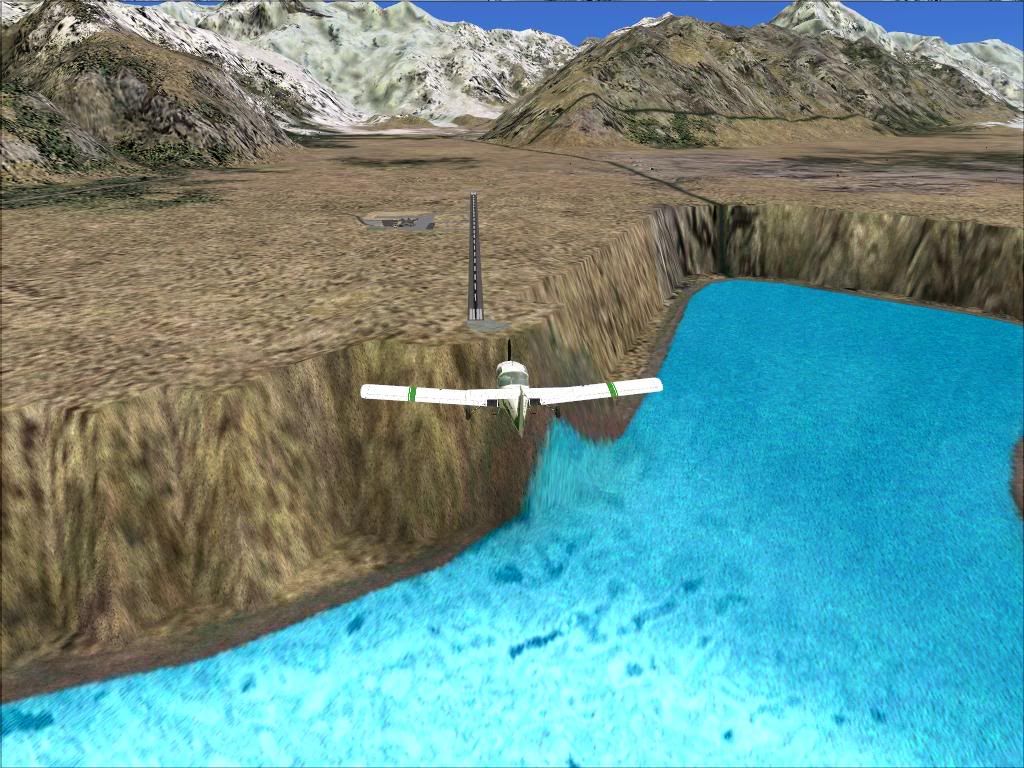
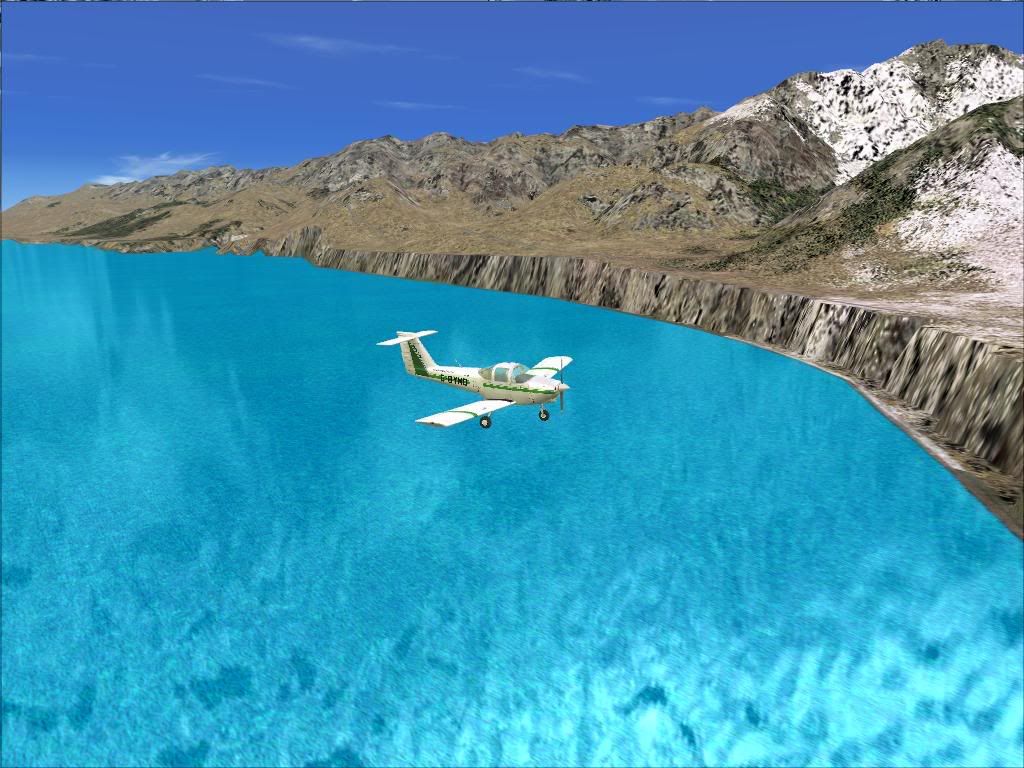


After some research I found that this has nothing to do with the addon scenery or the Lake Fix I use. Is this a known issue?

Many thanks
Image
User avatar
gojozoom
Sim-holic
 
Topic author
Joined: Fri Dec 21, 2007 10:37 am
Posts: 947
Location: Wellington

Postby Ian Warren » Sun Feb 14, 2010 11:20 am

There is a fix , 'Lakes and Rivers Fix ' ... Savern Raweti had it posted on his site ,'now' who has that address ? , the main thing you had to do was place it correctly or right level / layer in your scenery folder , takes a bit off mucking around , and i have to install FS9 for other reasons , i did have it flattened , ill have a look at this and post the solution .
Image
User avatar
Ian Warren
NZFF Pro
 
Joined: Fri May 05, 2006 5:23 pm
Posts: 41187
Location: AREA 51

Postby gojozoom » Sun Feb 14, 2010 12:12 pm

Thanks Ian,

I really appreciate it! I've just been at Mount Cook recently and had a chance to see how it looks i real life. As my only reference was from the flightsim before, i was quite surprised that it's "flat". smile.gif

Cheers
Image
User avatar
gojozoom
Sim-holic
 
Topic author
Joined: Fri Dec 21, 2007 10:37 am
Posts: 947
Location: Wellington

Postby Dan » Sun Feb 14, 2010 12:13 pm

I had this problem with 150m mesh - even with the lakes and rivers fix. When I installed 75m mesh, the problem went away.

By the way, I've got a couple of NZ repaints for your Tomahawk on flightsim.com with a couple more on the way. (Shameless plug)
User avatar
Dan
Member
 
Joined: Tue Jul 25, 2006 7:07 pm
Posts: 78
Location: Waitakere

Postby Snowman » Sun Feb 14, 2010 2:45 pm

Ian Warren wrote:
QUOTE (Ian Warren @ Feb 14 2010, 12:20 PM) <{POST_SNAPBACK}>
There is a fix , 'Lakes and Rivers Fix ' ... Savern Raweti had it posted on his site ,'now' who has that address ? , the main thing you had to do was place it correctly or right level / layer in your scenery folder , takes a bit off mucking around , and i have to install FS9 for other reasons , i did have it flattened , ill have a look at this and post the solution .


I dont have this problem in FS9 with the 20m mesh and NZ Topo installed.
The link to Savern's site is here Ian,..................

http://www.massey.ac.nz/~avweb/papers/fltsimdesign/index.htm

Lawrie. New_Zealand_etc.gif
Image

Image
User avatar
Snowman
NZFF Pro
 
Joined: Wed Jul 26, 2006 3:52 pm
Posts: 2427
Location: Tauranga, NZ.

Postby Ian Warren » Sun Feb 14, 2010 2:57 pm

Cheers Lawrie , been a long time since had FS9 installed , i did have this issue so fresh install will be off help to Gojo

PS: Now were the heck were you at the recent Airshow unsure.gif
Image
User avatar
Ian Warren
NZFF Pro
 
Joined: Fri May 05, 2006 5:23 pm
Posts: 41187
Location: AREA 51

Postby Snowman » Sun Feb 14, 2010 3:07 pm

Ian Warren wrote:
QUOTE (Ian Warren @ Feb 14 2010, 03:57 PM) <{POST_SNAPBACK}>
Cheers Lawrie , been a long time since had FS9 installed , i did have this issue so fresh install will be off help to Gojo

PS: Now were the heck were you at the recent Airshow unsure.gif


Wife and i recently separated after 21 years,........... my head was definately not in the right place to be at the airshow...........
And now she tells me that it isnt over, that there is hope for the future,................ aye aye aye..................

Lawrie. New_Zealand_etc.gif
Image

Image
User avatar
Snowman
NZFF Pro
 
Joined: Wed Jul 26, 2006 3:52 pm
Posts: 2427
Location: Tauranga, NZ.

Postby Ian Warren » Sun Feb 14, 2010 3:22 pm

Lawrie , we all be backing you .. you spend to much time on the PC .. first primary .. look after your Lady , 21 years is a long time to forget smile.gif
Image
User avatar
Ian Warren
NZFF Pro
 
Joined: Fri May 05, 2006 5:23 pm
Posts: 41187
Location: AREA 51

Postby mavman » Tue Feb 16, 2010 2:52 pm

I too have the same problem with the Mt Cook area....I have the NZ20m Mesh and Topo installed. I thought it may have been a problem with my mesh installation but I have completely removed it and reinstalled but alas, the problem remains. sad.gif

So, if anyone does have any ideas or solutions that would be most appreciated!!
Last edited by mavman on Tue Feb 16, 2010 3:17 pm, edited 1 time in total.
User avatar
mavman
Forum Addict
 
Joined: Sun Apr 30, 2006 7:27 pm
Posts: 320
Location: Dunedin

Postby Ian Warren » Thu Feb 18, 2010 12:30 pm

I have been playing around with files released with Peter Lohr 's , Queenstown was the first scenery that fixed itsself , i do recall making sure one scenery was layered above the other , interested to here from you if your NZQN imesh is working . In the readme files , it is mentioned not to use the RB20mesh , again i'm trying to recall if i had that mesh when i had the Mount Cook scenery working .
Last edited by Ian Warren on Thu Feb 18, 2010 12:47 pm, edited 1 time in total.
Image
User avatar
Ian Warren
NZFF Pro
 
Joined: Fri May 05, 2006 5:23 pm
Posts: 41187
Location: AREA 51

Postby mavman » Thu Feb 18, 2010 9:46 pm

Hmmm I will have to check next time I have the sim fired up but from memory ZQN looks fine (lake level, mesh)....with the 20m mesh.
User avatar
mavman
Forum Addict
 
Joined: Sun Apr 30, 2006 7:27 pm
Posts: 320
Location: Dunedin


Return to Scenery

Who is online

Users browsing this forum: No registered users and 5 guests